Freedom251 › Coding Learning Software
Hopscotch
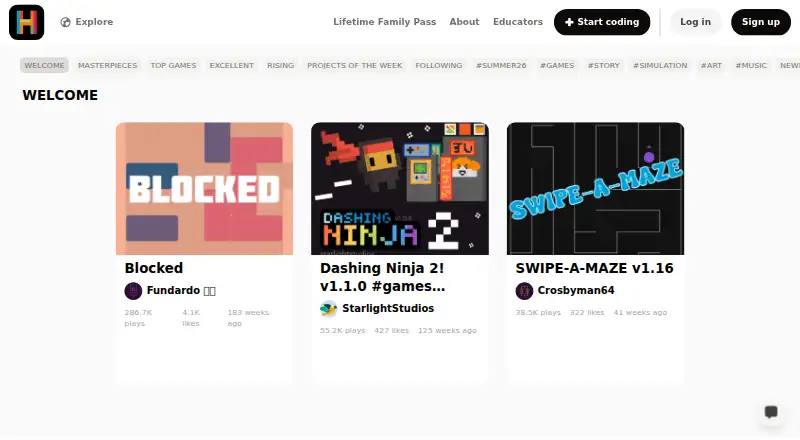
What Hopscotch is
Hopscotch is a programming environment for creating games, animations, art and stories without prior coding knowledge. It is designed for ages 10 and up; its help page describes its primary audience as ages 9–15. Video tutorials guide users through projects, or they can start from scratch. Finished projects can be published to the community, where others can play and remix them. Hopscotch is available on Android, iOS, macOS, web and Windows. A free account includes basic characters and essential coding blocks. Play Pass costs $1.99 per month and includes 30 monthly seeds, uninterrupted play and prioritized support. Unlimited costs $9.99 per month and adds custom art uploads, drawing tools, and unlimited drafts and published projects. A seven-day trial is advertised, with cancellation at any time. Hopscotch also offers free educator and classroom accounts and lesson plans, though some tutorials require a subscription. The company says it does not sell or rent personal information or display ads, and states its privacy and safety practices are COPPA-compliant.
Who it suits
Hopscotch suits children and young people who want to make interactive projects while learning coding concepts. Educators can use its free educator and classroom accounts and lesson plans.
What it does well
- Create games, animations, art and stories without prior coding knowledge.
- Video tutorials or starting-from-scratch project creation.
- Community members can play and remix published projects.
- Available on Android, iOS, macOS, web and Windows.
- Free educator and classroom accounts and lesson plans.
What to know first
- Some tutorials require a subscription.
- Unlimited costs $9.99 per month.
- The Free Account has 0 monthly seeds.
Limits
The Free Account includes 0 monthly seeds and provides basic characters and essential coding blocks. Custom art uploads, drawing tools, and unlimited drafts and published projects are included with Unlimited at $9.99 per month.
Plans
| Plan | Billed and limits | Price |
|---|---|---|
| Free Account | Play community games · Create games · Basic characters · Essential coding blocks · 0 monthly seeds | Free |
| Play Pass | $1.99/month · 30 seeds/month · Uninterrupted play · Prioritized support | $1.99 a month |
| Play Pass | $19.99/year · 30 seeds/month · Uninterrupted play · Prioritized support | $19.99 a year |
| Unlimited | $79.99/year · 30 seeds/month + 10 bonus seeds · Custom art upload · Drawing tools · Unlimited drafts and published projects | $79.99 a year |
| Unlimited | Lifetime Access · Up to 5 profiles · Multi-kid family friendly | $98.40, paid once |
| Unlimited | $9.99/month · 30 seeds/month + 10 bonus seeds · Custom art upload · Drawing tools · Unlimited drafts and published projects | $9.99 a month |
As gethopscotch.com lists them, read 3 Oct 2026. The maker's own page has the final word.
Getting started
- Visit the Hopscotch website.
- Choose a Free Account or a paid plan.
- Use Hopscotch on Android, iOS, macOS, web, or Windows.
- Start with a video tutorial or create a project from scratch.
- Publish a project to the community for others to play and remix.
Hopscotch is a creative coding environment aimed at children who want to make games, animations, art and stories. It is strongest for young beginners who learn by building and sharing projects; families should compare the free account’s limits with the paid tools before committing.
Overview
Instead of requiring prior coding knowledge, Hopscotch lets learners start with a video tutorial or a blank project. They can publish their work for others to play and remix, making the community part of the learning loop. The approach suits children motivated by creative outcomes, but it is less suited to learners seeking a conventional course in a named programming language: its programming language is Hopscotch.
The maker says the environment is designed for ages 10 and up, while its help page describes the primary audience as ages 9–15. Educators can access free educator accounts, classroom accounts and lesson plans, though some tutorials require a subscription.
Key features
- Project-based creation: Children can make games, animations, art and stories, either following video tutorials or starting from scratch. Tutorials lower the barrier to a first project; independent creation gives more room to explore.
- Community sharing and remixing: Others can play and remix published projects, giving learners examples to examine and build on. The educator page describes the community as fully moderated and COPPA-compliant.
- More room to create: Unlimited adds drawing tools, custom art uploads, additional coding blocks, exclusive characters, and unlimited drafts and published projects. Those features matter most to children who have outgrown the basic tools or regularly reach project limits.
- Privacy and safety: Hopscotch says it does not sell or rent personal information, sell user data, or display ads, and states its privacy and safety practices are COPPA-compliant. It also says it investigates breaches involving personal information and trains staff on app security concerns.
- Project links and support: An Open Project block can link to other Hopscotch community projects. Email support is available at [email protected]; paid plans include prioritized support.
Pricing
Hopscotch is freemium, with a 7 day trial advertised for parents and cancellation at any time. The three plans serve distinct needs:
- Free Account — free: Play community games, create games, and use basic characters and essential coding blocks. It includes 0 monthly seeds, so it is the sensible starting point for trying basic creation, but not for families seeking paid play benefits or expanded creative tools.
- Play Pass — $1.99 a month: Includes 30 seeds/month, uninterrupted play and prioritized support. This is the lower-cost paid option for users focused on play access; it does not include the Unlimited plan’s listed custom art, drawing tools or unlimited project capacity.
- Unlimited — $9.99 a month: Includes 30 seeds/month plus 10 bonus seeds, custom art upload, drawing tools, and unlimited drafts and published projects. It is the fit for frequent creators who need those tools and fewer project-capacity constraints; occasional builders may not need the step up from Play Pass.
The advertised paid entry point is $1.99/mo. The parents page advertises a 7 day trial with cancellation at any time.
Platforms
Hopscotch is available on Android, iOS, macOS, web and Windows, with mobile apps as well as computer access. That range gives families and educators options across phones, tablets and computers.
Who it's for
Hopscotch is a strong fit for children in its stated 9–15 primary age range who want to learn through making and sharing creative projects. It can also suit educators looking for classroom accounts and lesson plans. It is a weaker fit for families seeking a fully equipped free creation plan, since custom art, drawing tools and unlimited drafts and published projects are part of Unlimited.
Pros and cons
- Pro: Tutorials and scratch creation serve both guided beginners and children ready to experiment.
- Pro: Sharing and remixing give projects a social learning dimension, with a moderated community described as COPPA-compliant.
- Pro: Free educator accounts, classroom accounts and lesson plans give teachers a way to use Hopscotch in learning settings.
- Con: Some tutorials require a subscription, limiting access to parts of the guided learning experience without paying.
- Con: The free plan has 0 monthly seeds and lacks the expanded creative tools and unlimited project capacity of Unlimited.
- Con: Play Pass and Unlimited address different needs, so users who want both richer creation and paid play benefits must weigh the higher monthly price.
Alternatives
For a broader comparison, see Coding Learning Software.
- MIT App Inventor is a free educational platform for building Android and iOS apps; choose it when app creation is the goal rather than Hopscotch’s games, art and stories.
- Progate offers some introductory lessons free and a 12-month Plus plan billed $119.00 paid one time at registration; it is an option for learners who prefer lesson-led study.
- CodeHS has a permanent free plan with a free teacher plan, 100+ courses, a browser-based code editor, automatic code submission and section management; choose it for a more classroom-course-oriented setup.
- Scratch is a free platform for creating and sharing projects, with an Annual Membership at $35.00 per year; consider it for another project-sharing environment.
- freeCodeCamp is a free, open-source option under the BSD-3 license; consider it when open-source coursework is important.
- Mimo has a free Basic plan with limited mobile course and career-path access, intro sections and limited AI Tutor on web; it suits learners looking for course-based learning.
- Scrimba offers free intro courses, intro scrims per Pro course, basic Discord access, up to 10 challenges and 10 free Explainers; choose it when those course and challenge formats appeal.
- Edabit lets users complete all challenges for free; it is a straightforward alternative for learners who want challenge-based practice.
Verdict
Choose Hopscotch for a child who is motivated by making creative projects and sharing them with a community, especially if tutorials or classroom resources will help them get started. The main reason to look elsewhere is the divide between a basic free creation experience and the paid tools and uncapped project capacity; families who need those features should decide whether Unlimited’s $9.99 per month is worthwhile.
Verdict
Hopscotch combines project creation, tutorials and community sharing in an environment designed for young learners. Check which paid features and subscription-dependent tutorials are relevant before choosing a plan.
Questions
Is Hopscotch free?
Yes. The Free Account costs nothing and includes community games, game creation, basic characters, and essential coding blocks.
What do the paid plans cost?
Play Pass costs $1.99 per month. Unlimited costs $9.99 per month.
Is there a free trial?
Yes. The parents page advertises a 7 day trial with cancellation at any time.
Which platforms does Hopscotch support?
Hopscotch is available on Android, iOS, macOS, web, and Windows.
Who is Hopscotch designed for?
Its About page says ages 10 and up; its help page describes ages 9–15 as its primary audience.
Does Hopscotch offer educator resources?
It offers free educator accounts, classroom accounts, and lesson plans. Some tutorials require a subscription.
Facts from Hopscotch's own pages
- Coding features
- The paid Unlimited plan includes drawing tools, custom art uploads, additional coding blocks, exclusive characters, and unlimited drafts and published projects. · gethopscotch.com, 3 Oct 2026
- Community safety
- The educator page says the community is fully moderated and COPPA-compliant. · gethopscotch.com, 3 Oct 2026
- COPPA
- Hopscotch states that its privacy and safety practices are certified COPPA-compliant. · gethopscotch.com, 3 Oct 2026
- Educators
- Hopscotch offers free educator accounts, classroom accounts, and lesson plans, with some tutorials requiring a subscription. · gethopscotch.com, 3 Oct 2026
- Founded
- 2013 · gethopscotch.com, 28 Sept 2026
- Integrations
- The maker’s pages describe linking to other Hopscotch community projects with an Open Project block. · gethopscotch.com, 3 Oct 2026
- Intended users
- The About page says Hopscotch is designed for people ages 10 and up, while its help page describes it as primarily designed for ages 9–15. · gethopscotch.com, 3 Oct 2026
- Learning resources
- Hopscotch offers video tutorials that help users build projects such as games, or they can start from scratch. · help.gethopscotch.com, 3 Oct 2026
- Privacy
- Hopscotch says it does not sell or rent personal information and that it does not sell user data or display ads. · gethopscotch.com, 3 Oct 2026
- Security
- Hopscotch says it investigates data breaches involving personal information and trains staff to address security concerns in the app. · gethopscotch.com, 3 Oct 2026
- Sharing and remixing
- Users can publish projects to the community, where others can play and remix them. · help.gethopscotch.com, 3 Oct 2026
- Support
- Hopscotch lists email support at [email protected], and its paid plans include prioritized support. · gethopscotch.com, 3 Oct 2026
- Trial
- The parents page advertises a 7 day trial with cancellation at any time. · gethopscotch.com, 3 Oct 2026
- What it does
- Hopscotch is a kid-friendly programming environment for making games, animations, art, and stories without prior coding knowledge. · gethopscotch.com, 3 Oct 2026
Where Hopscotch stands on Freedom251
- Coding Learning Software#6 of 42