
Dyad
What Dyad is
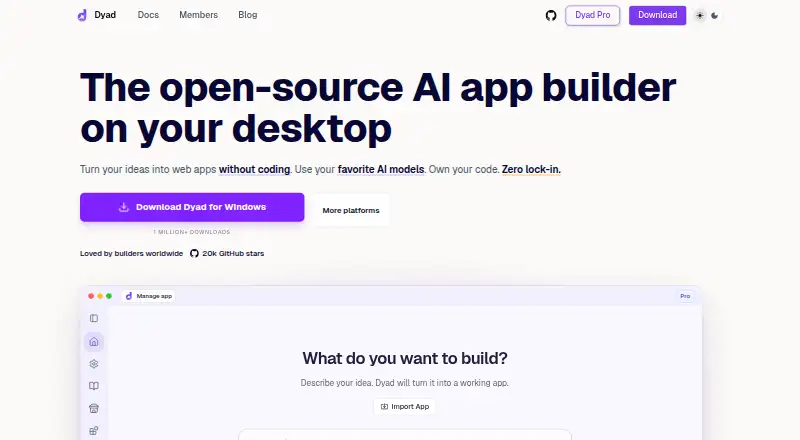
Dyad is a desktop app builder that turns ideas into web apps through AI chat, without requiring coding. It runs on Linux, macOS, and Windows, keeps project files on your machine, supports offline work with local models, and does not limit project counts. You can connect OpenAI, Anthropic, Google, Ollama, LM Studio, or a custom provider with an OpenAI-compatible API. Projects can be imported from repositories, edited in VS Code, and exported as runnable code. Supabase and Neon integrations provide authentication, databases, and server functions; Neon is currently available only for Next.js and Vite projects. Dyad can sync app changes to GitHub for deployment through Vercel or another cloud provider, and connect to Chrome DevTools, web browsing, custom APIs, and other MCP servers. Its AI security review panel is experimental and may miss relevant issues. The free desktop version sends API-key prompts and code to the selected provider, while local-model data stays on the device. Pseudonymous telemetry is collected only with consent and excludes chats, prompts, and code. Free includes community support; Pro is $20 a month with 200 AI credits monthly.
Who it suits
Dyad suits people building web apps with AI chat who want local project files and the option to use local models. It also offers repository import, code editing in VS Code, and exportable code for developers.
What it does well
- Runs on Linux, macOS, and Windows.
- Works offline with local models.
- No limit on project counts.
- Supports multiple AI providers and custom compatible APIs.
- Exports runnable code and syncs changes to GitHub.
What to know first
- Neon integration is limited to Next.js and Vite projects.
- Security review is experimental and may miss issues.
- Pro costs $20 a month.
Limits
Dyad Free requires users to bring their own API key when using an API provider; local models can work offline. Dyad Pro includes 200 AI credits per month, while Dyad Max includes 900 credits per month. Neon is available only for Next.js and Vite projects.
Plans
| Plan | Billed and limits | Price |
|---|---|---|
| Dyad Free | Local open-source app builder · macOS & Windows download · no sign-up · bring your own API key · community support | Free |
| Dyad Pro | $20/month · Exclusive Pro modes · 200 AI credits/month · Dyad Academy access · reload credits at same price | $20 a month |
| Dyad Max | $79/month · Everything in Pro · 900 AI credits/month · prioritized office hours · available as upgrade | $79 a month |
As dyad.sh lists them, read 1 Oct 2026. The maker's own page has the final word.
Getting started
- Visit https://www.dyad.sh/.
- Download Dyad for Linux, macOS, or Windows.
- Install Node.js and connect an AI provider such as Gemini, Claude, or OpenAI, or choose a local model.
- Start without signing up on the free plan, or choose Pro or Max for paid features.
- Import a repository or begin a project, then edit in VS Code or export runnable code.
Verdict
Dyad combines AI-assisted app building with local files, provider choice, and exportable code. Its security review is experimental, and the Neon integration has a project-type restriction.
Questions
Is Dyad free?
Yes. Dyad Free costs nothing and does not require sign-up. It includes community support and requires your own API key unless you use local models.
How much do the paid plans cost?
Dyad Pro costs $20 a month, billed monthly. Dyad Max costs $79 a month, billed monthly.
Which operating systems does Dyad support?
Dyad runs on Linux, macOS, and Windows.
Can Dyad work offline?
It can work offline with local models, and data used with local models stays on the device.
Which AI providers can I use?
Dyad supports OpenAI, Anthropic, Google, Ollama, LM Studio, and custom providers with OpenAI-compatible APIs.
Does Dyad connect to databases and backends?
It integrates with Supabase and Neon for authentication, databases, and server functions. Neon is currently limited to Next.js and Vite projects.
Facts from Dyad's own pages
- AI providers
- Dyad supports OpenAI, Anthropic, Google, Ollama, LM Studio, and custom providers with OpenAI-compatible APIs. · dyad.sh, 1 Oct 2026
- Code ownership
- Dyad lets users import repositories, edit in VS Code, and export clean runnable code. · dyad.sh, 1 Oct 2026
- Database integrations
- Dyad provides integrations for Supabase and Neon for authentication, databases, and server functions. · dyad.sh, 1 Oct 2026
- Free plan
- Yes · dyad.sh, 19 Sept 2026
- Free-version data handling
- With the free desktop version, API-key prompts and code go directly to the selected provider, while local-model data stays on the device and does not pass through Dyad servers. · dyad.sh, 1 Oct 2026
- GitHub and deployment
- Dyad can sync local app changes to GitHub for deployment through Vercel or another cloud provider. · dyad.sh, 1 Oct 2026
- Integration limit
- The Neon integration is currently available only for Next.js and Vite projects. · dyad.sh, 1 Oct 2026
- Local operation
- Dyad runs on the user's machine, keeps project files on disk, works offline with local models, and does not limit project counts. · dyad.sh, 1 Oct 2026
- MCP extensibility
- Dyad can connect Chrome DevTools, web browsing, custom APIs, and other MCP servers. · dyad.sh, 1 Oct 2026
- Security review
- Dyad includes an AI-powered security review panel, but the feature is experimental and may miss relevant issues. · dyad.sh, 1 Oct 2026
- Setup requirements
- The quickstart says users need Node.js and AI access through an API such as Gemini, Claude, or OpenAI, unless they use local models. · dyad.sh, 1 Oct 2026
- Paid from
- 20 · dyad.sh, 19 Sept 2026
- Support
- The Free plan includes community support, while Dyad Max includes prioritized access to office hours. · dyad.sh, 1 Oct 2026
- Telemetry
- Dyad collects limited pseudonymous telemetry only with user consent, and it does not include chat messages, prompts, or code. · dyad.sh, 1 Oct 2026
- What it does
- Dyad turns ideas into working web apps by chatting with AI, without requiring coding. · dyad.sh, 1 Oct 2026
Where Dyad stands on Freedom251
- AI App Builders#7 of 39
- No-code app builders#40 of 177
- No-Code AI App Builders#9 of 29