Crashes, No Sound, or Screen Glitches?
Random freezes, missing sound and display glitches usually trace back to one bad driver. Find and replace yours safely.Free scan · under a minutePC Slower Than It Used to Be?
A free scan shows the junk files, broken settings and background clutter dragging Windows down - then fixes them in one click.Free scan · Windows 10 & 11Apple’s public beta program updates eligible Apple devices; it does not enroll third-party Matter accessories in their manufacturers’ beta programs. Before opting in, identify whether you mean an Apple operating-system or HomePod beta, an Apple Home architecture upgrade, or firmware for one specific accessory. Each has a different update path and recovery options.
First, identify what you are updating
“Apple Home beta” can refer to several distinct things. Treating them as one program can lead you to the wrong enrollment instructions.
As an Amazon Associate I earn from qualifying purchases.
| Update type | What it changes | Where to look |
|---|---|---|
| Apple public beta software | Pre-release software for an eligible Apple device. Apple lists iPhone, iPad, Mac, Apple TV, HomePod mini, HomePod (2nd generation), and Apple Watch in its public beta program. | Apple Beta Software Program and the device’s beta update settings. |
| Apple Home architecture upgrade | The underlying version of Apple Home, not a beta for a third-party accessory. | Apple’s Update Apple Home instructions. |
| Accessory firmware update or beta | Firmware for a particular Matter or HomeKit accessory, if its manufacturer provides an update or beta path. | The accessory maker’s app and instructions. Apple Support also directs users to the maker for firmware and continued support. |
An Apple device being enrolled in a beta does not mean every Matter device in the home receives accessory firmware from Apple. Apple’s accessory troubleshooting guidance tells users to check the manufacturer’s app for firmware updates.
Do these 3 things before closing this tab:
1Scan for outdated or missing drivers - takes under a minute2Repair Windows errors before they cause bigger problems3Fix the driver behind crashes, sound loss and screen glitchesWhat Apple’s public beta changes—and what it does not
Apple describes its public beta as a way to try pre-release Apple software and provide feedback. The beta recipient is an eligible Apple device. A manufacturer’s beta for a Matter accessory is a separate program, controlled by that accessory maker and potentially limited to specific models or users.
#1 Best Overall

- 【Easy Setup, One Control】With Matter, Skip the step of downloading and registering multiple manufacturers' apps every time you buy a new device. Instead, head straight to certified smart home platforms like Apple Home, Alexa, Google Home, SmartThings, or AiDot to control all your Matter devices.【TIP】Matter-certified hub or controller (HomePod, Echo Dot, Nest, SmartThings Hub) is required for Apple Home/Alexa/Google Home/SmartThings platforms. Alternatively, the AiDot app can be used without hub
- 【Offline-Ready Control】Once you've set up your Matter-certified devices on your LAN, they'll be able to communicate with each other directly, using the Matter protocol. This means that if your home internet connection goes offline, your Matter-certified devices will still be able to communicate and be controlled within your LAN, without relying on the internet or cloud services.
- 【Remote Control from Anywhere】Use the app to turn electronics on before you arrive home and off after you leave, no matter where you are. Using the smart plug that work with alexa manage your power usage and save money.
- 【Hands-free Voice Control】Control linkind homekit plug using simple voice commands through Apple HomeKit, Siri, Amazon Alexa, Google Assistant, and SmartThings, without the need for physical input such as buttons or switches.
- 【Flexible Scheduling & Timer】Effortlessly reduce energy usage with automatic device shutdown after a set time. For example Chrismas Tree, TV, Lamp, Fan, Humidifier,Blenders, Lightbulbs
For example, if a Matter light’s maker offers test firmware, enrolling an iPhone in Apple’s public beta does not enroll the light. Look up the light’s manufacturer and exact model, then follow the maker’s current app and instructions. Apple’s separate smart accessory setup guidance also points users to manufacturer firmware instructions when setup requires them.
Check household impact before enrolling
A beta changes the software on its target device; an accessory beta changes the firmware of that specific accessory. Either could matter to a household that depends on the affected device, but the available guidance does not establish that every beta causes problems or how any particular manufacturer beta will behave.
Rank #2

- 【Matter: All-Round Compatibility】With Matter, users are no longer tied to specific platforms and works with all certified smart home platforms, such as Apple Home, Amazon Alexa, Google Home and Samsung SmartThings. You can control all your smart home devices from a single app, reducing the need for multiple apps for different devices.
- 【Matter: Smooth LAN Control】All Matter-certified devices in your local area network (LAN) will work smoothly even when your home internet goes offline. Matter allows effective communication directly between devices, without the need for a specific 'forwarding' device. For example, a Matter smart switch or sensor can turn on/off a Matter bulb directly without being connected to a cloud service, or other specific action. Once configured, communication and control between Matter devices can be achieved directly on the local network.
- 【Matter: Future-Proofing】Matter devices will be compatible with future updates and advancements in technology, ensuring that your smart home system remains up-to-date and compatible with new devices and features.
- 【Compact & Flame Retardant Design】Avoid blocking additional outlets with its compact design, and plug in your WiFi smart plug with confidence thanks to its UL certified flame retardant design and 2-year limited warranty.
- 【App & Voice Control】Control your WiFi smart plug from anywhere, anytime via the free Tapo App or just give voice commands to Siri, Amazon Alexa, Google Assistant or Samsung SmartThings. Your favorite smart assistant enables you to have a truly hands-free experience.
Apple warns that beta software may contain errors or inaccuracies and may not work as well as released software. It recommends using non-production devices that are not business critical. That is especially relevant if an Apple device or HomePod has a role in a home you rely on: consider whether you can tolerate unexpected behavior while testing, rather than assuming the beta is suitable for a critical setup.
Prepare for an Apple beta
- Confirm device eligibility. Check Apple’s current public beta FAQ for supported device families and enrollment information; the list and program details can change.
- Read the release notes. Apple says release notes cover changes, known issues, fixes, workarounds, and deprecated features. Review them for the version and device you plan to update.
- Back up where applicable. Keep a usable backup before installing pre-release software so you have a recovery option if you need one.
- Use a suitable test device. Prefer a non-production device that is not business critical, consistent with Apple’s guidance.
- Check the exit path for that device. Turning beta updates off stops future beta delivery, but does not necessarily restore the installed software to a commercial release.
For HomePod software specifically, Apple documents automatic and manual update options in its HomePod update instructions. These are separate from third-party accessory firmware controls.
Rank #3

- 【Apple Homekit Support】This Apple HomeKit compatible smart plug fully integrates into your Apple ecosystem, just ask Siri to turn on/off the devices in your home. (Apple HomeKit remote control requires an additional networked Apple device at home such as an iPad, HomePod or Apple TV.)
- 【Energy Monitoring & 15A Max Load】Use the smart Wi-Fi home plug to monitor your connected device's energy usage in real-time and view its historical power consumption within the Kasa Smart app. 1800W, 15A max load supported.
- 【Super Easy Setup】Enjoy an extremely easy and quick setup process with this Amazon Frustration-Free Setup (FFS) & Google Seamless Setup (GSS) supported smart plug. You can also setup in a few steps with the Kasa App.
- 【Compact & Flame Retardant Design】Avoid blocking additional outlets with its compact design, and plug in your WiFi smart plug with confidence thanks to its UL certified flame retardant design and 2-year limited warranty.
- 【App & Voice Control】Control your WiFi smart plug from anywhere, anytime via the free Kasa App or just give voice commands to Siri, Amazon Alexa, Google Assistant or Samsung SmartThings. Your favorite smart assistant enables you to have a truly hands-free experience. Operating Humidity: 5%~90% RH, Non-condensing
Understand opt-out and recovery limits
Apple’s exit and restore options vary by device. Turning off beta updates prevents future beta updates, but a device may remain on its installed beta until a newer commercial version becomes available. Apple says Apple Watch and AirPods cannot be restored to a prior released version after beta firmware is installed. Check the device-specific guidance before opting in; do not assume that disabling beta updates rolls back an installation.
Manufacturer accessory betas are model-specific
Apple’s support pages establish the manufacturer’s app as the place to check third-party accessory firmware, but they do not establish a universal manufacturer beta enrollment or rollback process. The available Apple guidance does not verify current beta terms for any named Matter accessory maker.
Rank #4
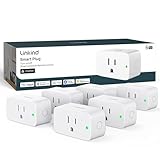
- 【Flexible Scheduling & Timer】Effortlessly reduce energy usage with automatic device shutdown after a set time. For example Chrismas Tree, TV, Lamp, Fan, Humidifier,Blenders, Lightbulbs
- 【Easy Setup, One Control】With Matter, Skip the step of downloading and registering multiple manufacturers' apps every time you buy a new device. Instead, head straight to certified smart home platforms like Apple Home, Alexa, Google Home, SmartThings, or AiDot to control all your Matter devices.【TIP】Matter-certified hub or controller (HomePod, Echo Dot, Nest, SmartThings Hub) is required for Apple Home/Alexa/Google Home/SmartThings platforms. Alternatively, the AiDot app can be used without hub
- 【Hands-free Voice Control】Control linkind homekit plug using simple voice commands through Apple HomeKit, Siri, Amazon Alexa, Google Assistant, and SmartThings, without the need for physical input such as buttons or switches.
- 【Remote Control from Anywhere】Use the app to turn electronics on before you arrive home and off after you leave, no matter where you are. Using the smart plug that work with alexa manage your power usage and save money.
- 【Design with Safty and Compact】Linkind alexa plugs are ETL & FCC certified with fire-resistant materials and provide 1800W 15A power capacity, as well as protection against short-circuits and overloads. Despite safety features, the smart outlet plug has a small form factor that won't take up too much space.
- Identify the accessory’s manufacturer and exact model before following beta instructions.
- Use the maker’s current app and documentation to check availability, eligibility, known issues, and enrollment steps.
- Before installing, find out whether the maker documents a rollback, recovery, or support route for that model. If no recovery path is described, treat the update as potentially difficult to reverse.
- Consider whether the household can manage without that accessory if its behavior changes during testing.
If an accessory already is not responding in Apple Home, Apple’s guidance is to check the manufacturer’s app for a firmware update and contact the maker for continued support—not to assume that enrolling an Apple device in beta will fix the accessory.
Do not confuse a Home architecture upgrade with a beta
Apple’s Home architecture upgrade is a separate operation from selecting beta updates for an Apple device or accessory. Apple states that support for the previous Apple Home version ended on 10 February 2026. Its upgrade instructions describe compatibility requirements, so check those prerequisites for the devices and people in your home before upgrading. This lifecycle date is not a beta enrollment deadline.
Best Value

- 【Easy Setup, One Control】With Matter, Skip the step of downloading and registering multiple manufacturers' apps every time you buy a new device. Instead, head straight to certified smart home platforms like Apple Home, Alexa, Google Home, SmartThings, or AiDot to control all your Matter devices.【TIP】Matter-certified hub or controller (HomePod, Echo Dot, Nest, SmartThings Hub) is required for Apple Home/Alexa/Google Home/SmartThings platforms. Alternatively, the AiDot app can be used without hub
- 【Offline-Ready Control】Once you've set up your Matter-certified devices on your LAN, they'll be able to communicate with each other directly, using the Matter protocol. This means that if your home internet connection goes offline, your Matter-certified devices will still be able to communicate and be controlled within your LAN, without relying on the internet or cloud services.
- 【Remote Control from Anywhere】Use the app to turn electronics on before you arrive home and off after you leave, no matter where you are. Using the smart plug that work with alexa manage your power usage and save money.
- 【Hands-free Voice Control】Control linkind homekit plug using simple voice commands through Apple HomeKit, Siri, Amazon Alexa, Google Assistant, and SmartThings, without the need for physical input such as buttons or switches.
- 【Flexible Scheduling & Timer】Effortlessly reduce energy usage with automatic device shutdown after a set time. For example Chrismas Tree, TV, Lamp, Fan, Humidifier,Blenders, Lightbulbs, an
Organizations have a separate enrollment route
For managed organizations, Apple documents AppleSeed for IT and device-management controls separately from ordinary public beta participation. Administrators should follow Apple’s managed beta enrollment documentation, including its organization-specific token and management requirements, rather than treating it as consumer enrollment.
Apple’s Matter OTA testing guide is for developers
Apple’s Matter OTA User Guide, dated 12 February 2026, describes a developer accessory-testing setup. It specifies an Apple home hub for the described Matter over-the-air test, and a Thread-capable Apple home hub for Thread Matter accessories. Those are requirements for that documented testing setup, not universal prerequisites for a consumer to join a manufacturer’s accessory beta.
Quick Recap
Product prices and availability are accurate as of the date/time indicated and are subject to change. Any price and availability information displayed on Amazon at the time of purchase will apply.




