Android may eventually let a connected gamepad or joystick move an on-screen cursor anywhere and tap with a controller button, but that is not a shipping feature. Strings found in Android 17 QPR3 Beta 1 name a “Gamepad mouse” setting that describes this behavior. Android Authority reported the find on October 8, 2026, and says it cannot tell when, or whether, the setting will reach a public release.
What the beta strings describe
According to Android Authority’s teardown, the beta contains four strings for the feature. Read together, they describe a setting that uses a connected gamepad or joystick to control the cursor and perform actions. The publication’s interpretation is free cursor placement across the Android interface: push a joystick to put the pointer on any part of the screen, then press the controller’s default action button to simulate a tap.
As an Amazon Associate I earn from qualifying purchases.
<string name="gamepad_mouse_title">Gamepad mouse</string><string name="gamepad_mouse_summary">Use a connected gamepad to control the cursor</string><string name="gamepad_mouse_main_title">Use Gamepad mouse</string><string name="gamepad_mouse_footer_description">Gamepad mouse lets you control the cursor and perform actions using a connected gamepad or joystick.</string>The Tool Desk
Outbyte PC Repair FREEClear out junk files and repair common Windows errorsFree Scan →Outbyte Driver Updater FREEFix the driver behind crashes, sound loss and screen glitchesFind Drivers →Special offer. See more information about Outbyte and uninstall instructions. Please review EULA and Privacy policy.
These are code strings as reported by Android Authority. They are not official release text, and they do not show what the settings screen will look like on any device.
#1 Best Overall

- The 2.4 GHz wireless connection uses a tiny Plug-and-Forget Nano-receiver that stays in your USB port, even on laptops, for fast data transmission with minimal delays, dropouts, or interference.
- With broad game support, the Logitech Wireless Gamepad F710 works with old standbys to today's biggest titles, so it's easy to set up and use with your favorite games
- Profiler software allows the gamepad to be programmed to perform keyboard and mouse commands for games without gamepad support.* Requires software installation
- Dual vibration motors let you feel every hit, crash and explosion in games that support vibration feedback for a more realistic and immersive experience
- A familiar control layout that doesn't require a learning curve to be able to use, with all the same buttons as on game console controllers
How it differs from gamepad navigation today
Android’s current gamepad navigation moves focus, or a cursor, from one selectable element to the next. That works well for screens built from buttons, list items, and other focusable controls. It breaks down on interface pieces that are not designed as discrete targets. Android Authority notes that floating menus and scrolling feeds can be difficult or impossible to operate this way. A free cursor would address that gap by letting the controller reach any screen position, not only the ones an app has marked as focusable.
The table below separates the approaches the report discusses. Only the first is established behavior on Android; the others are either an unreleased feature or third-party options the report mentions without testing.
Rank #2
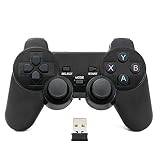
- Brand new and high quality.
- Wireless Game Controller for PC.
- 2.4GHz wireless.
- Powered by 2* AAA battery.
- This controller can't be used on the Raspberry Pi.
| Approach | How it moves | Reaches any point on screen? | What it requires | Status in the reporting |
|---|---|---|---|---|
| Focus-based gamepad navigation | Moves focus between selectable elements | Limited to focusable elements; floating menus and scrolling feeds can be hard or impossible to use | A connected gamepad with standard Android button mappings | Current Android behavior |
| Proposed Gamepad mouse | Joystick moves a cursor; a default action button simulates a tap | Yes, as described in the strings | A connected gamepad or joystick | Found in beta strings; not confirmed for public release |
| Controller with a built-in touchpad | Touchpad gives mouse-style pointer control | Yes | A controller that includes a touchpad | Named as an existing option; no specific product tested or recommended |
| Third-party keymapping apps | Remap controller buttons to taps or pointer actions | Depends on the app; not evaluated in the reporting | Installing a third-party app | Named as an existing option; no specific app tested or recommended |
What is confirmed and what is not
- Confirmed as reported: beta strings in Android 17 QPR3 Beta 1 name the setting and describe a connected gamepad or joystick controlling the cursor and actions.
- Not confirmed: that the feature will ship in stable Android, on which devices, or in what form. No official Google announcement covers it.
- Adjacent platform support: the Android 16 Compatibility Definition from the Android Open Source Project describes gamepad input mappings, including standard buttons and analog stick axes. That supports general game-controller input, but it does not document this pointer mode.
- Android 17 context: Google’s Android 17 features overview, dated June 16, 2026, describes a rollout that starts with Pixel devices and then reaches other eligible Android devices through 2026. It discusses foldable gaming mode and controller remapping but does not mention a gamepad mouse.
Timing
Android Authority speculates that the feature could be aimed at the stable release of QPR3, which it expects next spring. That is the publication’s own guess, not a schedule. The same report says it cannot determine when the functionality will be enabled, and it warns that teardown findings sometimes never reach a public release.
Quick wins for a faster PC:
Scan for outdated or missing drivers - takes under a minuteDriver Scan →Clear out junk files and repair common Windows errorsFree Scan →What to do now
- Check whether your phone runs a beta build. Strings from QPR3 Beta 1 do not appear on stable builds you can install today, and nothing in the reporting says otherwise.
- For ordinary gamepad use, rely on the standard controller support in your Android version and any remapping option your device or game offers. Google’s Android 17 overview describes controller remapping, but the exact menu location varies by device and build.
- If you need true pointer control now, the reporting points to two routes: a controller with a built-in touchpad, or a third-party keymapping app. Verify compatibility with your phone and Android version yourself before buying, since the reporting names no tested product.
- Do not expect a generic Bluetooth gamepad to gain pointer control through a software update alone. The proposed feature is described as working with a connected gamepad or joystick, but that is only a description of the strings, not a compatibility guarantee.
If the feature does ship, a standard Bluetooth gamepad is the likely hardware path, because Android already documents standard gamepad inputs. That is a category statement only; it does not mean any specific controller will be supported.
Rank #3

- Compatible with Windows and Android.
- 1000Hz Polling Rate (for 2.4G and wired connection)
- Hall Effect joysticks and Hall triggers. Wear-resistant metal joystick rings.
- Extra R4/L4 bumpers. Custom button mapping without using software. Turbo function.
- Refined bumpers and D-pad. Light but tactile.
The Bottom Line
Android has a documented path for gamepad input and an unreleased “Gamepad mouse” setting in beta strings that would add free cursor control. Until Google confirms it for stable Android, treat it as a possibility rather than a feature you can use.
Quick Recap
Best Value

- Support PC and Android
- Support for Wireless
- Dual Vibration Motors Inside
- Durable Switches with Excellent Feel
Rank #4

- RGB Cool Lightning Bolt & Long Battery Life: Switch controller with lightening bolt style and 9-color LED looks really cool; 4 light modes: solid lights, breathing lights, RGB strobe led light and led off; Fully charged: 3-4 hours, Runtime: 10-15 hours
- Widly Compatible & One-key Pairing/Wake Up: The switch pro controller is compatible with Switch/Lite/OLED/PC Windows 7/8/10 (only wrok for pc under wired connection); 2 pairing ways; Support one key to wake up your switch console
- Programmable Button & 3 Speeds Turbo: Switch controllers has simplify complex skill operations with M1/M2 key; Support single and multiple mapping; 3 adjustable burst: 5 shots/s, 12 shots/s and 20 shots/s; Programming and Turbo will maximize game play
- Sensitive Motion Control & 4-Level Nice Vibration: 6-axis gyro sensor help you react quickly, enhance experience in sports games; Buttons and joysticks are responsive, no lag; Dual vibration motors with 4-level feedback: Strong, Medium, Weak and None
- Great Gift For All People: This cool switch controller will be great gifts for women, men, girl, boy, family and friends; Packing list: 1 X Wireless switch controller, 1 X Type-C cable, 1 X Detailed user manual, 1 X Cool gift box
Product prices and availability are accurate as of the date/time indicated and are subject to change. Any price and availability information displayed on Amazon at the time of purchase will apply.




