Windows Errors? Fix Them Before They Spread
Repair common Windows errors and clear accumulated junk for a smoother, more stable PC - no reinstall needed.Free scan · no reinstallCrashes, No Sound, or Screen Glitches?
Random freezes, missing sound and display glitches usually trace back to one bad driver. Find and replace yours safely.Free scan · under a minuteA Gmail analyzer can request permission through Google’s OAuth flow instead of asking you to share your Google password. A local-first design goes further: it connects from your device, requests only the access its features need, and keeps analysis results on your device. That reduces how much mailbox data the analyzer operator needs to handle; it does not, by itself, prove an app is secure or exempt it from Google’s policies.
Why shouldn’t an email analyzer ask for your password?
Your Google password unlocks much more than an email-analysis feature. Giving it to a third-party tool can expose the account itself, while OAuth lets Google handle sign-in and lets you consent to specific access. The app receives authorization to call approved services; it need not receive your password.
As an Amazon Associate I earn from qualifying purchases.
For Gmail API requests, Google requires OAuth 2.0 credentials. In a typical authorization flow, you sign in and approve requested scopes on Google’s authorization page. The app then receives an authorization result. Depending on the design, a server-side application may exchange a one-time code for an access token and, for offline access, a refresh token. The important privacy question is where that code and any durable grant go: an operator’s server or the user’s device. Google’s Gmail server-side authorization guide describes the server-side pattern; it is not the only possible architecture.
Recommended Free Tools
What does local-first mean in practice?
In a local-first design, the user’s device connects to the email provider and performs the relevant analysis locally. For example, Corresync describes opening Google’s authorization page in the system browser using OAuth 2.0 with PKCE and a loopback redirect, then connecting from the device to Google over TLS. Its policy says its project does not receive the user’s password, authorization grant, or mail content. That is the project’s own description, not an independent security audit or a guarantee about all desktop OAuth apps. Corresync’s privacy policy explains its stated handling.
#1 Best Overall

- 【Measure Your Viewable Area First】AEGIVIXE 27 inch privacy screen filter for flat monitor 16:9 Aspect Ratio. Ensure your screen's viewable area measures: Width: 23 9/16" (598mm); Height: 13 1/4" (337mm). Do not rely on diagonal size. Note: Not compatible with thick-edge monitors and curved computer monitors
- 【Unique Magnetic Attachment】Eliminating complicated procedures, embedded strong magnetic strips inside the monitor privacy screen 27 inch enable automatic alignment for a secure fit on your screen in just a second. It also features a specially designed 85°suspended premium aluminum alloy bracket that is long-lasting and resistant to deformation, effectively preventing slipping and falling for added peace of mind.
- 【Ultimate privacy protection】 With upgraded micro louver technology, the 27 inch monitor privacy screen blocks visibility beyond 28 degrees and creates a complete blackout near 60 degrees. Protect your sensitive information privacy in crowded places like open-plan offices, busy bank counters, and shared offices, ensuring confidential data remains secure from prying eyes.
- 【Your Partner in Reducing Eye Strain】AEGIVIXE's advanced privacy screen for computer monitor 27 inch filters 98% of harmful blue light and 99.9% of UV rays with its composite optical material, while the anti-glare frosted surface and grid-free optical technology provide 99% light Clarity without distortion, significantly reducing eye strain during extended screen time.
- 【High Definition Visual Experience】This privacy screen shield 27 inch monitor crafted with proprietary optical materials and advanced micro-structural design balances original color accuracy and text sharpness, delivering a clear, natural viewing experience.
“Local-first” is a description of where work and data are intended to live, not a complete security certification. A useful explanation from an app should identify which component handles authorization, whether a backend receives any code or token, which fields are fetched, what is stored locally, and what telemetry or crash reporting sends elsewhere.
Which Gmail access should an analyzer request?
OAuth does not automatically mean narrow access. The app’s requested scope determines what Google authorizes, so a privacy-conscious analyzer should map each feature to the minimum scope that supports it. Google advises developers to use the least privilege needed and determine that every requested scope is necessary. The appropriate scope depends on the API methods and features; do not assume a particular scope covers a feature without checking. Google’s restricted-scope verification guidance sets out those requirements.
Rank #2

- 【24 Inch Privacy Protection Film Size】Width: 20 inches (20.91 inches/531 mm), height: 11 inches (11.77 inches/298 mm) -16:9 aspect ratio. This computer privacy protection film can be seamlessly adapted. Support most mainstream models on the market. In order to ensure the best user experience, it is recommended to carefully measure the width and height of the screen before placing an order. If you have any questions about the size, please contact us. It is not recommended to choose the size only according to the diagonal
- 【Enhanced Privacy Protection】DMFXNBLM 24 inch computer privacy filter can ensure the security of your electronic information in your daily work and study, which is very suitable for use in public. The 24 inch computer privacy screen adopts advanced micro-blind design technology, which can completely cover the screen at about 26 degrees. Protect the screen privacy of your computer monitor and no longer disclose any confidential data
- 【Protect Eye Health】DMFXNBLM 24 inch monitor privacy screen can block 95% of blue light and 98% of ultraviolet light, and filter all harmful light emitted by the screen to minimize the potential harm to eyesight and take care of your eyes. As a double-sided privacy filter, the matte surface can provide a clearer field of view and better privacy, while the matte surface can minimize glare and interference reflection. Meet your different daily needs
- 【Anti-scratch, Washable】Anti-glare display protective film high-hardness anti-scratch coating can resist daily friction and say goodbye to scratches; when stained, it can be wiped clean with a soft cloth dipped in water. After tearing off, you can clean up the residue and paste it again. Repeated use will not affect the effect
- 【Two Accessories Options】Easy to install 1) Use slide tabs to fix the label on both sides of the monitor, slide the filter on the screen 2) Remove the adhesive strips and paste them on the four corners of the monitor to complete the installation. All installation accessories are attached to the packaging and come with detailed graphic tutorials, easy to operate and easy to use
| Access route | Documented scope point | What to check |
|---|---|---|
| Gmail API | Google documents granular restricted scopes; the exact scope depends on the feature and API methods. | Map each feature to its required endpoint and minimum scope. Google’s scope guidance covers verification considerations. |
| Gmail IMAP, POP, or SMTP via XOAUTH2 | Google documents the full-mail scope https://mail.google.com/ for these protocols. |
Use this route when the protocol requires it, explain why broader access is needed, and check applicable review obligations. Google’s XOAUTH2 documentation describes the scope. |
This distinction is specific to Gmail. These sources do not establish current scope details for Microsoft Graph, Apple, Yahoo, or every IMAP provider, so Gmail’s scope rules should not be generalized to those services.
What’s actually slowing this PC down?
Pick the symptom - the matching free tool is one click away.
What email data does an analyzer actually need?
A feature that sorts bulk mail may be able to work from message metadata rather than message bodies or attachments. Ciela’s privacy page describes a classification feature that reads sender address and name, subject, snippet, List-Unsubscribe-related headers, timestamp, read/unread state, and labels. It says that feature does not read bodies or attachments and stores results in a local SQLite database encrypted with SQLCipher. It also says tokens are held in memory or the operating system’s credential vault. These are Ciela’s product disclosures, not independently verified guarantees, and the page describes a separate sender-triage action that fetches threads. Ciela’s privacy policy provides its feature-specific account.
Rank #3

- 【Perfect for 21.5 Inch Monitors】: RedANGEL privacy screen is carefully designed to fit with 21.5” computer monitors with 16:9 aspect ratio, Width: 18 3/4"(477mm), Height: 10 9/16"(268mm), compatible with Hp Dell Acer Asus Samsung LG ViewSonic and More.
- 【Two Attachment Options】: This screen filter offers two simple attachment options for your convenience. Option 1 uses clear adhesive strips that securely attach to any screen for a strong and durable hold. For easy installation and removal, option 2 uses slide mount tabs. Choose the method that works best for you and experience superior protection and privacy for your device.
- 【SUPERIOR PRIVACY】: With our privacy screen, you can work confidently knowing that your sensitive data and personal information will be protected. Our team has conducted over 5,000 angle experiments to ensure that only the content directly in front of the screen (within +-30° angle) is visible, keeping your confidential information safe from prying eyes.
- 【PERFECT FOR VARIOUS OCCASIONS】: Whether you're working in the office, library, airport, or other public space, our privacy screen provides the ultimate solution to keep your screen secure. Ideal for healthcare providers, mobile workers, commuters, students, and business travelers, it also offers valuable protection against dust and scratches.
- 【FREE LIFETIME REPLACEMENT GUARANTEE】: Lifetime warranty money-back guarantee for any reason, save you from the worries of after-sales. If you encounter any problems or have any suggestions, please feel free to tell us and we will help you wholeheartedly.
The practical test is whether an app explains its data use feature by feature. “We don’t read your email” is too broad if a feature fetches threads, reads snippets, or transmits diagnostics. Look for a clear inventory of fields, a reason each is needed, and a description of what leaves the device.
Independent reader supportYour contribution helps us test, update, and keep practical guides available for everyone.Where should OAuth tokens and analysis results be kept?
A password-free design still handles a credential: the OAuth grant or token that authorizes API access. A local client can keep durable credentials in an operating-system credential vault or keyring, rather than placing them in a general-purpose file or sending them to an operator’s server. Analysis results can remain in local storage; if encrypted storage is claimed, the app should say what is encrypted and how keys are handled.
Rank #4
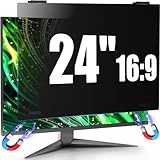
- 【Fits 23.6-24 inch Computer Monitors】JEEETINTX 24 inch Privacy Screen Filter for computer monitor is suitable for frameless or thin/narrow bezel monitors with size of 23.6",23.8", and 24" monitor (16:9 aspect ratio). Before ordering, measure the viewable area dimensions instead of using diagonal size solely. Detailed measurement steps are available on Main Image 8.❗❗Note: ❌Not suitable for curved monitor and dimensions exclude the bezel. 【Privacy Filter Only: Monitor not included.】
- 【4th Generation Magnetic Design】The 4th Generation Magnetic Design offers cutting-edge screen protector technology for seamless, secure attachment to devices. The computer privacy screen 24 inch provides easy installation and removal while ensuring stability. Users enjoy a clutter-free workspace and the convenience of quickly swapping screens as needed.
- 【6A Enhanced Materials】Our magnetic hanging 24 inch privacy screen filter integrates six specialized layers into one design. It enhances privacy, filters harmful light, resists dust, minimizes motion blur, and ensures a bubble-free application. These features improve visual clarity and user comfort for a superior viewing experience.
- 【29-Degree Extreme Privacy Viewing Angle】With a 29-degree privacy angle, the magnetic computer screen privacy shield appears darkened from side angles, protecting sensitive information. This is ideal for public spaces where privacy matters, such as offices or cafes.
- 【HD Eye Protection】Designed for HD eye protection, our privacy screen filter for computer monitor 24 inch delivers clear visuals while safeguarding eyes from prolonged screen exposure. Protective layers against blue and UV light ensure a comfortable and healthier computing experience, suitable for daily and professional use.
Provider requests also create network traffic. A product should say whether they travel directly between the device and provider, whether any backend sees message data or tokens, and whether analytics, crash reports, or support diagnostics transmit information. Corresync describes storing grants or standards credentials through an OS keyring or approved helper and distinguishes OAuth routes from providers that use standards credentials. That distinction matters: avoiding password collection by an analyzer does not mean no local credential is involved, and some provider routes may require a password, app-specific password, or bearer token. Its policy describes those routes.
How can users revoke access?
OAuth authorization is a grant, not a permanent transfer of account ownership. Users should be able to revoke an app’s access through the provider’s account permissions. Revocation prevents continued use of that grant, while deleting a local analyzer’s database is a separate action. A trustworthy product should explain both how to disconnect the provider and how to remove locally stored results; the available product descriptions cited here do not establish a single universal menu path for revocation across accounts and devices.
What Google policy requirements still apply?
Local processing does not remove provider review requirements. Google’s policy says every app using its OAuth 2.0 infrastructure for authentication or authorization must have at least one registered OAuth client, and it sets requirements around production app configuration and user consent. Apps should also avoid making API calls for a scope a user did not grant. Google’s OAuth 2.0 policies were marked last modified August 5, 2026.
Google says restricted-scope apps may need verification. If an app accesses restricted user data from or through a third-party server, Google requires an independent security assessment; the guidance also says compliance must be reassessed at least every 12 months for verified restricted scopes. Review rules and timelines can change, so developers should confirm the live requirements before release. Google’s restricted-scope verification page is the relevant reference.
Quick Recap
How to judge a local-first analyzer’s privacy claims
- Authorization: Does the app use the provider’s authorization flow rather than asking you to give its operator your account password?
- Scope: Does it name the access requested and explain why each feature needs it?
- Data: Does it list the message fields each feature reads, including any thread or body access?
- Storage: Does it state where tokens and results are kept and how local data can be deleted?
- Network boundary: Does it say whether a backend, analytics, or crash reporting receives tokens or mailbox data?
- Evidence: Are privacy statements clearly presented as the developer’s claims, rather than implied to be an independent audit?
Product prices and availability are accurate as of the date/time indicated and are subject to change. Any price and availability information displayed on Amazon at the time of purchase will apply.




