Do these 3 things before closing this tab:
1Clear out junk files and repair common Windows errors2Fix the driver behind crashes, sound loss and screen glitches3Repair Windows errors before they cause bigger problemsAn XDG Desktop Entry is a UTF-8 text file that tells Linux desktop environments about an application, link, or directory entry. Use one to add an app to menus, define its name and icon, launch it with the right arguments, or declare the file types it can handle. It is a defined desktop-interoperability format—not a shell script and not simply any INI file.
What a desktop entry does
Desktop environments read desktop-entry files to learn how to present and invoke applications. The standard also covers links and directory entries. An application entry can supply a display name, icon, menu categories, launch command, supported MIME types, visibility rules, and optional actions. The format is maintained by freedesktop.org; its specification and file-naming rules were checked on September 28, 2026.
As an Amazon Associate I earn from qualifying purchases.
The required group header is exactly [Desktop Entry]. Keys are case-sensitive, duplicate keys in a group are not allowed, and implementations must preserve fields they do not understand when rewriting a file. The specification says: “Compliant implementations MUST not remove any fields from the file, even if they don’t support them.” Read the Desktop Entry Specification.
Outdated Drivers Are Slowing You Down
One free scan finds every outdated or missing driver and matches the right update for your exact hardware.Free scan · exact hardware matchPC Slower Than It Used to Be?
A free scan shows the junk files, broken settings and background clutter dragging Windows down - then fixes them in one click.Free scan · Windows 10 & 11Create a basic application launcher
For an application, create a UTF-8 text file with the .desktop extension. This minimal example launches an installed program named example-app:
#1 Best Overall

- KEYBOARD: The keyboard works for Windows with hot keys that enable easy access to Media, My Computer, Mute, Volume up/down, and Calculator
- EASY SETUP: Experience simple installation with the USB wired connection
- VERSATILE COMPATIBILITY: This keyboard is designed to work with multiple Windows versions, including Vista, 7, 8, 10 offering broad compatibility across devices.
- SLEEK DESIGN: The elegant black color of the wired keyboard complements your tech and decor, adding a stylish and cohesive look to any setup without sacrificing function.
- FULL-SIZED CONVENIENCE: The standard QWERTY layout of this keyboard set offers a familiar typing experience, ideal for both professional tasks and personal use.
[Desktop Entry]
Type=Application
Name=Example App
Comment=Open Example App
Exec=example-app
Icon=example-app
Terminal=false
Categories=Utility;
Save it in an applications directory, such as ~/.local/share/applications/ for the current user. A system-wide entry can be installed in an applications directory under a system XDG data directory, subject to the machine’s permissions and conventions. The standard’s naming rules derive a desktop file ID from its location relative to the applications directory, so install location and filename both matter.
What the example fields mean
Type=Applicationidentifies this as an application entry.Nameis the human-readable label.Commentis a short description, andIconnames an icon or gives an icon path.Execspecifies how the program is launched. It is not interpreted as an arbitrary shell command.Terminal=falsesays the application should not be run in a terminal window.Categoriescan help place the app in menus. Multi-value fields use semicolons as separators; a trailing semicolon is conventional and significant when representing a final empty value.
Boolean values are written as true or false. Keys contain ASCII letters, digits, and hyphens, and capitalization must match the specification. A localized display string can use a locale-suffixed key, such as Name[fr]=...; include the plain, unlocalized key as well.
Choose a filename and install location
Application filenames conventionally use a reverse-DNS-style identifier based on a domain the author controls, followed by an application name—for example, org.example.ExampleApp.desktop. The application stem should satisfy D-Bus well-known-name rules. Directory entries use .directory rather than .desktop; other desktop-entry types use .desktop.
Rank #2
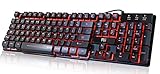
- Professional Mechanical feeling backlit gaming keyboard,Ideal for desktop and PC; Can be used for gaming and office,not the real mechanical keyboard,,but it worth more.
- Support Win10, Win8, Win7, Linux, Vista, IBM PC Laptop Pad Google Android TV Box HTPC IPTV Smart TV Mac OS Raspberry Pi ,Chrome OS and Linux OS
- Features 3 color LEDs with breathing light function; Press fn + light key to enter into breathing light mode; Press light button thrice to turn off backlight
- Standard 105 Keys full size keyboard; Comes with 11 special designed multi media keys combinations,Measures 17.1 x 5.3 x 0.9 inches
- Automatically enters sleeping mode if not used for 10 minutes; Any key press will awaken and backlights turn back on
A desktop file ID is calculated from the file’s path under an applications directory: remove that directory prefix and replace remaining slashes with hyphens. If two files produce the same ID, the first found according to $XDG_DATA_DIRS precedence takes priority. The specification does not define a reliable winner for every collision caused by different paths producing the same ID, so avoid such collisions. See the desktop file naming specification.
Write an Exec line that handles arguments correctly
The Exec value consists of an executable and space-separated arguments, with quoting and escaping governed by the desktop-entry specification. The executable may be a path or a program name resolved through the desktop environment’s PATH. Do not rely on shell features such as pipes, redirection, variable expansion, or shell wildcards as if the value were a shell script.
Reserved characters in arguments must be quoted and escaped according to the specification. Field codes let a launcher substitute files, URLs, or application metadata. They must not be placed inside quoted arguments.
Rank #3

- Media-Friendly: The K400 Plus wireless touch TV keyboard gives you integrated, comfortable control of your PC-to-TV entertainment, eliminating the clutter of a separate keyboard and mouse
- Plug-and-Play: Simply plug the Unifying receiver into a USB port and the wireless touchpad keyboard is ready to go; adjust controls using the Logitech Options Software to save preferred settings
- Power-Packed: Built with laid-back control in mind, this wireless TV keyboard has a reliable and long battery life of up to 18 months (2), including an on/off button to help it go even longer
- Wireless Freedom: Designed for seamless comfort and control, this HTPC keyboard boasts a range of up to 33 ft (1) wireless connectivity, with quiet keys and a large touchpad for easy navigation
- Broad Compatibility: Designed for use with Windows 7, Windows 8, Windows 10 and later, Android 7 or later, and Chrome OS
| Code | Meaning | Important constraint |
|---|---|---|
%f, %F |
One file or multiple files | At most one file/URL field code from the four-code set may appear in the command. |
%u, %U |
One URL or multiple URLs | %F and %U must each be a standalone argument. |
%c |
The translated application name | Use only where the specification defines a field code. |
%k |
The location of the desktop file | Use only where the specification defines a field code. |
%i |
An icon option expansion | It expands according to the icon field’s value. |
For example, an app intended to open one file can use Exec=example-app %f; one intended to receive a list can use Exec=example-app %F. Choose a form that matches what the application accepts. Only one of %f, %F, %u, and %U may occur. Deprecated field codes such as %m, %v, %d, %D, %n, and %N should not be used in new entries. The Exec key specification describes quoting and field-code expansion.
Quick wins for a faster PC:
Scan for outdated or missing drivers - takes under a minuteDriver Scan →Repair Windows errors before they cause bigger problemsFix Now →Fix the driver behind crashes, sound loss and screen glitchesFind Drivers →Set visibility, menu placement, and availability
Use recognized keys for specific desktop behavior rather than assuming every optional hint works everywhere:
Categoriessupports menu placement, whileKeywordscan support search.NoDisplay=truecan keep an entry out of menus while leaving it available to other desktop components.Hidden=truemarks an entry as deleted or hidden according to the specification’s semantics.OnlyShowInandNotShowIncan restrict display by desktop environment.TryExeclets a launcher check whether a program exists and is executable; if the check fails, the entry may be ignored.Terminal=truerequests terminal execution where appropriate.
Some recently added or optional keys have uneven implementation support. A key being recognized by the specification does not guarantee that every desktop environment will act on it.
Rank #4

- ⌨【Large Print Keyboard】With letter characters larger than usual and command keys in a larger bolder font, these high-contrast keys can really help those who have trouble seeing keyboards. Perfect for elderly, the visually impaired, schools, special needs departments and libraries, as well as companies.
- ⌨【Spill resistant keyboard】It is designed to keep electronic components of keyboard safe. Water-Resistant function protection against accidental spills provides extra peace of mind. Be sure to air dry completely after spill before further use.
- ⌨【High Contrast】Large print keyboard offers increased visibility with easy to see yellow key caps and crisp large print black letters, Easily seen print, even in low light. With a life cycle of 5 million keystrokes, membrane key switches provide a faster response along with a quieter typing experience.
- ⌨【Ergonomics Design】Unfold the feet at back of the keyboard to reduce hand fatigue and enjoy long hours of playing. Full QWERTY English (US) 104 key keyboard layout with numeric keypad, Large Print keys provides superior comfort without forcing you to relearn how to type.
- ⌨【Wide Compatibility & Lifetime After-Sales Service】Compatible with Windows 10 / 8 / 7 / Vista / XP / 2000 / 98 | Also works with Mac OSX and macOS. Easy to install with plug and play technology | No additional software required.Except for Windows systems, other system hotkeys may not work and are only used for typing
Declare file types and URL handling
The MimeType key lists MIME types an application can handle, typically as a semicolon-separated list, for example MimeType=text/plain;image/png;. The application should actually be able to open those types through its launch command. Declaring a type does not assign the application priority over other handlers; defaults and preference ordering are managed separately.
Use the field codes in Exec to receive the selected files or URLs. A MIME declaration without a command capable of handling the corresponding input does not make the association useful.
Use D-Bus activation only when the application supports it
DBusActivatable=true signals that the application supports D-Bus activation. It does not create a D-Bus service by itself: the application must implement the specified org.freedesktop.Application interface at the object path derived from its well-known name. The specification recommends keeping an Exec value as a compatibility fallback for older implementations, even though Exec is not required when DBusActivatable=true.
Best Value

- The things you do most are right at your fingertips with one-touch controls for instant access to play/pause, volume, mute and the Internet.
- Comfortable low-profile keys: Enjoy fast, fluid quiet typing on a familiar standard layout, including number pad.
- High-definition optical mouse: Smooth, responsive cursor control from a comfortable sculpted mouse.
- Sleek and durable design: Thin profile, spill-resistant design, durable keys and sturdy adjustable tilt legs. Tested under limited conditions (maximum of 60 ml liquid spillage). Do not immerse keyboard in liquid.
- Plug-and-play PC compatibility: Simple USB connection. Works with Windows XP, Windows Vista, Windows 7, Windows 8 or later or Linux kernel 2.6 or later.
Add optional launcher actions
Actions provide alternate invocation paths, such as quicklist items. List each action identifier in the main group’s Actions key, then define a matching [Desktop Action identifier] group with the action’s display name and command. An action not listed in Actions is invalid and should be ignored.
[Desktop Entry]
Type=Application
Name=Example App
Exec=example-app
Icon=example-app
Actions=NewWindow;

[Desktop Action NewWindow]
Name=Open a New Window
Exec=example-app --new-window
Some implementations may ignore action groups. A launcher can still use the main entry’s ordinary metadata and command.
Avoid obsolete keys and formats
For new entries, do not use legacy Type=MimeType, Encoding, [KDE Desktop Entry], or .kdelnk. Obsolete keys include MiniIcon, TerminalOptions, Protocols, Extensions, BinaryPattern, MapNotify, and SortOrder. Use current keys such as MimeType and the supported file/URL field codes instead. Optional newer hints—including SingleMainWindow, PrefersNonDefaultGPU, and Implements—may not be supported uniformly.
Recommended Free Tools
Quick Recap
Product prices and availability are accurate as of the date/time indicated and are subject to change. Any price and availability information displayed on Amazon at the time of purchase will apply.




