Windows Errors? Fix Them Before They Spread
Repair common Windows errors and clear accumulated junk for a smoother, more stable PC - no reinstall needed.Free scan · no reinstallCrashes, No Sound, or Screen Glitches?
Random freezes, missing sound and display glitches usually trace back to one bad driver. Find and replace yours safely.Free scan · under a minuteIf Windows 11 shows a magnifying-glass icon instead of a Search text box, change the taskbar’s Search display setting: right-click an empty area of the taskbar, choose Taskbar settings, then go to Taskbar items > Search and select Search box. An icon-only control is a supported display choice, so it does not automatically mean Search is broken.
Restore the full Search text box
- Right-click an empty area of the taskbar and select Taskbar settings.
- Under Taskbar items, open Search.
- Select Search box. Microsoft describes this option as displaying “a full text box to enter your search.” Microsoft’s taskbar instructions document the available presentations; labels can vary by Windows version or configuration.
What the other Search taskbar choices mean
Windows offers four taskbar presentations for Search. Choose the one that fits how you use the taskbar:
As an Amazon Associate I earn from qualifying purchases.
| Option | What appears |
|---|---|
| Search box | A full text box for entering a search. |
| Search icon and label | A Search icon with its label. |
| Search icon only | The magnifying-glass icon without a text box. |
| Hide | No Search control on the taskbar. |
If you only need to search occasionally, Search is still available without a full-width taskbar box. Press Windows key + S, or open Start and begin typing. Microsoft documents both methods.
If the Search box option is missing
Check for the setting at Settings > Personalization > Taskbar > Search. A Microsoft Q&A response also suggests testing Search under a new local Windows user account to see whether the setting behaves differently there. This is a community diagnostic suggestion, not a guaranteed fix. See the Microsoft Q&A discussion.
#1 Best Overall

- Patent No.D1025743. ✅ STRENGTHEN HOME SECURITY - High-grade Steel window locks security bar block criminals from entering through sliding glass windows or patio doors. Windows open in a fixed position for fresh air. Perfect for window air conditioner units or ventilation.
- ✅ ADJUSTABLE - The sliding door security bar extends from 15 1/2" to 29 1/2" with the 22 adjustable settings. Lock the height in place with the spring clip and the long screw help to reach the very small adjustment of the window's opening.
- ✅ STOP FORCED ENTRY OR UNEXPECTED ACCIDENT - The steel spring clip provides extra resistance from forced entry and ensures long-term use. Burglars can't reach it from the outside when correctly installed. Prevents children from falling out of open windows.
- ✅ NOTICE- BEFORE BUYING, MEASURE the window or door track where the guard will be placed . Window tracks MUST be at least 1 inch wide. The security device is 1 inch wide on every side.
- ✅ EASY TO INSTALL - Unique design. No tools required. Stick the lock bar on the window /door track with the supplied adhesive strips. It stays well and doesn't fall out when properly installed and adjusted. Removes easily in emergencies. Fits discretely in window / door tracks and looks decent.
If Search itself does not work
Changing the taskbar presentation only changes how Search appears. If Search also fails to open or return results, use Microsoft’s Windows Search troubleshooting guidance, which covers checking for updates and restarting the Windows 11 SearchHost.exe process in Task Manager.
Microsoft also provides a Windows Search reset procedure using a PowerShell script. It requires administrator permission and may temporarily affect the relevance of search results. That is an escalation for Search problems, not the first step when the only issue is an icon-only taskbar control.
Quick Recap
Best Value

- Security Bars for Windows: This window security bar with a childproof anti-lift lock provides window protection from burglars and acts as a visual deterrent against burglars who can see it clearly through the glass
- Dimensions: Made of aluminium, this window lock bar slides from 10.6 to 16.625 inches, it can be installed on vertical or horizontal hung windows without cutting, allowing the window to partially open while being secured
- Lock for Air Conditioners and Pet Doors: Install window safety bars for in-window air conditioner units, pet doors, or leave the window open for ventilation, locking your window securely to provide security and peace of mind while allowing airflow
- Permanent or Temporary Installation: Suitable for renters and owners, this security bar can be permanently installed by drilling into the frame or temporarily mounted with double-sided tape, or placed in the track to prevent forced entry
- Convenient Mounting Height: These window guards for home security can be installed at any height on the window frame, making them easy to position out of children’s reach for added safety while also serving as a visual deterrent to intruders
Rank #4

- ✅ 【Adjustable Length】 The window security bar can be adjusted from 10" to 18" with 12 adjustable settings, fit a variety of sliding window widths, and suitable for most standard window tracks with more than 1" width.
- ✅ 【Window Security Lock】This highly reliable and sturdy window lock bar is specially designed to protect against potential intruders entering through sliding glass windows. And it also prevents children from falling out of open windows.
- ✅ 【Durable & Reliable】Our window security bars are made of strong steel with smooth surface, rust resistant, non-deformation, ensure long time use. Comes with non-slip rubber on both ends to better secure without damaging the window frame.
- ✅ 【Easy Installation】Just put the window sefety bar on the window track and push the pin to lock the height in place, no tools required. If it is a vertical window, you need to tape it to the vertical window track.
- ✅ 【Portable & Versatile】As a portable security solution, you can easily remove the window security bar for cleaning or emergencies. It also makes it an excellent choice for homeowners, renters, or even those who need added security measures while traveling.
Rank #3

- Offers a simple, professional way to present and keep documents safe
- Clear front and back covers keep reports, proposals, and presentations easy to view
- White binding bars hold pages securely without punching holes in your documents
- Fits standard letter-size 8.5 x 11 inch materials for versatile everyday use
- Economy-weight plastic provides a lightweight, practical document-covering solution
Rank #2
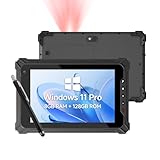
- [ ENTERPRISE-CLASS HONEYWELL N4680 SCANNER ] – Still struggling with laggy or inaccurate barcode scans? The Arrvel I87J rugged tablet features an integrated Honeywell N4680 engine for rapid, first-time capture of virtually any 1D/2D barcode (Code 128, UPC, EAN, PDF417). Whether labels are damaged, smudged, or under shrink wrap, it ensures your WMS, ERP, or inventory software runs at peak velocity without the need for bulky external Bluetooth scanners
- [ WINDOWS 11 PRO & SEAMLESS MULTITASKING ] – Powered by the Intel Quad-Core N5100 (up to 2.8GHz), the Arrvel I87J is engineered for heavy-duty multitasking. Pre-installed with Windows 11 Pro, inventory scanner provides a secure, enterprise-grade environment to run ArcGIS, SAP, AutoCAD, and complex WMS/ERP systems without lag. With 8GB RAM and 128GB storage (expandable to 512GB via SD card), it’s the ultimate field-ready workstation for real-time supply chains and industrial datasets
- [ IP65 & MIL-STD-810H RUGGED ] – Built for environments where consumer tablets fail. Certified IP65 waterproof and MIL-STD-810H, the Arrvel I87J withstands 4ft (1.2m) drops to concrete and resists mud, rain, and dust. It operates flawlessly from -4°F to 140°F (-20°C to 60°C), making it the ideal mobile data terminal for sub-zero freezers, dusty factories, and outdoor sites. Whether on a vibrating forklift or in the field, your workflow remains strictly uninterrupted
- [ DUAL-MODE POWER & SEAMLESS CONNECTIVITY ] – Built for 24/7 productivity, the I87J windows tablet features a removable 5,000mAh battery (8h runtime) for quick swapping. Uniquely supporting a battery-free mode, it can be powered directly via USB-C, eliminating battery swelling risks for forklift or fixed-station users. Stay synced with Intel Wi-Fi 5 for seamless roaming, plus 4G LTE and GPS/GLONASS for off-grid field service. [Expand Your Power: Search B0GHNVJQ92 for an extra 5000mAh battery and B0GTL1MVV6 for the charging dock]
- [ SUNLIGHT-READABLE & SITE DOCUMENTATION ] – The compact 8-inch FHD display (1200x1920) delivers 550 nits of high brightness, ensuring crystal-clear data visibility even in direct sunlight. Perfectly sized for one-handed operation, it empowers field professionals with an 8MP rear camera for high-definition site documentation and a 5MP front camera for remote collaboration. This portable scanning tablet ensures your workflow remains uninterrupted in any harsh industrial environment
Product prices and availability are accurate as of the date/time indicated and are subject to change. Any price and availability information displayed on Amazon at the time of purchase will apply.
Free tools Windows power users keep installed
One-click scans. No signup required.




