Outdated Drivers Are Slowing You Down
One free scan finds every outdated or missing driver and matches the right update for your exact hardware.Free scan · exact hardware matchPC Slower Than It Used to Be?
A free scan shows the junk files, broken settings and background clutter dragging Windows down - then fixes them in one click.Free scan · Windows 10 & 11You can reduce optional diagnostic collection, limit some ad personalization, review app permissions, and uninstall apps you do not use in Windows 11. These settings do not provide a single switch that blocks every connection to Microsoft or every form of data collection.
Can you disable telemetry in Windows 11?
Not completely through the documented consumer settings. Windows distinguishes between required and optional diagnostic data. Required data supports functions such as security, updates, compatibility, and reliability; choosing not to send optional data limits that additional diagnostic collection rather than turning off all telemetry. Microsoft describes these categories in its required diagnostic data and optional diagnostic data documentation.
As an Amazon Associate I earn from qualifying purchases.
Choose Required diagnostics
- Open Settings.
- Go to Privacy & security > Diagnostics & feedback.
- Under diagnostic data options, select Required diagnostic data rather than optional data, if the choice is available.
Labels and available options can differ by Windows release, account setup, or organization policy. A work- or school-managed device may have settings controlled by its administrator. Microsoft’s documentation lists Windows 11 versions 25H2, 24H2, 23H2, and 22H2 for optional diagnostic data; this does not mean every device on those releases exposes identical choices.
Do these 3 things before closing this tab:
1Scan for outdated or missing drivers - takes under a minute2Repair Windows errors before they cause bigger problems3Fix the driver behind crashes, sound loss and screen glitchesWhat deleting diagnostic data does
The Delete diagnostic data control in the same settings area clears diagnostic data associated with the device, but Microsoft says it does not stop future diagnostic data from being sent and does not delete information associated with a Microsoft account. Treat it as a deletion action, not an ongoing opt-out. See Microsoft’s Diagnostics, feedback, and privacy in Windows 11.
#1 Best Overall

- Privacy screen protector exclusively designed for 13.0 inch Microsoft Surface Pro 11/ Pro 10 2024 / Pro 9 2022 released ONLY; Compatible with Surface Pen
- Limits viewing angle to +/- 30 degrees, the privacy film guard will darken your screen when viewing from the side; (Please note that the privacy cover will darken the screen a little to prevent the peeking eyes near you, so please turn up your device display brightness for better viewing experience)
- 9H hardness surface, protecting against accidental scratches and bumps
- Easy to install, only take seconds; Advanced silicon adhesive, no residue when removing
- Made from ultra thin tempered glass (0.33mm thickness), maintaining true touch sensitivity of your device
Inspect device diagnostic data
If diagnostic data viewing is enabled, the Diagnostic Data Viewer lets you review device diagnostic data. It is not a complete inventory of account-associated information or every data flow handled by Microsoft services. Microsoft explains the viewer in its Windows diagnostics and privacy guidance.
How to limit personalized ads and offers
Windows 11’s newer privacy settings include Recommendations & offers. Open Settings > Privacy & security > Recommendations & offers to review the available controls. Microsoft says this page is replacing the older General privacy settings page in newer Windows versions, so the exact location can vary.
Rank #2

- 【WIDELY APPLICABLE】Peslv Surface pro magnetic privacy filter designed for Surface, Compatible with 13" Microsoft Surface Pro 12th/11/10/9/8/X (released in 2026-2019). Removable design and comes with a Surface privacy screen protector storage clip that can be taken and used as needed, perfect for various occasions where screen privacy needs to be protected.Like offices, airports, cafes, trains, etc.
- 【NEW 3RD GENERATION】 We have innovated the installation method of the privacy film, using the bottom magnetic suction and the top nano suction installation method, the installation will become super easy, It's done in a second.. The removable, washable design will allow the surface pro 13 inch privacy screen to be reused and look new every day.
- 【STUNNING PRIVACY PROTECTION】To ensure that only the +-28° angle directly in front of the screen is visible, we have corrected the angle of the Surface Pro 9 privacy screen more than 5000 times to ensure that other angles of view are not visible. By getting the Peslv magnetic privacy screen Surface pro 13 inches, you can ensure that your computer data privacy is not peeked.
- 【PROTECT SCREEN ALSO EYES】The high-quality materials imported from Japan and the process imported from Germany have greatly improved the performance of the magnetic privacy screen Surface pro 8. High-quality filter layer that can reduce 95% of blue light and 92% of UV light. Matte surface, anti-glare, effectively intercepts 95% of the reflected light. Anti-scratch layer to avoid scratches from daily use. Protect your screen while protecting your eyesight.
- 【HIGH-GRADE MATERIALS AND CRAFTSMANSHIP】Modeled in accordance with the real screen size 1:1 restoration, the size is perfectly matched. The light-transmitting layer with advanced material has a super high light transmission rate. So all this will make you have a super high-definition Surface Pro X privacy screen with unparalleled picture quality close to the original picture.
Turn off the advertising ID
In the Recommendations & offers settings, switch off the advertising ID option if you do not want apps that use this identifier to personalize ads for you. This setting applies to that identifier; it does not control cookies or separate advertising practices used by third-party products.
Recommended Free Tools
Microsoft states: “Turning the advertising ID off will not reduce the number of ads you see, but it may mean that ads are less interesting and relevant to you.” The control affects personalization, not the number of ads. See Microsoft’s privacy settings for Recommendations & offers.
Rank #3

- Perfect fit 11.6" (16:9) diagonal measurement - Widescreen monitor - 16:9 aspect ratio - Filter size: Width: 10 1/8", Height: 5 11/16" (257mm x 144mm).
- LEAVE VISUAL HACKERS IN THE DARK: Don't expose personal or business data to prying eyes. These filters darken your LCD screen if seen from the sides, while allowing clear vision for you. Keep your computers secure with these industry best protectors.
- WE'VE GOT YOUR SCREEN COVERED: Our 11.6 inch (11.6" diagonally) desktop filter is 1 of 26 covering 1,000's of displays with the highest quality polymer film available. We cover both standard and widescreen monitors & the full range of aspect ratios.
- EASY INSTALLATION: It's a snap to apply your Akamai privacy cover. We use the highest quality 3M adhesives to ensure long lasting protection. We've included full installation instructions so you'll have no problem applying the filter to your screens.
- BLUE LIGHT & ANTI-GLARE EYE PROTECTION: Not only will your filter protect your login and other data from prying eyes, it reduces harmful blue light by 60%. And its 3H hardness rating also provides a layer of physical protection to your screen.
How to review Windows app permissions
Open Settings > Privacy & security and review the individual capabilities you care about, such as location, camera, microphone, contacts, and calendar. For each capability, check which apps are allowed and turn off access for apps that do not need it. Windows’ permission pages primarily govern Microsoft Store apps. Desktop apps may not appear in these lists and can access information through different mechanisms, so an empty or short list is not proof that no desktop software can use a capability. Microsoft outlines this distinction in its Windows app permissions guidance.
How to remove unwanted preinstalled apps
Uninstall apps you recognize and no longer need using Windows’ supported options. Open Settings > Apps > Installed apps, find the app, select its menu, and choose Uninstall when that option is available. You can also uninstall some apps from the Start menu by right-clicking the app and selecting Uninstall. Microsoft documents these options in how to uninstall or remove apps and programs.
Rank #4

- 【COMPATIBILITY】Designed for the 13-inch Surface Pro 12th11/10/9/8/X released in 2019-2026, with precise dimensions and a perfect fit. If you have questions about product dimensions, please contact us or ask a question. We have 24-hour online professional pre-sales and after-sales customer service to ensure you have a satisfactory shopping experience.
- 【EASY TO INSTALL】Peslv has innovatively designed a new installation method - MagicSuction. We designed nano-adsorption strips on the four sides of the Surface privacy screen. Just align it with the Surface screen frame and press it gently, and it can be installed in one second. With Peslv Privacy Screen Surface Pro 13 inch, you will never be in the embarrassing situation of not knowing how to install it!
- 【ABSOLUTE PRIVACY PROTECTION】Peslv Surface Pro 13inch privacy screen uses the most advanced grating technology, and conducts quality inspection on every factory Surface pro privacy screen, so that the contents of the laptop are only visible from the front, filtering side views to ensure the security of your data.
- 【PROTECT SCREEN AND EYES】Surface pro privacy screen 13 inch uses AG anti-glare technology imported from Germany and base material imported from Japan. The frosted surface layer effectively intercepts 95% of reflected light and glare; the high-quality filter layer can filter 92% of blue light; the anti-scratch layer prevents scratches during daily use. Protect your screen while protecting your eyesight.
- 【SUPER PORTABLE】 The privacy screen Surface pro 10 13 inch adopts the most advanced nano-adsorption process, which has strong adsorption force and is removable, washable, and reusable. The four-sided adsorption perfectly solves the problem of the bottom lifting. Package contents include a storage clip for easy storage of the Surface screen protector. A great Surface accessory to protect your screen privacy in public.
Not every bundled component is removable through these options, and there is no universal safe-to-remove list established by the cited Windows guidance. Avoid removing system components indiscriminately or relying on bulk debloat tools as guaranteed privacy fixes. Uninstalling an app only changes that app’s presence; do not assume it improves privacy or performance unless the app’s behavior supports that conclusion.
What these settings can—and cannot—block
| Action | What it changes | What it does not establish |
|---|---|---|
| Select Required instead of Optional diagnostics | Limits optional diagnostic data sent from Windows, where the setting is available. | It does not disable required diagnostic data or every Microsoft service connection. |
| Delete diagnostic data | Deletes device diagnostic data through the Windows control. | It does not stop future transmission or erase account-associated information. |
| Turn off advertising ID | Limits use of that identifier by apps that rely on it for ad personalization. | It does not reduce the number of ads or control cookies and other companies’ ad practices. |
| Change app permissions | Restricts the listed capability access for apps covered by the setting. | It is not a complete control panel for desktop apps or all ways software can access information. |
| Uninstall an app | Removes an app through Windows’ supported uninstall workflow when available. | It does not guarantee a general privacy or performance improvement, nor establish that every preinstalled component is safe to remove. |
Windows’ documented privacy controls address specific categories of diagnostic data, personalization, permissions, and installed apps. They do not establish a supported consumer switch that blocks every Microsoft data flow. For that reason, registry scripts, firewall rules, and bulk removal utilities should not be presented as guaranteed ways to stop Microsoft tracking.
Quick Recap
Best Value
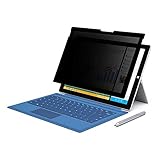
- 【Surface Pro 11/10 /9 /8 /X 13 inch Privacy Screen 】FILMEXT high-grade Surface Pro 11/10 /9 /8/ X privacy screen 13 inch is perfectly fit 2024 Microsoft Surface Pro 11 13inch, Surface Privacy Screen filter shows a black edge with removable silicone seal, easy on and off, bubble free design.
- 【Blocking Side-Snoopers】FILMEXT Surface Pro 11/10/9/8/ X -13 inch removable privacy angle is 30 degrees ±5, transparency is 60%±5, thickness is 0.35mm. Data is only visible in front of the display, appears a darkened or black screen from side view, with anti-glare and blocks 35% blue light feature, protects your eyes and prevents reflection from strong light, reduces stress on your eyes from daily glare & UV light and helps protect your screen from damage and dust.
- 【Compability】FILMEXT Removable Privacy Screen for Surface Pro 11/10/9/8/X-13 inch is perfectly compatible with Microsoft Surface Pro 11 2024 Release/Surface Pro 10 2024 Release/ Surface Pro 9 -2022 Release/ Surface Pro 8 2021 Release /Surface Pro X - 13 inch 2019 Release ( Model: Model:1983 1982 2038 1996 2010 2079 2077 2078 2121 2076 2085 2103, the Model on the back of surface, Please check the model before purchase )
- 【Anti-Glare & Anti Blue Light】Say goodbye to eye fatigue and sleepless. FILMEXT Surface Pro 11/10/9/8/X blue lIght screen protector can reduces stress on your eyes by blocking blue light and preventing reflection from strong light, daily glare & UV light.
- 【Bubble Free Design】Surface Pro 11/10 /9 /8 / X screen protector 13 inch adopt the latest black frame silicone seal design, easy to install and remove, 100% bubble-free. The Privacy screen protector for surface Pro 11/ 10 / 9 / 8 / X 13 inch with fingerprint resistance, and excellent touching sensibility. Installation tips: clean screen and ensure it is dust-free, align the product to screen, gently press over on the frame to remove the bubbles and let the silicone adhered to the frame.
Product prices and availability are accurate as of the date/time indicated and are subject to change. Any price and availability information displayed on Amazon at the time of purchase will apply.




