If an E-mount lens will not autofocus, first check that autofocus is enabled, your subject is within the lens’s focusing range, and the scene gives the camera enough light and contrast. If the camera does not recognize the lens, turn the camera off before reseating it and checking the mount contacts. Then verify the exact camera, lens and adapter combination. Testing another known-compatible lens can help identify whether the problem is more likely in the lens or the camera body.
First identify what “won’t autofocus” means
Watch what the camera and lens do, rather than judging only the resulting photograph:
As an Amazon Associate I earn from qualifying purchases.
- No focus movement or acquisition: The lens does not appear to respond, or the camera cannot acquire focus.
- Hunting: The camera moves focus back and forth without locking on.
- Wrong subject in focus: Autofocus works, but the selected focus area or subject detection may be directing it elsewhere.
- A soft photograph: This alone does not establish that the autofocus motor has failed. The camera may have focused on another distance, or the scene may have made focus difficult.
Note any on-screen lens-recognition error and whether the issue began after changing lenses, adding an adapter or updating camera firmware. Those details help distinguish a scene or setting issue from a communication or compatibility problem.
What’s actually slowing this PC down?
Pick the symptom - the matching free tool is one click away.
Check focus settings and the test scene
- Set the camera and lens to AF. Check both the camera’s focus setting and any AF/MF switch on the lens. If either is set to manual focus, the camera will not drive autofocus as expected.
- Move within the lens’s focusing range. Check the minimum focusing distance marked or specified for that lens. A subject closer than that distance may not come into focus.
- Try an easier subject. Use a stationary subject with clear edges or other visible contrast, in good light. For this first test, avoid a blank wall, featureless sky, strong backlighting or several objects at different distances.
- Choose a focus area that covers the subject. A focus area that misses the intended subject can make a functioning system appear to focus incorrectly or not at all.
Sony’s camera guidance identifies dim scenes, low-contrast subjects, close subjects and subjects at different distances as conditions that can make focusing difficult. Autofocus performance and available features also vary by camera and lens. If the issue occurs only in a particular burst mode or while tracking a moving subject, check the manual and compatibility information for the exact combination rather than assuming every tracking feature works in every shooting mode.
#1 Best Overall

- F2.8 Large Aperture: With a large F2.8 aperture, this lens captures more light in dimly lit environments, allowing for slower shutter speeds and reducing blur in handheld shots. It also delivers cleaner, more detailed nighttime images with noticeably less noise
- 113.8° Ultra-Wide Angle: Experience an unprecedented 113.8° ultra-wide field of view (equivalent to 13.5mm on a full-frame camera). Perfect for capturing expansive landscapes, tight interiors, group selfies, and dynamic vlogs—now with more context and freedom in every frame
- 0.13m Minimum Focusing Distance: With a minimum focus distance of just 0.13m, emphasize dramatic foreground-background relationships, shoot in tight spaces with depth, and turn everyday scenes into eye-catching photos
- Eye/Face AutoFocus: Never miss a moment thanks to advanced Eye and Face Detection autofocus. Whether you're filming lively pets, capturing spontaneous street moments, or shooting vlogs on the move, this lens keeps your subject sharp and clear with effortless precision
- 13 Elements in 11 Groups Optical Design: Packed with high-performance optics including 2 aspherical elements, 3 extra-low dispersion elements, and 3 high-refractive index elements, this lens ensures excellent distortion control, minimal vignetting, and edge-to-edge sharpness you can trust
If the camera does not recognize the lens
- Turn the camera off. Do this before detaching the lens.
- Remove and reseat the lens. Check that it is mounted correctly and fully seated on the camera.
- Inspect the mount and contacts. Look for anything obstructing the connection. Do not scrape or abrade the electronic contacts.
- Turn the camera on and check again. If the recognition error remains, continue with compatibility checks and a lens comparison.
Sony Support explains: “The camera can’t communicate with the lens if the metal pins on the camera body and lens don’t make contact.” This is why a recognition message calls for checking the connection as well as the focus settings.
If the front glass has visible fingerprints or dirt, Sony recommends gently wiping it with a soft cloth. Cleaning the glass may improve the image when dirt is present, but it does not repair poor electrical contact, restore compatibility or fix failed autofocus hardware.
Rank #2

- 84.9° wide angle of view: Viltrox 15mm F1.7 wide angle lens with a 84.9°angle of view. It is suitable for landscape, architecture, indoor and VLOG photography
- F1.7 large aperture: With 9 aperture blades, creating a dreamy and aesthetic blur; easily capturing portraits and close-ups with dreamy background blur, adding a professional
- Eye/face Autofocus: Equipped with an STM motor, achieving precise and fast automatic focusing. When capturing portraits, pets, or moving subjects, quickly lock onto the focus to not miss any exciting moments
- Closest focusing distance of 0.23m: Get up close and personal with your subjects, unlocking a variety of creative possibilities with the wide-angle lens—creating exaggerated perspectives with a sense of depth, delivering creative shots in an instant, and adding depth to even tight spaces
- Video shooting: The 15mm lens boasts comprehensive and reliable video shooting capabilities, ensuring smooth and natural focus transitions during video recording. Whether capturing travel vlogs on the go or filming while walking, the focus will always keep up with your pace
Confirm the mount, adapter and firmware combination
Read the model names on the camera body and lens, then verify that the lens mount suits the body. A Sony E-mount lens is made for Sony E-mount bodies. An A-mount lens requires an adapter for use on an E-mount body, and autofocus support depends on the adapter and the particular camera-and-lens combination.
Free tools Windows power users keep installed
One-click scans. No signup required.
| Setup | What to verify | Autofocus expectation |
|---|---|---|
| Native Sony E-mount lens on an E-mount body | Confirm the exact lens and body models, their support information, and that the lens is seated correctly. | Do not assume a particular focus feature is available in every mode; check the exact models’ documentation. |
| Third-party E-mount lens on an E-mount body | Check the lens maker’s compatibility information and whether it offers firmware for the lens. | Sony says it cannot guarantee that third-party lenses and accessories support every camera function. |
| A-mount lens on an E-mount body | Check the exact adapter, its supported functions and the camera-and-lens combination. | Autofocus and other functions can differ by adapter and setup; do not assume they are supported. |
If a third-party lens or adapter stopped working after a camera firmware update, ask its manufacturer whether a relevant accessory firmware update is available. Sony notes that when a third-party device cannot communicate with a camera, functions such as autofocus and stabilization may be unavailable. An update may be relevant, but it is not a guaranteed fix. Sony provides lens downloads by model, so use the support information for the specific lens and body instead of applying a version number meant for another product.
Rank #3
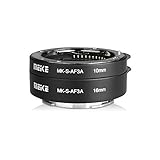
- Compatible with E-Mount APS-C and Full Frame camera (NEX , E-mount ,FE-mount)
- Support autofocus, recommended to use the manual mode to change the shutter speed directly to control the exposure level
- Can be used alone or in superimposed(10mm,16mm,10+16mm)
- Take close-up of small objects, insects , flowers or more item
- Metal Bayonet Plastic Body, small and Easy to carry
Some specialty or non-Sony setups may require a model-specific option such as “Release without Lens,” or manual-focus and exposure settings. Such workarounds do not restore autofocus communication. Follow the exact camera manual for applicable menu names and instructions.
Independent reader supportYour contribution helps us test, update, and keep practical guides available for everyone.Use a second lens to narrow down the fault
- Test another known-compatible lens on the same body, if available. If it focuses normally, the original lens becomes the stronger service suspect.
- If multiple compatible lenses fail on that body, consider the body as well. A camera-side issue becomes more plausible, but the comparison does not prove which component has failed.
- If possible, test the suspect lens on a second compatible body. This can help distinguish a lens-specific issue from one tied to the original body.
- Seek service if the problem persists. Sony recommends comparing with a compatible lens and directs users to repair options when the issue remains.
Do not buy a replacement lens based only on one failed focusing attempt. A controlled comparison is more useful for deciding whether the lens, body or their compatibility needs attention.
Quick Recap
Rank #4

- F1.7 Large Aperture: Beautiful natural bokeh, 9 aperture blades, creating a dreamy and artistic blur effect, effectively highlighting the subject.
- Efficient & Reliable Autofocus: The built-in STM stepping motor provides the high driving force for precise autofocus and tracking focus, while supporting eye/face AF for better response, lower latency, and reduced vibration
- 11 Elements ln 9 Groups: Optical structure of 11 elements in 9 groups, including 1 ED lens, 2 high refractive index lens, 1 aspherical lens, and high-definition multi-layer coating
- Lightweight Design: Weight 170 g, the compact and lightweight body allows you to capture inspiration at your fingertips. This portability positions it as a favorite for those impromptu shoots, be it on bustling city streets or serene landscapes
- The bottom of the lens is equipped with a micro USB interface, which is convenient for future firmware upgrades and makes its performance stronger
Product prices and availability are accurate as of the date/time indicated and are subject to change. Any price and availability information displayed on Amazon at the time of purchase will apply.




