Free tools Windows power users keep installed
One-click scans. No signup required.
Unencrypted screen mirroring can reveal whatever appears on your screen to someone able to monitor the unprotected connection. The exposure is not automatic: it depends on the mirroring protocol, its configuration, the receiver, and who can reach the network. Some systems encrypt the stream; others make protection conditional. Treat stream encryption, receiver access, and network security as separate checks.
What can someone see when you mirror?
A mirror sends a representation of what is visible on the source device. That may include messages, account details, notifications, documents, or other private material if it appears onscreen while mirroring is active. If the stream has no effective encryption, a person able to observe the relevant communication path may be able to read its contents. Cleartext traffic can also be manipulated, according to Android’s guidance on cleartext communications; that principle applies to mirroring only when the mirroring stream itself is unprotected.
As an Amazon Associate I earn from qualifying purchases.
An attacker still needs a way to observe or interfere with that path. A separate risk is weak receiver authentication: an unintended person or device might connect to a receiver, or a vulnerable app might expose or accept data improperly. Those are not the same as passively intercepting an unencrypted stream.
Does every mirroring protocol leave the stream unencrypted?
No. Protection varies by protocol, device combination, and negotiated settings. Official platform documentation describes different safeguards, and one platform’s behavior should not be assumed for third-party receivers or other implementations.
#1 Best Overall

- WARNING: Not compatible with iPhone 16, iPhone 16 Plus, iPhone 16 Pro Max
- Content: 3 Tempered Glass Privacy Screen Protectors for iPhone 15 Pro (6.3 inches) and an easy installation tool. The privacy screen protector can protect the confidentiality of the data on the screen. It reduces the viewing angle to prevent prying eyes, keeping confidential information out of sight from third parties.
- The privacy screen protector can protect the data on the screen. It reduces the viewing angle to prevent prying eyes, keeping confidential information out of sight from third parties.
- Provides an additional layer of privacy protection: the advanced privacy filter blocks viewing from any angle greater than 28° to keep what’s on your iPhone 15 Pro screen for your eyes only.
- An ideal anti-break solution: Extremely high hardness, protects the phone screen from shocks and accidental damage. Dust-free, no fingerprints, a push-button,installation too easy, bubble-free.
| System or case | What the cited guidance establishes | What to check |
|---|---|---|
| AirPlay to Apple TV | Apple says AirPlay uses AES encryption for content mirrored or streamed from iPhone, iPad, or Mac to Apple TV. Apple also documents device verification and onscreen passcodes. Apple’s deployment guide includes behavior specific to tvOS 18 and later. | Verify the receiver and settings. After an initial connection, later connections may not require a code unless onscreen-code settings are enabled; Apple recommends passcodes for Apple TV in public environments. |
| Miracast over Infrastructure | Microsoft says the session can use DTLS encryption when both source and sink support it. Without that support, protection must come from another layer, such as WPA2 on Wi-Fi or physical security on a wired network. Microsoft’s security considerations were last updated 2024-10-30. | Do not assume DTLS is active just because the connection uses Miracast; confirm device support and rely on an appropriately protected network if it is unavailable. |
| Google Cast devices | Google warns that people with access to the Wi-Fi network connected to supported devices also have access to those devices. This is a network and receiver-access warning, not proof that every Cast stream is unencrypted. Google’s security tips recommend strong Wi-Fi protection, current router firmware, caution on shared networks, and checking for exposed port forwarding. | Control who can join the network and whether receiver services are exposed beyond it. |
| Android secure-display compatibility | The Android 5.0 Compatibility Definition requires cryptographically strong link protection such as HDCP 2.x or higher for Miracast implementations declaring secure video-output capability, and specifies HDCP requirements for supported wired displays. | These are content-protection compatibility requirements, not proof that every screen-mirroring use case has end-to-end encryption. |
What evidence exists about mirroring-app vulnerabilities?
A 2025 empirical study by Qiu et al. examined more than 20 popular mobile-to-PC screen-mirroring apps and reported four risk classes: arbitrary access to screen content, man-in-the-middle attacks for screen-content theft, malicious command injection, and data sniffing. The authors found 71.43% of the apps they analyzed at risk of MITM attacks. That figure describes the study’s sample, not all mirroring products, protocols, or current app versions. Qiu et al., Cybersecurity 8:68 (2025).
Is screen mirroring secure on public Wi-Fi?
A public, hotel, school, guest, or otherwise broadly shared network is a poor place to mirror sensitive material unless the specific source, receiver, and configuration provide suitable protections. Other network members may be able to access compatible casting devices, as Google warns. Public-network membership does not by itself prove that a particular stream is readable, but it expands who may be able to reach the receiver or relevant path.
Rank #2

- [2 Pack] This product includes 2 pack privacy screen protectors.WORKS FOR iPhone 17e/16e/14/iPhone 13/13 Pro 6.1 Inch tempered glass screen protector.Featuring maximum protection from scratches, scrapes, and bumps.[Not for iPhone 16 6.1 inch, iPhone 13 mini 5.4 inch, iPhone 13 Pro Max/iPhone 14 Pro Max/iPhone 14 Plus 6.7 inch, iPhone 14 Pro 6.1 inch]
- Specialty: to enhance compatibility with most cases, the Tempered glass does not cover the entire screen. HD ultra-clear rounded glass for iPhone 17e/16e/14/iPhone 13/13 Pro is 99.99% touch-screen accurate.
- 99.99% High-definition clear hydrophobic and oleophobic screen coating protects against sweat and oil residue from fingerprints.
- High Privacy: Keeps your personal, private, and sensitive information hidden from strangers,screen is only visible to persons directly in front of screen.Good choose when you are in the bus,elevator,metro or other public occasions.(Note: Due to this privacy cover will darken the image to prevent the peeking eyes near you, you might need to turn your device display brightness up a bit when use it.)
- Online video installation instruction: Easiest Installation - removing dust and aligning it properly before actual installation,enjoy your screen as if it wasn't there.
A QR code or PIN used to sign in to a TV is a related but distinct issue: the IETF’s RFC 10027, Best Current Practice for Security of Cross-Device Flows addresses risks in QR/PIN authorization and session transfer. Such a context channel can enable social engineering even when display-stream encryption is not the problem.
How to reduce the risk
- Choose a trusted, access-controlled network. Avoid mirroring sensitive content over broadly shared Wi-Fi unless you have verified protections for the particular devices and setup.
- Protect the network and router. Use a strong Wi-Fi password, keep router firmware current, and share access only with people you trust. Review port-forwarding settings; Google identifies ports 8008, 8009, and 8443 as examples to check if configured for forwarding.
- Limit receiver access. Use device verification or onscreen codes where available, especially for a receiver in a public room. Check whether pairing lets future sessions skip the code.
- Keep software current. Update the source device, receiver firmware, and mirroring app. Updates may address reported vulnerabilities, but they cannot guarantee that a session is secure.
- Consider a wired display path when appropriate. Confirm that the source and display support the connection and required content protection. A cable is not itself a guarantee of encryption or privacy.
What to compare before choosing a setup
Do not judge security by a protocol name alone. Compare the whole path, from sender to receiver and the network connecting them.
Quick Recap
Best Value

- PRECISE COMPATIBILITY: Designed exclusively for iPhone 16 6.1" and iPhone 15 6.1". Not compatible with iPhone 15 Pro, 15 Plus, 15 Pro Max, iPhone 16 Pro, 16 Plus or 16 Pro Max. Please check the exact model of your smartphone before purchase. European/global model: A3287.
- 28° PRIVACY ANTI-SPY FILTER: The privacy filter limits side-angle screen visibility. When viewed directly from the front, the content remains visible, while from the side the screen gradually appears darker, helping to protect your personal information.
- 3 TEMPERED GLASS PROTECTORS + INSTALLATION KIT: The pack includes 3 tempered glass screen protectors and a handy installation tool to ensure the protector is positioned correctly on the screen.
- 9H TEMPERED GLASS: Made from durable 9H-hardness tempered glass, it helps protect the screen against everyday scratches and impacts. The oleophobic coating reduces fingerprints, smudges, and residue, making the screen easier to clean.
- CASE-FRIENDLY DESIGN: The protector is designed with a small margin around the screen edges to ensure compatibility with most cases. This is not a sizing error; the gap prevents the case from lifting the tempered glass.
Rank #4
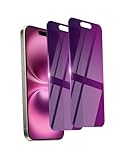
- Briliant Purple Color: Make your phone stand out with a brilliant violet purple color that changes under different lighting and angles. The stronger light indoor or outdoor, the brighter private screen protector color will present. Fully embellishing your phone to showcase your personality!
- 28° Privacy Screen: Use the most appropriate color depth for the 28° anti-peep coating, it is only visible to persons directly in front of screen, while satisfying privacy and visual comfort. Protecting your privacy and sensitive information well in malls, buses, metro, restaurant or other public area.
- Anti Blue Light Protection: The protective privacy glass is combined with EVA multi-coating technology and filter technology, but still allows non-harmful light through the screen, prevent sleep disorders and eye strain.
- 9H Hardness: The screen saver is made from 9H multiple tempered glass layer which provide shatterproof protection from high impact drop and preventing your phone from any scratch. The screen protector will self-expel air bubble when automatically bonding with the screen.
- Package Include: Inside the package, it comes with 2 x iPhone 16 privacy screen protector glass, 1 x easy apply components pack, 1 x installation framework.
Rank #3

- [Compatible Models] - 3 Pack Privacy Glass Screen Protector for the iPhone 17e/iPhone 16e/iPhone 14/iPhone 13/iPhone 13 Pro(6.1 inch). Includes 3 privacy screen protectors and a cleaning kit. *Two types of packaging boxes are randomly shipped.
- [Full Coverage Protection] - This screen protector offers edge-to-edge protection for your device, using military-grade explosion-proof glass. It is also compatible with most phone cases, the appropriate size ensures that the phone case won't squeeze the screen protector after installation, providing double protection for the edges of the phone.
- [High Privacy Protection] - The necessary choice for you in public places. Select the optimal anti-peeping angles for the anti-spy coating to balance privacy and visual comfort. Protect your personal privacy and sensitive information from being seen by people nearby who might peek. To better protect your phone, 3mm nano-scale ultra-thin aviation glass is chosen as the material, it also protects your eyes from harsh light, ensuring a softer visual effect.
- [Superior Quality] Made of high-quality tempered glass, free of bubble wrap, easy to install and no residue when disassembled. Maintain the original touch experience, with a high-definition and clear hydrophobic and oleophobic screen coating to prevent fingerprints, sweat and oil residue. High-hardness glass protects your screen from drops, impacts, scratches and breaks, providing ultimate protection for your phone.
- [Face ID Compatible] - Precise cutting combined with high-quality glass material supports the perfect use of the Face ID function, and it can also take high-pixel photos through the front camera.
- Is the screen stream encrypted, and is that protection unconditional or negotiated only when both devices support it?
- How does the receiver authenticate a sender, and do later sessions require verification after pairing?
- Who can reach the receiver on the local network, and are any receiver services exposed beyond it?
- Does the vendor provide software updates and address vulnerabilities?
- Are the source and display compatible with any required protected-content features?
Product prices and availability are accurate as of the date/time indicated and are subject to change. Any price and availability information displayed on Amazon at the time of purchase will apply.




