A mobile coding-agent client is most useful when it gives you a dependable way to view and control a session running on your development machine—not when it implies that the phone itself is doing the coding. Moku’s stated answer is a phone-oriented terminal workspace with a Rust terminal engine, network-roaming support and one-tap resumption for Claude Code, Codex and other command-line agents. Those are vendor claims, not independently verified test results.
Why bring a terminal coding session to a phone?
Claude Code and Codex can run in a terminal on a development machine. That machine may have the project files, tools and environment the agent needs, while the developer is away from the desk and wants to check output, respond to a prompt or continue work. A mobile client can serve as a remote display and control surface for that host.
As an Amazon Associate I earn from qualifying purchases.
That distinction matters: connecting from a phone does not by itself mean the agent or project has moved to the phone. In Anthropic’s Remote Control workflow, the session continues on the user’s machine while the phone or browser connects to it. Moku describes its product as a mobile terminal and coding workspace designed to resume sessions on a host.
What Moku says its Rust terminal engine is for
Moku, published by Porthole Lab, says it replaces webview-based emulators with a custom Rust terminal engine and direct memory rendering. The stated goal is a responsive terminal interface on phones and desktops, including while rendering substantial output. Moku’s product description also says it can detect a dozen or more coding CLIs and resume their local session data, naming Claude Code and Codex. These compatibility and implementation details come from the vendor; they have not been independently verified here.
#1 Best Overall

- USB-C Wired Connection: Wired keyboard with USB-C connectivity for tablets, laptops, and other USB-C devices. Connects directly without adapters for a stable, reliable plug-and-play experience.
- Compact Mini Keyboard Design: PERIBOARD-422 features a space-saving layout (11.46 × 5.43 × 0.77 in; 0.68 lb). Lightweight and portable—ideal for home, office, travel, or limited desk spaces.
- 12 Multimedia Function Keys: Integrated multimedia hotkeys offer quick access to audio and media controls. Use Fn + F1–F12 for efficient operation during work or entertainment (see manual for details).
- Ideal for Educational Use: Wired design ensures stable performance, avoids wireless interference, and reduces security risks. No batteries or pairing required—perfect for classrooms and group learning environments.
- Low-Profile Typing with Red Accents: Durable ABS build with quiet membrane switches and 3 mm key travel for comfortable, laptop-style typing. Slim profile with red bottom accents adds a modern touch.
Moku reports 2.1× ANSI parsing throughput versus “common emulators” and says a 10 MiB log burst renders in about 0.3 seconds. The cited product material does not give a benchmark protocol, comparison set, publication year or reproducible test conditions. Treat the numbers as vendor-reported figures, not as a controlled comparison or a guarantee of how the app will perform on a particular phone.
How Moku describes its network approach
Moku says it integrates Mosh to help a session remain useful when a connection changes or drops temporarily, such as when moving from Wi-Fi to cellular. It separately describes Tailcat as a userspace networking utility for private access to a host through an encrypted peer-to-peer link without opening a public port. These are different parts of the stated approach: Mosh concerns session transport across changing connectivity, while Tailcat concerns private reachability of the host. The descriptions are Moku’s own, not an independent security or reliability assessment.
Rank #2

- Full 3-System Compatibility & Wide Device Support: Perfectly compatible with Android, iOS and Windows three major systems. Works seamlessly with Samsung tablets, iPads, iPhones, laptops, smartphone, android, iOS, windows etc
- How to Switch Systems: Switching to the corresponding system will improve compatibility and higher work efficiency (“FN + A” is for iOs , “FN + S” is for Windows, “FN + D” is for Android )
- Enhanced Oversized Keycaps:27% bigger than standard keycaps. The spacious surface minimizes accidental presses and ensures comfortable typing for long hours
- 5 Adjustable Angles & Foldable Stand for tablet or phone, It effectively eases hand and eye fatigue during long hours of use, helping you stay focused and work more efficiently
- Long Battery Life & Smart Power Saving:Built‑in rechargeable lithium battery, Type‑C fast charging (full charge in 2–3 hours, last up to 200 hours with the backlight off, and 3-5 hours with the backlight on). Auto sleep mode after inactivity to save power, no frequent charging needed
Other remote-terminal arrangements use different architectures. For example, Cordless documents access through Tailscale when away from the local Wi-Fi network, or through a LAN address when phone and host share Wi-Fi. Its README warns users not to expose its service port to the public internet. That is a separate project and should not be treated as evidence about how Moku’s networking works.
How this differs from Claude Code Remote Control
Anthropic documents Remote Control as a bridge from a locally running Claude Code session to the Claude app or claude.ai/code. The local session retains access to its filesystem, tools, MCP servers and configuration. The terminal and Claude process must remain running, and one Claude Code session supports one remote connection.
Rank #3

- Full-Size Layout: This Lenovo 305 USB-C keyboard offers a complete, full-size layout with a numeric keypad, making it ideal for data entry, calculations, and spreadsheets
- Slim and Stylish: Ultra-thin design with low-profile keys delivers a modern, sleek look without compromising on typing comfort. Perfect for minimalist workspaces
- USB-C Connectivity: Features a USB-C connection for fast, reliable data transmission, offering plug-and-play convenience with modern devices including laptops, PCs, and tablets
- Durable and Responsive: Built to last, the Lenovo 305 keyboard is made with high-quality materials and features robust keys, offering excellent tactile feedback for long-lasting use
- Versatile Functionality: Includes dedicated function keys, Windows keys, and multimedia controls, enhancing your productivity with every keystroke
| Question | Anthropic Remote Control | Moku’s stated approach |
|---|---|---|
| Which agents? | Claude Code, as described in Anthropic’s Remote Control documentation. | Moku says it supports a dozen or more coding CLIs, including Claude Code and Codex; compatibility is a vendor claim. |
| Where does work run? | The session runs on the user’s machine, which retains local files and tools. | Moku describes resuming local session data from a mobile workspace; its product description does not establish that agents run on the phone. |
| Must the host session stay active? | Yes. Anthropic says the terminal and Claude process must remain running. | Moku describes session resumption and network-roaming features, but the cited material does not establish every host-lifecycle requirement. |
| How is remote access handled? | The phone app or browser connects to the local Claude Code session; Anthropic documents one remote connection per session. | Moku says it uses Mosh for roaming and Tailcat for private host access. The cited product description does not provide an independent security audit. |
Anthropic’s support guide says the claude remote-control command can spawn a new local session from the mobile app for Pro, Max, Team and Enterprise plans when using CLI v2.1.51 or later. Plan eligibility and version requirements can change, so check the current Anthropic support instructions before relying on those details.
What to consider before choosing a mobile workflow
- Agent coverage: If you only need Claude Code, Anthropic’s own remote workflow is a documented option. Moku’s broader multi-CLI support may matter if its claimed compatibility includes the agents you use.
- Host availability: A remote terminal is a connection to a host, not a replacement for one. Establish whether your machine and session must remain awake and running for the particular workflow you choose.
- Network trust: Private networking and encrypted links are meaningful claims, but vendor statements are not the same as an independent security audit. Avoid exposing a terminal service directly to the public internet unless its documentation explicitly supports a safe configuration.
- Phone input: A virtual keyboard can handle short replies, but longer commands and prompts may be awkward. A Bluetooth keyboard is optional; the cited material does not establish that one is required or recommend a specific model.
- Performance evidence: If terminal rendering speed is central to your decision, look for a published method, comparable devices and reproducible tests rather than relying on a single vendor figure.
What is Moku?
Moku describes itself as a mobile terminal and coding workspace for phones and desktops. Its stated feature set includes a Rust terminal core, private networking, management of multiple agents and one-tap resumption for sessions such as Claude Code and Codex. The company’s description is a product claim; compatibility, performance, privacy and networking have not been independently tested or audited in the material cited here.
Quick Recap
Best Value
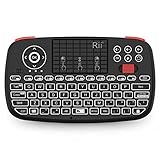
- Support BLUETOOTH 4.0 and 2.4GHz RF Connections: No extra clutter because it has Bluetooth built in (no dongle required). Just pair the Bluetooth Keyboard with your computer and ready for use immediately.Press Fn+Tab then switch to Bluetooth mode.
- 2019 Upgraded Wireless keyboard:Bulit-in rechargeable lithium-ion battery control it in your home theater(XBMC media center) wireless remotely on your couch input the text/surf the internet/play games without several remotes make life more easier and enjoyable.
- Superior Compatibility:Bluetooth Wireless Keyboard with 2.4G dongle for fire stick new fire TV box Apple iOS iPad Pro mini 4 iPhone X Android Tablets (Galaxy Tab) Windows Mac OS 6.0 and later
- PERFECT SIZE AND RECHARGEABLE BATTERY: Convenient and lightweight pocket sized Dual mode mini wireless bluetooth keyboard perfect for gaming and travel.
- We Promise 100% satisfactory after-sales service, Up to 12-month quality guarantee and 30 days money back warranty.Package contents: Rii Mini Wireless Bluetooth Keyboard USB charging cable and 2.4G USB dongle.
Rank #4

- Dual (USB A + USB C) Connection: Built-in USB C and USB A plug ensure direct compatibility with modern and legacy computers without adapters, making this a reliable apple wired keyboard across multiple systems.
- Space Saving Design: Slim, space efficient design keeps all essential keys while reducing desk clutter. This mac compatible keyboard usb c is ideal for minimalist workspaces, small desks, or travel.
- One Touch Shortcut Keys: 13 dedicated shortcut keys deliver quick access to Mission Control, brightness, media, and volume controls, giving you familiar functionality expected from a mac keyboard wired for daily productivity.
- Responsive Scissor Switch Keys: Low profile scissor switch keys offer stable, responsive typing with reduced noise and shorter key travel, creating a comfortable typing experience similar to a macbook keyboard.
- Plug and Play Reliability: No batteries, charging, or wireless dropouts to manage. The wired type c keyboard delivers consistent, uninterrupted typing you can rely on at home, in the office, or on the go.
Product prices and availability are accurate as of the date/time indicated and are subject to change. Any price and availability information displayed on Amazon at the time of purchase will apply.
What’s actually slowing this PC down?
Pick the symptom - the matching free tool is one click away.




