Free tools Windows power users keep installed
One-click scans. No signup required.
Samsung Sound Assistant can make Galaxy volume buttons control media instead of ringtone volume, which may solve the problem when the buttons work but adjust the wrong sound. It also offers volume-step and per-app controls. That changes software behavior; it does not repair a physically faulty button.
When the buttons work but change the wrong sound
A volume button can register normally while adjusting a sound category you did not mean to change. For example, Samsung’s Sound Assistant listing says the module can assign the physical volume keys to media volume rather than ringtone volume. If music or video stays too quiet while the ringtone slider changes, the issue may be which volume stream the keys control—not a broken button.
As an Amazon Associate I earn from qualifying purchases.
Samsung presents Sound Assistant as part of its Good Lock customization tools. Its Galaxy Store listing also describes adjustable volume increments and app-specific volume controls. Samsung Global Newsroom says users can manage volume for individual apps and assign the keys to media rather than ringtone volume (Samsung Global Newsroom feature overview).
What Sound Assistant can change
- Media versus ringtone: Set the volume keys to control media volume instead of ringtone volume, according to the Samsung Galaxy Store listing for Sound Assistant.
- Volume increments: Customize how much the level changes with each button press, as described in the same listing.
- Individual apps: Adjust volume for specific apps. Samsung’s Newsroom feature overview describes per-app volume management.
These options are useful when the controls register but their default behavior does not match what you need. Samsung does not establish that every Galaxy phone, software version, or region has identical features or menus. Check the current Good Lock and Galaxy Store availability for your device before relying on a particular option.
#1 Best Overall
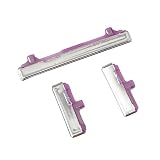
- 100% Brand new and high quality.
- This product are tested before shipping.
- Please check both the model and picture before purchase.
- Special skill and techniques required for proper installation.
- Easy for you replace your faulty,cracked or broken one ,seller remind that you should replace this in the off state.
Check basic sound settings before changing apps
First, identify which sound is affected: media, ringtone, notifications, or another category. Then try the buttons while playing audio in more than one app. If the keys respond but change a different category than expected, the behavior may be a settings issue. If audio trouble appears in only one app, that app may be involved; if it occurs across apps, check the device’s sound settings and Samsung’s general Galaxy audio troubleshooting guidance.
The exact settings path can vary across Galaxy models and One UI versions, so use the labels and instructions shown for your own device rather than assuming one universal menu route. Once you confirm Sound Assistant is available, use its current controls to select the volume behavior you want.
Rank #2

- 100% Brand New, OEM, High Quality
- This product are tested before shipping
- Compatible with Samsung Galaxy s9/ s9 plus
- Disassembly instruction isn't include, you may can search it via Internet.
Choose between built-in settings and Sound Assistant
| What you need | Where to start | What it addresses |
|---|---|---|
| Basic sound-category checks | Galaxy sound settings and Samsung troubleshooting | Helps identify which sound category is changing and whether the issue is limited to an app or occurs more broadly. |
| Media instead of ringtone control, custom increments, or app-specific levels | Sound Assistant, if available for your device and region | Adds customizable volume behavior beyond basic checks. |
| Buttons that do not physically register or remain incorrect after settings checks | Samsung support or a repair assessment | Determines whether there may be a device or hardware fault; Sound Assistant is not a button repair. |
When the problem may be hardware
If a button does not click or register reliably, or its behavior stays wrong after you check sound settings and available Sound Assistant options, seek Samsung support or a repair assessment. The app can change volume controls; it cannot establish the cause of a device fault or fix damaged hardware.
What’s actually slowing this PC down?
Pick the symptom - the matching free tool is one click away.
Quick Recap
Best Value
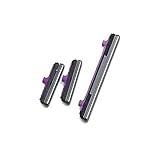
- 100% Brand New, OEM, High Quality
- This product are tested before shipping
- Compatible with Samsung Galaxy s10/ s10 plus
- Disassembly instruction isn't include, you may can search it via Internet.
Rank #4

- This product are tested before shipping
- Compatible with Samsung Galaxy S20 / S20 Plus
- Disassembly instruction isn't include, you may can search it via Internet.
- Special skill and techniques required for proper installation,Please check both the model and picture before purchase.
- Packing : 1 set
Rank #3

- 100% Brand New, OEM, High Quality
- This product are tested before shipping
- Compatible with Samsung Galaxy s10/ s10 plus
- Disassembly instruction isn't include, you may can search it via Internet.
Product prices and availability are accurate as of the date/time indicated and are subject to change. Any price and availability information displayed on Amazon at the time of purchase will apply.




