Quick wins for a faster PC:
Clear out junk files and repair common Windows errorsFree Scan →Fix the driver behind crashes, sound loss and screen glitchesFind Drivers →Repair Windows errors before they cause bigger problemsFix Now →If a live stream buffers on Apple TV, first check whether the live service or Apple TV app is having an outage. Then play the same stream on another device using the same internet connection. If that device buffers too, focus on the connection or contact your internet provider; if only Apple TV has trouble, restart and update it, then test its Wi-Fi placement or Ethernet connection.
Why is a live stream buffering on Apple TV?
Buffering can come from a provider interruption, a busy or unreliable internet connection, weak Wi-Fi, or a problem limited to the Apple TV or a particular app. The pattern helps narrow it down, but does not prove the cause: compare one service with other apps, and Apple TV with another device on the same connection.
| # | Preview | Product | Price | |
|---|---|---|---|---|
| 1 |
|
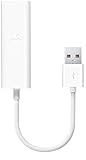
Apple USB Ethernet Adapter | $28.99 | Buy on Amazon |
| 2 |

|
Micro-USB Ethernet Adapter for Amazon Fire TV Devices | $14.99 | Buy on Amazon |
| 3 |

|
Apple Thunderbolt to Gigabit Ethernet Adapter | $29.99 | Buy on Amazon |
| 4 |

|
Anker USB C to Ethernet Adapter, Portable 1 Gbps Network Hub | $15.53 | Buy on Amazon |
| 5 |

|
Thunderbolt Gigabit Ethernet Adapter | $24.99 | Buy on Amazon |
As an Amazon Associate I earn from qualifying purchases.
Live delivery can adjust playback to the available wired or wireless connection speed, as Apple describes in its HTTP Live Streaming technical overview. That adaptation cannot rule out an outage or guarantee uninterrupted playback when conditions change.
Do these 3 things before closing this tab:
1Repair Windows errors before they cause bigger problems2Fix the driver behind crashes, sound loss and screen glitches3Clear out junk files and repair common Windows errorsWhat to check before changing your network
Check the event and app for an outage
Check Apple’s System Status page and the live-service provider’s website or status channel. If there is an interruption, wait and try again later; changing home equipment will not fix a provider-side outage. Apple’s guidance also directs users with trouble in a third-party App Store streaming app to contact that app’s developer.
#1 Best Overall
- Easily connect your MacBook Air computer to an Ethernet network with the Apple USB Ethernet Adapter.
- Small and light, it connects to the USB 2.0 port of your MacBook Air
- Provides an RJ-45 connector that supports 10/100BASE-T performance
Compare another device on the same connection
Try the same service on a phone, tablet, or computer connected to the same Wi-Fi network as Apple TV. If the other device also buffers, the connection or service is more likely involved; if the problem persists across devices, contact your internet provider. If only Apple TV struggles, continue with device and connection checks below.
Check whether the network is busy
Apple notes that concurrent internet use can slow a connection. Temporarily pause other high-bandwidth activity in the household, then retry the live stream. If playback improves, shared network use may be contributing; this test alone does not identify a permanent fix.
Rank #2
- Allows Fire TV devices to connect directly to a wired Ethernet network, providing reliable internet speeds and freeing up WiFi bandwidth.
- Easy to set up – simply connect the micro-USB Amazon Ethernet Adapter into the USB port on your Fire TV and plug in an Ethernet cable directly from your router.
- Compatible with Fire TV Stick Lite, Fire TV Stick, Fire TV Stick (2nd Gen), Fire TV Stick HD (1st Gen), Fire TV Stick 4K Select, Fire TV Stick 4K, Fire TV Stick 4K Plus, Fire TV Stick 4K Max, Fire TV Cube, and Amazon Fire TV (3rd Gen, Pendant Design).
- As the micro-USB version, this accessory is incompatible with Fire TV Stick HD (2nd Gen) with USB-C.
- 10/100 Ethernet
How to troubleshoot Apple TV, step by step
- Restart Apple TV: Open Settings > System > Restart, then reopen the streaming app and retry the stream.
- Restart the network equipment if the connection is unreliable: Unplug power from the router and modem, reconnect them, and allow them to reconnect before testing playback.
- Check for a tvOS update: Open Settings > System > Software Updates and check for an available update. Menu wording may vary by tvOS version.
- Improve the Wi-Fi path: Keep Apple TV and the router in the same room when practical, reduce obstacles—especially metal—and avoid placing Apple TV directly on the router or within a foot of it. Confirm the router is powered and connected to the modem.
- Compare Wi-Fi with Ethernet if your model has an Ethernet port: Connect Apple TV to the router or modem with an Ethernet cable and retest. Apple says Apple TV automatically uses Ethernet instead of Wi-Fi when the cable is connected. Check your model for an Ethernet port before buying a cable; a wired connection tests the wireless path but cannot fix a service outage.
Does your internet speed meet Apple’s guidance?
Apple Support’s article, published February 16, 2026, says HD content requires 8 Mbit/s or faster. Treat that as Apple’s stated HD guidance, not a guarantee that every live stream will play smoothly. The figure does not account for every broadcaster’s requirements, competing household traffic, Wi-Fi interference, or changing connection conditions.
What’s actually slowing this PC down?
Pick the symptom - the matching free tool is one click away.
If Apple TV reports a Wi-Fi connection error rather than buffering alone, Apple documents forgetting and reconnecting to the network through Settings > Network > Wi-Fi. This is aimed at joining or password problems, not a universal remedy for buffering.
Quick Recap
Best Value
- New
- APPLE OPTIONS MD463ZM/A
- APPLE OPTIONS MD463ZM/A THUNDERBOLT GIGABIT ETHERNET ADAPTER
Rank #4
- The Anker Advantage: Join the 65 million+ powered by our leading technology.
- Instant Internet: Connect to the internet instantly from virtually any USB-C 3.0 device, and enjoy stable connection speeds of up to 1 Gbps.
- Lightweight and Compact: The space-saving and portable design measures just over half an inch thick and weighs about the same as a AA battery.
- Premium Build: Features a sleek aluminum exterior and braided-nylon cable to complement the design of high-end devices.
- What You Get: PowerExpand USB-C to Gigabit Ethernet Adapter, welcome guide, 18-month worry-free warranty, and friendly customer service.
Rank #3
- The Apple Thunderbolt to Gigabit Ethernet Adapter lets you easily connect to a high-performance Gigabit Ethernet network.
- Thunderbolt-equipped Mac computer
- Supports 10/100/1000BASE-T networks.
- System requirement:OS X v10.7.4 or later
Who should you contact if buffering continues?
- The internet provider: The same stream has trouble on multiple devices using the same connection, or the connection remains unreliable after a router and modem restart.
- The streaming app’s developer or live-service provider: Other apps work, but one live app or event consistently fails.
- Apple Support: Multiple apps fail only on Apple TV after restarting, updating, and checking the connection. Share your Apple TV model, tvOS version, app, and whether Ethernet or Wi-Fi was tested to help narrow the issue.
Product prices and availability are accurate as of the date/time indicated and are subject to change. Any price and availability information displayed on Amazon at the time of purchase will apply.




