Windows Errors? Fix Them Before They Spread
Repair common Windows errors and clear accumulated junk for a smoother, more stable PC - no reinstall needed.Free scan · no reinstallOutdated Drivers Are Slowing You Down
One free scan finds every outdated or missing driver and matches the right update for your exact hardware.Free scan · exact hardware matchIn most cases a dark Samsung TV is a settings problem, not a failed screen. The usual causes are energy-saving or automatic-brightness features, the wrong picture mode, motion processing, or picture settings that were changed. Work through those first, reset the picture settings if needed, then run the TV’s built-in Picture Test to find out whether the TV or the connected device is at fault. Menu names vary by model, region, input signal and software version, as Samsung’s support guidance notes.
First, identify which kind of dark you have
Samsung’s support pages treat two situations separately: a picture that is always dim, and a screen that flashes or darkens unexpectedly. Ask yourself these questions before changing anything:
As an Amazon Associate I earn from qualifying purchases.
- Constant dimness or automatic dimming? Constant dimness points to picture mode or brightness settings. Brightness that shifts by itself points to automatic-brightness features.
- All content or one app or input? If only one HDMI device or app looks dim, the TV is probably fine.
- Settings or physical obstruction? On some models, a blocked sensor or leftover protective film can matter.
Common causes
Energy saving or automatic brightness
Samsung says that if the screen looks too dim, you should try resetting the picture or disabling Brightness Optimization and Energy Saving Solution. For brightness that changes sporadically, Samsung Philippines also points to Brightness Reduction and Motion Lighting. Names and availability differ between generations.
Picture mode
Samsung describes Dynamic as brighter and clearer for bright rooms, and Movie as suited to a dark room. Samsung Canada notes that FILMMAKER MODE may look darker than other modes. That is by design, so judge it in a dim room before calling it a fault. Dynamic is not the right answer for everyone, so compare modes in your own room with your usual content.
#1 Best Overall

- 【Product information】Size (Length): 21.26 in. There are 2 pieces per set.The voltage of each LED bead is 6V.Each LED strip has 38 beads.Double-sided adhesive paper on the back.
- 【Purchase information】match the strips shown in the photo to the originals in your TV before ordering. If you are not sure if it is compatible, you can turn on the inside of the TV, Compare it to my product picture. Thank you very much.
- 【AFTER-SALE SERVICE】Our shop provides 180-day after-sales service guarantee. If you have any questions, please do not hesitate to contact our customer service, we always reply you within 24 hours to solve your worries. Our shop mainly sells TV LED Backlight strip.For more product, you can browse our shop homepage.
Motion and contrast processing
Samsung Canada says LED Clear Motion or Clear Motion can make the screen appear darker. Samsung’s automatic-brightness article says Contrast Enhancer can make the image look brighter or darker.
Changed picture settings
Brightness lives under Picture > Expert Settings. If someone changed it, or several settings drifted, Reset Picture restores the defaults.
Rank #2

- A Symphony of RGBIC Lighting: Govee RGBIC technology realizes the color segmentation display of the TV lights behind, creating more dynamic and gorgeous lighting effects. Experience more vibrant colors in your TV lights and upgrade your visuals.
- App & Voice Control: Manage the LED TV lights via app or smart voice control with Alexa & Google Assistant. ( Please note that it won't capture colors automatically and support 2.4G only.)
- Multiple Preset Scenes: Govee Home App offers 99+ preset scene modes and 11 music modes, from which you can choose the lighting effects that suit your mood or the atmosphere around you to enhance your viewing.
- Music Sync: Govee TV LED Backlight includes a built-in mic, making the color and brightness sync with the music. Experience breathtaking lighting effects that dance with any audio as though you're at a concert.
- Flexible Installation: The 12.5ft TV backlight can easily cover 4 sides of any 55-65 inch TV. It is recommended to use the cable clips to secure the TV LED strip lights to make them snugly fit your TVs.
Blocked sensor or protective film (model-specific)
The 2023 Samsung QLED Q80C manual says its Eco Sensor adjusts brightness to room light, and that blocking it can decrease picture brightness. It also warns that protective film left on the Samsung logo or the bottom of the TV may dim the screen. This is documented for that manual’s models. Don’t assume every Samsung TV has the same sensor or film.
External device or connection
If the Picture Test finds no problem, Samsung advises checking the connection between the TV and external devices.
Rank #3

- 【Product information】Size (Length): 23.5 in. There are 2 pieces per set.The voltage of each LED bead is 6V.Each LED strip has 40 beads.Double-sided adhesive paper on the back.
- 【Purchase information】match the strips shown in the photo to the originals in your TV before ordering. If you are not sure if it is compatible, you can turn on the inside of the TV, Compare it to my product picture. Thank you very much.
- 【AFTER-SALE SERVICE】Our shop provides 1 year after-sales service guarantee. If you have any questions, please do not hesitate to contact our customer service, we always reply you within 24 hours to solve your worries. Our shop mainly sells TV LED Backlight strip.For more product, you can browse our shop homepage.
Troubleshooting order
Change one setting at a time and note the starting value so you can undo it. Samsung gives no universal brightness number, so adjust to your room.
- Compare sources. Check the TV’s own menus against the affected app or HDMI input. If only one source is dim, check that device’s settings, cable and port.
- Check Picture Mode. Under Settings > All Settings > Picture > Picture Mode (the path Samsung Singapore uses), compare Standard with another mode suited to the room. Remember FILMMAKER MODE looks darker.
- Check Brightness. Open Picture > Expert Settings and review Brightness.
- Turn off automatic dimming. Temporarily disable Brightness Optimization, Energy Saving Solution, Brightness Reduction, Motion Lighting and Contrast Enhancer where your model has them. Power-related options may sit under General & Privacy > Power and Energy Saving.
- Test motion settings. Turn LED Clear Motion or Clear Motion off, if available, and compare.
- Reset the picture. Use Picture > Expert Settings > Reset Picture. This erases your custom adjustments, so you will need to reapply preferences. Samsung Canada documents separate steps for 2022-and-newer and 2021-and-older sets, so the path may differ on yours.
- Run the Picture Test. Go to Settings > Support > Device Care > Self Diagnosis > Picture Test, where available. If it finds nothing, look at external devices and connections.
- Check the sensor and film. On models covered by the Q80C manual, make sure nothing blocks the Eco Sensor and that no protective film remains.
When to contact Samsung
If the Picture Test image itself is dim and the checks above change nothing, contact Samsung Support or an authorized service provider. Backlight or internal faults are not something to fix yourself without a confirmed diagnosis.
Rank #4
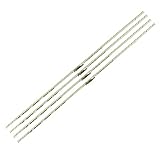
- 【Product Name】:UN75AU8000 LED Backlight Strips for Samsung 75" TV.
- 【Product information】:Size (Length): 16.14 in.There are 4 pieces per set.The voltage of each LED bead is 3V. Each LED strip has 42 beads.
- 【Compatible Led Strip Models】:UN75AU8200 UN75AU8000FXZA UN75AU8000 UA75AU8000 UE75AU8000 LM41-01046A/C 75AUBK BN96-52594A S1A8-750SM0-R0.
- 【Purchase information】:match the strips shown in the photo to the originals in your TV before ordering. If you are not sure if it is compatible, you can turn on the inside of the TV, Compare it to my product picture. Thank you very much.
- 【AFTER-SALE SERVICE】:Our shop provides 180-day after-sales service guarantee. If you have any questions, please do not hesitate to contact our customer service, we always reply you within 24 hours to solve your worries. Our shop mainly sells TV LED Backlight strip.For more product, you can browse our shop homepage.
Menu names by region
| Source | What it covers |
|---|---|
| Samsung Singapore (updated 2024-11-19) | Picture Mode and Expert Settings; Power and Energy Saving; Brightness Optimization and Energy Saving Solution |
| Samsung Philippines (2022 guide, updated 2022-05-25) | Brightness Optimization, Brightness Reduction, Motion Lighting |
| Samsung Canada (Canadian TVs) | Reset Picture steps for 2022-and-newer and 2021-and-older; FILMMAKER MODE and Clear Motion notes |
If your menu doesn’t match, search the settings for the feature name or look up your model’s manual. These sources are manufacturer troubleshooting guidance, not independent testing, and none gives statistics on how often each cause occurs.
Quick Recap
Best Value

- Upgraded Govee Envisual Technology: The upgraded chip provides stronger performance with a fish-eye correction function, expanding the effective range to provide more accurate color-matching along the edges.
- 4-in-1 Lamp Bead: RGBICW TV lights add an extra warm white chip into the color mix, a purer white tone and the improved pixel density make the lighting effect more vivid and natural, which helps enhance immersive movie watching and gaming.
- Gravitational Hanging Design for Camera: Simplify installation and adapt for ultra-thin TVs. You can use the adhesive to stabilize it without wobble, when installing the camera.
- Govee DreamView Syncing: The function realized the linkage of Govee lights. Add up to 7 sub-devices to sync the lighting effects of the 3 Lite, create a 360° immersive view experience, and enrich the light mapping effects within the home environment.
- Full Compatibility for Any TV Content: The 3 Lite can instantly capture the color of any TV screen for color matching without compatibility issues. Use the TV lights while streaming content, watching online videos, gaming, etc.
Product prices and availability are accurate as of the date/time indicated and are subject to change. Any price and availability information displayed on Amazon at the time of purchase will apply.




