A Kahoot! game stays a draft when it is not yet a complete, playable kahoot. The usual causes are a missing title, a Test knowledge question with no correct answer, a starred premium feature that your current plan does not include, or a new game that was closed without being saved. Open Library > Drafts, choose Edit, click Save, resolve whatever the save dialog flags, and save again.
What the draft label means
Kahoot! distinguishes a draft from an ordinary unsaved edit. A draft is a kahoot that does not yet exist in playable form, so it cannot be played, assigned, or shared. An unsaved edit applies to a kahoot that already works, where only your latest changes are pending. Kahoot!’s official guidance states that drafts cannot be played, assigned, or shared until they have been saved as complete (How to save a kahoot).
As an Amazon Associate I earn from qualifying purchases.
Why a kahoot stays in draft
Kahoot!’s save guide says a kahoot will only save as a draft if the creator is closed without saving, the user explicitly chooses Keep as a draft or Save to drafts, necessary elements are missing, or a premium feature not included in the current plan is used. The last two causes are the ones most people hit when a save appears to do nothing.
Quick wins for a faster PC:
Repair Windows errors before they cause bigger problemsFix Now →Fix the driver behind crashes, sound loss and screen glitchesFind Drivers →Clear out junk files and repair common Windows errorsFree Scan →Missing required content
A kahoot needs a title. Each question in the Test knowledge category also needs at least one answer marked correct. If either is missing, the game remains a draft even after you click Save. The save dialog identifies the gap, and the Fix option takes you to it.
#1 Best Overall

- Interactive Fun: Includes 4 colorful buzzers (blue, green, yellow, red), perfect for group activities and team-based games, Each buzzer lights up and makes a distinct sound (Charge, Laser, Buzz, Siren), adding excitement and clear identification to each player's response
- Durable and Portable: Made from high-quality materials, these buzzers are sturdy and portable, making them easy to take to different venues or classrooms
- Easy to Use: Simply press the top of the buzzer to activate the lights and sounds, making it easy for kids and adults to use.Each button requires two AA batteries (you need to buy it yourself), Please note that the buzzer already has four different sound effects, and no other sounds can be recorded
- Educational Tool: It helps kids exercise their brains and improve their concentration. Great for enhancing learning in classrooms by adding a fun, interactive element to quizzes and educational games. It is a teacher must haves game buzzer for middle school classrooms
- Fun Gifts for Kids: You can use them as creative and fun gifts for kids aged 3-10 on birthdays, Halloween, Christmas, etc. This button provides many unexpected entertainment and interaction, bringing them endless fun
Starred premium features
Features marked with a turquoise star require a paid subscription. If a question or theme uses one and your plan does not include it, the kahoot cannot be saved as complete. You have two options: remove the feature from the affected question or theme, or move to a plan that includes it. Kahoot!’s web creator guide confirms that starred features must be removed or covered by an upgraded plan before a playable kahoot can be saved (How to make a kahoot).
A creator closed without saving
A brand-new kahoot that was never saved with the Save button can be stored as a draft automatically when the creator is closed. Nothing is lost, but the game will not be playable until you reopen it and save it properly.
Rank #2

- FIRST BUZZ, CLEAR WINNER - Tired of students or players arguing over who buzzed first? These buzzers for trivia games use light-and-sound feedback plus first-press lock to show the host which buzzer was hit first. Simply use the reset function on the remote control to quickly start the next round—no need to wait 5 seconds like with other buzzer systems—making classroom quizzes, party and game nights run more smoothly
- TWO MODES, MORE FUN - Use buzzer mode for trivia competitions, classroom review games, and training Q&A, then switch to random mode when you want a surprise player or team to answer. Two modes of the game buzzers make the trivia game more fun and exciting. These answer buzzers also help boost student engagement and keep students more focused. It also has incorrect-answer lockout function, helping keep turns fair, making quiz games more exciting for students, families, coworkers
- EASY TO USE - No complicated pairing before the activity starts(AAA Batteries need to be purchased separately. A total of 18 of them are required). These answer buzzers for classroom games are factory paired for quick begin, with a mute option setting for quieter classrooms, offices, or home play. We also provide portable storage bag make it easier for teachers, trainers, and party hosts to carry and organize. A practical choice for busy teachers, trainers, youth group leaders, and hosts who need quick setup before every activity
- Wireless devices, venue-friendly - This game buzzer system includes 8 wireless buzzers, 1 system remote, 1 user manual, and 1 compact storage bag. The 50 ft range lets groups spread out instead of sharing one button or crowding around the table. It also keeps the game area free from messy wires. Use trivia game buzzers for family game night, office icebreaker games, school competitions, Sunday school activities, quiz bowl practice, and group events
- EXPANDABLE GROUP FUN - Running a bigger quiz contest, youth activity, family reunion, or team building game for work? If there are more than 8 participants, you can purchase additional buzzer units to pair them up, allowing more people to join the game (up to 32 units can be paired). A practical choice for bigger trivia games, classroom activities, party games, board game nights, Christmas Eve, Family Travel Games, and training sessions where fast answers and fair turns matter
How to recover the draft
- Go to Library and open the Drafts tab.
- Find the kahoot and choose Edit. On a small screen or with browser zoom, this may appear as a pencil icon.
- Click Save in the upper-right corner of the creator.
- If the dialog lists missing elements, choose Fix and complete them. Check the title first, then each Test knowledge question for a correct answer.
- If the dialog names a premium feature, remove the feature from the question or theme, or upgrade your subscription.
- Click Save again. Kahoot! states that the game is saved as a complete version when no further prompt appears (How to save a kahoot).
Drafts are listed under the Drafts tab of Library, and the location of a missing kahoot can also be checked through Kahoot!’s restore guide (How to find or restore a missing kahoot).
What’s actually slowing this PC down?
Pick the symptom - the matching free tool is one click away.
Draft versus unsaved changes
| Status | Playable? | Where it appears | What to do |
|---|---|---|---|
| Draft | No. Cannot be played, assigned, or shared | Library > Drafts tab | Edit, fix missing elements or premium features, then Save |
| Unsaved edits | Yes, the previously saved version still works | Under Recent and in its folder | Save the latest changes |
Kahoot! also autosaves edits to an existing kahoot and shows saving status next to the title in the top navigation bar. That indicator confirms autosave only. It does not convert a draft into a complete kahoot, so a kahoot that still shows a draft status needs the manual Save steps above.
Rank #3
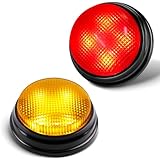
- INTERACTIVE FUN: Contains 2 colorful buzzers (red, yellow), perfect for family activities and group games. Each buzzer lights up and makes a unique sound (Buzz,Siren), adding fun and clear identification to each player's answer.
- EDUCATIONAL TOOL: Buzzers can help children exercise their brains and improve concentration. Great for learning, quizzes and games in the classroom, liven up the classroom atmosphere and strengthen communication with students.
- EASY TO USE: Simply install the batteries and press the top of the buzzer to activate the lights and sounds, convenient to use, suitable for adults, teachers and Kids. Each button requires two AAA batteries (need to be purchased separately). Please note that the buzzer has two different sound effects built in, and other sounds cannot be recorded.as two different sound effects built in and other sounds cannot be recorded.
- ULTRA-PORTABLE DESIGN: 50% smaller than standard buzzers (5 x 4.5 x 3.8 inches) + 4.0 ounces lighter - fits in a teacher's desk drawer or party favor bag. Carrying case included.
- 4X BRIGHTER, BETTER VISIBILITY: 4 high-intensity LED lights, the light is also artificially adjusted for human eyes, and can be clearly seen even in a sunny room at 16 feet (about 5 meters) or outdoor picnic. Instantly solve the dispute of "Who rang the bell first?".
Mobile app behavior
In the mobile app, Save stores your edits, but if the checklist is incomplete the game is saved as a draft, and drafts cannot be played or shared. Kahoot!’s mobile guide directs users to a separate guide for web editing, so menu labels and steps may differ between platforms (How to edit a kahoot in mobile app). If a draft will not clear on your phone, try the same steps in a web browser.
Independent reader supportYour contribution helps us test, update, and keep practical guides available for everyone.What the official guidance cannot tell you
Kahoot!’s published help does not identify the cause for a particular account, because that depends on the kahoot’s content, your plan, and your platform. The save dialog is the most reliable diagnostic. Its message points to the specific missing element or premium feature, and resolving that message usually clears the draft status.
Quick Recap
Best Value

- Interactive Fun: Includes 8 colorful buzzers (wo each of blue, green, yellow, red), perfect for group activities and team-based games, Each buzzer lights up and makes a distinct sound (Charge, Laser, Buzz, Siren), adding excitement and clear identification to each player's response.
- Durable and Portable: Made from high-quality materials, these buzzers are sturdy and portable, making them easy to take to different venues or classrooms.
- Easy to Use: Simply press the top of the buzzer to activate the lights and sounds, making it easy for kids and adults to use.Each button requires two AA batteries (you need to buy it yourself), Please note that the buzzer already has four different sound effects, and no other sounds can be recorded.
- Educational Tool: It helps kids exercise their brains and improve their concentration. Great for enhancing learning in classrooms by adding a fun, interactive element to quizzes and educational games. It is a teacher must haves game buzzer for middle school classrooms
- Fun Gifts for Kids: You can use them as creative and fun gifts for kids aged 3-10 on birthdays, Halloween, Christmas, etc. This button provides many unexpected entertainment and interaction, bringing them endless fun.
Rank #4

- Fast Thinking Meets Total Panic: Slam the Buzzer is the dangerously fast party game for dangerously slow brains. Race the timer to name your answers out loud, then slam the buzzer to lock them in before time runs out. It is easy until the clock starts, and then it is pure chaos and laughter for the whole table.
- Risk It For The Points: Pick your difficulty from Easy to Expert before every turn. The harder the level, the bigger the reward, and the bigger the risk, because running out of time costs you points instead of earning them. This quick thinking card game rewards the brave and punishes the slow, so choose wisely.
- The Wild Card Showdowns Change Everything: Hidden through the deck are Duo Showdown cards that trigger a head to head bidding war. How many dog breeds can you name in thirty seconds? Players raise the stakes back and forth until someone calls a bluff.
- Made For Game Night And Anywhere Else: Great for family game night, parties, sleepovers, holidays, road trips, and ice breakers with groups of all sizes. Built for two to ten or more players and ages fourteen and up, this fast paced group game plays in about thirty to sixty minutes, or as long as you want to keep going
- What Is In The Box: You get 200 difficulty leveled prompt cards, hidden Wild Cards for Duo Showdowns, a loud physical buzzer where you can record your own sound with batteries included, and a scorecard to track every win and wipeout. Everything you need to start playing in minutes, right out of the box
The Bottom Line
“”
Product prices and availability are accurate as of the date/time indicated and are subject to change. Any price and availability information displayed on Amazon at the time of purchase will apply.




