If your MacBook screen looks washed out, yellow, or unexpectedly cool, first check macOS display adjustments, accessibility options, and the selected color profile. These settings can change how colors look without indicating that the screen is damaged. If the appearance stays abnormal after you check them, compare with another display if possible and seek a case-specific service assessment.
Why does my MacBook screen look washed out?
Several settings can alter screen color or contrast. True Tone adapts the display to ambient light, Night Shift warms colors, and accessibility display features can apply filters, tints, inversion, or contrast changes. A changed color profile can also affect how the display renders color.
As an Amazon Associate I earn from qualifying purchases.
Check the reversible settings below before assuming the built-in display has failed. Menu names and availability vary with macOS version and Mac hardware.
Free tools Windows power users keep installed
One-click scans. No signup required.
How to check the settings that change display color
-
Turn off True Tone temporarily
Open Apple menu > System Settings > Displays, select the built-in display if needed, and turn off True Tone for comparison. True Tone uses display sensors to adapt color and intensity to ambient lighting, which can make whites appear to change as the room or viewing conditions change. It is available only on supported displays, and some accessibility settings may turn it off. See Apple’s True Tone guidance.
#1 Best Overall
 JYYSCRN A2337 Screen Replacement A2337 LCD for 13 inches MacBook M1 air 2020 Year 2560x1600 Replacement LCD Full Assembly for EMC 3598 MGN63 Space Gray
- 【Model Check Before Ordering】 Compatible with MacBook Air 13-inch M1 2020, Model A2337, EMC 3598, resolution 2560x1600. Please confirm the model number on the bottom case before purchase. Not compatible with A2338, A2681, A2179, or A1932. If unsure, contact us through Amazon Messages for compatibility help.
- 【Core Specifications】 13.3-inch LCD screen assembly replacement for A2337 MacBook Air M1 2020. Please match your original model and color before ordering. Includes a 1-month warranty for confirmed product defects under normal use.
- 【Quality Control】 Each screen is inspected for glass condition, backlight, brightness, color uniformity, pixel integrity, camera, cables, and hinge movement before packing. Please test the display function before final installation.
- 【Package Contents】 Includes 1 LCD top assembly with front glass, back cover, cables, webcam, and hinges, plus a screwdriver, cleaning brush, and installation guide. This is a replacement screen assembly, not a complete laptop. No soldering required.
- 【Installation Support】 Screen replacement is delicate. Avoid bending cables, pressing the LCD surface, or tightening screws before testing. For installation or warranty questions, contact us through Amazon Messages for troubleshooting and replacement support.
-
Turn off Night Shift
In System Settings > Displays > Night Shift, switch Night Shift off temporarily or set its schedule to Off. Night Shift warms the display after dark, making whites look more yellow and reducing blue. That is an intended color-temperature adjustment, not by itself evidence of damage. Apple says Night Shift requires macOS Sierra 10.12.4 or later and is available on Macs introduced in 2012 or later, and Mac Pro computers introduced in 2013 or later. External-display behavior depends on the display. Night Shift can also make colors inaccurate relative to their content values. See Apple’s Night Shift guidance and Apple’s display workflow guidance.
-
Inspect Accessibility display options
Open System Settings > Accessibility > Display. Check Color Filters, Color Tint, Invert Colors, and contrast controls. Turn off any setting you did not intend to use, then compare the screen again. Filters can change the appearance of images and video, and accessibility shortcuts can toggle some display features. Details are in Apple’s accessibility display guidance.
Rank #2
 JYYSCRN A2338 Screen Replacement for 13.3 inches MacBook Pro M1 2020 2022 Year 2560x1600 Replacement LCD Full Assembly for EMC 3578 Silver
- 【Model Check Before Ordering】 Compatible with MacBook Pro 13.3-inch Model A2338, resolution 2560x1600, Silver Please confirm the model number printed on the bottom case before purchase. Do not order by screen size only. If unsure, contact us through Amazon Messages for compatibility help.
- 【Core Specifications】 13.3-inch LCD screen top assembly replacement for A2338 MacBook Pro. Please match your original model, year, EMC number, and color before ordering. Includes a 1-month warranty for confirmed product defects under normal use.
- 【Quality Control】 Each screen is inspected for glass condition, backlight, brightness, color uniformity, pixel integrity, camera, cables, and hinge movement before packing. Please connect and test the display before final installation.
- 【Package Contents】 Includes 1 LCD top assembly with front glass, back cover, cables, webcam, and hinges, plus a screwdriver, cleaning brush, and installation guide. This is a replacement screen assembly, not a complete laptop. No soldering required.
- 【Installation Support】 Screen replacement is delicate. Avoid bending cables, pressing the LCD surface, or tightening screws before testing. For installation or warranty questions, contact us through Amazon Messages for troubleshooting and replacement support.
-
Check the color profile
Open System Settings > Displays and inspect the selected color profile. If it was changed, choose the appropriate default or profile for that display. The profile menu and wording can differ by macOS release. Apple’s calibration guide explains where to find the profile setting and how calibration creates a profile assigned to the display: Calibrate your Mac display.
Recommended: Crashes or Glitches? A Free Driver Scan Usually Finds the Culprit →Recommended: Fix Windows Errors and Clear Junk Files in Minutes - Free Scan →Special offer. See more information about Outbyte and uninstall instructions. Please review EULA and Privacy policy.
Why does my Mac screen look yellow?
A yellow or warmer appearance is often consistent with Night Shift being active, especially after dark. True Tone can also shift the display’s color and intensity in response to ambient light. Turn off each feature temporarily, one at a time, to see whether the appearance changes. If neither setting is active, inspect Accessibility display options and the selected color profile.
Rank #3

- 【Model Check Before Ordering】 Compatible with MacBook Air 13-inch M1 2020, Model A2337, EMC 3598, resolution 2560x1600. Please confirm the model number on the bottom case before purchase. Not compatible with A2338, A2681, A2179, or A1932. If unsure, contact us through Amazon Messages for compatibility help.
- 【Core Specifications】 13.3-inch LCD screen assembly replacement for A2337 MacBook Air M1 2020. Please match your original model and color before ordering. Includes a 1-month warranty for confirmed product defects under normal use.
- 【Quality Control】 Each screen is inspected for glass condition, backlight, brightness, color uniformity, pixel integrity, camera, cables, and hinge movement before packing. Please test the display function before final installation.
- 【Package Contents】 Includes 1 LCD top assembly with front glass, back cover, cables, webcam, and hinges, plus a screwdriver, cleaning brush, and installation guide. This is a replacement screen assembly, not a complete laptop. No soldering required.
- 【Installation Support】 Screen replacement is delicate. Avoid bending cables, pressing the LCD surface, or tightening screws before testing. For installation or warranty questions, contact us through Amazon Messages for troubleshooting and replacement support.
Could lighting or the viewing angle be responsible?
Perceived color can vary with ambient light, display position and angle, and display age. Compare the screen in consistent lighting and from a consistent viewing angle before judging whether the panel itself is abnormal. Apple discusses these factors in its display calibration guidance.
How do I reset MacBook display colors?
There is no single reset switch that is appropriate for every MacBook and macOS release. For a practical settings check, turn off True Tone and Night Shift temporarily, disable any unintended Accessibility display adjustments, and restore the suitable display profile if it was changed. Recheck the screen after each change so you can identify which setting affected its appearance.
Rank #4

- Color: Space Gray ; Compatible Model: Replacement for MacBook Air 13" M1 2020 A2337 EMC 3598 Lcd Screen ;
- Screen Resolution: 2560x1600; Screen Size: 13.3 inches ; Backlight: LED LCD ; Warranty: 3 months ;
- This is a screen (not a laptop) ;
- Please kindly check your model and Color again before you purchase.
- Make sure the battery port is turned on before installation. If you have no experience, please refer to the installation video or find a professional to help install.
Full display calibration is a separate, color-critical workflow—not a routine first fix. Apple says calibration adjusts white point, primary colors, luminance, and gamma response, and requires a compatible spectroradiometer or colorimeter. Apple also says calibration is not usually necessary for a Mac in a typical home or office environment. Presets are designed for particular workflows and combine targets such as color space, white point, gamma, and brightness. Check that your specific Mac and display support the controls and target you need before pursuing calibration or buying a measuring instrument. See Apple’s workflow guidance and calibration guidance.
Recommended Free Tools
When should you seek service?
If the screen still looks abnormal after the settings checks, see whether the issue appears only in one app or one image, and compare with an external display if you can. If the built-in screen remains abnormal, arrange an assessment with Apple or a qualified service provider. Settings checks can identify common software adjustments, but they cannot rule out a hardware problem or establish a remote diagnosis.
Quick Recap
Best Value
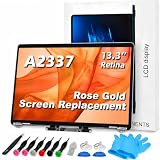
- 【Model Check Before Ordering】 Compatible with MacBook Air 13-inch M1 2020, Model A2337, EMC 3598, resolution 2560x1600. Please confirm the model number on the bottom case before purchase. Not compatible with A2338, A2681, A2179, or A1932. If unsure, contact us through Amazon Messages for compatibility help.
- 【Core Specifications】 13.3-inch LCD screen assembly replacement for A2337 MacBook Air M1 2020. Please match your original model and color before ordering. Includes a 6-month warranty for confirmed product defects under normal use.
- 【Quality Control】 Each screen is inspected for glass condition, backlight, brightness, color uniformity, pixel integrity, camera, cables, and hinge movement before packing. Please test the display function before final installation.
- 【Package Contents】 Includes 1 LCD top assembly with front glass, back cover, cables, webcam, and hinges, plus a screwdriver, cleaning brush, and installation guide. This is a replacement screen assembly, not a complete laptop. No soldering required.
- 【Installation Support】 Screen replacement is delicate. Avoid bending cables, pressing the LCD surface, or tightening screws before testing. For installation or warranty questions, contact us through Amazon Messages for troubleshooting and replacement support.
Product prices and availability are accurate as of the date/time indicated and are subject to change. Any price and availability information displayed on Amazon at the time of purchase will apply.




