Choose by the frame rate you want the computer to record. For 1440p60 capture, the HD60 X is the straightforward external option. For capture above 60 fps—up to 1440p144 on Elgato’s listed specifications—look at the external 4K X or the internal 4K Pro. Elgato’s comparison also lists the 4K S for up to 1440p120 capture, but check its detailed compatibility information before relying on that mode.
Keep capture separate from passthrough: capture is what the computer records; passthrough is what the card sends to your monitor. A card may pass a higher refresh rate to the display than it records.
As an Amazon Associate I earn from qualifying purchases.
Which Elgato cards support 1440p capture?
The table summarizes Elgato’s listed maxima. They are specifications, not a guarantee that every console or PC, card connection, computer, application, and display combination will achieve them. For a particular resolution and refresh rate, check the manufacturer’s input and capture matrices as well as your full signal chain.
| Model | Connection | 1440p capture listed | 1440p passthrough listed | Best fit and key caveat |
|---|---|---|---|---|
| Game Capture HD60 X | External; USB 3.0 Type-C; HDMI 2.0 | Up to 60 fps | Up to 120 Hz | 1440p60 recording when 120 Hz passthrough matters; it is not a 1440p120 capture card. |
| Game Capture 4K X | External; USB 3.2 Gen 2 Type-C; HDMI 2.1 | Up to 144 fps | Up to 240 Hz | External high-refresh capture; verify host USB capability and the exact input/output combination. |
| Game Capture 4K Pro | Internal; PCIe 2.0 x4; HDMI 2.1 | Up to 144 fps | Up to 240 Hz | Desktop with an available compatible PCIe slot; it does not support signals using DSC. |
| Game Capture 4K S | External; Elgato comparison lists USB-C 3.0 and HDMI 2.0 | Up to 120 fps, according to Elgato’s comparison | Up to 120 Hz, according to Elgato’s comparison | Potential 120 fps alternative; consult its detailed official compatibility matrix before choosing it for a specific setup. |
For detailed specifications and supported-resolution information, consult Elgato’s pages for the HD60 X and its supported resolutions, the 4K X, and the 4K Pro. Elgato’s comparison is the basis for the 4K S figures above; confirm its detailed matrix before treating a particular mode as compatible.
#1 Best Overall

- Stream Anywhere, Anytime: Connect seamlessly to any software (Zoom, Teams, OBS) and platform. It’s the ultimate versatile tool for creators and professionals alike.
- Dual 4K60 Mastery: Play in native 4K60 resolution while capturing every detail in matching 4K60 quality—no compromises on your visual experience.
- High-Speed 240fps Recording: Capture high-motion action with 240fps recording at 1080p, ensuring your most intense gaming moments are preserved in high definition.
- Near-Zero Latency Passthrough: Enjoy instant gameview with zero lag. Perfectly sync your broadcast and gameplay for a seamless, professional streaming experience.
- Lifetime Warranty Support: Buy with confidence. We provide a Lifetime Warranty and 24-hour expert customer service to ensure your streaming setup always performs at its peak.
Do you need 1440p60 or higher-refresh capture?
For 1440p60 recording
The HD60 X is listed for capture up to 1440p60. Its 1440p passthrough figure is up to 120 Hz, which describes the signal sent onward to a compatible display—not a 120 fps recording. This distinction makes it a fit when 60 fps capture is sufficient but you want a higher-refresh display signal.
For capture above 60 fps
Elgato lists the 4K X and 4K Pro for capture up to 1440p144. The 4K X connects externally over USB, while the 4K Pro installs inside a desktop through PCIe. Elgato’s comparison lists the 4K S at up to 1440p120 capture; its detailed compatibility matrix should guide any setup-specific decision.
Rank #2

- Seamless Broadcasting and Versatile Streaming: Connect effortlessly to any app such as OBS, Streamlabs, Twitch Studio, Restream, Zoom, Teams, and stream flawlessly on various platforms like YouTube, Twitch, Discord, Facebook Gaming, etc., providing you with unparalleled flexibility and reach.
- Unrivaled Gaming Experience: Immerse yourself in pure gameplay at an astounding 8K60 resolution, all while effortlessly capturing the action in stunning 4K60 quality.
- Cutting-Edge Connectivity: Harness the power of HDMI 2.1 in/out to effortlessly record high frame rates, reaching up to an incredible 240fps in pristine 1080p resolution.
- Seamless Visuals: Say goodbye to screen tearing and relish in a flawlessly smooth gaming experience with Variable Refresh Rate (VRR) passthrough technology.
- Perfectly Synced Entertainment: Achieve unparalleled synchronization between your broadcast and gameplay, thanks to ultra-low latency that ensures every moment is captured with precision.
Passthrough figures are a separate ceiling: the 4K X and 4K Pro are listed for up to 1440p240 passthrough, while the 4K S comparison lists up to 1440p120. The source, card, connections, and display all have to support the chosen output mode.
Free tools Windows power users keep installed
One-click scans. No signup required.
Should you choose an external USB card or an internal PCIe card?
Choose the 4K X if you need an external card
The 4K X is the external high-refresh option in this group. Its listed connection is USB 3.2 Gen 2 Type-C, so check the computer’s actual USB capability rather than assuming any USB-C port is sufficient. USB-C describes the connector shape; the host port and connection must meet the card’s requirements.
Rank #3

- Clean and crisp 4K60 unlimited HDR10 video format with zero-lag pass-through for game capture and live streaming
- Smooth gameplay recording: Live Gamer 4K is mighty in every aspect from capturing 4K HDR content to amazing high-frame capturing of up to 240 fps
- The LG4K with its three preset modes of RGB lighting brings more than just awesome performance to your PC setup
- With the AVerMedia Gaming Utility you can customize which resolutions and corresponding frame rates you are able to preview and record
- Perfect for next-gen game consoles such as PS5, XBox Series X/S, XBox One X, works with OBS, Streamlabs, XSplit to live stream or broadcast to Twitch and Youtube
Choose the 4K Pro if your desktop has compatible PCIe capacity
The 4K Pro is an internal PCIe 2.0 x4 card. It makes sense for a desktop build with an available compatible slot, but its lack of support for Display Stream Compression (DSC) can disqualify it for some source-and-display configurations. Elgato says the card does not support passthrough or capture of signals using DSC; check whether the signal you plan to send uses DSC before settling on this model.
Choose the HD60 X when 60 fps capture is enough
The HD60 X is an external USB 3.0 Type-C card with HDMI 2.0. Its listed 1440p capture limit is 60 fps, even though its listed 1440p passthrough reaches 120 Hz. Do not select it on the assumption that passthrough refresh rate is the same as recording frame rate.
Rank #4

- Capture video and audio via PCIE interface. Supports CVBS and S-video video input, compatible with NTSC and PAL video formats, and automatically recognizes the format of the video input signal source.
- No need to install drivers, plug and play.
- Digitizes incoming images using high-quality video sampling and displays them in a window on the PC's screen. Video output supports MJPEG and YUV422 formats with a maximum capture resolution of 1080P@30Hz.
- Transmits images directly from the digitpro Video Capture Card to the main system memory or the VGA adapter's memory.
- Suitable for full and half height brackets (not included), offering a wide range of mounting options. Compatible with many capture software such as OBS, VLC, Amcap, etc. Support Windows 8, 10, 11 and Linux system.
Will your setup actually deliver 120 Hz or higher?
Check every stage: the console or PC output, the card’s input and passthrough capability, the HDMI connections, and the monitor or TV. Elgato’s high-refresh guidance says maintaining 120 Hz from PlayStation 5 or Xbox Series X/S requires the entire video signal chain and connected devices, including the display and capture card, to support 120 Hz.
Quick wins for a faster PC:
Fix the driver behind crashes, sound loss and screen glitchesFind Drivers →Clear out junk files and repair common Windows errorsFree Scan →Scan for outdated or missing drivers - takes under a minuteDriver Scan →- Confirm that the source can output the resolution and refresh rate you want.
- Check the card’s supported input and output combinations; a headline maximum does not mean every combination is supported.
- Verify that the computer’s USB port or PCIe slot meets the card’s requirements.
- Check that the display and the connections in the chain support the intended mode.
- Confirm software support for the capture format you plan to use.
Software can affect supported formats, so check Elgato’s current model-specific matrix and the software you intend to use rather than relying only on a product’s maximum number.
Best Value
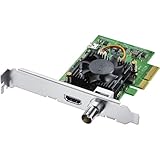
- Blackmagic Design DeckLink Mini Recorder 4K PCIe Capture Card
- SDI Video Input: 1x 10-bit SD/HD/Ultra HD switchable
- HDMI Video Input: 1x HDMI 2.0a connector
- Computer Interface: Gen 2 PCIe Express 4 lane, compatible with 4, 8 and 16 lane PCIe slots
- SDI Audio Input: 16 channels embedded in SD, HD, Ultra HD
What should you know about HDR capture?
HDR passthrough and HDR capture are different capabilities: a card may pass an HDR signal to a display without recording HDR to the computer. The cited specifications for the HD60 X, 4K X, and 4K Pro limit HDR capture to Windows. Check the current model-specific requirements and matrix for your operating system and software before choosing a card for HDR recording.
Elgato lists included HDMI and USB cables with the HD60 X and 4K X, and an HDMI cable with the 4K Pro. You do not automatically need to buy another cable; check what is included and whether your existing connections support the signal you intend to use.
Quick Recap
Product prices and availability are accurate as of the date/time indicated and are subject to change. Any price and availability information displayed on Amazon at the time of purchase will apply.
What’s actually slowing this PC down?
Pick the symptom - the matching free tool is one click away.




