Quick wins for a faster PC:
Clear out junk files and repair common Windows errorsFree Scan →Fix the driver behind crashes, sound loss and screen glitchesFind Drivers →Use a customer support ticket when a problem needs provider-specific investigation, account access, or follow-up—and the help center or a known-issue notice has not already resolved it. Before submitting, assess the impact, choose the provider’s official channel, and include enough detail to reproduce the problem. For a service outage or possible security risk, follow the provider’s designated urgent reporting route rather than treating every ticket as an emergency.
Decide what to do before submitting a ticket
Work through these steps in order. A ticket is most useful when it gives the provider a concrete issue to investigate and creates a record you can track. Providers use different names and processes—such as a request or a case—so follow the terminology and instructions on the provider’s support site.
- Check whether the answer is already available. Search the provider’s current help center, account settings, status page, and known-issue tracker. Zendesk’s customer portal can suggest relevant help articles while a request is being drafted. Atlassian’s Jira Software guidance recommends searching for an existing issue before creating one.
- Check for an existing report or incident. If the same problem is already being tracked, use that issue’s or incident’s update mechanism instead of opening a duplicate when the provider supports that option. If the problem affects your account in a distinct way, report that impact through the provider’s official process.
- Assess the impact and any workaround. Note whether you are completely blocked, experiencing degraded service, able to continue with a workaround, or asking a general question. Describe what is affected and how broadly; do not label a problem urgent simply to seek faster attention.
- Choose the provider’s official route. Use the channel the provider identifies for your issue, plan, region, and severity. If the issue is urgent or security-related, check for a specifically designated urgent route and use it.
- Send a concise, reproducible report. Include the task, what failed, what you expected, when it last worked, exact reproduction steps, any error, and the impact. Add only attachments that are useful and permitted.
- Follow the existing case or incident. Keep the case number and use the provider’s status or update mechanism for new evidence and progress. If the provider links your report to a broader incident, follow that incident’s updates rather than filing another copy of the same report.
When a ticket is the right next step
A problem needs individual investigation
Submit a request or case for a reproducible defect, an account-specific problem, a failed transaction, a service request, or a question that requires provider access or follow-up. A useful case gives the support team enough context to distinguish your situation from a general how-to question.
Self-service has not answered the question
Use the help center first when the issue is a general question and the provider’s documentation clearly covers it. A ticket is reasonable when the documentation does not fit what you see, when a documented step fails, or when the answer depends on your account or service. If the provider’s portal offers suggested articles during submission, check them before sending the request.
#1 Best Overall

- PREPRINTED: These receipts are pre-printed with common salon services but also include a blank line for added flexibility. There is a space for operator's name as well as the amount due per service and a total amount due.
- PERFORATED: The pad is perforated on top allowing one for your records and other for check out at the register.
- BULK PACK: Each pad includes 100 sheets that are numbered in sequence for easy reference.
- CONVENIENT SIZE: The pad measures 5.25" tall and 3" wide making it easy to use and store.
The service is blocked, severely degraded, or may be at risk
Report the actual business or personal impact and use the provider’s urgent route when its instructions say the issue qualifies. Zendesk’s Customer Support guidance, dated November 17, 2025, illustrates one provider’s severity distinctions: inability to use its service and high-risk security vulnerabilities are Level 1; major degradation is Level 2; a moderate slowdown with an easy workaround is Level 3; and informational questions fall into Level 4. These are Zendesk-specific categories, not universal definitions or a promise that another provider uses the same labels or service targets.
Zendesk says it typically responds to its Level 3 issues within 1–2 business days. That statement applies to Zendesk’s own support guidance; it is not a general ticket response-time standard. Check the current support page for the provider you are contacting, because eligibility and handling can depend on the provider, plan, region, language, and issue severity.
The issue may be widespread
Check the provider’s status page or public issue tracker, but distinguish a suspected outage from one the provider has confirmed. If needed, submit a report describing the effect on your own account or service. Zendesk describes a process in which a customer report may be linked to an existing incident, lead to a new incident, or proceed through ordinary troubleshooting if it is not a broader outage. In that example, customers linked to an incident can receive incident-status updates.
Rank #2

- Standard Size: 6 green server note pads, Each Book Comes with 50 bound order slips - that's 300 ticket sheets total! Check Pads Size 6.75 x 3.5 inch.
- Convenient Work: These guest check books for servers have a tear-free dotted line that is easy to rip off. You can give as a customer copy or keep for record keeping. We've provided extra rows on the back for additional note taking.Perfect For Restaurants, Lounges, Hotels, Cafes, And Waiters To Use.
- Record Important Information: These server note pads can record important information.Each ticket has a unique serial number printed at the top, dates, order details, number of guests, order amount, table numbers etc. They are lightweight, small and can fit most aprons. They can be used on-demand and can help decrease errors in orders, while improving work efficiency.
- High Quality: Sturdy, Not Drop Powder, It's Thick, You Can Write On The Back And Front Easily.Their whole page printing has clear handwriting and a reasonable layout. On the customer retention part of each guest check, "THANK YOU" on the back to make customers feel appreciated.
- Contact Us: We're confident that the quality of the server note pads will go beyond your expectation. If you experience an issue, feel free to contact us, we'll appreciate it to learn from your experience, and we'll make it better
Atlassian’s Incident Management Handbook says, “We urge people to create an issue if they’re worried about something, rather than wait to escalate it.” That is Atlassian’s advice within its own incident-management practice—not a universal instruction to file an urgent customer support ticket for every concern.
Do these 3 things before closing this tab:
1Scan for outdated or missing drivers - takes under a minute2Repair Windows errors before they cause bigger problems3Fix the driver behind crashes, sound loss and screen glitchesThe question is informational or low impact
If the help material does not answer a low-impact question, a standard support request may still be appropriate. Describe it accurately and use the ordinary support channel. Zendesk’s Level 4 category is one provider-specific example of how informational requests may be distinguished from service-blocking incidents.
Choose the channel that fits the issue
A provider may offer a help center, issue tracker, case form, chat, phone support, or other routes. The right choice is the route the provider makes available for your case—not an assumption that one channel is always faster. Salesforce’s published support options vary by success plan, region, language, and severity. Use its live support information, or the equivalent page for another provider, to determine what is available to you.
Rank #3

- Custom Receipt Book with Logo Create a custom receipt book with your logo, business name, address, phone number, email, customer information area, payment method, and personalized business layout.
- Carbonless 2-Part Design The 2-part carbonless form design allows duplicate copies without separate carbon paper, helping businesses record payments, services, sales, and customer transactions.
- Great for contractors, repair services, auto shops, cleaning companies, landscaping crews, salons, retail shops, mobile vendors, delivery businesses, and local service providers. Bulk customization is supported for teams, organizations, service companies, and repeat business use.
- Made for Service Industries Perfect for auto detailing, towing, HVAC, home repair, landscaping, cleaning companies, salons, pet grooming, mobile vendors, contractors, and small business owners.
- Multi-Purpose Business Forms Can be used as invoice forms, receipt books, work orders, sales orders, estimate forms, quote forms, service tickets, payment records, and customer copy forms.
| Option | Best fit | What to check |
|---|---|---|
| Help center or account settings | A general question with a documented answer or a routine setting change. | Whether the instructions match your product version and what you see in your account. |
| Known-issue page, status page, or public tracker | A suspected service-wide problem or an issue that may already be under investigation. | Whether the provider has confirmed the issue, how to follow updates, and whether you still need to report an account-specific impact. |
| Standard support request or case | A reproducible defect, individual account problem, failed transaction, service request, or question needing provider follow-up. | Whether it creates a trackable case, supports back-and-forth troubleshooting and relevant attachments, and is available for your plan and region. |
| Designated urgent route | A problem the provider defines as critical, such as a service-blocking issue or a security concern. | The provider’s severity criteria, eligible plans and regions, stated support hours, and required reporting channel. Do not assume phone or chat is available or faster. |
When more than one route is offered, compare whether it accepts your severity, supports the information and attachments needed to investigate, creates a trackable case, and is available under your plan and in your region. Also check the provider’s stated hours or response target. Those details are provider-specific and can change; a channel name by itself does not establish how quickly you will receive a response.
What to include in a useful support ticket
Keep the subject short and specific—for example, “Checkout fails after payment confirmation” rather than “Help.” In the description, answer the questions that let a support team understand and reproduce the issue:
Free tools Windows power users keep installed
One-click scans. No signup required.
- What were you trying to do? Name the task, product area, or service request.
- What happened instead? Describe the actual behavior, including any error message.
- What did you expect? State the result you were trying to achieve.
- How can it be reproduced? Give the exact steps, in order, and say whether the problem happens every time or intermittently.
- When did it last work? Include the approximate time and date, with a time zone when it could matter.
- What is affected? Explain the impact and scope: one user, several users, a particular account, or a broader service. Mark a suspected outage as suspected unless the provider has confirmed it.
- What identifiers are needed? Provide an account, organization, product, transaction, or case identifier when the provider requests it.
- What supporting evidence helps? Attach a relevant screenshot or log only when useful and allowed by the provider’s form.
Salesforce’s case-resolution guidance calls for the task or goal, what failed, when it last worked, reproduction steps, expected and actual results, and scope. Its Salesforce Help page also warns that Salesforce Help is separate from the Salesforce environment and is not intended for sensitive or regulated data. Follow the same caution with any provider: do not put passwords, payment details, health information, personal identifiers, or other sensitive data in a ticket unless the provider explicitly offers an appropriate secure channel and asks for it.
Rank #4

- Extra Custom Space: Personalize with 40 characters for your business name and 60 per address line. Avoid text cut-offs on custom invoice books tailored for professional quotes, purchase orders, invoices, work orders repair orders and receipts
- Sequential Numbering: Includes 2 books with 50 duplicate sets each (100 total NCR sets). Sequentially numbered pages ensure organized record-keeping for retail shops, contractors, and daily business
- Perforated Carbonless Paper: Get clean, smudge-free duplicate copies without messy carbon sheets. Standard 5.5x8.5 books tear cleanly at the perforation to a 5.5x8 customer receipt
- Wrap-Around Divider Cover: Built-in heavy wrap-around shield slips between the white and yellow paper sets. Safely prevents ink or text transfer to the next carbonless forms below
- Built For Trade Professionals: Low minimum orders suitable for small entrepreneurs. Receipt book with carbon copies for HVAC, plumbing, mobile mechanics, landscaping, and electrical work
After you submit
Keep one clear thread
Save the case or request identifier and add relevant new evidence to that existing record. If the problem is already attached to a provider incident, use its update path where available. Duplicate reports can split context; a separate report makes sense when the provider asks for one or your issue is materially different.
Use the provider’s stated process for escalation
If the impact changes—for example, a workaround stops working or more users become affected—update the case with what changed and when. Use an urgent escalation route if the provider’s published criteria now apply. Do not infer an expected response time from another provider’s policy: plans, severity definitions, hours, and support routes differ.
Frequently Asked Questions
Should I submit a ticket if I cannot reproduce the problem every time?
Yes, if the issue is important or needs provider investigation. Say that it is intermittent, include the times it occurred, and list the steps that preceded it. Do not describe an intermittent problem as consistently reproducible.
Crashes, No Sound, or Screen Glitches?
Random freezes, missing sound and display glitches usually trace back to one bad driver. Find and replace yours safely.Free scan · under a minuteWindows Errors? Fix Them Before They Spread
Repair common Windows errors and clear accumulated junk for a smoother, more stable PC - no reinstall needed.Free scan · no reinstallBest Value
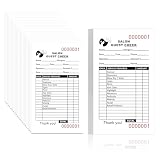
- Comprehensive Customer Tracking:Each Salon Check Pad contains 100 sheets designed for efficient and accurate client record-keeping. Each page includes clearly labeled fields: Name, Date, Time, and Phone, helping stylists capture important appointment and client details at a glance—ideal for both solo operators and busy barbershop teams.
- Premium, Durable Paper for Daily Use:Printed on 60g double offset paper, this check pad ensures a smooth, smudge-resistant writing surface. Its quality construction stands up to frequent handling in salon environments without bleeding or tearing, maintaining a clean and professional appearance.
- Dual Serial Numbers & Tear Line for Easy Organization:Every sheet is printed with two serial numbers—one for the customer, one for your records—making it easy to track appointments or cross-reference services. A clean perforated tear line allows you to remove pages neatly, whether handing a copy to a customer or filing it for your records.
- Compact Size, Maximum Utility:At just 3 x 5.1 inches, this check pad is compact enough to fit in drawers, workstations, or pockets, while still providing ample space for notes. Its top-bound format allows for quick flipping and easy one-handed use, making it a must-have for beauty salons and barbershop setups.
- Polished, Professional Touch with Customer Message:Each sheet is printed with a simple "THANK YOU" message at the bottom, adding a subtle but thoughtful gesture to every interaction. This small detail contributes to a warm, professional salon atmosphere that clients will remember.
Does submitting a ticket guarantee a particular response time?
No general response time follows from the fact that a ticket was submitted. Response targets and availability depend on the provider’s current support terms, plan, region, language, and severity. For example, Zendesk’s November 17, 2025 guidance says it typically responds to its own Level 3 issues within 1–2 business days; that is not a general industry target.
Should I open another ticket if I have not received an update?
Use the provider’s instructions for following up on the existing case, and add the case identifier and any material change in impact. Open a new case only when the provider directs you to or the new issue is distinct.
Quick Recap
Product prices and availability are accurate as of the date/time indicated and are subject to change. Any price and availability information displayed on Amazon at the time of purchase will apply.




