To reach the Samsung T9’s manufacturer-rated maximum speed, connect it to a host port that supports USB 3.2 Gen 2×2 (20 Gbps), use a cable that supports the same interface, and have UASP mode enabled. A USB-C socket alone does not guarantee any of those conditions: USB-C describes the connector shape, not the data rate.
What connection does the Samsung T9 need for full speed?
Samsung specifies USB 3.2 Gen 2×2 for the T9. Its product page says the host device and connection cable must support USB 3.2 Gen 2×2, and UASP mode must be enabled, to reach maximum sequential read/write speeds of up to 2,000 MB/s. Samsung’s T9 specifications describe the drive’s interface and performance condition.
As an Amazon Associate I earn from qualifying purchases.
- Host port: USB 3.2 Gen 2×2 (20 Gbps).
- Cable: must support USB 3.2 Gen 2×2; a USB-C connector by itself is not proof.
- UASP: must be enabled for Samsung’s stated maximum sequential performance.
USB-C is not the same as USB 3.2 Gen 2×2
USB-C identifies the physical connector. It does not tell you which USB data interface a port or cable supports. A computer may have a USB-C port that operates at a lower data rate, so check the computer’s specifications for “USB 3.2 Gen 2×2” or “20 Gbps.” Check the cable’s data-rate support as well; the plug fitting the drive is not enough.
The Tool Desk
Outbyte Driver Updater FREEFix the driver behind crashes, sound loss and screen glitchesFind Drivers →Outbyte PC Repair FREERepair Windows errors before they cause bigger problemsFix Now →Samsung UK says the T9 package includes USB-C-to-C and USB-C-to-A cables. That is useful for connecting to different port shapes, but does not mean every host port reached through either cable supports Gen 2×2. See Samsung UK’s T9 product page for package and compatibility details.
#1 Best Overall
![Cable Matters 20Gbps USB C to USB C Monitor Cable, 6ft / 1.8m | [8K@30Hz / 4K@120Hz Video, 240W Charging, 20Gbps Data Transfer] Works with CarPlay and Android Auto](https://m.media-amazon.com/images/I/318KC8i7iYL._SL160_.jpg)
- 20Gbps Data Transfer: This USB C data cable (USB C 3.2 Gen 2x2 cable) supports blazing-fast 20Gbps data transfer for fast file transfers, high-speed storage access, and external drive connections. This USB C 3.2 Gen 2 cable / USB-C data cable ensures reliable performance and is backward compatible with earlier USB-C versions.
- 8K or 4K UHD Video Output: This USB C video cable / USBC display cable supports 8K@30Hz or 4K@120Hz video output to a USB-C monitor. Use this USB-C monitor cable to connect your computer to a USBC monitor like the MB169C Type-C portable monitor, ZenScreen MB16AC, AOC i1601fwux, or LG 4K USB C monitor for gaming, content creation, or extended desktop viewing.
- 240W Power Delivery: This 240W USB C display cable charges laptops, tablets, and phones with up to 240W. The USB C to USB C video cable for monitor (USB C to USB C data cable) supports devices like iPad Pro, Google Pixel 2/3XL, OnePlus 2/3, HTC 10, Huawei P9, LG G5, Nexus 6P, and Galaxy S9/S9+, S8/S8+, Note 9/Note 8 when used with a USB Type C charger, USB C power adapter, or USB C car charger.
- Broad Monitor & Dock Compatibility: This USB C to USB C monitor cable works with USB-C monitors and docks such as Dell U2520D, P2720DC, U2721DE, U2719DC, and HP E273d, E24d G4, E223d, E27d G4—delivering smooth video output and charging.
- Thunderbolt 4 & USB-C Device Support: This Thunderbolt 4 & USB C cable is compatible with USB-C computers such as MacBook Pro, Dell XPS 13/15, Dell Alienware 13/15/17, Dell Precision 15/17, Aspire R13/V15, S5-391-6419 Nitro, V17 Nitro, Predator 15/17, ROG G752VL, GT752VT, GT752VY, GX700VO, ZenBook Pro UX501VW, Clevo P750DM/P770DM/P870DM, ThinkPad P50/P70, MSI GS40, GS60, GT72, GT80, Vortex, WS60, WS72, and VAIO S11.
What speeds does Samsung rate the T9 for?
Samsung’s published figures are conditional, manufacturer-rated sequential maxima—not guaranteed real-world transfer speeds. Its 2023 announcement says performance depends on the host configuration, cable, and system environment; the listed test configuration was an ASUS ROG STRIX Z590-E GAMING WIFI motherboard, Intel i9-10900K processor, and Windows 11 Pro. Samsung Newsroom’s announcement provides the capacities and ratings:
| Samsung T9 capacity | Sequential read, up to | Sequential write, up to |
|---|---|---|
| 1TB | 2,000 MB/s | 1,950 MB/s |
| 2TB | 2,000 MB/s | 1,950 MB/s |
| 4TB | 2,000 MB/s | 2,000 MB/s |
The interface figure of 20 Gbps is gigabits per second; the sequential ratings are megabytes per second. They are different units, and the interface number should not be read as a promise of 20 gigabytes per second of file transfers. Samsung’s T9 technical data sheet also lists the capacity-specific sequential ratings.
Rank #2

- 【240W Super Fast Charging】ULT-WIIQ USB C to USB C cable fast charging supports PD 3.1 up to 240W (48V 5A) fast charging, and is backward compatible with PD 3.0/QC 5.0 QC 4.0 QC 3.0 (100W/65W/45W), one USB Type-C cable can fast charge almost all your USB-C devices and compatible with Thunderbolt 3 / 4 devices.
- 【20Gbps Data Transfer】This USB C data cable fully complies with the USB C 3.2 Gen 2x2 specification, and is USB-IF certified, supporting up to 20Gbps high-speed data transfer, and is backward compatible with USB 3.1 and USB 3.0, the amazing transfer rate allows you to move 1GB movies, files, documents or your entire photo library in 3 seconds.
- 【8K/4K HD Video Display】This USB C monitor cable supports up to single-monitor 8K@60Hz, 4K@144Hz/120Hz/60Hz, 2K@240Hz/165Hz/144Hz/120Hz and dual-monitor 4K@60Hz HD video, compatible with all screens or monitors with USB-C video ports. whether you are watching home movies or playing games, it can bring you a great experience!
- 【Safe and Durable】This 3.3 ft braided USB C cable has a built-in E-Marker chip, which makes the device charging process safer and faster. The aluminum shell and nickel-plated plug ensure a more stable signal output. After 20,000+ times of bending and plugging tests, it can be used for a longer time without being damaged.
- 【Widely Compatible】Our USB Type C cable is compatible with iPhone 17/16/15 e/Plus/Pro/Pro Max, MacBook Noe, MacBook Pro/Air series, iPad Air/Pro series, Samsung Galaxy S26/S25/S24/S23 series, Google Pixel series, SSD, Power Bank, Oculus Quest series and more devices with USB-C port. (Non-Complete List)
Will the T9 work with a slower USB connection?
Samsung lists backward compatibility with USB 3.2, USB 3.1, USB 3.0, and USB 2.0. That means the T9 can connect over earlier listed USB generations; it does not mean those connections meet the USB 3.2 Gen 2×2 condition for the stated maximum speed. Actual performance depends on the connection in use.
Crashes, No Sound, or Screen Glitches?
Random freezes, missing sound and display glitches usually trace back to one bad driver. Find and replace yours safely.Free scan · under a minuteWindows Errors? Fix Them Before They Spread
Repair common Windows errors and clear accumulated junk for a smoother, more stable PC - no reinstall needed.Free scan · no reinstallHow to check whether your setup can reach the rated maximum
- Look up your computer’s port specifications. Find the exact port used and verify it supports USB 3.2 Gen 2×2 (20 Gbps). Do not infer this from the presence of USB-C.
- Verify the cable’s data capability. Use a cable specified for USB 3.2 Gen 2×2. Connector compatibility alone does not establish data-rate support.
- Check UASP support and configuration. Samsung lists UASP support for the T9 and requires UASP mode to be enabled for its maximum sequential performance.
- Interpret speed results against your model and setup. The write rating differs between the 1TB/2TB and 4TB models, and Samsung’s figures are conditional maxima rather than a guarantee for every computer or workload.
The sources cited here do not establish which interface a particular computer model’s port supports. For a specific laptop or desktop, consult that model’s own specifications before assuming it can provide Gen 2×2 performance.
Quick Recap
Best Value
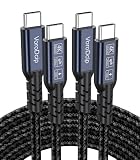
- All-in One USB C Cable: 1.Standard USB C 3.2 Gen 2x2 Cable supports 20Gbps data transfer speeds. 2.USB C Monitor Cable supports 4K@120Hz Ultra HD video output. 3.USB C 100W/5A Fast Charging Cable delivers up to 100W Power Delivery (PD) for rapid charging
- 20Gbps USB C Data Cable: USBC 3.2 Gen 2x2 cord supports up to 20Gbps data transfer speeds (Note: Maximum speed is achievable when both the input and output devices feature USB-C with 20Gbps support). Backward compatible with USBC 3.1/3.0/2.0
- 4K@120Hz USB C Monitor Cable: USB C Video Cable supports up to 4K@120Hz, 2K@240Hz, 1080P@240Hz, and is suitable for connecting laptops and monitors. (Note: Please make sure the devices support DP Alt Mode)
- USB C 100W Charging Cable: Supports PD 3.0 and QC 5.0, delivering up to 5A at 5V/9V/12V/15V/20V. Built-in E-marker chip intelligently regulates voltage and current based on your device. Powers most USB-C devices, including iPhone 17/16 series, MacBooks, iPad Pro, power bank and more
- Compatible Monitors & Portable Monitors: Compatible with all USB-C port monitors: SAMSUNG, Dell, LG, HP, SANSUI, ASUS, PHILIPS, ViewSonic, and many more brands. Portable Monitors: MNN, KKY, YxK, KEFEYA, Arzopa, AOC, InnoView, ASUS, ForHelp, Ingnok, Anyuse, and many more brands. (Note: Ensure your device has a USB-C port that supports DP Alt Mode)
Rank #4
- 【240W Super Fast Charging】ULT-WIIQ USB C to USB C cable fast charging supports PD 3.1 up to 240W (48V 5A) fast charging, and is backward compatible with PD 3.0/QC 5.0 QC 4.0 QC 3.0 (100W/65W/45W), one USB Type-C cable can fast charge almost all your USB-C devices and compatible with Thunderbolt 3 / 4 devices.
- 【20Gbps Data Transfer】This USB C data cable fully complies with the USB C 3.2 Gen 2x2 specification, and is USB-IF certified, supporting up to 20Gbps high-speed data transfer, and is backward compatible with USB 3.1 and USB 3.0, the amazing transfer rate allows you to move 1GB movies, files, documents or your entire photo library in 3 seconds.
- 【8K/4K HD Video Display】This USB C monitor cable supports up to single-monitor 8K@60Hz, 4K@144Hz/120Hz/60Hz, 2K@240Hz/165Hz/144Hz/120Hz and dual-monitor 4K@60Hz HD video, compatible with all screens or monitors with USB-C video ports. whether you are watching home movies or playing games, it can bring you a great experience!
- 【Safe and Durable】This 6.6 ft braided USB C cable has a built-in E-Marker chip, which makes the device charging process safer and faster. The aluminum shell and nickel-plated plug ensure a more stable signal output. After 20,000+ times of bending and plugging tests, it can be used for a longer time without being damaged.
- 【Widely Compatible】Our USB Type C cable is compatible with iPhone 17/16/15 e/Plus/Pro/Pro Max, MacBook Noe, MacBook Pro/Air series, iMac mini, iPad Air/Pro series, Samsung Galaxy S26/S25/S24/S23 series, Google Pixel series, SSD, Power Bank, Oculus Quest series and more devices with USB-C port. (Non-Complete List)
Rank #3

- 【Latest Version USB C 3.2 Gen 2 Cable】ZeroneTeck latest USB C for Thunderbolt cable: ①This 20Gbps USB C to USB C data cable is capable of meeting your ultra-fast data transfer needs. ②USB C to USB C monitor cable support 4K@60Hz Ultra HD video output ③In addition, this Type c to Type c cable also has a faster than normal 60W data cable with 100W ultra fast charging. Makes it easy for you to solve all your problems with just one cable.
- 【20Gbps USB C Data Cable】USBC to USBC data transfer cable provides explosive transfer speed up to 20Gbps, connect hard drives and SSDs, Also suitable for phone to laptop data transfer, transfer large files in seconds and save you more work time. Meanwhile, USBC to USBC 3.2 gen 2 20gbps data transfer cable backward compatible with USB 3.1, USB 3.0 and USB 2.0.(*Note: Maximum speeds are achieved when both upstream and downstream devices are Thunderbolt 3/4 interfaces.)
- 【4K@60Hz USB C Cable for Monitor & Plug and Play】Plug and play, no drivers or applications required to use this cable! USB C monitor cord to stream 4K@60Hz (3840*2160) content directly from your phones, tablets, laptops and desktop computers to large screens such as monitors, HDTVs and projectors. You will enjoy stunning Ultra HD video and colorful image quality. (Note: Please make sure your device has a USB-C port and supports DP Alt mode).
- 【5A/100W Fast Charging Cable】USB Type C fast charging cable with E-Marker IC chip, safely charges your devices with up to 100W power. It can fully charge a MacBook Pro 60%, an iPad Pro 75%, a iPhone 15 85%, and a Switch 95% in 35 minutes. Fully satisfies the charging power needs of professionals for MacBooks Pro, Android devices, Samsung and iPad Pro. Charge any USB-C device at maximum speed for timely use and no more waiting. *Note: Requires a C-port adapter of appropriate power.
- 【Dual Vehicle System】 Flawlessly supports CarPlay & Android Auto for seamless navigation/music streaming. 20Gbps ultra-speed — 40× faster than USB 2.0 CarPlay cables with enhanced signal stability.
Product prices and availability are accurate as of the date/time indicated and are subject to change. Any price and availability information displayed on Amazon at the time of purchase will apply.




