Unplug a USB-C car charger that is abnormally hot, smells burnt, changes color, or shows melted or cracked plastic. Remove the connected devices, let the charger cool in a well-ventilated place, and inspect the charger, cable, vehicle socket, and connected load before trying again. If visible damage remains or the charger heats up again under a normal load, stop using it and arrange service or replacement.
Some warmth during charging is expected, but there is no universal safe touch-temperature limit for USB-C car chargers. The safest decision depends on the charger’s condition, whether heat decreases after cooling, and whether the fault follows the charger, cable, device, or car socket.
As an Amazon Associate I earn from qualifying purchases.
Unplug immediately when heat is abnormal
Disconnect the charger from the vehicle socket and remove every attached device when it becomes unusually hot. Put it somewhere dry and ventilated, away from seats, clothing, direct sun, and other heat sources. Do not cover it, leave it charging while unattended, or keep testing it while it is hot.
Outdated Drivers Are Slowing You Down
One free scan finds every outdated or missing driver and matches the right update for your exact hardware.Free scan · exact hardware matchPC Slower Than It Used to Be?
A free scan shows the junk files, broken settings and background clutter dragging Windows down - then fixes them in one click.Free scan · Windows 10 & 11Warmth by itself does not prove a fault. Huawei explains that all chargers, including car chargers, generate some heat while charging and that internal safeguards can reduce output or stop charging when the temperature exceeds the product’s preset range. Those protections are model-specific; they are not a guarantee that a visibly damaged or repeatedly overheating charger is safe.
#1 Best Overall

- Triple-Port 167.5W Max: Seamlessly power up all your essential devices with the first USB-C port delivering a powerful 100W, the second USB-C port providing 45W, and the USB-A port adding an additional 22.5W.
- Ultra-Fast 100W USB-C1 Port: With the first USB-C port offering 100W, quickly charge your 16-inch MacBook Pro from 0 to 50% in only 47 minutes.
- Reliable 45W USB-C2 Port: The second USB-C port offers 45W max of power, providing fast and reliable charging for iPhones and Samsung devices, keeping you connected without any delays.
- Tiny and Mighty: Designed to be unobtrusive, this super-compact charger won't clutter your car's interior.
- What You Get: Anker Car Charger (167.5W, 3 Ports), 3.3 ft USB-C to USB-C cable, welcome guide, 18-month warranty, and our friendly customer service.
Stop using it permanently if you see or smell damage
- Burnt or electrical odor
- Melted, soft, swollen, or discolored plastic
- A cracked enclosure, loose housing, or exposed metal
- A blackened, bent, or loose connector
- A cable with cuts, crushed insulation, exposed conductors, or heat damage
Xiaomi’s support guidance says to discontinue use and consider replacement when a car charger has this kind of damage. Do not repeatedly plug in a visibly damaged unit “just to check”; repeated testing can worsen an electrical or heat fault. Contact the manufacturer or seller about warranty service, safe disposal, or replacement.
What the heat or disconnecting is telling you
A USB-C car charger converts the vehicle’s power into the voltage and current requested by the device. Conversion losses become heat. Higher charging power, multiple connected devices, a hot cabin, poor ventilation, or a loose electrical connection can increase that heat. A charger may also reduce output or shut down temporarily when its internal temperature protection activates.
Rank #2

- Universal High-Speed Charging: PowerIQ 3.0 ensures rapid charging for USB-C phones, tablets, and more with fast charging capabilities.
- Space-Saving Design: Ultra-Compact build provides easy access to other dashboard functionalities while supporting fast charging for your devices.
- Wide Device Compatibility: Effortlessly powers USB-C devices with fast charging technology, enhancing user experience across gadgets.
- Safe and Reliable Charging: Built-in safety technology helps protect devices with safeguards for stable, high-speed charging.
- What You Get: PowerDrive III Duo car charger, welcome guide, our worry-free 18-month warranty, and friendly customer service.
Intermittent charging has no single established cause. The break can occur at the vehicle socket, the charger plug, either end of the USB-C cable, the cable itself, the device’s port, or the charger’s internal electronics. A phone that repeatedly starts and stops can therefore be reporting a connection problem rather than a failed battery or a defective charger.
What’s actually slowing this PC down?
Pick the symptom - the matching free tool is one click away.
| Symptom | What it may indicate | First safe response |
|---|---|---|
| Warm but stable charging, with no odor or damage | Normal conversion heat or a high charging load | Keep it ventilated, reduce unnecessary load, and monitor it |
| Very hot to touch, charging slows or stops | Thermal protection, excessive load, poor ventilation, or a developing fault | Unplug, remove devices, and cool before inspection |
| Charging cuts out when the plug or cable moves | Loose socket fit, connector, or cable | Stop moving the connection; inspect and reseat it |
| Burnt smell, melted plastic, or discoloration | Potential electrical or thermal damage | Do not retry; replace or obtain service |
| The same charger fails in more than one suitable car or source | Fault likely follows the charger or its cable | Stop using that charger and contact the seller or manufacturer |
Follow this troubleshooting sequence
- Stop and cool. Switch off charging, unplug the charger from the car socket, and disconnect the phone, tablet, or other devices. Let every part cool in open air. Do not put a hot charger under a seat, inside a closed console, or against upholstery.
- Inspect before reconnecting. Look and smell for melting, brown or black marks, warping, cracks, a loose plug, or a damaged USB-C connector. Examine the cable along its full length and at both plugs. A damaged cable should not be used. If any damage or burnt odor is present, skip further tests and arrange replacement or service.
- Reseat the connection path. With the vehicle switched off if your car manual recommends that, check that the charger sits firmly in the 12-volt socket or USB power port. Remove dust or debris only in a way permitted by the vehicle and charger instructions; never insert metal objects. Plug the USB-C cable fully into the charger and the device. A plug that feels loose, sits crooked, or falls out with light movement is not a reliable connection.
- Reduce the load. Disconnect additional devices and test with one device that normally charges from USB-C. If the charger has several ports, do not assume it can deliver its maximum advertised output to every port simultaneously. Xiaomi specifically recommends reducing the number of devices or using a lower-power device when its car charger overheats. If the charger stays cool with one modest load but overheats with several devices, keep the load within the charger’s documented limits or choose a charger with suitable capacity.
- Test the cable, if it passed inspection. Substitute a known-good, compatible USB-C cable for one controlled test. The replacement cable must support the charging capability your device requires; not every USB-C cable supports every power level or charging mode. If charging becomes stable only with the substitute, retire the suspect cable.
- Test the source safely. If the charger and cable show no damage and have cooled, try the charger in another suitable vehicle or power source that matches its input requirements. You can also test the vehicle socket with another appropriate device. Do not bypass fuses, wiring, or socket protections. If the symptom follows the charger, stop using it. If only the original car socket behaves badly, consult the vehicle manual or a qualified automotive technician; the available manufacturer guidance does not diagnose vehicle wiring.
- Check the device side. Inspect the receiving device’s USB-C port for lint, moisture, looseness, or visible damage. Do not scrape the port with metal or force a connector. If the same device disconnects with multiple known-good chargers and cables, its port or charging circuitry may need service.
Use the test results to isolate the fault
| Controlled result | Most useful next step |
|---|---|
| Another cable fixes charging while the original cable fails | Replace the damaged or suspect cable with one rated for the device’s required charging mode |
| The charger works in another car, but the original socket causes cut-outs | Stop relying on that socket and have the vehicle’s socket or wiring checked |
| The charger fails in another suitable car as well | Retire the charger and contact its manufacturer or seller |
| Only one phone or tablet disconnects | Inspect that device’s port and charging settings; test it with a known-good charger |
| Heat returns quickly even with one device and clear ventilation | Stop use and seek service or replacement rather than continuing to test |
These tests identify where the symptom follows; they do not prove a particular internal component has failed. A charger can pass a brief test and still be unsafe if it later develops odor, discoloration, or excessive heat.
Rank #3

- 【Fast Charging 3 Devices Simultaneously】200W fast car charger with 2 Type-C ports and 1 USB port, allowing you to charge up to 3 electronic devices at the same time.
- 【200W Car Charger USB C Fast Charge】200W (Max) super fast usb c car charger supports Type-C1 100W, Type-C2 100W and USB-A 60W high output and is compatible with QC4.0, QC3.0, PD3.0, PPS, SCP/FCP, AFC fast charging protocols for all devices.
- 【Excellent Heat Dissipation & Safety Car Charger】New heat dissipation process, low temperature charging without burning. With over-current, over-voltage, over-temperature and other protection, safety protection equipment. Intelligent start trickle mode, mobile phones do not overcharge, battery healthier.
- 【LED ambient light】The car charger has an ice blue ring LED ambient light for easier charging at night.
- 【Wide Compatibility】USB C car charger is compatible with most devices, such as for MacBook Pro Air, NoteBook, iPad Pro, iPhone 15 Pro Max 14 13 12 11, AirPods Pro, Steam Deck, Switch, Galaxy S23 Ultra/S22/S21, Steam Deck and more. 12V-24V car charger universal.
When replacement is the safer choice
Replace the charger instead of troubleshooting indefinitely when it has visible damage, repeatedly becomes abnormally hot after cooling, shuts down under a normal single-device load, or disconnects in more than one suitable vehicle. Huawei advises using an authorized service center for an overheating product, while Xiaomi advises contacting its service center or seller when its troubleshooting does not resolve a car-charger problem. Those are manufacturer-specific routes, so follow the support process for your own model.
A USB-C Power Delivery (PD) car charger is the relevant replacement category when your device charges through USB-C PD. Hama’s manual documents a car charger combining USB-C, USB-A, PD/QC 3.0, and a 2.1 A specification; that manual establishes the product category, not a performance endorsement or head-to-head test. Match the replacement to your equipment rather than buying on the USB-C label alone.
Rank #4
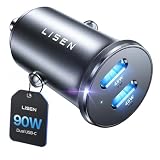
- THROW AWAY THE OLD A+C CAR CHARGER: What sets the LISEN usb c cigarette lighter adapter fast charger for iphone Duo & 18 pro max apart is its dual USB-C ports, each capable of delivering up to 45W of power. This configuration is particularly beneficial for users looking to fast charge two high-power devices at once, such as an iPhone 17 Pro Max and an iPad Pro. The simultaneous 45W output is a game-changer, significantly reducing charging times and ensuring your devices are ready to go when you are
- DUAL USB C FOR VERSATILE CHARGING: The LISEN 90W cigarette lighter adapter usb c car charger for iPhone 18 Pro Max 12v lives up to its promise of super fast charging. It supports Power Delivery (PD) 3.0. In practical terms, this means it can charge an iPhone 18 Pro from 0 to 83% in just about 30 minutes, a claim that holds up under testing. The charger is equally adept at handling other PD-compatible devices, ensuring that everything from smartphones to tablets receives an efficient power boost
- PREMIUM METAL ALLOY SHELL: The LISEN 90W usb c car charger adapter for iPhone 18 Pro Max fast charging impresses right out of the box with its sleek, all-metal design. Not only does the metal construction give it a premium feel and look, but it also aids in heat dissipation, ensuring the charger stays cool even when powering two devices simultaneously
- SMALL SIZE, BIG POWER: The tiny thumb-sized (2.1" (L) x 0.9" (W)) body fits most car 12V cigarette lighter usb c charger, providing a trim, less cluttered look. Its mini size is noteworthy, making it unobtrusive and a perfect fit for most car interiors without sacrificing accessibility
- UL AND FCC CERTIFICATION: LISEN iPhone Duo & iPhone18 Pro Max Car Charger USB C Fast Charging equipped with the intelligent power management chip, and passed UL, CE, FCC, and RoHS certifications. Made with PC fuel barrier V-0 grade material, it won 't get heat, is flame retardant, and is environmentally friendly
Compare a replacement against these requirements
| Check | Why it matters |
|---|---|
| Supported USB-C output and charging protocol | The charger must provide the voltage, current, and PD profile your device can use. A higher advertised wattage does not force the device to draw it, but an incompatible profile can prevent fast charging. |
| Vehicle input and physical fit | The plug must fit the car’s 12-volt socket or intended USB power port securely and remain clear of adjacent controls. |
| Port arrangement | Count the USB-C and USB-A ports you actually need. Multi-port use can change the output available to each port. |
| Safety and thermal information | Prefer documentation that explains over-temperature, over-current, short-circuit, and overload protections, without treating those protections as permission to use a damaged unit. |
| Manufacturer support | Keep the manual, model number, warranty terms, and seller details in case the charger overheats or disconnects again. |
If inspection or a controlled cable swap points to the cable, replace only the cable with a compatible one. Verify the device’s required charging capability and do not assume every USB-C cable supports the same power level.
The Tool Desk
Outbyte Driver Updater FREEScan for outdated or missing drivers - takes under a minuteDriver Scan →Outbyte PC Repair FREEClear out junk files and repair common Windows errorsFree Scan →Temperature guidance: what is known and what is not
No universal safe surface-temperature number for USB-C car chargers was established. Touch is also an unreliable instrument: a charger can feel hot because of its enclosure and surroundings, while internal components may be at a different temperature. Judge the situation using the combination of heat, charging behavior, ventilation, odor, and physical condition.
Best Value

- 67W 3-Port Super Fast Car Charger: Total 67 Watt USB C car charger Support PD 37W Max (USB C) and QC 30W Max (USB-A) output, can fast Charge for Most USB-A and USBC Devices Simultaneously. One car charger for all your USB A & USBC devices, your ideal travel companion
- 3X Fast Charge Speed: with upgrade PD and QC Fast Charging Technology, it can rapid charging for iPhone and Samsung or other phones from 0-50% in about 30 minutes, up to 3X faster than before, even can fast charge for Macbook air and iPad in high speed
- Broad Compatibility: with USB-C and USB-A output, can charge almost all USB Devices, compatible with iPhone 18 Pro/18 Pro Max, iPhone Duo, iPhone 17/17 Pro Max, iPhone Air, iPhone 16/16e/16 Pro Max/16 Plus, iPhone 15/15 Pro Max/15 Plus, iPad, Samsung Galaxy S26/S25/S24/S23/S22/S21/S20, Note 20/10/9, Google Pixel 11/10/9/8/7/6/5, android Cell Phone and other devices
- Safe & Reliable: USB C Car Charger Cigarette Lighter with intelligent chip inside, the Car Charger Adapter provides multi protections against over-current, over-voltage, over-heating and short-circuit. will automatically stop charging when power is full; the product shell made by ABS + PC fireproof material, ensure Protect your device and charge safely all the time
- What You Get: 1 x 67W 3-Ports USB-C & USB-A car charger Adapter + 1 x 3FT USB C to USB C Cable (Color: Black), 1-Year Replacement
Google’s safety guide for its specific 30 W USB-C wall charger says: Do not expose your 30W USB-C Charger to temperatures above 113° F (45° C), such as on a car dashboard or near a heating vent, as this may damage the 30W USB-C Charger, overheat the battery, or pose a risk of fire.
That 45°C limit applies to that named wall-charger model and must not be presented as a universal limit for car chargers.
Similarly, Satechi says warmth can be normal under load for its 100 W USB-C PD wall charger, recommends ventilation, and advises stopping use if it becomes too hot to hold comfortably or develops a burning smell or discoloration. This is product-specific wall-charger advice, not an industry-wide specification for vehicle chargers.
Prevent the problem from returning
- Keep the charger and cable uncovered so air can circulate around them.
- Do not leave a charger pressed against upholstery, buried in a storage compartment, or exposed to direct dashboard heat.
- Use only the number of ports and devices the charger’s documentation supports.
- Route the cable so passengers cannot pull or sharply bend the connector.
- Replace a cable at the first sign of crushed insulation, exposed wire, heat damage, or a loose plug.
- Store the charger dry and remove it from the socket when the vehicle is parked for long periods if the vehicle or charger instructions advise doing so.
- Keep the charger’s model and support information so you can obtain the correct service or replacement rather than an unverified substitute.
When professional help is appropriate
Contact the charger manufacturer or seller when overheating persists after cooling and load reduction, when the fault follows the charger to another suitable source, or when any damage is visible. Contact a qualified automotive service professional when another device also loses power in the vehicle socket, the socket is loose or scorched, a fuse repeatedly fails, or the problem appears limited to the car’s wiring. Do not open the charger or attempt an internal repair; its enclosure may contain components that remain hazardous even after unplugging.
Quick Recap
Product prices and availability are accurate as of the date/time indicated and are subject to change. Any price and availability information displayed on Amazon at the time of purchase will apply.




