Start by checking whether the watch—and the specific AI features you want—work with your phone, in your country, and in your language. Then weigh real-world battery life, fit, connectivity costs, and the watch’s intended health uses. “AI smartwatch” is not a guarantee that every advertised feature will work for every buyer.
1. Confirm phone and feature compatibility first
A watch may pair with your phone but still restrict some standout features to a particular operating system, phone brand, app, or account. Before buying, check the manufacturer’s current product page for your exact phone model and operating-system version, then verify each feature you care about separately.
As an Amazon Associate I earn from qualifying purchases.
For example, Samsung Canada’s 2026 guide says Galaxy Watch9 and Galaxy Watch Ultra2 are designed for compatible Android phones and are not compatible with iOS. It also says some Samsung Health or Galaxy features may require a compatible Samsung Galaxy phone. This is model- and manufacturer-specific guidance, not a rule for every smartwatch. Samsung Canada’s Watch9 and Ultra2 guide
The Tool Desk
Outbyte Driver Updater FREEFix the driver behind crashes, sound loss and screen glitchesFind Drivers →Outbyte PC Repair FREEClear out junk files and repair common Windows errorsFree Scan →- Check the minimum phone OS, compatible phone models, required companion app, and account requirements.
- Confirm that the feature is available in your country and preferred language.
- Look for setup steps, required data history, and whether internet access is needed.
2. Identify what “AI” actually does
Separate voice assistants from algorithmic wellness summaries. An assistant may answer questions, set reminders, or act across compatible apps; a wellness feature may interpret sleep or activity data and produce a score or recommendation. Ask what the feature does on the watch you intend to buy rather than relying on a broad AI label.
#1 Best Overall

- 【Built-in ChatGPT AI Assistant – Smart Support Anytime, Anywhere】This smart watch comes equipped with ChatGPT AI, allowing you to access smart features directly from your wrist. Whether you need instant answers, translation help, or even emotional and wellness support, ChatGPT is there to help—all with voice or text input. Simply pair the smartwatch via Bluetooth and keep the "GloryFit" app active on your phone to enable the AI features. It’s like having your personal assistant with you 24/7.
- 【Comprehensive Health Monitoring with AI-Generated Reports】Track your health more intelligently. This fitness watch continuously monitors your heart rate, sleep quality (light, deep, REM), steps, calories, distance, and even menstrual cycles. What sets it apart is the AI-powered health report function: it analyzes your daily data and provides personalized wellness suggestions to help you better understand your body and improve your lifestyle over time.
- 【 Bluetooth Calling & App Alerts – Stay Connected Anytime】The built-in speaker and microphone allow you to answer, reject, and dial calls directly from the smart watches for men without taking out your phone. You can also sync your contacts and view your recent call history. Plus, receive real-time message and app notifications from SMS, WhatsApp, Facebook, Instagram, Twitter, and more—all visible on the 1.91" screen. Perfect for work, fitness, driving, or any hands-free situation.
- 【110+ Sports Modes & IP68 Waterproof – Ready for Any Workout】Whether you're into walking, running, cycling, basketball, jump rope, or hiking, this android smart watch supports over 110 sports modes with accurate activity tracking. It records your workout metrics like steps, duration, calories burned, heart rate, and distance in real-time. With an IP68 waterproof rating, you can confidently wear it while sweating or in light rain. (Note: Not suitable for hot showers or swimming.)
- 【1.91" HD Display & AI Watch Faces – Style Meets Tech】Featuring a large 1.91-inch TFT HD display with 320*380 resolution, this fitness tracker provides a vivid, responsive, and easy-to-read interface. With 4 brightness levels, it stays readable even under direct sunlight. Choose from 100+ watch faces via the "GloryFit" app, or describe your preferences and let the built-in AI create a unique, personalized watch face for you. It’s both smart and stylish—made to match your lifestyle.
Samsung says Gemini availability depends on supported devices, languages, and countries; setup and an internet connection may be required. Account or subscription requirements can also depend on the service. Check the current requirements for your region and watch before treating an assistant as a reason to buy. Samsung Canada’s Watch9 and Ultra2 guide
For health summaries, check what data the feature uses, how much history it needs, and which app or account is required. Requirements vary by model: Samsung’s older Galaxy Watch7 page, for example, described some wellness features as requiring Android, Samsung Health, and an account, and Sleep Coaching as requiring a minimum data history. Do not assume those Watch7 conditions apply unchanged to newer models. Samsung Gulf’s Galaxy Watch7 product page
3. Treat health scores as wellness information
Check the manufacturer’s stated intended use for any feature that sounds medical. Samsung says Watch9 sleep tracking, Vitals, Energy Score, and Sleep Coaching are for general wellness or personal reference, not for diagnosing or treating a condition. Its Watch7 page gives similar limitations for several features, including sleep apnea risk detection, and says availability can be limited to selected countries. Confirm the exact feature’s wording and local availability for the model you are considering. Samsung Canada’s Watch9 and Ultra2 guide · Samsung Gulf’s Galaxy Watch7 product page
Recommended Free Tools
A watch score is not a substitute for qualified medical advice if you have symptoms or a health concern.
Rank #2
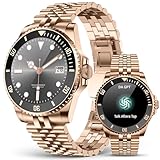
- [Multimodal AI Engine] Leveraging GPT voice commands, you can generate personalized workout plans, meeting summaries, and travel itineraries with just a single tap. Voice commands also enable the automatic creation of AI-generated watch faces—simply say, "I want a picture of a puppy," and the watch instantly displays a unique, custom design. Additionally, the device supports Bluetooth activation of Siri, Bixby, or Google Assistant on your smartphone, making voice control even more convenient.
- [Your Professional Training Companion] Featuring 107 built-in sports modes and a library of professional, real-person coaching demonstrations, this device helps you scientifically enhance your athletic performance. With an IP67-rated dustproof and sweat-resistant design, it is impervious to sweat and rain, allowing for worry-free use while washing your hands or in rainy weather; however, please do not wear it while swimming.
- [Precise Health Monitoring] Equipped with AI smart sensors and dynamic algorithms, it precisely monitors multi-dimensional health metrics—including heart rate, blood oxygen, and blood pressure. Intelligent sleep management identifies three distinct stages—deep sleep, light sleep, and wakefulness—and generates a sleep score accompanied by personalized recommendations (e.g., "Insufficient deep sleep; consider going to bed one hour earlier") to help you manage your health scientifically.
- [HD Bluetooth Calling & Smart Message Management] Equipped with a Bluetooth 5.3 chip and a high-performance noise-canceling microphone (-42dB sensitivity), this device ensures crystal-clear calls even on noisy streets. It supports direct dialing, contact synchronization, and call history viewing—keeping your hands free while driving or exercising. Receive real-time vibration alerts for notifications from apps like WhatsApp and SMS; simply raise your wrist to preview the content.
- [1.19-inch AMOLED Display] Featuring a 390×390 resolution and a peak brightness of 600 nits, details remain clearly visible even under direct sunlight. It comes pre-loaded with 15 watch faces, while the DaFit app unlocks access to over 80 creative designs; it also supports custom watch faces using your own photos. The full-touch COF screen, paired with a rotary encoder, boasts a 0.1-second response time for an exceptionally smooth and fluid user experience.
4. Compare battery claims under your settings
Look for the “up to” estimate, the settings used, and the manufacturer’s qualification. Samsung Canada’s 2026 guide lists up to 30 hours with Always On Display for Galaxy Watch9. For Ultra2, it lists up to 60 hours with Always On Display and up to 80 hours with Always On Display disabled in normal battery mode. These are Samsung figures based on internal lab tests under typical-use scenarios, not independently tested guarantees; Samsung says actual life varies with use and device. Samsung Canada’s Watch9 and Ultra2 guide
Always On Display, LTE, GPS, apps, and continuous workout tracking can all increase power use. Consider your routine: frequent GPS workouts or leaving your phone behind may make a headline estimate less relevant, while charging every night may be acceptable if you already do so.
5. Decide whether you need LTE
Bluetooth models generally rely on a nearby compatible phone for supported functions. LTE models can support mobile functions away from the phone, but require an eligible carrier and compatible plan, which may add a recurring monthly cost. Check carrier eligibility, plan terms, and coverage before choosing LTE. If your phone is almost always nearby, Bluetooth may be sufficient. Samsung Canada’s Watch9 and Ultra2 guide
Quick wins for a faster PC:
Fix the driver behind crashes, sound loss and screen glitchesFind Drivers →Clear out junk files and repair common Windows errorsFree Scan →Scan for outdated or missing drivers - takes under a minuteDriver Scan →6. Check size, comfort, and activity fit
Case diameter and weight affect display space and how comfortable a watch feels, especially overnight. Try to assess the fit for both daytime wear and sleep tracking, and check whether the display is easy for you to read. Match durability, navigation, and workout tools to the activities you actually do rather than paying for features that will stay unused.
Rank #3

- Global Language Translator with 144+ Languages: Break down communication barriers effortlessly! Our AI smartwatch supports real-time translation for 144+ languages, including 8 major official languages. Perfect for travel—ask directions, order meals, or breeze through security with a simple wrist raise.
- Revolutionary GPT-4o AI Companion: The world’s first smartwatch powered by GPT-4o! Voice-activate answers, draft emails, plan trips, and more. Ideal for study, travel, and daily tasks—your personal assistant in the palm of your hand.
- Comprehensive Health Monitoring: Track heart rate, blood oxygen, stress levels, sleep quality, and women’s health cycles. Stay proactive about your wellness with advanced sensors and intuitive insights.
- 50+ Sports Modes for Active Lifestyles: From running and swimming to yoga and hiking, this watch adapts to your workouts. Get detailed metrics and personalized goals to elevate your fitness journey.
- Stunning 1.96” HD Display: Enjoy crystal-clear visuals on the 1.82-inch HD touchscreen. Customize watch faces and navigate apps with ease, even in bright sunlight.
Samsung’s Canada guide lists Watch9 in 40 mm and 44 mm sizes and Ultra2 at 47 mm. It describes Watch9 as an all-round option for everyday wellness and recreational running, while positioning Ultra2 for outdoor activity and endurance, with rugged construction, route guidance, and specialized outdoor features. These are Samsung’s product descriptions, not independent comparative test results. Samsung Canada’s Watch9 and Ultra2 guide
7. Compare the models on the same basis
| Factor | Galaxy Watch9 | Galaxy Watch Ultra2 |
|---|---|---|
| Sizes listed by Samsung Canada | 40 mm and 44 mm | 47 mm |
| Connectivity options described | Bluetooth or LTE versions | LTE |
| Battery estimate in Samsung Canada’s 2026 guide | Up to 30 hours with Always On Display | Up to 60 hours with Always On Display; up to 80 hours with Always On Display disabled in normal battery mode |
| Positioning in Samsung’s guide | Everyday wellness, sleep, general fitness, and recreational running | Outdoor activity, endurance, ruggedness, route guidance, and specialized outdoor features |
| Phone compatibility noted by Samsung | Compatible Android phones; not compatible with iOS | Compatible Android phones; not compatible with iOS |
All comparisons and battery estimates in this table come from Samsung Canada’s 2026 buyer guide; the battery figures are “up to” manufacturer estimates, and actual performance varies. Both models are described as supporting notifications, apps, Samsung Health, Gemini, and dual-frequency GPS. Confirm current feature prerequisites and local availability before purchase. Samsung Canada’s Watch9 and Ultra2 guide
8. Use a pre-purchase checklist
- Write down your phone model and operating-system version.
- Name the one or two AI features you actually want, then verify their device, app, account, language, country, and internet requirements.
- Decide whether you are comfortable charging daily or need longer intervals, and compare estimates under your likely settings.
- Measure or try the case size and consider overnight comfort if you want sleep tracking.
- Choose Bluetooth or LTE based on whether you need mobile functions away from your phone; verify carrier and plan costs for LTE.
- Match durability and activity tools to your typical exercise or outdoor use.
- Read the health-feature intended-use statement and confirm local availability.
Samsung’s own buyer guidance recommends narrowing a choice by smartphone compatibility, watch size, connectivity, and the activities you use your watch for most. Apply those checks to the exact model and regional product page before checkout. Samsung Canada’s Watch9 and Ultra2 guide
Free tools Windows power users keep installed
One-click scans. No signup required.
Quick Recap
Product prices and availability are accurate as of the date/time indicated and are subject to change. Any price and availability information displayed on Amazon at the time of purchase will apply.




