Outdated Drivers Are Slowing You Down
One free scan finds every outdated or missing driver and matches the right update for your exact hardware.Free scan · exact hardware matchWindows Errors? Fix Them Before They Spread
Repair common Windows errors and clear accumulated junk for a smoother, more stable PC - no reinstall needed.Free scan · no reinstallRansomware is malicious software that can lock up files by encrypting them while attackers demand payment for a way to decrypt them. An attack may also involve stealing data and threatening to disclose it, so getting files back does not necessarily resolve the breach. Reducing risk takes several layers: limit exposed systems and accounts, protect access, maintain recoverable backups, and prepare for a response. The detailed controls below are primarily organizational guidance; they are not a universal cleanup procedure for a personal device.
What ransomware does
The interagency #StopRansomware Guide, revised October 19, 2023, defines ransomware as malware that encrypts files, making them and systems that rely on them unusable. Attackers then demand payment for decryption.
As an Amazon Associate I earn from qualifying purchases.
Encryption is not the only pressure tactic
Some attackers also steal data and threaten to publish or otherwise disclose it. CISA calls the combination of encryption and data theft “double extortion.” In some incidents, attackers steal and threaten to disclose data without encrypting files. That means restoring access to systems may not settle questions about what information was taken or who needs to be notified.
Quick wins for a faster PC:
Clear out junk files and repair common Windows errorsFree Scan →Fix the driver behind crashes, sound loss and screen glitchesFind Drivers →Repair Windows errors before they cause bigger problemsFix Now →How ransomware gets in and spreads
There is no single chain that every incident follows. CISA identifies several common organizational routes into a network:
#1 Best Overall

- USB A PORT BLOCKERS WITH KEY: Designed for standard USB A ports on laptops, desktop PCs, notebooks, and docking stations. Includes 10 USB blockers and a removal key for simple physical port control on compatible devices.
- PREVENT DATA THEFT AND UNWANTED ACCESS: Use these USB port locks to restrict unauthorized data transfer on unattended devices. They provide total peace of mind for offices, schools, front desks, computer labs, and libraries.
- FOR WORK, TRAVEL, AND SHARED DEVICES: Useful when devices are left unattended or used by multiple people. Ideal for business travel, classrooms, hotel workstations, field setups, and family computers in shared spaces.
- DUST AND MOISTURE PROTECTION: In addition to controlling port access, these USB A blockers keep out dust, debris, and moisture that collect in open ports over time. A smart choice for everyday protection and cleaner ports.
- DESIGNED FOR IT ADMINS AND HOME USERS: Made from durable, heat resistant PE material. A simple solution for IT teams, schools, parents, and security minded users who want better control over open USB A ports.
- Exposed or vulnerable systems: Internet-facing services with vulnerabilities or misconfigurations can give attackers a way in.
- Compromised credentials: Stolen or misused usernames and passwords can expose email, remote access, or other systems.
- Phishing: A person may be tricked into opening a malicious attachment, following a harmful link, or providing login information.
- Precursor malware: Other malicious software may establish access before a ransomware attack.
- Third parties: A supplier or managed service provider with access to an organization may become an entry route.
- Poorly secured remote access: Remote services, including remote desktop, can create risk when exposed or inadequately protected.
What may happen after the first compromise
Once inside, attackers may move through a network, compromise more accounts or systems, and look for backups they can reach. The initial entry point and the later actions vary by incident; a phishing message is only one possible starting point. CISA’s guide also describes how attackers may target accessible backups, which is why a backup connected to everyday systems may not be available when it is needed.
How to reduce the chance of an attack
For organizations, the strongest approach is layered rather than relying on a single security product. The controls below reflect the organizational recommendations in CISA’s #StopRansomware Guide.
Rank #2

- POWERFUL SECURITY KEY: The YubiKey 5 NFC is the most versatile physical passkey, protecting your digital life from phishing attacks. It ensures only you can access your accounts
- WORKS WITH 1000+ ACCOUNTS: Compatible with popular accounts like Google, Microsoft, and Apple. A single YubiKey 5 NFC secures 100+ of your favorite accounts, including email, password managers, and more
- FAST & CONVENIENT LOGIN: Plug in your YubiKey 5 NFC via USB and tap it, or tap it against your phone (NFC), to authenticate. No batteries, no internet connection, and no extra fees required
- MOST SECURE PASSKEY: Supports FIDO2/WebAuthn, FIDO U2F, Yubico OTP, OATH-TOTP/HOTP, Smart card (PIV), and OpenPGP. That means it’s versatile, working almost anywhere you need it
- PRIMARY & SPARE KEYS: Just like having a spare house key, we recommend buying two YubiKeys - one for daily use and one as a spare. That way you’ll never get locked out of your accounts
Reduce exposed entry points
- Avoid exposing remote desktop services directly to the internet when possible. Limit remote desktop access, close unused ports, and secure necessary remote access with multifactor authentication (MFA).
- Scan for vulnerabilities and prioritize internet-facing assets for fixes. Keep a clear view of which systems and services are exposed.
- Log access to remote services and use account lockouts where applicable, so suspicious access attempts are easier to identify and constrain.
Protect accounts and limit what they can reach
- Use phishing-resistant MFA, especially for email, VPNs, and critical systems. Consider both coverage and the account recovery process when selecting an approach.
- Apply least privilege: give users and service providers only the access their roles require. Separate administrative accounts and duties from ordinary work accounts.
- Review third-party and managed service provider access, and define security and backup responsibilities in contracts. A provider’s access should be scoped to its work, not treated as unlimited by default.
Make phishing and malware harder to succeed
- Train staff to recognize suspicious messages and report them. Clearly flag external email and filter suspicious messages and attachments.
- Keep centrally managed anti-malware current. CISA also recommends application allowlisting and/or endpoint detection and response (EDR) for organizational assets.
Keep backups separate and prove they can be restored
CISA recommends keeping critical backups offline and encrypted, then regularly testing their availability and integrity during recovery. Ransomware may search for backups it can reach and delete or encrypt them, so a copy that remains connected to production accounts and devices may not be a dependable recovery option.
Cloud-to-cloud and immutable storage are options organizations may consider, but immutable storage can bring configuration, compliance, and cost implications. Compare backup approaches by how isolated they are from production access, whether they are encrypted, how reliably they can be tested, how quickly critical data can be restored, and whether they meet the organization’s data and compliance needs. An encrypted external drive can serve as a separate offline copy only if it is disconnected or otherwise isolated when not in use and restoration is tested; buying a drive alone does not prevent infection or guarantee recovery.
Rank #3

- Protect Confidential Data, Prevent Unauthorized Access: Protect sensitive data and prevent unauthorized access to your computer. Our robust metal USB port lock physically locks all unused USB ports, ensuring your files, photos, and confidential information are protected from data theft and external intrusion
- Dust and Moisture Protection,Extending Device Lifespan: Protect your devices from dust, dirt, and moisture, extending their lifespan. By sealing unused ports, you reduce the risk of port damage and malfunction, avoid costly repairs, and maintain the long-term performance of your laptops and desktops
- Quick Tool-Free Installation:Easy installation in seconds. No tools or technical experience required—simply insert the port lock and lock it in place. Its compact and portable design makes it ideal for travel, the office, and public places
- Convenient Master Key and Durable Metal Design:Simplify security management by controlling all compatible locks with a single master key. This lock is made of durable, high-strength metal for long-lasting durability
- Widely Applicable to Homes and Offices:Ideal for home and workplace security. This prevents children from using unauthorized USB drives and accidentally damaging ports, and restricts unauthorized device connections in the office, thereby improving safety and productivity
Prepare before an incident
Keep an incident response and communications plan, exercise it, identify critical assets and dependencies, and set recovery priorities in advance. NIST’s June 2026 announcement describes a ransomware community profile aligned to CSF 2.0, covering governance, identification, protection, detection, response, and recovery; the NIST IR 8374 Revision 1 publication record lists its final publication date as June 11, 2026.
What an organization should do during a suspected incident
These are organizational response priorities, not a universal set of steps for a household device. CISA advises organizations to follow their approved incident response plan. Its guide is an interagency resource authored by CISA, the FBI, the NSA, and MS-ISAC; CISA’s StopRansomware information page describes the participating agencies and the guide’s purpose.
Rank #4
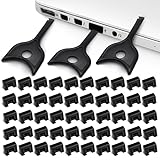
- USB A PORT BLOCKERS WITH KEY: Designed for standard USB A ports on laptops, desktop PCs, notebooks, and docking stations. Includes 50 USB blockers and a removal key for simple physical port control on compatible devices.
- PREVENT DATA THEFT AND UNWANTED ACCESS: Use these USB port locks to restrict unauthorized data transfer on unattended devices. They provide total peace of mind for offices, schools, front desks, computer labs, and libraries.
- FOR WORK, TRAVEL, AND SHARED DEVICES: Useful when devices are left unattended or used by multiple people. Ideal for business travel, classrooms, hotel workstations, field setups, and family computers in shared spaces.
- DUST AND MOISTURE PROTECTION: In addition to controlling port access, these USB A blockers keep out dust, debris, and moisture that collect in open ports over time. A smart choice for everyday protection and cleaner ports.
- DESIGNED FOR IT ADMINS AND HOME USERS: Made from durable, heat resistant PE material. A simple solution for IT teams, schools, parents, and security minded users who want better control over open USB A ports.
- Detect, assess, and contain. Determine which systems are affected and isolate them from the network. If multiple systems or subnets are affected, taking the network offline at the switch level may be appropriate. If needed, disconnect impacted devices from wired or wireless networks. CISA treats powering down as a fallback when disconnection is not possible, because shutdown can destroy volatile evidence.
- Coordinate safely. Follow the incident plan and consider out-of-band communications so responders can coordinate without relying on potentially affected systems.
- Investigate the extent and path of access. Triage critical services, inspect logs and endpoint defenses for signs of earlier compromise, and identify accounts or systems that enabled access. Preserve relevant evidence where feasible.
- Recover in priority order. Restore clean systems from recoverable backups in a way that avoids reinfection. Prioritize services according to the organization’s prepared recovery plan.
- Address stolen data. If information was breached, follow the organization’s notification and communications plan; restored files do not by themselves establish that no data was taken.
If a personal device may be affected
The official guidance cited here is strongest on organizational controls and response planning; it does not establish one household remediation sequence that is safe for every device or incident. Seek trusted technical support and consult current official guidance rather than assuming that a particular cleanup action is always appropriate.
Recommended Free Tools
Quick Recap
Best Value

- Protect Confidential Data, Prevent Unauthorized Access: Protect sensitive data and prevent unauthorized access to your computer. Our robust metal USB port lock physically locks all unused USB ports, ensuring your files, photos, and confidential information are protected from data theft and external intrusion
- Dust and Moisture Protection,Extending Device Lifespan: Protect your devices from dust, dirt, and moisture, extending their lifespan. By sealing unused ports, you reduce the risk of port damage and malfunction, avoid costly repairs, and maintain the long-term performance of your laptops and desktops
- Quick Tool-Free Installation:Easy installation in seconds. No tools or technical experience required—simply insert the port lock and lock it in place. Its compact and portable design makes it ideal for travel, the office, and public places
- Convenient Master Key and Durable Metal Design:Simplify security management by controlling all compatible locks with a single master key. This lock is made of durable, high-strength metal for long-lasting durability
- Widely Applicable to Homes and Offices:Ideal for home and workplace security. This prevents children from using unauthorized USB drives and accidentally damaging ports, and restricts unauthorized device connections in the office, thereby improving safety and productivity
Product prices and availability are accurate as of the date/time indicated and are subject to change. Any price and availability information displayed on Amazon at the time of purchase will apply.




