Free tools Windows power users keep installed
One-click scans. No signup required.
The Home key is a navigation key that moves toward the beginning of the item or area you’re using. Its exact effect depends on the operating system, app, focused control, and keyboard layout: it might move through a list or scrollable region, while some apps use it to move to the start of a text line.
What does the Home key do?
Home takes you toward the start of the thing you’re navigating. In Windows interfaces, Microsoft describes Home and End as keys for moving to the beginning or end of a user-interface region. What happens depends on the control that has focus, rather than following one rule everywhere. Microsoft’s Windows app keyboard-interaction guidance documents these control-specific behaviors.
As an Amazon Associate I earn from qualifying purchases.
In a list or grid
In Windows ListView and GridView controls, Home moves focus to the first element and scrolls it into view. End moves focus to the last element and scrolls it into view.
In a scrollable area
In a Windows ScrollView, Home scrolls the region to the top without changing focus. The key therefore can move the visible content without moving the active selection.
#1 Best Overall
![English Keyboard Stickers [5 in 1], Replacement Keyboard Letters Sticker](https://m.media-amazon.com/images/I/41Fp3igdQGL._SL160_.jpg)
- 【5-in-1】Unlike others, our keyboard letter replacement stickers English set includes 2 x English keyboard stickers, 1 x Tweezer, 1 x Keyboard Cleaning Brush, and 1 x Microfiber Cleaning Cloth for easy, clean, and accurate application. Each sticker: 0.43" × 0.51"
- 【Great Compatibility】The English keyboard stickers fit various desktop, laptop, and tablet computer keyboards. Widely used by students, office or remote workers, multilingual users, language learners, or anyone tired of squinting at worn keys
- 【Renew Worn-Out Keyboards 】Tired of faded letters under your fingers and the high cost of a new keyboard? The keyboard letter stickers adhere well and are easy to read. Renew worn letter keys to give your keyboard a fresh look without replacement
- 【Easy to Install and Remove】The computer keyboard stickers can be easily applied and removed without leaving residue. Each letter of the stickers is precisely cut, and the F and J keys feature alignment notches to blend naturally with your keyboard
- 【Premium Materials】The keyboard stickers are made of durable, long-lasting black vinyl materials with a matte texture, which offers you a comfortable tactile experience similar to the original keyboard. It will not fade for 5 years under normal use
In a text field
Some applications use Home to move the insertion point to the beginning of the current line. That is a common text-editing context, but the cited Microsoft guidance establishes list, grid, and scrollable-region behavior—not a universal text-field rule. Check the instructions for the app you’re using if Home behaves differently than expected.
Why Home can behave differently
Before deciding what the key should do, consider four things: the operating system, the active app, the control that has focus (such as a text field, list, or scrollable area), and whether the keyboard has a dedicated Home key or a mapped alternative. Microsoft’s Windows examples show how the focused control matters; Chromebook documentation shows that keyboard layout and configurable key actions matter too.
Rank #2

- 【DESIGN FOR】- The english keyboard stickers are suitable for a variety of keyboards for Desktops, Laptops and Computer. The keyboard letter stickersare designed with big font, well suited for different language communication, education or a language self-learning.
- 【EASY TO APPLY & REMOVE】- The english keyboard stickers are easy to apply and remove without leaving any residue behind. The individual keyboard replacement english stickers have been cut neatly, and there is a notch for the F and J keys to blend well with your keyboard.
- 【RENEW THE WORN-OUT KEYBOARD】- It’s a great way to update your keyboard worn-out letter keys with a different fresh new look, so you don't have to spend a lot of money on a new keyboard.
- 【PREMIUM MERTIALS】- The computer keyboard stickers are made of high-quality, non-transparent vinyl with a matte texture that will give you a good grip and feel close to the original keyboard. Long-lasting, durable coating, not fade for 5 years in normal use.
- 【PACKAGE INCLUDED】- This keyboard replacement stickers english set includes 2 x Full Size English keyboard stickers. Each one small sticker: 0.43" x 0.51". Full Size: 8.50" x 5.74". Risk-Free Replacement Warranty with CaseBuy
What if your Chromebook has no Home key?
Chromebook keyboards differ from regular keyboards, and the physical layout can vary. Google’s Chromebook keyboard guide explains that users can set up actions including Home and End, and choose which keys perform them. If your keyboard has no key labeled Home, check your Chromebook keyboard settings and the shortcut help for your device to see whether an alternative is configured.
Quick wins for a faster PC:
Fix the driver behind crashes, sound loss and screen glitchesFind Drivers →Repair Windows errors before they cause bigger problemsFix Now →Scan for outdated or missing drivers - takes under a minuteDriver Scan →Google notes that its standard-key assumptions are based on a US English QWERTY layout; international layouts may differ. Don’t assume that a key combination or physical key placement is identical across all Chromebook models and regions.
Rank #3

- Compatible With: Logitech MX Keys / Logitech MX Keys S Series Keyboard
- Good Quality: Each replacement support brackets keycap hinge was tested before shipping and working in good condition.
- Made from hing quality ABS, these keycap hinge are built to last and offer reliable functionality.
- This replacement requires skilled installation to replace the white hing support brackets effectively.
- Package contain 2pcs support hing brackets, 1pc tweezer
How to get a dedicated Home key
If you regularly need Home and your compact keyboard lacks a dedicated key, a full-size external keyboard with a labeled Home key is one practical option. Check the keyboard’s layout and compatibility with your operating system before choosing one; the availability of a particular model or feature depends on the product.
Quick Recap
Best Value
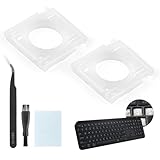
- Compatibility: This keyboard hinge compatible with Logitech MX Keys is suitable for square keys. This product is not a keyboard and does not include keycaps. Please confirm your purchase requirements and model before purchasing to avoid placing an incorrect order.
- Application: If your keyboard keys are falling off, you can use our keyboard hinge clip for Logitech MX Keys to replace them and restore your keyboard to like-new condition. Please note that if your keyboard keys are not working properly, our product is not suitable for such cases.
- Quality and Durability: For Logitech MX Keys support brackets is made of plastic, which reduces wear and tear during use and increases the durability of your keyboard. It is quality-inspected before shipment, so you can use it with confidence.
- Easy Installation: First, remove the keycaps, align the keyboard hinge for Logitech MX Keys insert it into place, press firmly and then reinstall the keycaps. If you are unsure how to operate, we recommend that you consult a professional.
- Packaging Details: 2 Keyboard hinge clips for Logitech MX Keys + 1 set of tools. Our tools can help you install easily. If you have any questions about the product or need an installation video, please leave us a message.
Rank #4
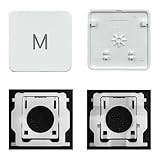
- Package inlucdes:1pcs Key+ 1 Pcs Hinge
- Replacement Models Number For: Magic Keyboard w/ Touch ID A2438 A2439 2021 Year
- Replacement Models Number For:Magic Keyboard A2449 A2450
- Replacement Modes Number For: Magic Keyboard A3118 A3203 2024 Year
Product prices and availability are accurate as of the date/time indicated and are subject to change. Any price and availability information displayed on Amazon at the time of purchase will apply.




