The Society for Motion Picture and Television Engineers (SMPTE) is a global professional society for creative professionals, media technologists, and engineers. It advances media technology and develops standards, recommended practices, and engineering guidelines for motion-picture, television, and related imaging systems. It is a professional and standards-development organization—not a film or television production company.
What does SMPTE do?
SMPTE works on the technical practices that help motion-imaging equipment, content, and workflows function consistently together. Its scope includes images as they are produced, processed, reproduced, distributed, and displayed, along with associated audio, data, metadata, and control signals. The Society describes its mission as “To inspire technological advancement in art, science, and media everywhere for everyone.” SMPTE’s “Who We Are” page describes its global professional community.


As an Amazon Associate I earn from qualifying purchases.
The Society’s standards overview says it has over 800 standards, recommended practices, and engineering guidelines. Its “Who We Are” page says it has more than 5,000 members. These are figures stated on SMPTE’s pages, which do not display a year for either figure.
Recommended Free Tools
What kinds of documents does SMPTE publish?
SMPTE publishes several types of engineering documents. They differ in purpose, and a draft under committee review is not the same thing as a published standard.
#1 Best Overall

- Used Book in Good Condition
| Document type | Purpose or status |
|---|---|
| Standard (ST) | States criteria necessary for effective interchange or interconnection. |
| Recommended Practice (RP) | Facilitates implementation. |
| Engineering Guideline (EG) | Another category of SMPTE engineering document. |
| Committee draft | Work in development; it should not be described as a published standard. |
SMPTE also publishes other informative or disclosure document types. Its standards process information explains the Society’s document categories and process.
How are SMPTE standards developed?
Standards development is collaborative. SMPTE’s overview describes seven technology committees, supported by working and drafting groups that handle detailed work. Study groups and task forces address specialized or cross-cutting activity. Committee scopes include electronic capture, generation, editing, mastering, archiving, and reproduction; theatrical distribution and operations; metadata and registries; file formats; facility infrastructure; media systems and control; and packaging and interchange. SMPTE’s standards overview outlines these areas.
Professionals interested in or affected by the standards can participate in committee work, subject to the applicable participation agreement; fees may apply. SMPTE’s standards FAQ describes participation details.
Quick wins for a faster PC:
Clear out junk files and repair common Windows errorsFree Scan →Scan for outdated or missing drivers - takes under a minuteDriver Scan →What are examples of SMPTE standards?
SMPTE identifies several widely used standards and technologies as key examples. Their roles span transport, file exchange, cinema delivery, and timekeeping.
Rank #3
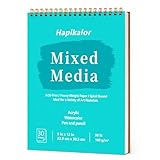
- 【Convenient Spiral Bound】---Designed as a user-friendly mixed media sketchbook, the ergonomic spiral binding ensures effortless use for both left-handed and right-handed individuals. This paint sketchbook allows the mixed media paper to lay flat when opened for comfortable writing or reading.
- 【Easy Tear-Away Pages】---Every page features clean micro-perforation, allowing beginners and young artists to easily remove their artwork without jagged edges. This makes it effortless for kids to tear out a drawing as a gift for parents, or for students to submit individual assignments to teachers. It turns the sketchbook into a convenient portfolio, encouraging creators to proudly display and share their progress.
- 【High-quality Paper Quality 】---This professional sketch book mixed media (98lb/160gsm) is built for durability. Each set contains 30 high-quality sheets of thick paper sketchbook material that resists bleed-through. We designed this mixed media pad so pages can be easily removed and will hardly tear. As a heavy-duty painting book or paint book, it is very suitable for sketching, illustration, and serves as an excellent paper for painting and drawing.
- 【Acid-Free & Non-Faded】---Our mixed media journal is made from fade-resistant, acid-free art paper for drawing and painting. This durable mix media sketchbook preserves your creativity, making it an ideal oil pastel sketchbook or pastel paper solution. It ensures your artwork stays vibrant for years to come, functioning perfectly as a long-lasting sketchbook mixed media for all your artistic endeavors.
- 【Perfect Gifts for Teen & Tween Girls】---Looking for a thoughtful present that sparks creativity? Our multimedia sketch book is an ideal gift for any occasion—whether it's a holiday surprise, a birthday celebration, or a festive Christmas stocking stuffer. Designed to delight young artists, this art sketchbook effortlessly fits into gift baskets or stands alone as a cherished keepsake, perfect for anyone needing a high-quality sketch book thick paper option.
- ST 2110: a suite for professional media over IP networks.
- MXF (Material eXchange Format): a file format for exchanging audiovisual content and related metadata.
- IMF (Interoperable Master Format): a format for exchanging and managing versions of finished media.
- D-Cinema: standards supporting digital cinema distribution and presentation.
- SDI (Serial Digital Interface), including HD-SDI: interfaces used to transport digital video in professional facilities.
- Time Code: a system for identifying positions in media by time.
SMPTE also explains DPX as a common file format for digital intermediate and visual-effects work, and describes HDR/EOTF standards as supporting consistent representation of high-dynamic-range content across a workflow. See SMPTE’s standards overview and standards FAQ for its examples and explanations.
Independent reader supportYour contribution helps us test, update, and keep practical guides available for everyone.Does everyone have to follow a SMPTE document?
No. The Society’s Standards Operations Manual says that the existence of an engineering document does not obligate a member or nonmember to follow it. Whether a particular standard applies depends on the relevant contract, regulation, workflow, or other requirements—not simply on the document’s publication by SMPTE. This principle appears in the SMPTE Standards Operations Manual, Version 3.1, approved 9 February 2015.
Quick Recap
Best Value
Rank #4
Product prices and availability are accurate as of the date/time indicated and are subject to change. Any price and availability information displayed on Amazon at the time of purchase will apply.




