The Tool Desk
Outbyte PC Repair FREEClear out junk files and repair common Windows errorsFree Scan →Outbyte Driver Updater FREEScan for outdated or missing drivers - takes under a minuteDriver Scan →Remote deposit capture (RDC) is a way to deposit a check by sending its digital information to a financial institution from a location away from a branch. For consumers, that usually means photographing a check in a bank’s mobile app. Businesses may use a check scanner and a bank’s RDC service. Availability, eligible checks, limits, fees, equipment, and funds timing depend on the financial institution.
What remote deposit capture means
Remote deposit capture is a deposit delivery system in which a financial institution receives digital information from deposit documents captured somewhere other than the institution’s usual teller or processing location. In everyday consumer banking, it commonly refers to mobile check deposit. In business banking, it can describe a service for scanning checks and transmitting their images and associated information to a bank.
As an Amazon Associate I earn from qualifying purchases.
RDC describes how a deposit is captured and delivered; it does not mean that every bank offers the service or accepts every check submitted through it. Check eligibility and service terms are set by the financial institution.
How remote deposit capture works
- Prepare the check. Follow the bank’s endorsement instructions before capturing it.
- Capture the information. Use the bank’s mobile app to photograph the front and back, or use a business check scanner if the bank supports that setup.
- Transmit the deposit. The image and related payment information are sent electronically to the financial institution.
- The bank processes the deposit. The institution handles collection through its check-processing arrangements and applies its account terms, including any availability timing or hold.
The customer’s phone image is not automatically a “substitute check.” Under U.S. Check 21 law, a substitute check is a particular paper instrument created from an electronic image that meets statutory requirements. Check 21, effective October 28, 2004, enables electronic check processing and establishes the substitute-check framework; it does not require banks to accept checks electronically or create substitute checks. See the Federal Reserve’s Check 21 FAQ.
#1 Best Overall

- Best-in-class reliability, superior image quality
- Flawless Document Handling, MICR Read Accuracy
Mobile deposit and business RDC
| Type | Typical capture method | What to verify |
|---|---|---|
| Consumer mobile deposit | Photos of the check’s front and back submitted through a bank app. | Eligible checks, endorsement instructions, deposit and item limits, holds, and any image-retention instructions. |
| Business RDC | A check scanner and banking service, when supported by the financial institution. | Eligible accounts, compatible devices and software, equipment costs, transaction fees, deposit limits, image-retention rules, and support. |
These are common approaches, not universal requirements. A business should confirm hardware and software compatibility with its bank before buying or leasing a scanner; there is no single scanner requirement that applies across financial institutions. The Minneapolis Fed’s overview of mobile RDC describes the basic mobile workflow.
Does RDC make funds available immediately?
No. A remote submission does not guarantee immediate access to deposited funds or faster availability than another deposit channel. In the United States, Regulation CC addresses funds availability and check collection. The Federal Reserve notes that Check 21 did not itself change the maximum hold times described in its Check 21 FAQ. The timing that applies to an account depends on applicable rules and the account’s terms, so check the bank’s stated availability policy.
Rank #2

- Scanner Type: Document Scanner| Scanner Form Factor: External| Scan Mode: 256-level grey scale, Black and White| Scan Speed: 500 mm/s| Scan Element Type: Contact Image Sensor (CIS)| Scanner Input Type: Color| Scanner Interface: USB 2.0| Header / Model: TM-S1000| Features: Document Length 120 mm - 235 mm (approx 4.8 in - 9 in), Document Height 68mm - 120 mm (approx 2.7 in - 4.8 in)| Width: 6.30 Inch| Depth: 14.00 Inch| Height: 6.93 Inch
What RDC may cost
Consumer mobile deposit and commercial RDC pricing are determined by the financial institution and the account terms. Commercial services may involve monthly service fees, per-item fees, scanner purchase or lease charges, and other fees. These are fee categories listed in a 2011 Federal Reserve document, not current market prices; ask the bank for its current fee schedule before enrolling or obtaining equipment. Federal Reserve material on remote deposit capture discusses these categories.
What to check before using a bank’s RDC service
- Whether the service is available for your account and which check types it accepts.
- Whether capture is through a mobile app, a scanner, or both, and which devices or software are supported.
- Any per-check or daily deposit limits and image-quality requirements.
- Funds-availability terms, including when a hold may apply.
- Monthly, per-item, equipment, or other fees in the bank’s current pricing.
- How long to retain the original check and what to do with it after submission.
- How to contact support and report a submission or processing problem.
For financial institutions, RDC also changes check capture, transmission, clearing, and settlement. FDIC/FFIEC guidance describes potential processing-cost and customer-access benefits alongside additional operational, legal, compliance, and monitoring risks. That guidance is directed to institutions rather than a consumer checklist. See the FDIC’s RDC risk-management guidance.
Quick Recap
Rank #4
- Best-in-class reliability, superior image quality.
- Flawless Document Handling, MICR Read Accuracy.
- 50 dpm, 50 doc feeder, ink jet.
Rank #3
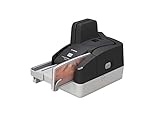
- Sharper images with less distortion
Product prices and availability are accurate as of the date/time indicated and are subject to change. Any price and availability information displayed on Amazon at the time of purchase will apply.




