Mini LED and full-array local dimming are not competing display types. Mini LED describes the small, densely packed LEDs used to illuminate an LCD screen; full-array local dimming (FALD) describes a backlight arrangement in which LEDs behind the screen are controlled in separate zones. A Mini LED TV can use full-array local dimming. The label alone does not tell you how well a particular TV controls light or renders dark scenes.
What Mini LED means
An LCD television does not create light at each pixel. It uses a backlight behind the LCD panel, which modulates that light to form the picture. Mini LED uses smaller backlight LEDs than conventional LED systems, allowing manufacturers to place more of them behind the screen. Sony describes its Mini LED backlights as using smaller, denser LEDs than conventional full-array LED systems (Sony).
As an Amazon Associate I earn from qualifying purchases.
Mini LED identifies the backlight hardware, not a guaranteed number of independently controlled sections. The count, arrangement and behavior of those sections vary by model and screen size.
The Tool Desk
Outbyte Driver Updater FREEScan for outdated or missing drivers - takes under a minuteDriver Scan →Outbyte PC Repair FREEClear out junk files and repair common Windows errorsFree Scan →What full-array local dimming means
Full-array describes LEDs distributed behind the screen rather than only along its edges. Local dimming means the TV can lower or raise the brightness of groups of backlight LEDs independently. Because each group illuminates an area rather than a single pixel, a bright object against a dark background can still cause some surrounding glow, often called blooming.
#1 Best Overall

- Witness virtual worlds come to life on a stunning VA panel equipped with state-of-the-art Mini-LED backlight technology and 336 individual dimming zones that produce true blacks and brighter whites
- With Panel resolution 2560x1440, this monitor boasts a pixel density that delivers brilliantly sharp images with the finest details
- Lightning-fast 180Hz (overclocked, via DP1.4) refresh rate and rapid 1ms GtG response time lets you target moving opponents with precision, putting you ahead of the game. Fast-moving action and dramatic transitions will be rendered smoothly without the effects of ghosting
- Adaptive-Sync ensures ultra-smooth, tear-free team fights for flawless skill shots and stutter-free loading times
- The 3-sided frameless display with calibrated color gamut provides true-to-life images. Impressive 134% sRGB color gamut and VESA DisplayHDR 1000 brings characters to life and creates stunning imagery with rich details and diverse contrast
The terms describe different attributes: Mini LED is about the size and density of backlight LEDs; FALD is about backlight placement and zone-based control. TCL’s comparison page, for example, lists full-array local dimming and QD-Mini LED as distinct product tiers, illustrating that a manufacturer can use both concepts in a product description (TCL Canada).
How Mini LED and FALD compare
| Question | Mini LED | Full-array local dimming |
|---|---|---|
| What does the term describe? | Smaller, denser LEDs in an LCD backlight. | LEDs behind the panel, dimmed in separate zones. |
| Can the two be used together? | Yes. A Mini LED TV can use full-array local dimming. | Yes. FALD can be used with different LED backlight implementations. |
| Does the term guarantee picture quality? | No. It does not specify zone count or control quality. | No. The result depends on the zones, dimming algorithm, LCD panel and implementation. |
Smaller LEDs can make it possible to create more numerous or finer-grained dimming zones. More zones can help control light more precisely, but the number is not a quality score by itself. RTINGS cautions that a poor algorithm can produce weak local-dimming results even with 10,000 zones, and recommends comparing performance rather than choosing a TV solely by its zone count (RTINGS).
Rank #2

- 27" QHD MINI-LED IPS DISPLAY Experience sharp 2560×1440 QHD resolution on a 27-inch mini-LED IPS panel with 1152 local dimming zones, delivering vivid colors, deeper contrast, and detailed visuals for immersive gaming.
- 320HZ REFRESH RATE & 1MS RESPONSE TIME Dominate fast-paced gameplay with an ultra-smooth 320Hz refresh rate via HDMI 2.1 or DisplayPort 1.4 and fast 1ms GtG response time, minimizing blur and ghosting.
- DISPLAYHDR 1000 CERTIFIED Enjoy lifelike HDR visuals with DisplayHDR 1000 certification, featuring 700 nits HDR brightness and 1200 nits peak brightness for stunning highlights and enhanced contrast.
- ADAPTIVE SYNC & EYE COMFORT FEATURES Stay smooth and tear-free with Adaptive Sync, while Flicker-Free technology helps reduce eye strain during extended gaming sessions.
- WHITE GAMING DESIGN WITH FULL ERGONOMICS Stand out with a sleek white finish and fully ergonomic stand featuring height adjustment, tilt, swivel, and pivot for personalized comfort and setup flexibility.
Why zone count does not tell the whole story
A zone is an area of the backlight, not an individual pixel. When a zone brightens to show a small highlight, light may spill into nearby dark parts of the image. More or smaller zones may reduce the area affected, but the TV must also decide how quickly and how far to dim each zone as picture content changes. The LCD panel’s native contrast affects how much of that backlight control reaches the viewer.
Do these 3 things before closing this tab:
1Scan for outdated or missing drivers - takes under a minute2Clear out junk files and repair common Windows errors3Fix the driver behind crashes, sound loss and screen glitchesCheck performance across several attributes rather than treating any single specification as decisive:
Rank #3

- 27" QHD MINI-LED DISPLAY Experience sharp 2560×1440 QHD resolution on a 27-inch mini-LED VA panel with 1152 local dimming zones, delivering deep contrast, vivid colors, and enhanced detail for immersive gaming.
- 300HZ REFRESH RATE & 1MS RESPONSE TIME Gain a competitive edge with an ultra-smooth 300Hz refresh rate via DisplayPort or HDMI and a fast 1ms GtG response time, minimizing motion blur and ghosting during fast-action gameplay.
- DISPLAYHDR 1000 CERTIFIED Enjoy brighter highlights and deeper contrast with DisplayHDR 1000 certification, delivering enhanced HDR visuals for gaming, streaming, and multimedia content.
- WIDE COLOR GAMUT PERFORMANCE Featuring an expanded color range of 150.2% sRGB (CIE1976), this monitor provides vibrant, accurate colors for immersive visuals and improved content clarity.
- ADAPTIVE-SYNC & ERGONOMIC DESIGN Stay in sync with Adaptive-Sync technology for smooth, tear-free gameplay, while the fully ergonomic stand offers height adjustment (130mm), tilt, swivel, and pivot for optimal comfort during extended sessions.
- Zone behavior and transitions: Look for whether dimming follows moving objects cleanly or creates visible halos, pumping or abrupt changes.
- Native panel contrast: The LCD panel’s ability to block light influences black levels independently of the backlight’s zone count.
- Brightness and HDR: Peak brightness can affect the impact of highlights, but a manufacturer’s peak-brightness claim does not establish how the TV handles mixed bright and dark scenes.
- Dark-scene detail: Check whether shadow detail remains visible without raising blacks or crushing dark areas.
- Screen size and model year: Specifications and behavior can differ between sizes or generations sold under a related model name.
Examples of model-specific zone claims
Published figures are useful only with their source and scope attached. These examples show why a zone count should not be generalized across a brand or technology category.
| Example | What the source says | How to interpret it |
|---|---|---|
| Sony BRAVIA 9 | RTINGS gave the TV a zone-precision score of 9 with 1,512 zones in its 2024–2025 TV comparison. | A model-specific independent test result, not a universal Mini LED statistic (RTINGS). |
| TCL Q7C-UK | TCL lists up to 2,048 zones for a configuration on its UK Mini LED page. | A manufacturer-reported, configuration-specific maximum; check the screen size and UK listing (TCL UK). |
| TCL QD-Mini LED tier | TCL Canada’s comparison page lists up to 1,500+ zones for this tier. | A tier-level manufacturer claim, not a figure applying to every TCL TV (TCL Canada). |
How to compare TVs before buying
- Identify the exact model and size. Confirm the complete model name, screen size, market and model year. Regional names and specifications can differ; a listing for one country or size may not describe the TV you are considering.
- Read the local-dimming claim in context. Note the published zone count and whether it refers to your exact configuration. Treat manufacturer figures as specifications or claims, not proof of image quality.
- Check independent testing of that model. Prioritize observations about blooming, dark-scene detail, dimming transitions and native contrast alongside any zone count. Testing and rankings are time-sensitive, so check the specific model rather than relying on a category label.
- Compare like with like. When possible, compare TVs of similar sizes and the same model year under the same types of scenes. This reduces the chance that a size or generation difference is mistaken for a technology difference.
For a concrete manufacturer example, TCL’s UK page labels the C6K-UK a QD-Mini LED television. That classification is useful for identifying the product, but it does not by itself establish how it performs against another model (TCL UK).
Rank #4
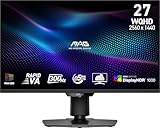
- Mini-LED – Improves HDR with full-array local dimming and 1,152 zones for deeper blacks and brighter highlights
- Rapid VA – Ensures the intensity and purity of colors when gaming
- VESA DisplayHDR 1000 – VESA-certified eye-catching details through precise contrast and shadow adjustment
- 300Hz High Refresh Rate – Delivers smooth visuals for faster in-game response
- 0.5ms (GtG, Min.) Response Time – Eliminates screen tearing and choppy frame rates
How to read Mini LED marketing terms
Terms such as QD-Mini LED and SQD-Mini LED are company terminology, not standardized performance guarantees. TCL’s April 17, 2026 announcement introduced its QM8L and QM7L SQD-Mini LED series and made claims about color, dimming and picture quality. Those statements describe TCL’s products and should be read as manufacturer claims, not independent findings (TCL North America).
Quick wins for a faster PC:
Fix the driver behind crashes, sound loss and screen glitchesFind Drivers →Repair Windows errors before they cause bigger problemsFix Now →Scan for outdated or missing drivers - takes under a minuteDriver Scan →Sony likewise describes its own approach this way: “Our unique XR Backlight Master Drive technology uses a Sony-developed local dimming algorithm to control thousands of tiny, high-density LEDs with absolute precision and independence.” This is Sony’s account of its system, not a general definition of Mini LED performance (Sony). To judge the result, look beyond brand-specific labels and compare the exact television’s tested picture behavior.
Quick Recap
Product prices and availability are accurate as of the date/time indicated and are subject to change. Any price and availability information displayed on Amazon at the time of purchase will apply.




