The Tool Desk
Outbyte PC Repair FREERepair Windows errors before they cause bigger problemsFix Now →Outbyte Driver Updater FREEFix the driver behind crashes, sound loss and screen glitchesFind Drivers →Constant bitrate (CBR) is an encoder rate-control mode that aims to keep a stream near a chosen bitrate or within a constrained rate range. Use it for live streaming when the platform recommends it or predictable bandwidth use matters; for offline video, variable bitrate (VBR) or a constant-quality mode may make better use of bits. CBR is a target for the encoder, not a promise that every frame or every moment of network traffic will use exactly the same number of bits.
What CBR means
A video encoder has to decide how many bits to spend representing each part of a video. In CBR mode, it aims to stay near a selected bitrate or within a constrained rate envelope. That can make the stream’s rate more predictable for a live platform or a bandwidth-limited connection.
As an Amazon Associate I earn from qualifying purchases.
It does not make every frame equally detailed. A simple still scene may need fewer bits than a fast-moving scene, but a CBR encoder is still working toward its selected rate constraint. The exact behavior depends on the encoder and codec. FFmpeg’s codec documentation, for example, describes encoder-specific CBR options rather than one universal setting that applies to every codec: FFmpeg Codecs Documentation.
CBR vs. VBR: which should you choose?
| Decision | CBR | VBR |
|---|---|---|
| Rate behavior | Aims for a selected or constrained rate; the exact behavior varies by implementation. | Varies the rate with the complexity of the content. |
| Typical fit | Live streaming or constrained delivery where a predictable rate is useful. | Offline or on-demand encoding where complex scenes can use more bits. Google recommends VBR for high-motion VP9 video-on-demand content. |
| Main trade-off | If a complex scene reaches the bitrate ceiling, the encoder may have to reduce quality. | Rate is less predictable, but bits can be allocated according to scene complexity. |
These are general tendencies, not rules that make VBR universally unsuitable for streaming or CBR universally better quality. Follow the destination platform’s requirements and the documentation for the specific encoder. Google’s guidance for VP9 recommends CBR for live streaming and VBR for high-motion video-on-demand; it also explains that quality falls as the CBR ceiling is reached: Google’s VP9 bitrate-mode guidance.
#1 Best Overall

- ⭐【Innovative Product with Leading Technology】- Equipped with an advanced H.265/H.264 dual encoding chip, supports 1920x1080 resolution input and output, achieving 60fps high-definition presentation with realistic and delicate color reproduction and lossless detail. It also supports HDCP 1.4 decryption, easily decoding various HDMI high-definition video sources, delivering a cinematic visual experience for both professional live streaming and high-definition content transmission.
- ⭐【Multi-protocol and Multi-platform Compatibility】- Fully compatible with streaming protocols such as HTTP, RTSP, RTMP(S), SRT, HLS(M3U8), MP4, Multicast(UDP, RTP, PTL), ONVIF, FLV, it can simultaneously output 4 video streams with different protocols and push them to live streaming platforms such as YouTube, Facebook, Twitch, and Vimeo with one click. Simultaneous live streaming across multiple platforms can be achieved without additional equipment.
- ⭐【Highly Customizable Settings to Meet Individual Needs】- It supports adding static text, scrolling captions, brand logos, and timestamps. Users can freely adjust core parameters such as video resolution, frame rate, and bitrate, and also perform personalized editing functions such as video cropping, rotation, flipping, and mirroring. It supports dual input of HDMI embedded audio and line-in audio, with adjustable sound quality, making your live stream content more distinctive and allowing you to create a unique brand live stream style.
- ⭐【Stable and Efficient Transmission, Easy Operation】- Employing HDMI to Ethernet core connection technology, it ensures stable and reliable network transmission with low latency and no lag, adapting to various network environments. Equipped with an intuitive user interface and detailed instruction manual, no professional technical background is required; setup can be completed quickly after connecting the device. It is also compatible with multiple terminals such as computers and mobile phones for management, and the video stream status can be viewed in real time via a URL.
- ⭐【Lifetime Free Warranty and Technical Supports】- All URayCoder video codecs come with a lifetime free warranty and technical supports, supporting secondary development and feature customization to meet enterprise-level personalized needs. Meanwhile, we providing many kinds of customization services such as shell pattern printing, logo addition, hardware and function development, ensuring reliable quality and worry-free after-sales service.
When CBR is the right choice
Live streaming to a platform that specifies CBR
For a live stream, a platform’s ingest recommendations are a sound starting point because the stream has to reach the service continuously. YouTube’s current encoder-settings page recommends CBR for RTMP/RTMPS live streams. Its bitrate recommendations vary by codec, resolution and frame rate, so do not select a number based on resolution alone: YouTube Help: Choose live encoder settings, bitrates, and resolutions.
Bandwidth-constrained delivery
A constrained rate can help avoid an encoder producing unexpectedly large bitrate peaks. NVIDIA describes NVENC CBR as a fit for streaming applications with strict bandwidth constraints. CBR still cannot compensate for an upload connection that lacks capacity or for congestion and other delivery problems.
Rank #2

- Avoid storing the products in a place at high temperature, high humidity and in Corrosive gases.
- Do not touch the product with water, as this may cause abnormal output waveforms.
- Material: Plastic, Metal; Main Color: Blue, Silver Tone.
- Rated Voltage: DC 5V; Shaft Movement Direction: Action Type: Momentary.
- Package Content: 10 x EC11 Rotary Encoder with Switch (20MM).
Offline video
For a file that will be uploaded or played later, strict rate predictability may matter less than quality, file size and delivery efficiency. VBR can spend more bits on difficult scenes and fewer on simple ones. Compare VBR or constant-quality modes for the codec and editing or encoding tool you use; there is no single best mode for every offline workflow.
Recommended Free Tools
YouTube Live: choosing a starting bitrate
YouTube’s published recommendations for live ingest differ by codec. The figures below are YouTube’s recommendations on its encoder-settings page, accessed in 2026; they are not universal values for other destinations or a guarantee of a trouble-free stream.
Rank #3

- ⭐【Innovative Product with Leading Technology】- Equipped with an advanced H.265 /H.264 dual encoding chip, supports 4K UHD (3840x2160) video input and output, with a maximum frame rate of 30fps at 4K resolution and up to 120fps at 2K and lower resolutions, delivering a smooth and detailed visual experience. It also supports HDCP 1.4 decryption, easily decoding various HDMI ultra HD video sources, delivering a cinematic visual experience for both professional live streaming and 4K ultra HD content transmission.
- ⭐【Multi-protocol and Multi-platform Compatibility】- Fully compatible with streaming protocols such as HTTP, RTSP, RTMP(S), SRT, HLS(M3U8), MP4, Multicast(UDP, RTP, PTL), ONVIF, FLV, WebRTC, TRTC, ICECAST, it can simultaneously output 4 video streams with different protocols and push them to live streaming platforms such as YouTube, Facebook, Twitch, and Vimeo with one click. Simultaneous live streaming across multiple platforms can be achieved without additional equipment.
- ⭐【Highly Customizable Settings to Meet Individual Needs】- It supports adding static text, scrolling captions, brand logos, and timestamps. Users can freely adjust core parameters such as video resolution, frame rate, and bitrate, and also perform personalized editing functions such as video cropping, rotation, flipping, and mirroring. It supports dual input of HDMI embedded audio and line-in audio, with adjustable sound quality, making your live stream content more distinctive and allowing you to create a unique brand live stream style.
- ⭐【Stable and Efficient Transmission, Easy Operation】- Employing HDMI to Ethernet core connection technology, it ensures stable and reliable network transmission with low latency and no lag, adapting to various network environments. Equipped with an intuitive user interface and detailed instruction manual, no professional technical background is required; setup can be completed quickly after connecting the device. It is also compatible with multiple terminals such as computers and mobile phones for management, and the video stream status can be viewed in real time via a URL.
- ⭐【Lifetime Free Warranty and Technical Supports】- All URayCoder video codecs come with a lifetime free warranty and technical supports, supporting secondary development and feature customization to meet enterprise-level personalized needs. Meanwhile, we providing many kinds of customization services such as shell pattern printing, logo addition, hardware and function development, ensuring reliable quality and worry-free after-sales service.
| Live video format | AV1 or H.265/HEVC | H.264 |
|---|---|---|
| 1080p30 | 10 Mbps recommended | 14 Mbps recommended |
| 1080p60 | 12 Mbps recommended | 17 Mbps recommended |
For other resolutions and frame rates, consult YouTube’s full codec-specific table rather than extrapolating from these examples. YouTube also lists a recommended keyframe frequency of two seconds, not exceeding four seconds, for the listed live encoder guidance. Its supported video codec options include H.264, H.265/HEVC and AV1; availability in a particular setup depends on the encoder and stream workflow. See YouTube’s current live encoder settings for the complete table and requirements.
Set up and check a CBR live stream
- Check the destination’s requirements. In YouTube Help, open Choose live encoder settings, bitrates, and resolutions. Select a recommended bitrate for the resolution, frame rate and codec you actually plan to send.
- Set rate control in your encoder. Choose CBR if that option is available, then enter a target that follows the destination’s guidance. Setting the mode alone does not choose an appropriate target for your platform or connection.
- Configure the keyframe interval. For YouTube’s cited live settings, use its recommended two-second frequency and do not exceed four seconds. Check the encoder’s own documentation for how it represents that interval.
- Check upload capacity. YouTube recommends using a speed test to assess upload bitrate. Make sure the connection can sustain the planned stream; a nominal CBR target does not create extra upload capacity.
- Run a representative test. Before the real broadcast, include movement and audio similar to what viewers will see and hear. A static desktop test may not reveal issues that appear during fast motion.
- Monitor stream health while live. Watch the platform’s stream-health indicators and respond to warnings rather than assuming the configured bitrate is reaching the service as intended. YouTube advises testing before a stream and monitoring stream health during it.
Why a CBR stream may not look or measure as constant
CBR describes encoder rate control, not a universal guarantee of identical instantaneous network throughput. Encoders may enforce the target differently; buffering, protocol overhead and transport behavior also affect observed traffic. NVIDIA’s NVENC guidance illustrates why the exact settings matter: in its documented FFmpeg workflow, -rc cbr selects CBR, -b:v sets the target, and setting -maxrate equal to -b:v enforces CBR behavior in that workflow. A higher -maxrate allows peaks above the target. Those options are specific to the documented NVENC use and should not be copied as a universal command for other encoders: NVIDIA’s FFmpeg and GPU-acceleration guide.
Rank #4
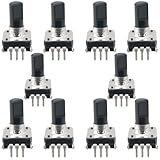
- Type: EC12 rotary encoder without switch; Adjustment method: 360 degrees; Number of pulses: 24
- Shaft type: Type D; Maximum operating current (resistive load): 10mA max; Rated voltage: 5 volts 500 characters can also be written
- Shaft Diameter: 6mm/0.24inch; Shaft Height: 15mm/0.59inch; Dimensions: 14 x 13.2mm/0.55 x 0.52inch
- Features: In forward rotation, line A phase leads to line B phase; when reversed, line B phase leads to line A phase. Simple digital logic circuits (exclusive or gate and d flip-flop) can be used to recognize the phase relationship of AB and the number of rotations.
- Uses/applications: industrial controls, robotics, camera lenses, computer input devices. Circuit board design dimming and sound 3D printers LCD displays, etc. (CD players, for volume and ON/OFF control or data selection via LED or LCD displays.)
Likewise, Google’s VP9 example sets target, minimum and maximum rates to the same value for its CBR configuration. The particular controls differ by codec and implementation: Google’s VP9 bitrate-mode guidance.
Windows Errors? Fix Them Before They Spread
Repair common Windows errors and clear accumulated junk for a smoother, more stable PC - no reinstall needed.Free scan · no reinstallOutdated Drivers Are Slowing You Down
One free scan finds every outdated or missing driver and matches the right update for your exact hardware.Free scan · exact hardware matchTroubleshoot common CBR problems
| Symptom | Likely cause | What to check |
|---|---|---|
| Traffic readings fluctuate despite CBR being selected | The encoder’s rate-control behavior, buffering, protocol overhead or transport can make measured network throughput vary. | Confirm the encoder’s actual CBR controls and inspect stream health. Compare encoder output and network measurements as distinct things. |
| Fast motion looks blocky or loses detail | The target or maximum rate may be too low for complex scenes, or the stream may be reaching a constrained ceiling. | Check YouTube’s recommendation for the chosen codec, resolution and frame rate. Test with representative motion before raising the target, and ensure upload capacity can sustain it. |
| The stream buffers, drops frames or shows health warnings | Possible causes include insufficient upload capacity, congestion, encoder overload, transport issues or a bitrate choice that does not fit the connection. | Run an upload speed test, verify encoder load and settings, test before going live, and monitor YouTube’s stream-health status. CBR by itself does not eliminate buffering. |
| Settings described as CBR still allow bitrate peaks | The selected encoder’s maximum-rate setting may be above its target, or its CBR implementation may use a constrained rather than perfectly fixed rate. | Read the specific encoder documentation. For the NVENC FFmpeg workflow described by NVIDIA, matching -maxrate to -b:v enforces CBR behavior; do not assume the same flags apply to other encoders. |
Cost and a cloud option for always-on YouTube video
CBR is an encoder setting, not a paid feature by itself. If your aim is to keep a YouTube channel live around the clock using uploaded video, the trade-off is also whether a computer at home must remain on. StreamNeo is a cloud service for looping uploaded videos or playlists to YouTube; it is not a camera-based live-broadcast tool. You upload a recording or build a playlist, add your YouTube stream key once, and start the stream. Your computer and home connection do not have to stay on. Learn more at StreamNeo.
Best Value

- Avoid storing the products in a place at high temperature, high humidity and in Corrosive gases.
- Do not touch the product with water, as this may cause abnormal output waveforms.
- Material: Plastic, Metal; Main Color: Blue, Silver Tone.
- Rated Voltage: DC 5V; Shaft Movement Direction: ; Action Type: Momentary.
- Package Content: 10 x EC11 Rotary Encoder with Switch (15MM).
Every slot includes one always-on stream, 24/7 looping and playlists, 10 GB storage per slot pooled across active slots, automatic recovery if YouTube drops the stream, and StreamNeo team support. The video streams as uploaded, up to 4K 60fps, with one flat price per slot and no re-encode or quality tiers. The product is the same on every plan; only the billing length changes.
Billing options: Daily $0.99 per day · Weekly $2.99 per week · Monthly $9.99 per month · 6 months $49.99 for 6 months · Yearly $89.99 a year. Visitors in India see the Indian price; visitors elsewhere see the global price. UPI and cards are available in India, and card checkout is available worldwide. You can cancel any time; a first day is free with no card, once per account. For five or more slots, contact support.
Before using any service for continuous playback, confirm you have the rights to the videos and music you upload and that your stream follows YouTube’s rules. StreamNeo provides a copyright safety checklist. Its upload-time calculator can help estimate upload duration, and its cloud vs PC cost calculator can help compare ongoing costs.
Free tools Windows power users keep installed
One-click scans. No signup required.
Or let it run in the cloud
- Upload a recording or build a playlist.
- Add your YouTube stream key.
- Go live; StreamNeo loops the uploaded video from the cloud.
Nothing has to stay on at home. Each slot streams your upload at its original quality up to 4K 60fps for one flat price, and automatically recovers if YouTube drops the stream. The first day is free with no card. Monthly billing is $9.99 per month. Start your free day with StreamNeo.
Quick Recap
Product prices and availability are accurate as of the date/time indicated and are subject to change. Any price and availability information displayed on Amazon at the time of purchase will apply.




