The Tool Desk
Outbyte Driver Updater FREEFix the driver behind crashes, sound loss and screen glitchesFind Drivers →Outbyte PC Repair FREEClear out junk files and repair common Windows errorsFree Scan →An IDE host adapter is the computer-side interface that lets the system communicate with IDE/ATA storage. It connects the system bus to the drive and provides the signals or registers the host processor and software use to access it. The interface may be built into the motherboard or supplied by a separate expansion card.
What does an IDE host adapter do?
The adapter provides the host-facing connection for an IDE device. In one documented CD-ROM design, for example, the adapter subsystem includes command, status, and data buffering: the processor checks status and reads or writes the data buffer. That is one implementation, not a universal circuit design. [c001]
As an Amazon Associate I earn from qualifying purchases.
In practical terms, the adapter is the computer’s interface to the storage device. Older PC hardware references describe its role as system-bus-level interfacing, distinct from electronics integrated into the drive itself. [c004] [c005]
Is an IDE host adapter the same as an IDE controller?
The terms are often used for the computer-side IDE interface, but “host adapter” helps distinguish that interface from the drive’s own integrated electronics. IDE stands for “Integrated Drive Electronics”: drive-side electronics are integrated with the drive, while the host adapter provides the connection between the host computer and the device. It does not have to be a separate, intelligent controller card; on many PCs, the interface circuitry is on the motherboard. [c004] [c005]
#1 Best Overall

- CONVENIENT SETUP: This IDE to SATA adapter enables SATA connectivity on older IDE motherboards, and is a complete hardware solution that does not require additional drivers or software; Works with any Operating System
- ADD SATA CONNECTIVITY: This IDE SATA converter is a cost-effective solution for connecting SATA hard drives or optical drives to legacy IDE systems, with no additional controller cards required; Includes LP4 to SP4 internal power cable
- WIDE COMPATIBILITY: Supports 2.5/3.5/5.25in SATA drives; Features features ODD (Optical Disk Drive) support for Blu-ray, DVD, or CD-ROM drives; Compliant with SATA version 1.0 and supports SATA I/II/III; Compatible with IDE/ATA 33/66/100/133
- THE IT PRO'S CHOICE: Designed and built for IT Professionals, this IDE to SATA motherboard adapter is backed for 2 years, including free lifetime 24/5 multi-lingual assistance
Where is the adapter located?
On the motherboard
Many systems include IDE/ATA interface circuitry on the motherboard, so there may be no separate adapter card to identify.
On an expansion card
A separate card can provide an IDE interface when the motherboard lacks a suitable one or when a particular capability is needed. Kontron’s platform documentation, for example, describes primary and secondary IDE host adapters as PCI bus devices configured by BIOS. That is a platform-specific example, not a universal layout. [c002]
Rank #2

- 【Dual-Drive Simultaneous Use & Wide Compatibility】This hard drive adapter supports connecting one IDE drive and one SATA drive at the same time. It works with 2.5"/3.5" IDE HDDs, 2.5"/3.5" SATA HDDs and SSDs, as well as optical drives like CD-ROM, DVD-ROM, and DVD-RW. The dual-head IDE connector (40-pin and 44-pin) and a SATA III port give you maximum flexibility for data migration, backup, or drive recovery.
- 【High-Speed Transfer with USB 3.0 & SATA III】Experience data transfer rates up to 6Gbps through the SATA III interface, with USB 3.0 connectivity (backward compatible with USB 2.0/1.1). Please ensure your computer has a USB-A port, as this hard drive reader uses a USB-A connection only.
- 【Stable Power Supply for Reliable Operation】The included 12V/2A power adapter is essential for stable performance—please always connect it when using this IDE to USB adapter, especially when accessing two drives simultaneously. The 4-pin power cable is designed specifically for 3.5" IDE drives (not required for SATA drives).
- 【Plug-and-Play with User-Friendly Design】No driver installation required. Supports hot-swapping for quick drive changes, and features an On/Off switch to protect your hard drives from unnecessary wear. The LED indicator clearly shows power and activity status.
- 【What's Included & Support】You'll receive the USB 3.0 to IDE+SATA adapter, a USB 3.0 data cable, a 4-pin power cable, a 12V/2A power adapter, and our 24/7 dedicated email support.
How do IDE and SATA interfaces relate?
Some SATA controllers can present a register interface equivalent to a traditional IDE host adapter in legacy-compatible modes. This is a compatibility behavior at the interface level; it does not make SATA and parallel IDE physically identical. [c007]
Quick wins for a faster PC:
Fix the driver behind crashes, sound loss and screen glitchesFind Drivers →Clear out junk files and repair common Windows errorsFree Scan →Scan for outdated or missing drivers - takes under a minuteDriver Scan →Conversion hardware can also connect devices and controllers with different interfaces, but direction matters. A converter intended to connect a SATA drive to an IDE host controller is not automatically suitable for the reverse arrangement. Check the device and host sides specified by the converter before choosing one. [c006]
Quick Recap
Best Value

- 【Wide Compatibility】FIDECO SATA or IDE adapter is compatible with 2.5”/3.5” SATA/IDE hard drives. It can support the connection of 3 hard drives simultaneously: one 2.5” IDE, one 3.5” IDE, one 2.5”/3.5” SATA.
- 【Compatible System】FIDECO SATA or IDE adapter is widely compatible with Windows, Mac OS, and Linux. Just plug and play with no driver or software needed!
- 【Maximum 5Gbps Super Speed】FIDECO hard drive reader is engineered with USB 3.0 port and can offer data transfer speeds up to 5Gbps. It can be also backward compatible with USB 2.0/1.1. Data transfer has never been so much easier and faster.
- 【Easy Set-up】Insert your hard drive, connect the power adapter and USB cable, and then turn on the device by pressing the power switch. Note: For 3.5” IDE HDD, you need to connect the 4-pin power cable.
- 【Warm Note】For new HDD/SSD, please go to "Disk Management" to initialize it first, and then your HDD/SSD can be recognized. If you have any other question, please contact us via amazon email at any time. Our engineer can offer technical support and firmware update.
Rank #4

- Recover Files from an Old Hard Drive with Ease: Have an old computer filled with family photos, important documents, music, or videos? FIDECO USB 3.0 to IDE SATA adapter can help recover or retrieve files from old hard drive, and read old ide hard drive on laptop. The sata ide adapter can let you quickly connect compatible 2.5" or 3.5" IDE and SATA drives to your current laptop or desktop. The included 12V power adapter provides stable power for reliable data access, while the plug-and-play design makes setup simple. Just connect the drive, turn on the adapter, and transfer the files you thought were left behind.
- Wide Compatibility: FIDECO SATA and IDE adapter can support 2.5 and 3.5 inches SATA HDD; 2.5 inches SATA SSD; 2.5 and 3.5 inches IDE HDD; DVD-ROM, CD-ROM, CD-RW, DVD-RW, DVD + RW.
- 5Gbps Super Speed: FIDECO hard drive adapter is engineered with USB 3.0 interface and can offer data transfer speeds up to 5Gbps. It can be also backward compatible with USB 2.0.
- Mini Design: The exquisite and slim design allows you to put SATA converter into your laptop's bag / backpack / travel case easily. When it is used in office or home, it will also not occupy much space on your desk.
- Compatible System: FIDECO SATA adapter is universally compatible with Windows 10/8.1/8/7/Vista/XP, Mac OS 9/10, Linux etc. Just plug and play! No drivers needed!
Rank #3
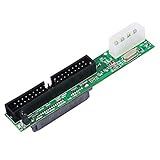
- One Female SATA 7+15pin port, one 3.5Male PATA port (40-pin IDE), and one 4-pin Molex power connection Adapter
- SATA Female to 40 pin Male 3.5 inch IDE Adapter allows you convert hard drive interfaces to work with newer/older systems.
- Converts Parallel ATA(PATA, ATA, IDE) to Serial ATA (SATA) Converts SATA to PATA/ATA/IDE/EIDE.
- No driver needed, plug and play.
- Package: Sata to Pata Interface Adapter x1.
What to check when using legacy IDE hardware
- Interface type: Confirm whether the drive and host use parallel IDE/PATA or SATA, and verify that any converter supports the required direction.
- Physical fit: Check connector and cable compatibility rather than relying on the word “IDE” alone.
- Device and channel support: Verify how many channels and devices the motherboard interface or add-in card supports.
- BIOS and operating-system support: Check that the platform can configure and use the adapter.
- Transfer modes: Do not assume a stated mode or speed applies to every system. Platform design, cabling, connectors, and peripherals can limit supported modes; Kontron’s manual describes these constraints for its platform. [c002]
Product prices and availability are accurate as of the date/time indicated and are subject to change. Any price and availability information displayed on Amazon at the time of purchase will apply.




