A micro data center is a compact deployment of computing equipment and supporting infrastructure located near the people, devices, or operations it serves. It can make sense when a workload needs faster local processing, must keep working through unreliable internet access, or would otherwise send impractical volumes of raw data elsewhere. It is not automatically cheaper, simpler, or more secure than centralized computing: each site also needs power, cooling, protection, monitoring, and ongoing operations.
What is a micro data center?
The term generally describes a small, often enclosed or modular computing installation that brings servers and related infrastructure into a site such as a factory, branch location, or communications facility. There is no universal rack-count, footprint, or power limit that makes something a micro data center.
As an Amazon Associate I earn from qualifying purchases.
It helps to distinguish micro from edge. “Micro” describes a compact deployment form or scale; “edge” describes a role and location in a computing architecture. The terms often overlap, but a remote edge installation need not be a single small enclosure, and a compact rack is not useful edge computing unless its location benefits the workload. The terminology is not globally standardized across “micro,” “edge,” “modular,” and “containerized” deployments.
The Tool Desk
Outbyte Driver Updater FREEScan for outdated or missing drivers - takes under a minuteDriver Scan →Outbyte PC Repair FREEClear out junk files and repair common Windows errorsFree Scan →ITU-T Recommendation L.1306 defines an edge data centre as “a data centre located near the final user in which it is necessary to finish relevant data processing in a short time and with low latency.” It describes edge centers as supporting processing, storage, and communications for one or a small number of entities, and says a single edge data centre generally does not exceed 250 kW. That is a characterization of edge data centers in the recommendation, not a universal definition of a micro data center. ITU-T L.1306 (February 2023)
#1 Best Overall

- Modular Dual-Piece Design: this 19-inch rack shelf features a modular two-piece structure, offering flexible front, rear, or single-sided mounting for standard server racks and network cabinets to support custom IT and AV setups
- Heavy Duty Alloy Steel Build: crafted from alloy steel, this vented rack mount tray supports up to 110 pounds, with a center-weighted design that prevents sagging and keeps heavy network switches and servers stable
- Optimized Space Management: at 10 inches deep, this server rack shelf is ideal for shallow 19-inch enclosures, organizing cluttered data closets and providing a sturdy platform for non-rackable gear without wasting vertical rack space
- Slotted Ventilation for Thermal Control: the slotted venting pattern promotes consistent airflow, helping to prevent equipment overheating and protect sensitive network devices like routers and switches in server room environments
- Universal Compatibility: designed to fit all standard 19-inch cabinets and open frames, this server rack shelf includes all necessary hardware to streamline your studio or server room organization immediately
When does a micro data center make sense?
Consider one when the workload has a concrete location-related need—not simply because the site has space for a rack.
Fast responses matter
Industrial control, local video analysis, and other time-sensitive workloads may benefit from processing close to the devices producing or consuming data. How much latency is acceptable depends on the application and the full network path; there is no universal micro data center latency target.
The European Commission’s Edge Observatory describes edge nodes in its EU policy context using “below 20 milliseconds.” That is a policy description, not a guarantee for a particular installation or a requirement every workload must meet. The same page states an EU target of at least 10,000 climate-neutral, highly secure edge nodes. This is a policy target, not evidence that this number of micro data centers has already been deployed. European Commission Edge Observatory
Do these 3 things before closing this tab:
1Scan for outdated or missing drivers - takes under a minute2Repair Windows errors before they cause bigger problems3Fix the driver behind crashes, sound loss and screen glitchesRank #2
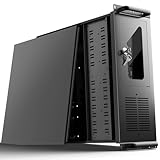
- 【Massive Storage Capacity】: Engineered for expandability, this 4U server chassis from UTLGAMENG features 12 dedicated hard drive bays. The server case built to reliably house all your critical data, games, and media files, offering exceptional scalability for growing storage needs in home servers, data centers, or intensive gaming setups.
- 【7 PCI Slot 4U Server Chassis】This server pc case features 7 PCI slots for seamless integration of graphics cards, network adapters, or additional storage drives, adapting to your evolving server demands. The rugged rack mount case ensures durable, rack-ready performance in data centers, home labs, or office setups, delivering steadfast reliability and versatility.
- 【2*Front USB 3.0 and LED Indicators】Enhance your server management with 2 front-panel USB 3.0 ports for rapid data transfer and clear LED indicators for instant system status display. This design effectively optimizes your rack mount computer case setup.
- 【Secure Lock and Dust Filter】This server rack case features a robust key-lock mechanism, providing reliable protection against unauthorized access, tampering, or theft of valuable internal components. Its dedicated side-panel air filter effectively blocks dust inflow, maintaining a cleaner internal environment to help ensure optimal performance and extend the service life of your system.
- 【Universal Compatibility】The UTLGAMENG 4U server case is engineered to house standard ATX power supplies, support ATX, Micro-ATX, and Mini-ITX motherboards, fit CPU coolers up to 125mm (153mm with bracket removed), and accommodate graphics cards up to 230mm (330mm after hard drive bay removal). This versatile server chassis enables seamless integration for custom server setups.
Wide-area connectivity is unreliable
Local compute or cached data can keep selected services available when a site’s internet connection is interrupted. That does not make the site independent of cloud services: decide in advance which functions can continue locally, what data must later synchronize, and how the application behaves when remote control or other cloud-dependent features are unavailable.
Sending all raw data is impractical
A local system can filter, analyze, or otherwise preprocess data before sending a smaller subset or derived result onward. This can reduce data traffic when the workload can do so without discarding information it needs or compromising safe operation.
Local processing fits the workflow
A site may need data available locally for operational reasons or want to reduce the amount of particular data sent across a network. Local handling alone does not establish legal compliance or better security. The edge device, physical location, data flows, identities, and any cloud control plane still need appropriate protection. The UK National Cyber Security Centre identifies low latency, unreliable internet connectivity, and reduced bandwidth through preprocessing as common reasons organizations deploy edge computing. NCSC: cloud service and deployment models
Rank #3

- 【Powerful Load-bearing】12U Network Rack Open Frame is constructed from durable cold rolled steel; Rack shelf supports enhance stability, wall-mounted capacity of 130lbs, the ground-mounted up to 260lbs
- 【Considerate Designs】Open-frame layout, including a top panel adding space, anti-slip shelf stops fixing devices and compatible racks for stack and expansion to meet requirements of home server rack
- 【Complete Accessories】A 12U open frame server rack, two ventilated shelves, four shelf stops, four velcro straps and a set of equipment mounting screws
- 【Versatile Application】Ideal for space-efficient multi-device setups in warehouses, retail, classrooms, offices and more; Excellent choices as AV Rack/IT Rack
- 【Effortless Setup】 Network Rack includes hardware, a comprehensive manual, mounting hole drilling template and an online assembly video to simplify setup
When is it a poor fit?
If the workload has no meaningful locality, latency, bandwidth, or connectivity requirement, a centralized service may meet its needs without adding another site to operate. A compact enclosure does not remove the work involved in running infrastructure; it concentrates that work in a smaller footprint.
PC Slower Than It Used to Be?
A free scan shows the junk files, broken settings and background clutter dragging Windows down - then fixes them in one click.Free scan · Windows 10 & 11Crashes, No Sound, or Screen Glitches?
Random freezes, missing sound and display glitches usually trace back to one bad driver. Find and replace yours safely.Free scan · under a minute- Distributed sites add physical-access and security requirements, remote monitoring, maintenance planning, and integration work.
- Power capacity, backup runtime, cooling, and environmental conditions can constrain what a site can support.
- More locations mean more equipment and sites to monitor, maintain, protect, and eventually replace.
- Local infrastructure does not eliminate dependencies on provider networks or cloud services; map which functions rely on them.
HPE identifies dispersed management, cost, interoperability, compliance, and limited site resources as challenges for edge deployments. These are useful issues to evaluate, not a general proof that one architecture always costs more than another. HPE: What is an Edge Datacenter?
What does a micro data center include?
It is more than a rack of servers. ITU-T L.1306 describes infrastructure that can include server cabinets, monitoring, power feeding, cooling, cabling, and other components. Power feeding may include an uninterruptible power supply (UPS) and backup generation. At dispersed outdoor sites, the recommendation also emphasizes safety, automation, maintenance, and resilience because routine on-site service may not be practical. ITU-T L.1306
Rank #4

- Sturdy:4u server rack is construct from cold rolled steel, with a weight capacity of 110lbs(50kg); Electrostatic powder coat prevents rust and corrosion,quality finish
- Direct use:Open and use, not having to assemble it.Network rack can be placed flat or mounted on the wall,also can be installed vertically under the table
- Design Features:maximum mounting depth of 14 in,cables can be fixed on the side panel;Open frame server rack achieves effortless inspection, replacement and assemble
- Installation:wall mount network rack is easy to install,with instructions or videos for reference;Equipped with multiple accessories, suitable for different needs
- Application:EIA/ECA-310-E Compliant;wall mounted 4u rack fits all 19" racks and cabinets to hold various IT, network, and AV equipment;wall mount rack available in 4U, 6U, and 8U to choose
Specific product designs differ. Schneider Electric describes its industrial micro data centers as configurable, pre-integrated enclosed rack systems, with options for power, cooling, management software, environmental monitoring, access control, and remote video surveillance. Its offerings include enclosure variants described as NEMA- and IP-rated. These are vendor-described products and options, not required features of every micro data center. Schneider Electric: EcoStruxure Micro Data Center
Deployment checklist
- Workload: Identify the applications, local data inputs, actual latency needs, and cloud or network dependencies.
- Capacity: Size servers, storage, and networking for current demand and a realistic growth plan.
- Power: Check site capacity, grounding, UPS runtime, redundancy, and whether backup generation is needed. A UPS is one component, not a complete data center.
- Cooling and environment: Estimate heat load; assess the cooling approach, ambient conditions, hazards, and monitoring requirements.
- Security: Plan physical access, network controls, data flows, incident response, and separation between workloads.
- Operations: Define remote management, maintenance ownership, spares, update procedures, and what happens during an outage.
- Lifecycle: Compare the full cost over time with cloud, colocation, or a larger central facility.
How should you compare local, cloud, and colocation options?
Compare them against the same workload, service levels, and time horizon. A local installation can improve proximity but also places more responsibility at the site; cloud or colocation arrangements may centralize some facilities or operations, but do not automatically solve the workload’s connectivity and latency needs.
What’s actually slowing this PC down?
Pick the symptom - the matching free tool is one click away.
| Decision factor | Questions to answer |
|---|---|
| Latency and locality | Does processing need to happen near the data source or user? What delay can the application actually tolerate? |
| Connectivity and outages | Which functions continue locally during a WAN outage? Which still depend on a provider control plane or remote service? |
| Data movement | How much raw data must leave the site? Can local preprocessing reduce traffic without losing information the workload needs? |
| Security and control | Who controls the physical site, network, host, identities, updates, and data flows? Which infrastructure or control planes are shared with a cloud provider? |
| Availability and resilience | What local redundancy is needed? What happens if a site, power source, cooling unit, or network link fails? |
| Cost and operations | Include equipment, installation, power, cooling, connectivity, monitoring, maintenance, staffing, spares, and replacement—not just server purchase price. |
| Scale and flexibility | Is demand concentrated at one site or spread across many? Can capacity be added without buying more than the workload needs? |
The source material does not establish a general return-on-investment threshold for choosing among these options. Build a workload-specific business case using the same service assumptions for each alternative.
How do security and energy affect the decision?
Do not treat an edge installation as inherently separate from cloud risk. The NCSC advises treating edge computing as a variant of public cloud when provider control planes—and sometimes data planes—are shared. Its guidance points to confidence in the physical data center and network, secure data flows, sufficient bandwidth and redundancy, and appropriate separation between edge workloads. NCSC deployment-model guidance
Energy performance also depends on the installation, not just its proximity to users. ITU-T L.1307, approved on 8 March 2024 and listed as in force, addresses energy-efficient management of micro data centers and an energy-efficiency indicator. Its published summary and recommendation record establish that scope, but do not provide a general energy-saving percentage. Actual energy use depends on IT load, cooling, utilization, power conversion, and site conditions. ITU-T L.1307 recommendation record · ITU-T L.1307 summary
Quick Recap
Product prices and availability are accurate as of the date/time indicated and are subject to change. Any price and availability information displayed on Amazon at the time of purchase will apply.




