Quick wins for a faster PC:
Clear out junk files and repair common Windows errorsFree Scan →Fix the driver behind crashes, sound loss and screen glitchesFind Drivers →Repair Windows errors before they cause bigger problemsFix Now →A GUID Partition Table (GPT) is a disk-partitioning scheme: it records where partitions begin and end and stores identifiers and other metadata about them. GPT is not a filesystem, and its backup partition metadata does not back up the files stored on the disk.
What does GUID Partition Table mean?
GPT stands for GUID Partition Table. It is the format a disk uses to describe its partitions and their locations. The format is defined by the UEFI specification and uses logical block addresses (LBAs), globally unique identifiers (GUIDs), and CRC32 integrity checks. A filesystem, such as one used to organize files within a partition, is a separate layer.
As an Amazon Associate I earn from qualifying purchases.
In disk-management software, GPT describes the partition map for a disk. It does not identify the filesystem inside each partition or contain the partition’s files.
How GPT is arranged on a disk
The UEFI GPT layout places a protective MBR at the beginning of the disk, followed by the primary GPT header and the partition-entry array. A backup array and header are stored near the disk’s end. The exact array placement and usable space are described by the header.
#1 Best Overall

- Prevent Data Loss
- Fast System Recovery
- Save Reinstallation Time
- Maximum Security
- Hardware-Independent Restore
| Location | What it contains | Purpose |
|---|---|---|
| LBA 0 | Protective MBR | Helps older tools that do not understand GPT recognize that the disk is partitioned. |
| LBA 1 | Primary GPT header | Identifies the format and records the disk GUID, usable LBA bounds, partition-array location and dimensions, and the location of the backup header. |
| Partition-entry array | Partition records | Describes partitions, including their type GUID, unique partition GUID, starting and ending LBAs, attributes, and name. |
| Last LBA | Backup GPT header | Provides a second GPT header; the primary and backup headers identify one another. |
The primary header begins with the EFI PART signature. Its fields describe where the partition-entry array is and how many entries it contains, as well as the size of each entry. The array’s configured size determines how many partition records the disk can hold.
What GPT checks—and what it does not protect
GPT stores CRC32 checksums for the header and partition-entry array. The header checksum is calculated with its checksum field set to zero. When the partition array changes, its checksum and then the header checksum must be updated. A checksum can reveal certain corruption; it cannot restore altered information by itself.
The backup GPT structures provide another copy of partition metadata, which can help with recovery from some partition-table damage. They do not duplicate the contents of the partitions. If files matter, maintain a separate backup of those files.
Rank #2
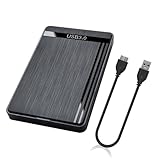
- 【Universal Compatibility】This external hard drive enclosure is compatible with 2.5 inch 7mm 9.5mm SATA SSD/HDD, up to 8TB capacity. Seamlessly works with Windows, Mac OS, Linux.
- 【5Gbps Transfer Speed】This external hard disk case features USB 3.0 Micro-B output port, delivers up to 5Gbps transmission speeds and supports UASP acceleration protocol for faster performance with Windows 8 or above.
- 2.5" External Hard Drive Enclosure: Easily connect your 2.5-inch SSD & HDD to your PC, laptop, PS4, or Xbox for data transfer or expanding storage.Great for booting up old HDD/SSDs and recovering essential files from older PCs
- 【Tool Free】This hard drive to USB 3.0 adapter requires no tools or drivers for setup which is easy to use. Simply tool free, pug and play to reduce setup time and streamline operation.
- 【Feature】LED Indicator / Anti Shock Pads / High-Strength ABS Plastic / Heat Emission Hole / 12x7.5x1.2cm Ultra Thin Case
GPT compared with legacy MBR
| Feature | GPT | Legacy MBR |
|---|---|---|
| Address fields | 64-bit LBAs | 32-bit LBAs |
| Partition records | Many entries are possible; the configured partition array determines the number. | Four partition records in the legacy MBR layout. |
| Partition metadata copies | Primary and backup GPT structures. | No corresponding backup table in the legacy layout described by the UEFI comparison. |
| Integrity fields and identifiers | CRC32 checksums and GUID identifiers. | The cited UEFI comparison does not list equivalent GPT-style fields. |
These are format differences, not a promise that every operating system or utility supports the same number of partitions or handles every disk identically. Actual partition limits depend on the GPT entry-array configuration and software support.
Where the definition comes from
The UEFI Specification 2.10 describes the GPT disk layout in section 5, GUID Partition Table (GPT) Disk Layout. The current UEFI Specification 2.11 also provides corroboration in its official PDF.
Quick Recap
Product prices and availability are accurate as of the date/time indicated and are subject to change. Any price and availability information displayed on Amazon at the time of purchase will apply.




