Quick wins for a faster PC:
Clear out junk files and repair common Windows errorsFree Scan →Fix the driver behind crashes, sound loss and screen glitchesFind Drivers →A nearby data center does not automatically add a new line to your electricity bill. It could affect what you pay indirectly if serving its power demand leads to new supply or grid costs that regulators allow utilities or regional grid operators to recover from customers. Whether households share any of those costs depends on local rates, contracts, regulatory decisions and how much power the facility actually uses.
How a data center can affect household electricity rates
Electricity bills help pay for both the power customers use and the systems that supply and deliver it. A large new customer can change demand forecasts and lead to investments in power supply or grid infrastructure. The utility, regulator and regional grid rules then determine which customers pay for those costs and when.
As an Amazon Associate I earn from qualifying purchases.
The U.S. Department of Energy’s January 2025 report on large-load rate design identifies fair allocation of system costs and protection against stranded investment as key issues. In other words, a central question is not only what upgrades are needed, but whether the data center, other large customers or a broader group of utility customers will cover them.
| Cost category | What it covers | Why it matters to a household bill |
|---|---|---|
| Energy | The electricity consumed over time and its supply cost. | Additional demand can affect supply needs and costs, but the retail effect depends on how the utility procures power and recovers costs. |
| Capacity or resource adequacy | Arrangements intended to ensure enough electricity is available when needed. | A cost in a wholesale capacity market is not automatically a charge on a nearby household; retail rules determine whether and how it is passed through. |
| Transmission | High-voltage network costs, which may be allocated across a region. | Regional allocation rules can affect customers beyond the community where the data center is located. |
| Distribution and interconnection | Local delivery-system upgrades and facilities needed to connect the data center. | Who pays depends on the applicable tariff, contract and regulatory decision. |
| Stranded or underused investment | Facilities built for demand that arrives late, is smaller than forecast or never materializes. | If costs are recoverable, customers could face a share of investment that is not being fully used; rate design can address this risk. |
These categories should not be treated as interchangeable. For example, a claim about a regional transmission allocation or wholesale capacity cost does not, on its own, establish that a residential customer’s current monthly bill rose by a particular amount.
#1 Best Overall

- SAFETY YOU CAN TRUST WITH UL CERTIFICATION: With Emporia Energy, your home energy monitoring is safe, reliable, and certified. The Emporia Vue is UL Listed, meaning it has met rigorous safety standards for electrical products in the U.S. and Canada. This certification ensures that every component has been thoroughly tested to prevent hazards, such as overheating, short-circuiting, or fire, offering you peace of mind as you manage your home’s energy consumption.
- INSTALLS IN CIRCUIT PANEL of most homes with clamp-on sensors. Supports Single phase, Single-split phase, and 2-wire systems. 3-wire systems; 3-phase, 4-wire Wye systems with earthed (TN or TT) neutral (no-Delta) are supported with an additional 200A sensor (sold separately).
- 24/7 ENERGY MANAGEMENT AND MONITORING: Automate, manage and control your home's real power anywhere, anytime to prevent costly repairs, conserve energy, and save costs. Monitor solar / net metering. PROTECTED BY A 1-YEAR WARRANTY.
- LOWER YOUR ELECTRIC BILL: Configure settings in the Emporia Energy App to automate energy management for time of use, peak demand, excess solar, and rewards programs. You can even see live reporting and invaluable savings opportunities instantly. Gauge real-time spending and get actionable notifications and automated energy management to help you reduce costs.
- REAL-TIME ENERGY DATA: REQUIRES 2.4 GHz WIFI WITH AN INTERNET CONNECTION to monitor energy use with iPhone / Android / Web app. Vue sensors collect energy data and are accurate from ±2%. The Vue is UL and CE Listed for your safety. 1 second data is only available in the app (when actively open) and retained 3 hours. Minute and hour data are retained in the cloud. 1 minute data is retained 7 days, 1 hour data is retained indefinitely. Export cloud data whenever you want in the app.
Does living near a data center mean your bill will rise?
No. Proximity alone does not show that a data center caused a bill increase. A facility may affect a wider utility service area or regional grid, while the costs it causes may be assigned directly to the facility, shared among customer classes or handled through other arrangements. The project’s actual electricity use also matters: an investment planned for forecast demand can become underused if the project is delayed, smaller than expected or cancelled.
A large-customer rate class or a special service agreement can make costs more visible and assign more of them directly to the data center. But whether such protections exist, and what they cover, varies by jurisdiction. Look for the applicable tariff or contract and the regulator’s decision rather than inferring the result from a facility’s address.
Rank #2

- ⚡ EASY INSTALLATION: Installs in circuit panel of most homes with clamp-on sensors. Supports single-phase up to 240VAC line-neutral; single, split-phase 120/240VAC; and three-phase up to 415Y/240VAC (no Delta). The branch lines can automatically match different phases and have no restrictions in terms of quantity and voltage.Panels with access only to busbars will need flexible sensors available from SEM-Meter.
- ⚡ ENERGY MONITORING ANYTIME, ANYWHERE: Monitor your home's real power anywhere, anytime to prevent costly repairs, conserve energy, and save costs. Monitor solar / net metering. Light commercial 3 phase option available as a separate bundle. Protected by a 1-year warranty.
- ⚡ VARIOUS ELECTRICAL APPLIANCE MONITORING: Comes with 16 50A sensors to accurately monitor your air conditioner, furnace, water heater, washer, dryer, range, etc.
- ⚡ LOWER YOUR ELECTRIC BILL: SEM-Meter measures real-time spending and gets actionable notifications to understand where savings can be made, both to lower your electric bill and to conserve energy and protect the planet’s resources. Be an environmentalist.
- ⚡ REAL-TIME ENERGY DATA: Connect SEM-Meter device via 2.4GHz WiFi to monitor energy usage, with an accuracy range of 1%. View usage in real time through Android/Apple software. Statistics of power usage in now/day/week/month/year format: the validity period of hourly exported data is 90 days, and the exported data of day/month/year data is permanent, available at any time Export from application.
What current regulatory examples show
Recent examples illustrate different mechanisms and stages of decision-making. They do not establish a single rule for every utility or prove a specific household bill impact.
The Tool Desk
Outbyte PC Repair FREERepair Windows errors before they cause bigger problemsFix Now →Outbyte Driver Updater FREEScan for outdated or missing drivers - takes under a minuteDriver Scan →| Jurisdiction and source | What the record says | Status and what it does not establish |
|---|---|---|
| Virginia — State Corporation Commission (SCC) | The SCC says Dominion Energy Virginia’s GS-5 class covers data centers and other customers demanding 25 megawatts or more, with separate rates based on their unique costs. In its 2025 biennial-review order, the SCC rejected Dominion’s requested base-rate increases of $822 million for 2026 and $345 million for 2027. | The GS-5 threshold and rate structure concern large-customer classification. The rejected amounts were utility requests in a rate case, not a calculation of what households paid because of data centers. |
| North Carolina — Attorney General | On September 14, 2026, the state Attorney General urged the Utilities Commission to create a data-center rate class and described a proposed framework for assigning generation and delivery-infrastructure costs. | This is a proposal, not an adopted tariff or final allocation decision. |
| Maryland and PJM — Maryland Office of People’s Counsel | In a 2026 complaint, the consumer advocate disputed the allocation of data-center-related transmission costs to Maryland customers, citing approximately $1.6 billion over a decade. | The amount is the advocate’s claim about a regional allocation dispute, not an adjudicated household-bill increase or a monthly estimate for Maryland residents. |
| Regional grid operators — Federal Energy Regulatory Commission (FERC) | On June 18, 2026, FERC announced show-cause orders to all six regional grid operators under its jurisdiction, directing them to justify or reform rules governing data centers and other large users. FERC highlighted transparency in transmission costs and preventing cost shifting. | The orders show that federal tariff proceedings are active. They do not find that every data center has raised nearby residential rates; the proceeding is ongoing. |
In its Virginia order, the SCC described its legal ratemaking duty as allowing the utility an opportunity to recover reasonable and prudent projected costs and earn a reasonable return. That statement explains the regulator’s role; it does not endorse a particular proposal for assigning data-center costs.
Rank #3

- Various Monitoring Parameters: The power meter plug can monitor the power (W), energy (kWh), volts, amps, hertz, power factor, cost, minimum and maximum power (W), cumulative days and time of your appliances. By switching 7 display modes, you can easily know the various parameters while the appliance is working. The home energy monitor can also calculate and display how much power your appliance uses and how much electricity bill it cost in cumulative time
- Upgraded LCD Display: With large screen size 2.36 inch x 1.85 inch, clearer monitor backlit, our electrical usage monitor can display the data clearer and more visible no matter day or night. 180°full wide viewing angles is great for reading and recording the data in any angles. No need to stand on the front of the display and bend over to read the numbers
- Adjustable Backlight Time: Our upgraded watt meter has 5 options of backlight time. The default backlight time duration is 10 minutes(bL-0). If you want to change the backlight time, you can press and hold "UP" and "DOWN" button at the same time to enter backlight time setting, then press "UP" and "DOWN" to select the backlight time (bL-0 =10 minutes, bL-1=1 hour, bL-2=4 hours, bL-3=8 hours, bL-4=always on), finally press the "COST" to save the backlight time settings
- Overload protection: When the power of the appliance exceeds the overload power, the LCD will display “OVERLOAD” to warn the user. All the buttons will quit working and can only be workable when you lower or remove the load power. The default overload power is 3680W and is adjustable from 0 to 3680W. In general, you need to set the overload power to 1800W before using. Just press the "function" button for more than 3 seconds to enter the setting
- Data Memory Function: The wattage meter will record your power consumption data when you remove it from socket, or remove appliances from the electricity monitor. You can directly see the last data when you use it next time. This function can also automatically save the data when there is a sudden power failure
What evidence says about the size of the effect
There is no defensible single dollar amount for what a household “near” a data center will pay based on the available examples. A local complaint, a utility rate-case request, a regulator’s order, a forecast and a national historical estimate answer different questions.
A 2026 working paper, Have Data Centers Raised Your Electric Bill? Causal Evidence from the United States, reports that its instrumental-variables analysis estimates data centers modestly lowered average U.S. retail electricity rates from 2015 through 2024. That is the paper’s historical national-average result—not a settled forecast, and not evidence that a new facility will lower a particular local bill. Its study period ends before the current wave of FERC regulatory action described above.
Rank #4

- SAFETY YOU CAN TRUST WITH UL CERTIFICATION: With Emporia Energy, your home energy monitoring is safe, reliable, and certified. The Emporia Vue is UL Listed, meaning it has met rigorous safety standards for electrical products in the U.S. and Canada. This certification ensures that every component has been thoroughly tested to prevent hazards, such as overheating, short-circuiting, or fire, offering you peace of mind as you manage your home’s energy consumption.
- INSTALLS IN CIRCUIT PANEL of most homes with clamp-on sensors. Supports Single phase, Single-split phase, and 2-wire systems. 3-wire systems; 3-phase, 4-wire Wye systems with earthed (TN or TT) neutral (no-Delta) are supported with an additional 200A sensor (sold separately).
- 24/7 ENERGY MANAGEMENT AND MONITORING: Automate, manage and control your home's real power anywhere, anytime to prevent costly repairs, conserve energy, and save costs. Monitor solar / net metering. PROTECTED BY A 1-YEAR WARRANTY.
- LOWER YOUR ELECTRIC BILL: Configure settings in the Emporia Energy App to automate energy management for time of use, peak demand, excess solar, and rewards programs. You can even see live reporting and invaluable savings opportunities instantly. Gauge real-time spending and get actionable notifications and automated energy management to help you reduce costs.
- REAL-TIME ENERGY DATA: REQUIRES 2.4 GHz WIFI WITH AN INTERNET CONNECTION to monitor energy use with iPhone / Android / Web app. Vue sensors collect energy data and are accurate from ±2%. The Vue is UL and CE Listed for your safety. 1 second data is only available in the app (when actively open) and retained 3 hours. Minute and hour data are retained in the cloud. 1 minute data is retained 7 days, 1 hour data is retained indefinitely. Export cloud data whenever you want in the app.
In August 2025, the Associated Press reported that isolating data centers’ effect on bills is difficult and described state efforts to study costs and develop more protective rate structures. That context does not replace local tariff records or regulatory decisions when assessing a specific utility.
Do these 3 things before closing this tab:
1Repair Windows errors before they cause bigger problems2Fix the driver behind crashes, sound loss and screen glitches3Clear out junk files and repair common Windows errorsHow to check a claim about your own bill
Start with the utility serving your address, then trace the claimed cost through the applicable rate and regulatory record. These checks help distinguish an approved charge from a forecast, proposal or allegation:
Best Value
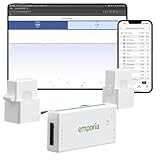
- SAFETY YOU CAN TRUST WITH UL CERTIFICATION: With Emporia Energy, your home energy monitoring is safe, reliable, and certified. The Emporia Vue is UL Listed, meaning it has met rigorous safety standards for electrical products in the U.S. and Canada. This certification ensures that every component has been thoroughly tested to prevent hazards, such as overheating, short-circuiting, or fire, offering you peace of mind as you manage your home’s energy consumption.
- INSTALLS IN CIRCUIT PANEL of most homes with clamp-on sensors. Supports Single phase, Single-split phase, and 2-wire systems. 3-wire systems; 3-phase, 4-wire Wye systems with earthed (TN or TT) neutral (no-Delta) are supported with an additional 200A sensor (sold separately).
- 24/7 ENERGY MANAGEMENT AND MONITORING: Automate, manage and control your home's real power anywhere, anytime to prevent costly repairs, conserve energy, and save costs. Monitor solar / net metering. PROTECTED BY A 1-YEAR WARRANTY.
- LOWER YOUR ELECTRIC BILL: Configure settings in the Emporia Energy App to automate energy management for time of use, peak demand, excess solar, and rewards programs. You can even see live reporting and invaluable savings opportunities instantly. Gauge real-time spending and get actionable notifications and automated energy management to help you reduce costs.
- REAL-TIME ENERGY DATA: REQUIRES 2.4 GHz WIFI WITH AN INTERNET CONNECTION to monitor energy use with iPhone / Android / Web app. Vue sensors collect energy data and are accurate from ±2%. The Vue is UL and CE Listed for your safety. 1 second data is only available in the app (when actively open) and retained 3 hours. Minute and hour data are retained in the cloud. 1 minute data is retained 7 days, 1 hour data is retained indefinitely. Export cloud data whenever you want in the app.
- Identify the decision-makers. Find your electric utility and the state regulator responsible for its retail rates. If the claim concerns regional transmission or wholesale markets, identify the relevant grid operator and federal proceeding as well.
- Find the relevant rates and agreement. Read the residential tariff and look for a large-load tariff or special contract covering the data center. Check which costs are assigned to the facility and which, if any, are shared with other customer classes.
- Locate the proceeding behind the claim. Search for the rate case, interconnection matter, generation procurement or regional transmission docket tied to the investment. Distinguish an approved order from a party’s filing or a proposed rule.
- Check the amount, timing and customers covered. Ask whether a figure is for one facility, one customer class, all ratepayers, a forecast period or a specific market year—and when any approved recovery would begin.
- Compare planned demand with actual use. Determine whether the facility was built and whether it is drawing the power anticipated. That matters when evaluating whether infrastructure could be underused.
When comparing claims, keep the utility and geography, cost category, customer group, time period, evidence status and cost-allocation rule in view. Without those details, a headline number cannot tell you what a household in another service area will pay.
Quick Recap
Product prices and availability are accurate as of the date/time indicated and are subject to change. Any price and availability information displayed on Amazon at the time of purchase will apply.




