A write-protect notch is a cutout or opening on some removable media that a drive reads to decide whether writing should be allowed. The exact meaning depends on the format: floppy disks use notches, covers, or tabs that a drive detects, while a full-size SD card’s sliding switch signals a read-only preference to the host device.
What “write protection” means
Write protection is the broader concept; a notch is just one way to signal it. The NIST glossary defines write protection as “Hardware or software methods of preventing data from being written to a disk or other medium.” That definition covers more than physical cutouts and does not mean every method offers the same level of security. NIST glossary
As an Amazon Associate I earn from qualifying purchases.
How floppy-disk notches and tabs work
On floppy disks, a drive detects the disk’s physical opening or covering and inhibits writing when it recognizes the disk as protected. Apple’s manual calls the relevant feature a “write-enable notch”: a small square cutout on a 5.25-inch disk or a small square hole on a 3.5-inch disk. Covers or tabs change whether the opening is exposed, but their direction and construction vary by format. Apple IIgs manual
What’s actually slowing this PC down?
Pick the symptom - the matching free tool is one click away.
There is no universal rule that an open notch always means “locked.” Brother’s manual, for example, says to slide the notch open to protect the disk. Apple’s instructions describe covering the write-enable notch on a 5.25-inch disk with a tab, and a sliding plastic tab that covers or uncovers an opening on a 3.5-inch disk. Follow the markings or instructions for the particular disk and drive. Brother describes the result plainly: “A write-protected disk is read-only.” Brother manual
#1 Best Overall

- EPIC WORLDS, LOADED INSTANTLY. From the Mushroom Kingdom to Hyrule, your card delivers read speeds up to 880 MB/s[2] and write speeds up to 650 MB/s[2].
- OFFICIALLY READY FOR NINTENDO SWITCH 2. Officially licensed for Nintendo Switch 2, this microSD Express card offers dependable, high-performance storage.
- CAPTURE IN STUNNING CLARITY. Capture screenshots and record short video clips of your gameplay in Full HD.
- ROOM FOR YOUR ADVENTURES. With capacities up to 512GB[1], your card gives you the freedom to store your digital games in one place.
How an SD-card lock switch differs
A full-size SD card has a sliding mechanical write-protect switch on its edge. The SD Association lists this switch in its overview of SD card features. The switch is not an internal circuit that blocks writes: the card itself does not sense its position. Instead, the host device reads the position and is responsible for honoring the read-only request. This makes the switch a useful handling safeguard, not a tamper-proof or card-enforced lock. SD Association overview · SD card reference
Which cards have the physical switch?
The distinction matters when choosing an adapter or diagnosing a card. The SD Association overview lists a write-protect switch for full-size SD cards, not microSD cards. MiniSD and microSD cards may be used in full-size adapters that have a switch; in that case, the host interprets the adapter’s switch position. SD Association overview · SD card reference
Quick Recap
Best Value
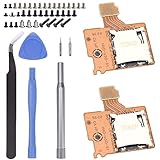
- Compatibility -- Brand New Micro SD Card Reader for Nintendo Switch Console Only (NOT FIT for Switch Oled and Lite).
- Install -- No soldering required. But the console battery won't be disconnected for this Replace, so be cautious when using metal tools around the motherboard.
- Ideal for -- Replace the SD card reader for Switch
- Package Included -- 2 x Micro SD Card Reader, 1 x Full Set of Console Screws for Switch, 1 x Metal Bit Driver, 2 x Precision Bits(1 x Phillips #000, 1 x Tri-point Y00), 1 x Tweezer, 1 x Pry tools, 1 x Pry bar.
- Customer Service & Warranty -- We provide 3 months warranty for replacement Micro SD Card Reader. If you have any problem about the product, please feel free to contact us, we will reply you with 24h.
Rank #4

- SNAP-ON PROTECTIVE COVER — Replacement SD card case snaps securely onto your memory card, shielding it from dust, scratches, and everyday wear. The precision-fit design holds the card firmly in place without rattling or slipping loose in your bag.
- SECURE STORAGE SHELL — Keeps your valuable photos, videos, and data safe between uses. The enclosed case design prevents accidental contact with the card's gold connectors, reducing the risk of data corruption from static or debris.
- SLOTTED QUICK-ACCESS DESIGN — Built-in slot on one end lets you easily slide the card out when needed. No fumbling with tiny cards or prying open difficult enclosures. Grab your card and get shooting in seconds.
- LIGHTWEIGHT AND PORTABLE — Compact form factor adds virtually no bulk to your camera bag, laptop sleeve, or travel kit. Toss it in a pocket, gear pouch, or desk drawer for convenient access whenever you need to swap or store memory cards.
- UNIVERSAL SD CARD FIT — Compatible with standard full-size SD, SDHC, and SDXC memory cards from all major manufacturers. Ideal replacement for lost or broken original card cases that came with your memory card purchase.
Rank #3

- Ultra-fast transfer rates
- Enough space for many photos and videos
- Lightweight and practical
- High-tech
- Compatible with the latest speed class
Rank #2

- Micro SD Card 128GB. Fast Read/Write Speed up to: 90MB/s and 60MB/s respectively for high-resolution photo capturing. Extended Capacity for pictures, music, documents
- 4K UHD Capable and Full HD Ready with UHS-I speed class 3 (U3) and video speed class 30 (V30). Cool travel gadgets for action cameras, DSLR, drones, laptops and more
- Rated Application Class 1 (A1) for faster app loading and enhanced app performance. Great storage accessories for tablets, smartphones, games consoles, android devices. A compatible micro SD card for Nintendo Switch and Switch Lite, a system update is required for using a microSDXC card, visit the Nintendo Switch official website for more details
- High durability Micro Card that is waterproof, shockproof, temperature proof and X-ray proof. Keep your data secure in dashcams, CCTV, surveillance and driving recorders
- microSDXC card, look for the SDXC logo on cards and host devices to ensure compatibility. 3-Year Limited Warranty. Includes Full-Size adapter for extended use
At a glance: notch versus SD switch
| Mechanism | Physical feature | What reads it | What protection means |
|---|---|---|---|
| Floppy disk | Notch or opening, sometimes covered by tape or a movable tab | Floppy drive | The drive inhibits writing when it detects the disk’s protected state, as described in the cited manuals. |
| Full-size SD card | Sliding tab | Host device | A read-only signal or request; the SD card itself does not detect the switch position, according to the cited secondary reference. |
Product prices and availability are accurate as of the date/time indicated and are subject to change. Any price and availability information displayed on Amazon at the time of purchase will apply.




