A wallet popup shows that a wallet is mediating a request—not that the requesting site, message, contract, or action is trustworthy. To understand what a site is asking for, identify whether the request is for account access, a signature, a method permission, or a transaction, then check the scope and effect before approving it.
What a wallet popup can ask you to do
Wallet prompts are not all the same. The permission or action depends on the request the site sends and how the wallet presents it. A prompt is a point to review the request; it is not a security endorsement of the site or its code.


As an Amazon Associate I earn from qualifying purchases.
- Expose an account: let the site learn one or more wallet addresses, typically so it can associate the app with an account or prepare a wallet-dependent interaction.
- Sign a message: use the wallet to sign data. The message may be used for authentication or another application-defined purpose; inspect what it says and what the signature will be used for.
- Grant a method permission: allow an application to call a particular wallet method, potentially with limits or caveats. The method and limits determine what that grant enables.
- Approve a transaction: authorize a proposed on-chain action. Review the chain, target contract, assets, and expected effect where the wallet and application provide reliable details.
These categories are distinct, even when an app presents them as one continuous “connect” flow. The Ethereum provider standards describe interfaces and intended behavior; they do not guarantee that every wallet implements every optional method or displays requests identically.
Quick wins for a faster PC:
Scan for outdated or missing drivers - takes under a minuteDriver Scan →Repair Windows errors before they cause bigger problemsFix Now →Connection is not the same as sign-in or transaction approval
Connection and account access
EIP-1102 describes opt-in approval before a site receives account access. EIP-1193 likewise recommends explicit requests such as eth_requestAccounts or wallet_requestPermissions rather than exposing accounts by default. A connection can make an account available to the application, but it is not by itself proof of the person’s identity and does not authorize arbitrary future actions.
#1 Best Overall
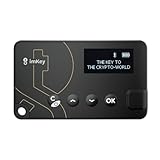
- Top-Tier Security Chip, Bank-Grade Asset Protection: Equipped with an industry-leading Infineon CC EAL 6+ certified security chip, also certified by EMVCo, this chip is widely used in bank payment and identity verification systems. Your private keys are generated and stored entirely offline within the chip, ensuring they never touch the internet. This physically blocks remote hacker attacks and eliminates the risk of private key leakage, building an impregnable first line of defense for your digital assets.
- What You See Is What You Sign, Hardware Button Protection: Every transaction requires manual confirmation via physical buttons on the imKey Pro's clear display. The device intuitively shows key transaction details like the amount and address, ensuring the data hasn't been tampered with during transmission—truly achieving "What You See Is What You Sign." It also features secure PIN code protection and a self-destruct mechanism after multiple incorrect attempts (the private key is wiped after 5 consecutive wrong entries), effectively preventing brute-force attacks even if the device is lost.
- Comprehensive Multi-Chain Asset Support, Access the Web3 Ecosystem: Fully supports major mainnets and Layer 2 networks, including Bitcoin (BTC), Ethereum (ETH), LTC, ATOM, FIL, TRX and more. By adding custom RPCs, you can easily access all EVM-compatible chains like BSC, Polygon, and Avalanche. Furthermore, imKey Pro perfectly supports Layer 2 solutions such as zkSync and Arbitrum, as well as the display and storage of NFTs, meeting all your diverse on-chain needs.
- Cold & Hot Wallet Separation, A Seamless Experience: Utilizing Bluetooth 4.1 wireless technology, it pairs seamlessly with the imToken App on your mobile phone or browser extension wallets on your PC without needing any cables. It combines the ultimate security of a cold wallet (offline private key storage) with the convenience of a hot wallet (online interaction). When a transaction is needed, you sign it offline with your imKey, and the app broadcasts it to the chain. This guarantees asset security without sacrificing the fluidity of use.
- Extremely Thin and Light, A Portable Digital Vault: The device is smaller than a credit card, measuring just 2.3mm thick and weighing approximately 17g. Crafted with a zinc alloy body and a PC panel, it offers a premium feel and is extremely portable. The built-in 33mAh lithium-polymer battery provides a battery life of up to approximately four weeks on a single charge. The package includes the hardware wallet, a USB cable, and mnemonic cards, making it ready to use right out of the box—a secure and reliable gateway to the crypto world.
Authentication and message signatures
A site may ask for a signature to prove control of an address. A signed message is not automatically an on-chain transaction, and a sign-in message should not require spending ETH. But a signature can still have consequences: read the exact message and verify that the request is an authentication challenge you intended to answer.
For Sign-In with Ethereum (SIWE), domain binding helps tie an authentication message to the site requesting it. The application must still validate the expected domain and URI, nonce, chain and account context, exact message contents, and recovered signer on the server. ERC-7846, a proposal for an extensible wallet connection API, recommends that the application check that the returned account matches the address inferred from the SIWE message. Treat its proposed capability flow as implementation-dependent, not as universally available behavior.
Rank #2

- Instant Ethereum Access — No Wallet Setup Required: Pre-loaded Burner ETH Card gives you immediate Ethereum access without needing an exchange account or complicated wallet setup. Perfect for beginners and experienced crypto users looking for a fast, secure onboarding option.
- Secure, Anonymous & Easy to Activate: No personal information, KYC, or lengthy verification process. Simply follow the activation instructions on the card to claim your ETH safely and privately.
- The Perfect Crypto Gift for Any Occasion: Great for holidays, birthdays, graduations, stocking stuffers, employee rewards, or gifting crypto to someone curious about Web3. A modern way to introduce family and friends to Ethereum.
- Use Your ETH Anywhere Ethereum Is Supported: Once activated, funds transfer to your preferred wallet—MetaMask, Coinbase Wallet, Ledger, Trust Wallet, and more. Spend, trade, stake, or hold your ETH just like any other Ethereum balance.
- Physical Card With Simple Step-By-Step Instructions: Premium-quality physical card includes clear instructions for activating and accessing your ETH. Everything is securely contained inside—no codes printed on receipts.
Transactions
A transaction authorizes an on-chain action and may incur a fee that varies with network conditions. Evaluate it separately from a message signature. An application should explain the action in terms of the asset, contract, chain, and likely effect when it has reliable information. Do not assume a wallet can decode every contract call or that the text shown in a prompt necessarily describes every consequence.
How method permissions work
EIP-2255 defines wallet_requestPermissions for requesting permissions and wallet_getPermissions for inspecting them. Its permission objects identify an invoker and a capability, and may include caveats that constrain the permission. That structure can make a grant more specific than a blanket “connected” state, but the actual experience and supported methods depend on the wallet.
EIP-2255 frames the wallet’s role as mediating consent between untrusted applications and users’ keys. Its motivation discusses readable, scoped permissions and the ability to reject individual requests; it does not establish that every wallet offers that review experience. A permission response should therefore be read as structured information to validate, not a universal promise about a wallet’s interface or future behavior.
- Identify the requesting application or invoker and the named capability or method.
- Read any caveats or constraints, including what is permitted and when they apply.
- Check whether the wallet supports the requested method and whether the action requires an active connection.
- Decide whether the permission is needed for the task in front of you; reject requests whose scope or purpose is unclear.
What developers should do before and after a prompt
Request the narrowest useful access
Ask only for the account, method, or capability needed for the immediate task. Explain what the request enables before triggering the wallet interface. Do not ask for broad permissions as a substitute for designing a scoped flow, and do not treat a successful connection as blanket authorization for later actions.
Handle rejection without pressure
Rejection is a valid user choice. EIP-1193 uses error code 4001 for a user-rejected request, including a rejected permission request. Handle the error by preserving the rest of the application where possible, explaining which feature needs the declined access, and letting the user choose whether to try again. Avoid automatic repeat prompts or language that implies approval is mandatory.
Track account and chain changes
EIP-1193 defines the accountsChanged and chainChanged provider events. Subscribe to them and refresh the state that depends on the account or network; do not assume a previously selected address or chain remains current. The provider’s account and chain results should accurately reflect wallet/client state, so applications should respond to changes rather than relying on stale cached values.
Best Value
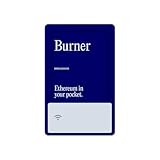
- Instant Ethereum Access — No Wallet Setup Required: Pre-loaded Burner ETH Card gives you immediate Ethereum access without needing an exchange account or complicated wallet setup. Perfect for beginners and experienced crypto users looking for a fast, secure onboarding option.
- Secure, Anonymous & Easy to Activate: No personal information, KYC, or lengthy verification process. Simply follow the activation instructions on the card to claim your ETH safely and privately.
- The Perfect Crypto Gift for Any Occasion: Great for holidays, birthdays, graduations, stocking stuffers, employee rewards, or gifting crypto to someone curious about Web3. A modern way to introduce family and friends to Ethereum.
- Use Your ETH Anywhere Ethereum Is Supported: Once activated, funds transfer to your preferred wallet—MetaMask, Coinbase Wallet, Ledger, Trust Wallet, and more. Spend, trade, stake, or hold your ETH just like any other Ethereum balance.
- Physical Card With Simple Step-By-Step Instructions: Premium-quality physical card includes clear instructions for activating and accessing your ETH. Everything is securely contained inside—no codes printed on receipts.
Treat provider data as untrusted input
EIP-1193 describes the provider as an extension of the wallet exposed in an untrusted environment controlled by a third party, such as a website. Validate returned values and keep provider interaction separate from application logic that assumes data is safe. The standard’s security considerations also call attention to issues such as validation and rate limits. A wallet-mediated response does not make arbitrary provider data trustworthy.
Independent reader supportYour contribution helps us test, update, and keep practical guides available for everyone.How to assess a permission or sign-in flow
When reviewing an implementation, evaluate the actual request and the application’s handling—not just whether a popup appeared.
- Purpose and scope: Is the requested account, method, or capability necessary for the task, and are its limits clear?
- Consent handling: Can the user reject the request without repeated prompting or losing unrelated app functionality?
- Authentication checks: Does the server validate the SIWE domain, URI, nonce, message contents, chain/account context, and recovered signer?
- State changes: Does the app update dependent state after account or chain events, and can it cope with access no longer being available?
- Transaction clarity: Does the app describe the intended asset, contract, chain, and effect only when it has information reliable enough to support that explanation?
- Wallet support: Has the application checked that the specific wallet supports the methods and permission behavior it relies on?
Where newer connection and execution proposals fit
ERC-7846 proposes a wallet connection API with extensible capabilities, including an initial SIWE capability. ERC-7715 proposes execution permissions, including use without an active wallet connection or with a scoped connection. These are proposals, not evidence of uniform wallet support or availability. Developers should verify the current status of each proposal and the implementation support of the wallets they target before designing a flow around it.
The cited standards and official developer guidance concern Ethereum-compatible wallet interfaces. They do not establish consistent behavior across all chains, wallet products, jurisdictions, or product versions. In practice, describe the exact method and capability your application requests, and test the behavior of the wallets you intend to support.
Quick Recap
Product prices and availability are accurate as of the date/time indicated and are subject to change. Any price and availability information displayed on Amazon at the time of purchase will apply.




