Do these 3 things before closing this tab:
1Clear out junk files and repair common Windows errors2Scan for outdated or missing drivers - takes under a minute3Repair Windows errors before they cause bigger problemsWarzone Dev Error 6068 is a DirectX crash signature commonly displayed as 0x887A0005 or 0x887A0006 (6068). It usually points to instability involving the graphics driver, the game’s compatibility with that driver, or another software conflict—not proof that one specific component has failed.
Use the sequence below in order: confirm Windows and hardware support, install the driver version appropriate to your GPU, let shader preloading finish, repair the game files, remove overlays and background conflicts, then test a clean driver installation or another driver version. If the crash remains, send Activision a PC Crash Report with your system details.

As an Amazon Associate I earn from qualifying purchases.
What Warzone Dev Error 6068 means
The 6068 signature appears when Warzone encounters a DirectX graphics failure. The hexadecimal forms 0x887A0005 and 0x887A0006 are often shown beside the number 6068. In practical terms, the game lost a stable path to the graphics device or driver.
Microsoft Community Support described the likely direction on 2024-08-04: “This problem may be caused by a problem with the graphics card driver or a compatibility issue between the graphics card driver and the game.” That is a useful diagnostic starting point, not a universal root-cause finding. Available guidance does not establish a dominant GPU model, a prevalence rate, or a guaranteed success rate for any one repair.
#1 Best Overall

- Officially licensed Call of Duty Ghost figure: Heavy-duty PVC construction with sturdy black base holds gaming controllers, mobile phones, remotes, and more without tipping over during intense gaming sessions
Reports about underclocking, a particular amount of VRAM, overlays, or replacing a graphics card are individual experiences rather than established explanations. Treat them as hypotheses only after the official software steps have been exhausted.
Before changing anything
Record the state that fails
Write down the exact GPU model, current driver version, Windows edition and build, Warzone build, launcher, and the point at which the crash occurs. Note whether it happens during startup, shader preloading, while entering a match, or after playing for a while. Change one variable at a time so you can tell which action helped or made the behavior different.
Check Windows support
Activision’s PC troubleshooting guidance, dated 2026-03-11, lists Windows 10 and Windows 11 as supported. Windows 7 and Windows 8 are not supported. You can check your edition and build in Settings > System > About. Install pending Windows updates before testing again, then restart the computer.
Confirm the game’s minimum requirements
Compare your system with the minimum requirements published for your Warzone release. Check the processor, memory, graphics device, graphics memory, storage and operating-system requirements as a set. A system that launches the game can still be below the requirements for a particular mode or update, so do not treat successful installation as proof of support.
Rank #2

- Bakker & Elkhuizen
- Mouse
- Colour: Black
- Package Dimensions: 14.8 L x 9.2 H x 10.2 W (cm)
- Model number: BNEEVR4S
Install the driver that matches your GPU
Activision’s current list gives these graphics-driver targets. The versions are time-sensitive and were listed on 2026-03-11; a later support-page revision may replace them.
| GPU family | Driver listed by Activision | Important qualification |
|---|---|---|
| AMD | 25.12.1 | Use the package intended for your exact AMD model and Windows edition. |
| NVIDIA desktop or notebook | 591.59 | Choose the package for the specific desktop or mobile GPU. |
| NVIDIA workstation | 582.08 | Workstation drivers are listed separately from desktop/notebook drivers. |
| NVIDIA Maxwell or Pascal | 581.80 | Activision says official Game Ready support has ended for these architectures. |
| Intel | 32.0.101.8531 | Use the package appropriate to the computer manufacturer and GPU. |
Identify the installed adapter and driver
- Open Device Manager, expand Display adapters, and record the exact adapter name.
- Open the adapter’s Properties, select the Driver tab, and record the provider, date and version.
- Compare that information with the applicable Activision version above and the driver release offered by the GPU manufacturer or computer maker.
For a notebook or a prebuilt computer, check the computer manufacturer’s support page as well as the GPU vendor. A manufacturer-customized package can be required for power-management or display-switching features.
Try a clean driver installation
If 6068 began after a driver update, or if the installed version already matches the target but the crash persists, reinstall the driver using the installer’s clean-install option when one is offered. This removes the existing driver components before placing the selected package. Restart Windows after installation and test Warzone before adding overlays or tuning utilities.
Microsoft Community Support specifically recommends testing several driver versions and choosing a clean installation. Keep the previous known-working installer available so you can return to it if the newest package behaves worse. Do not install multiple driver packages at once.
Let shader preloading finish
Shader Preloading is part of Warzone’s first boot and can also run again after a significant update or driver change. Activision says to let it complete before playing. Leaving the main menu interrupts preloading and can create performance problems that look like a graphics-driver crash.
- Start Warzone and remain on the main menu while the shader-preloading indicator is active.
- Do not launch a match, switch repeatedly between menus, or close the game until the process reports completion.
- After a driver change, allow preloading to run again even if it completed on an earlier installation.
If the process repeatedly stops at the same point, record the percentage or message and continue with file repair and conflict checks rather than repeatedly interrupting it.
Repair the game installation
Battle.net
- Open the Battle.net launcher and select Warzone.
- Open the game’s options menu and choose Scan and Repair.
- Allow the scan and any replacement download to finish, then restart the launcher and Windows before testing.
Steam
- In Steam, open your Library, right-click Warzone and choose Properties.
- Open Installed Files and select Verify integrity of game files.
- Wait for verification and reacquisition to complete. Start the game without optional overlays or background tuning utilities during the first test.
Repairing files addresses damaged or incomplete game data. It does not replace a graphics driver, so perform both checks when the symptoms began after an update or when the launcher reports no damaged files.
The Tool Desk
Outbyte PC Repair FREEClear out junk files and repair common Windows errorsFree Scan →Outbyte Driver Updater FREEScan for outdated or missing drivers - takes under a minuteDriver Scan →Remove software conflicts
Disable overlays and tuning utilities temporarily
Turn off nonessential overlay, monitoring and overclocking software for a controlled test. Activision specifically lists NZXT CAM, MSI Afterburner and Razer Cortex as programs to disable when crashes continue. Update Razer Synapse before testing again. If the crash disappears, re-enable programs one by one to identify the conflict instead of restoring them all together.
Rank #4
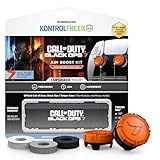
- MADE FOR CALL OF DUTY - Officially-licensed Black Ops 7 design
- EXCLUSIVE SINPER CASE - Holds Performance thumbsticks and Precision Rings
- INCLUDES IN-GAME ITEM - Comes with in-game weapon charm for Call of Duty Black Ops 7
- PERFECT FOR FPS GAMES - Mixed-rise thumbsticks upgrade your aim and control
- GET MORE CONTROL - Mid-rise left stick upgrades grip and movement
Also disable any launcher, recording or performance overlay that injects itself into the game process for the test. The purpose is diagnosis: a clean run tells you whether another process is interacting with DirectX, but does not prove that the disabled program is permanently incompatible.
Use a clean boot
- Press
Win, typemsconfig, and open System Configuration. - On the Services tab, select Hide all Microsoft services, then disable the remaining non-Microsoft services.
- Open Task Manager from the Startup tab and disable nonessential startup applications.
- Restart and test Warzone. If 6068 no longer appears, restore services and startup items in groups until the conflicting program is identified.
- Return System Configuration to Normal startup when testing is complete.
A clean boot is a diagnostic state, not a permanent recommendation. Keep security software enabled unless its vendor’s instructions require a temporary change for troubleshooting.
Check security-software interference
Activision advises adding the Warzone folder to antivirus exceptions when security software interferes with the game. Use the exception controls in your security product and select the actual Warzone installation folder. Activision provides additional instructions for Comodo and BullGuard users. Restore stricter exclusions if testing shows no change, and never exclude unrelated folders just to bypass an error.
Free tools Windows power users keep installed
One-click scans. No signup required.
Re-enable ASLR if it was disabled
Activision also advises re-enabling Address Space Layout Randomization (ASLR) if you previously disabled it. In Windows, open Windows Security > App & browser control > Exploit protection, review the system settings, restore ASLR to its default enabled state, and restart. Do not alter unrelated exploit-protection settings as a guess.
Best Value

- Mixed-rise thumbsticks upgrade your aim and control
- Mid-rise left stick upgrades grip and movement
- High-rise right stick increases precision for faster and more accurate aiming
- The dead are everywhere and these officially-licensed thumbsticks increase the precision, aim and movement of your controller to help you fight massive hordes of zombies
Intel-specific limitation
Intel’s support article, last reviewed 2023-01-12, advises checking Warzone requirements, updating through the computer manufacturer or Intel Download Center, and contacting Activision if the problem persists. It also states that Intel integrated graphics are not supported in Warzone 2.0. If your computer relies only on an Intel integrated GPU, verify the exact Warzone version and hardware requirement before spending time on repeated driver reinstalls.
When a different driver version is the right test
A driver can be current and still be incompatible with a particular game build. If 6068 started immediately after updating, test the previous known-working version with a clean installation. If the system has been failing for months, test the current Activision-listed package first, then one earlier package supplied for the same GPU family. Keep notes for each attempt: version, installation method, shader-preload result and crash location.
Do not use a driver intended for another GPU family, mobile system or workstation simply because its number looks newer. Maxwell and Pascal NVIDIA cards are a special case in Activision’s list and should use 581.80 because official Game Ready support for those architectures has ended.
Submit the crash report when software steps fail
After Windows, driver, shader, file-repair and conflict checks, submit Activision’s Call of Duty PC Crash Report. Include the exact 6068 text, GPU and driver version, Windows build, launcher, Warzone build, and the step at which the crash occurs. State which driver versions and clean-install methods you tested. This gives investigators reproducible context instead of only the error number.
Check Activision’s known-issues listing as well; it was updated 2026-10-09. A listed incident can explain why a previously stable installation began failing after a game update and can prevent unnecessary hardware changes.
Should you replace the graphics card?
Not on the basis of 6068 alone. The error is a stability symptom shared by driver incompatibility, damaged files, shader-preloading interruptions and software conflicts. Consider hardware diagnosis only if other demanding DirectX games show similar crashes, Windows records broader display-driver resets, temperatures or power delivery are abnormal, or the adapter fails outside Warzone. A new GPU, power supply, memory kit or cooling product is not a universal fix supported by the available evidence.
Run the official sequence first, preserve your notes, and change one variable at a time. That approach separates a Warzone-specific compatibility problem from a system-wide graphics fault.
Quick Recap
As an optional shortcut after the manual driver checks, Outbyte Driver Updater can scan more than 100 devices for outdated, corrupted or missing drivers, install official drivers, show current and recommended versions, and provide driver backup, restore and scheduled scans. It runs on Windows 11, 10, 8 and 7 and has a two-day free trial with no credit card before subscription terms apply.
Product prices and availability are accurate as of the date/time indicated and are subject to change. Any price and availability information displayed on Amazon at the time of purchase will apply.




