Quick wins for a faster PC:
Fix the driver behind crashes, sound loss and screen glitchesFind Drivers →Clear out junk files and repair common Windows errorsFree Scan →To dictate with Samsung Keyboard, open any text field, activate the microphone icon on the keyboard toolbar, speak while it is active, and stop with the control shown on screen. To choose which voice service the keyboard uses, Samsung’s Canadian instructions point to Settings > General management > Keyboard list and default, while Samsung’s Colombian instructions point to Samsung Keyboard settings > Voice input. Menu names and the microphone’s position vary by model, region, carrier and Android version, so the steps below mark where the paths differ.
Samsung voice input and Google voice typing are two different services
Samsung’s Canadian support guide says Galaxy phones have two built-in voice-to-text apps. In its words: “There are two built-in voice-to-text apps on your phone: Samsung voice input and Google voice typing.” (Samsung Canada, Adjust Samsung keyboard settings on your Galaxy phone, updated March 28, 2026.)
As an Amazon Associate I earn from qualifying purchases.
The restriction that matters most comes from Samsung’s Colombian guide, which states: “Ten en cuenta que la entrada de voz de Samsung solo está disponible con el teclado Samsung” (“Keep in mind that Samsung voice input is only available with Samsung Keyboard”). (Samsung Colombia, Cómo escribir con la voz en el teclado Samsung, updated August 15, 2025.) In practice, if you type in a different keyboard app, Samsung voice input is not the service you are using.
The Tool Desk
Outbyte PC Repair FREERepair Windows errors before they cause bigger problemsFix Now →Outbyte Driver Updater FREEFix the driver behind crashes, sound loss and screen glitchesFind Drivers →| Question | Samsung voice input | Google voice typing |
|---|---|---|
| Which keyboard it works with | Samsung Keyboard only, per Samsung Colombia | Offered as a built-in option on Galaxy phones; the sources reviewed do not state which keyboards it works with |
| Where it is selected | Keyboard list and default (Canada) or Samsung Keyboard settings > Voice input (Colombia) | Selectable in Samsung Keyboard settings > Voice input, per Samsung Colombia |
| Language and offline setup | Language can be changed in voice input settings, and offline language packages can be installed, per Samsung Colombia | Not stated |
| How you start it | Microphone on the keyboard toolbar | Microphone on the keyboard toolbar, per Samsung’s supported instructions |
| Recognition accuracy, privacy, latency, language coverage | Not stated; no measurements in Samsung’s pages | Not stated; no measurements in Samsung’s pages |
The Samsung pages do not support a broader ranking of the two services on accuracy, privacy or language coverage, so choose between them on whether you need Samsung Keyboard’s own features and offline language options.
#1 Best Overall
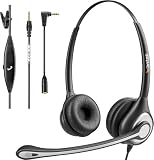
- ✅【4oz Ultra-Light Wired Headset & No Pressure to Wear】 Suitable for long-term use. Adjustable head beam, more suitable for users with different head circumferences. High quality protein skin sponge, soft and comfortable
- ✅【Volume Control & Multi-Function Control】The headphones with microphone can independently controlled, which can be flexibly switched according to the usage scene, and the microphone can be silenced separately. You can also easily adjust the volume
- ✅【Ultra-Large Wearing Freedom】The headset with microphone pole rotates 270 degrees back and forth, with a large adjustment space. It can be freely adjusted for left and right wearing, and more microphones can be placed left and right. Rotate the headset 180 degrees to better fit the contour of the ear
- ✅【Compatibility & Stable Connection Hadset】Suitable for Windows system. Also suitable for smartphones, computers, tablets, laptops and other devices with 3.5mm connectors.*For some PC or devices with 3.5mm Speaker and Headphone with Two Male Ports, this headsets only the Speaker function is supported. If you need to use the microphone and speaker function, you need to bring headphone Splitter yourself.*
- ✅【Comfortable ear cushion & Breathable Material】Soft ear cushion, so you can wear it for a long time without causing damage to your ears. In addition, we use breathable materials so that you can feel more comfortable and skin-friendly when using
Turn on the voice service you want
Canadian route: Keyboard list and default
- Open Settings.
- Tap General management.
- Tap Keyboard list and default.
- Turn on Samsung voice input if it is off.
Samsung advises enabling only one voice assistant in these controls. Check which service is active, and turn off a competing option you did not intend to use.
Colombian route: Voice input settings
- Open Samsung Keyboard settings. If you cannot find it, search Settings for “Samsung Keyboard.”
- Tap Voice input.
- Select Samsung or Google.
Samsung’s Colombian guide describes some Android 12 models that show a Samsung voice input switch on the keyboard-list screen instead. It also has a separate route for Android 10 and earlier. If your labels do not match either path, follow the version-specific steps on that page.
Rank #2

- 【WIDE COMPATIBILITY】: This 3.5mm wired headset includes a USB Type C to 3.5mm Headset Jack Adapter. Compatible with PCs, tablets, Macs, laptops, iPhone 15/16/17 and Android phones with a 3.5mm or USB-C port. COMPATIBILITY REMINDER: Not directly compatible with iPhone 7/8/X/XS/XR/11/12/13/14. These devices require Apple's official 3.5mm to Lightning adapter (not included with headset) .
- 【2-YEAR WARRANTY & ULTRA COMFORT】: 45 days money-back & 24 months warranty. Ultra lightweight 3.5mm Cell Phone Headset with adjustable headband to fit all head sizes, 330°adjustable boom mic, soft and breathable ear cushion enhance all-day wearing comfort.
- 【SIMPLE CALL CONTROLS & MULTI-PURPOSE】: Simply plug in and play. Easy to adjust volume up/down, answer/end a call. Callez Computer Headphone is perfect for Skype Chat, Call Center, Office, Business, K12 School Classroom, Online Courses, Conference Calls, Webinars, Dictation, MP3 players, Computer Games and more.
- 【CRYSTAL CLEAR CALLS】: Professional 3.5mm Call Center Phone Headset enables natural listening experience. Built in high quality noise cancelling microphone to reduce background noise and provide crystal clear sound quality. Acoustic Shock Protection Circuit protects your hearing.
- 【ULTRA DURABLE】: Precision design, quality plastics, unibody headband construction, flexible microphone boom makes this 3.5mm PC Headset sturdier and more durable. Compete with Jabra Business Office Headsets.
Dictate text with the keyboard microphone
- Tap a text field, such as a message box, so that Samsung Keyboard opens.
- Look for the microphone on the keyboard toolbar. If Voice Input is not visible, expand the keyboard toolbar to reveal it.
- Activate the microphone. Samsung’s Canadian guide says to touch and hold it, speak while it is active, and release it. Samsung’s Gulf-region guide instead describes tapping the microphone to begin and tapping again to stop. Follow whichever behaviour your screen shows.
- Stop dictation with the control shown on screen.
On first use, the device may ask you to review and accept terms or grant permissions before voice input works. Samsung’s public instructions say only that such prompts may appear, without listing them, so respond to whatever your phone shows.
Free tools Windows power users keep installed
One-click scans. No signup required.
Change the voice input language
Set the dictation language
- Open Samsung Keyboard settings.
- Tap Voice input, then select Samsung voice input as the service.
- Change the language under the offline voice input options, or install an offline language package if one is offered.
The options shown depend on your model and software version, so the labels and available languages may not match the Colombian guide exactly.
Rank #3

- 【WIDE COMPATIBILITY】: Compatible with iPhone, Samsung, most smartphones and Computer Laptop PC Mac iPad Tablet with single 3.5mm audio jack. Includes a Dual 3.5mm Y-adapter for separate headphone and microphone connection to a PC or Desktop. For iPhone 11/12/13...Newer iPhone, Original Lightning to 3.5mm Adapter is required. (Apple Lightning Adapter NOT Included,must be supplied by Apple Store, otherwise the headset will not work on the phone calls).
- 【EASY TO USE & MULTI-PURPOSE】: Simply plug in and play. Easy to adjust volume up/down, answer/end a call. Callez Computer Headset is ideal for Skype Chat, Call Center, Office, Business, Conference Calls, Online Courses, Webinars, K12 School Classroom, Dictation, YouTube Recording, MP3 players, PS4, Xbox one, Computer Games and more.
- 【CRYSTAL CLEAR CALLS】: Professional 3.5mm Cell Phone Headset enables natural listening experience. Built in high quality noise cancelling microphone to reduce background noise and provide crystal clear sound quality. Acoustic Shock Protection Circuit protects your hearing.
- 【ULTRA DURABLE】: Precision design, quality plastics, unibody headband construction, flexible microphone boom makes this 3.5mm PC Headphone sturdier and more durable. Compete with Jabra Business Office Headsets.
- 【2-YEAR WARRANTY & ULTRA COMFORT】: 45 days money-back & 24 months warranty. Ultra lightweight Call Center Phone Headset with adjustable headband to fit all head sizes, 330°adjustable boom mic, soft and breathable ear cushion enhance all-day wearing comfort.
Keyboard text language and voice language are set separately
Do not assume that changing the keyboard’s typing language also changes what voice input recognises. Samsung documents the voice-input language in the voice-input settings specifically, so look there when dictation is in the wrong language.
Independent reader supportYour contribution helps us test, update, and keep practical guides available for everyone.Troubleshooting
- Microphone is missing: Expand the keyboard toolbar and check the voice-input or keyboard settings. Samsung notes that the microphone’s location can change with Android version.
- Dictation uses the wrong service: Check Keyboard list and default and the Voice input setting in Samsung Keyboard settings. Select the service you want and confirm that no competing service is enabled.
- Voice input is blocked on first use: Respond to the terms or permission prompt on screen.
- Recognition seems poor: Samsung’s Colombian guide advises speaking in a high, clear tone. The guide gives no accuracy figures and does not claim that any accessory will improve recognition.
- Menu names do not match these steps: Search Settings for “Samsung Keyboard” or “Keyboard list and default.” Labels differ by Android version, carrier, region and device.
Which Samsung guide to follow
| Samsung guide | Region | Last updated | What it covers here |
|---|---|---|---|
| Adjust Samsung keyboard settings on your Galaxy phone | Canada | March 28, 2026 | Keyboard list and default path; touch-and-hold dictation |
| Cómo escribir con la voz en el teclado Samsung | Colombia | August 15, 2025 | Voice input service choice, offline language packages, Android 12 and Android 10-and-earlier variants |
| How to use Samsung Keyboard features on a Galaxy phone | Gulf region | Not stated | Tap-to-start and tap-to-stop microphone behaviour |
Samsung’s guides warn that screens and settings differ by country, carrier, software version and model. Use the guide for your own region and Android version, and treat the steps above as the common pattern rather than a universal sequence.
Quick Recap
Rank #4

- HD Sound and Mute Function: This bluetooth headset has built-in dual noise-canceling microphones, bringing HD sound quality, giving you a clear call experience. The bluetooth wireless headset equipped with mute function for privacy during calls
- Ergonomic design and Comfortable Fit: D2 wireless headset features a 45° rotating in-ear part, 360° ear hook, and 180° rotatable mic.Fits for left or right ear,and also comes with three sizes of earplugs. Provide you with a comfortable experience
- Dual-Device Connection and Voice Assistant:The trucker bluetooth headset supports connect two devices simultaneously switching between phone and computer.Quickly double-click the main button to activate Siri for hands-free use without touching your phone
- LED Display and Wide Compatibility: D2 wireless earpiece features an LED digital display to monitor battery levels in real time. The headset built with Bluetooth 5.3, and compatible with most Bluetooth devices like phones, tablets, computers, and more
- Dual Charging and Ultra Long Standby: Bluetooth earpiece supports USB C and wireless charging(not included).Charging case and headset can charge simultaneously. With up to 160 hours of standby time, enjoy a full day of music without worrying about power
Product prices and availability are accurate as of the date/time indicated and are subject to change. Any price and availability information displayed on Amazon at the time of purchase will apply.




