Recommended Free Tools
Joining a virtual power plant can make sense if its compensation is clear and the dispatch, battery-reserve, opt-out, and exit rules fit your household. There is no universal yes: the VPP label alone does not tell you how often your equipment may be used, what control you grant, or what you will receive. Get the current agreement from your utility or provider and assess its written terms before enrolling.
What joining a virtual power plant means
A virtual power plant (VPP) coordinates distributed energy resources—such as rooftop solar paired with batteries, electric vehicles and chargers, water heaters, smart buildings, or flexible commercial loads—to shift demand, reduce peaks, or provide power when needed. For a household, participation might mean changing when a device uses electricity, or it might give an aggregator some remote control over an eligible system. The specific program agreement determines which.
As an Amazon Associate I earn from qualifying purchases.
The U.S. Department of Energy describes VPPs as a way to coordinate these resources to support grid operations. Its VPP overview also discusses potential system-wide grid-cost benefits; those are not a promise of savings for an individual participant.
Quick wins for a faster PC:
Scan for outdated or missing drivers - takes under a minuteDriver Scan →Repair Windows errors before they cause bigger problemsFix Now →Fix the driver behind crashes, sound loss and screen glitchesFind Drivers →What you might gain
- Program compensation: Depending on the offer, this could be a bill credit, an incentive, an upfront payment, or compensation tied to performance. DOE says enrolled resource owners may receive rewards for supporting grid operations, but the amount and conditions vary by program and device.
- A role in grid flexibility: Coordinated resources can help shift use and balance supply and demand during periods of peak demand. That system-level purpose does not establish that your household will save money or avoid an outage.
Payment examples are local and program-specific, not standard VPP rates. For instance, Tesla’s Duke Energy program information describes model-specific monthly bill credits, while its CoServ information describes a monthly credit per Powerwall. Check the current offer for your utility, eligible device, and account rather than treating those examples as typical or guaranteed amounts.
#1 Best Overall

- 49 Min UltraFast Recharging: With upgraded HyperFlash tech, fully recharge at 1,600W—for outage prepping, camping trips, or tailgating events. Enable it in the Anker app.
- 2,000W Output via 10 Ports: Delivers 2,000W (3,000W peak) and 1,024Wh capacity. Power up to 10 devices—ideal for emergency backup, remote work setups, tiny homes, and off‑grid living.
- Compact and Portable: Easily carry, store, and move from room to room, your RV, or even on beach and park outings. C1000 Gen 2 is 14% smaller and 11% lighter than similar models.
- 10 Years of InfiniPower: Built to last through years of daily backup and RV and van life. After 4,000 cycles, the battery still has at least 80% capacity.
- 1.8 Hr Solar Recharging: Go fully off‑grid with sustainable power for tiny homes, camping RV off‑grid setups, and remote locations. Plug in 600W (60V max) of solar and recharge in just 1.8 hours.
What you may give up or need to manage
Battery capacity for backup or bill savings
A dispatch may discharge a battery when you would prefer to keep its charge for an outage or to offset high retail electricity rates. Find out what reserve the program protects, whether you can change it, and whether the system can still follow your normal schedule. Tesla’s Duke Energy example describes a 20% default reserve during events and limits on annual event opt-outs; those are terms for that example, not general VPP rules.
Event timing and frequency
Check which months and hours are eligible, how much notice you receive, how long an event lasts, and the maximum number of events. One Tesla program page describes up to 60 three-hour events per year on eligible weekdays. That schedule is specific to that program page and should not be assumed for another offer.
Payment conditions
Confirm the payment amount or formula, when and how it is paid, and whether it can be reduced or withheld if you opt out, miss an event, or your device underperforms. A headline incentive may not be guaranteed compensation: Tesla’s PGE Smart Battery pilot terms say Tesla does not guarantee a specific compensation level.
Rank #2
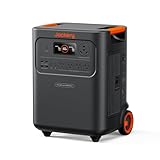
- Essential Home Backup: The Jackery HomePower 3600 Plus delivers 3600W output (7200W in parallel) to run pumps, heaters, and dryers with ease. With dual voltage (120V & 240V in parallel) and 3584Wh capacity expandable to 21kWh per unit or 43kWh with multiple units, it can power a 3-person household for over 2 weeks.
- Safe Power That Lasts: Built with high-temp resistant ceramic membrane battery cells tested at 302 °F, the Jackery HomePower 3600 Plus Portable Power Station prevents thermal runaway from heat or overcharge. Offering 6,000 cycles and a 10-year lifespan, it delivers safe, reliable even in -4 °F blizzards.
- Plug-and-Play: With its easy plug-and-play design, the Jackery HomePower 3600 Plus, paired with MTS, powers your home effortlessly—no complex installation required. Whether at work, in the kitchen, or with family, simply plug in, press "Power-On" and keep life running smoothly through any outage.
- 4 Charging Options: With 4 convenient ways to charge, the Jackery HomePower 3600 Plus solar generator can be fully recharged from 0–100% in just 2 hours via hybrid AC+DC. It also supports charging via AC in 2.5 hours, solar in 4 hours, or a gas generator in 2.5 hours —delivering a full day of quiet, clean energy.
- Ultra-Portable & Lightweight: The Jackery HomePower 3600 Plus, the lightest 3.6kWh LFP power station, boasts automotive-grade CTB tech and is 34% smaller and 29.3% lighter than other models. Its luggage-style design with wheels and a telescopic handle allows effortless rolling from kitchen to garage or beyond.
Control, data, and other commitments
Identify which company can remotely charge, discharge, or otherwise adjust your equipment; what account, device, or energy-use data it collects and shares; and how quickly an opt-out or suspension takes effect. Review contract duration, renewal and withdrawal provisions, and any restriction on enrolling in another demand-response program. Qcells’ California and Texas agreements illustrate that restrictions can appear, but the rules are program-specific. The relevant terms are in the current provider or utility documents, including Tesla’s VPP program information and Qcells’ terms and conditions.
Also consider the value of energy you may give up, any change to your usual battery schedule or retail-rate savings, and the agreement’s treatment of battery wear and equipment warranties. Do not assume the advertised incentive is net profit without checking those effects and terms.
How to assess your actual offer
- Confirm eligibility: Check that your utility territory, address, account holder, installation, and device model qualify. Ask who makes the enrollment decision.
- Clarify what the program controls: Determine whether it shifts consumption, charges a device, discharges a battery, or exports energy—and which company can issue those commands.
- Read the dispatch schedule: Look for eligible seasons and hours, advance notice, event duration, and annual event limits.
- Check backup and opt-out rights: Find the protected reserve, whether you can adjust it, whether you can skip an individual event or suspend participation, and whether opting out affects compensation.
- Calculate payment conditions: Identify the amount or formula, payment timing and method, and circumstances that can reduce or withhold it.
- Review commitment and data terms: Confirm the contract term, renewal and exit process, other-program restrictions, and the information collected and shared.
When joining is more—or less—appealing
Joining is more attractive when you know what you will be paid, your device is eligible, event and reserve rules leave enough capacity for your household, and the opt-out, exit, and data terms are acceptable. It is reasonable to decline or wait if compensation or control terms are vague, backup power is a priority but reserve protections are inadequate, or another program may offer better value. Ask your utility or VPP provider for the current participation agreement; broad descriptions and examples cannot resolve the terms of your individual offer.
Rank #3

- 1500VA/1000W PFC Sinewave Uninterruptible Power Supply (UPS): Uses sine wave output to provide battery backup power for Active PFC & conventional power supplies; Safeguards computers, workstations, network devices, and telecom equipment
- 12 NEMA 5-15R OUTLETS: 6 battery backup & surge protected outlets, 6 surge protected outlets; INPUT: NEMA 5-15P right angle, 45 degree offset plug with 5 foot power cord; 2 USB charge ports (1 Type-A, 1 Type-C) quickly charge phones and tablets
- MULTIFUNCTION, COLOR LCD PANEL: Displays immediate, detailed information on battery and power conditions; Color display alerts users to potential issues before they can affect critical equipment and cause downtime; Screen tilts up to 22 degrees
- AUTOMATIC VOLTAGE REGULATION (AVR): Corrects minor power fluctuations without switching to battery power; UL SAFETY CERTIFIED: Product has been tested in a UL certified lab and listed with UL as meeting or exceeding safety standards
- 3-YEAR WARRANTY – INCLUDING THE BATTERY; $500,000 Connected Equipment Guarantee; FREE PowerPanel Management Software (Download)
What the grid-wide figures do—and do not—tell you
The DOE’s 2025 VPP Liftoff update describes deployment reaching 33 GW across North America and presents a scenario in which 80–160 GW of VPP capacity by 2030 could serve 10–20% of peak load. A separate DOE project page says tripling current capacity to 80–160 GW by 2030 could address 10–20% of peak load and save on the order of $10 billion in annual grid costs. These are system-scale figures and potential outcomes, not forecasts of household enrollment, earnings, or savings. DOE’s project page frames the grid-cost figure as potential.
Free tools Windows power users keep installed
One-click scans. No signup required.
In a September 12, 2023 DOE announcement, Jigar Shah, then Director of DOE’s Loan Programs Office, called deployment of 80–160 GW by 2030 “the fastest and most cost-effective way to support electrification.” That is Shah’s policy assessment, not a finding about the economics or performance of any one household program. DOE materials do not establish a typical household payout, net customer savings, battery wear, or outage protection; those depend on the specific agreement and actual dispatch.
Quick Recap
Product prices and availability are accurate as of the date/time indicated and are subject to change. Any price and availability information displayed on Amazon at the time of purchase will apply.




