The Tool Desk
Outbyte PC Repair FREERepair Windows errors before they cause bigger problemsFix Now →Outbyte Driver Updater FREEScan for outdated or missing drivers - takes under a minuteDriver Scan →In the United States, start a Samsung tablet repair through Samsung Support’s repair page. Choose your tablet and follow the request flow to see which service options are available for your model and location. Before approving paid work, check warranty coverage and get a model-specific estimate.
How to request Samsung tablet repair
- Open Samsung Support’s repair page and select your tablet to begin a request.
- Have the tablet’s model and serial number ready. Samsung says these details are helpful when starting a repair request.
- Review the service options offered for your model and location, then follow the instructions in the request for the selected service type.
- Check warranty coverage and any separately purchased retailer service plan before accepting a quote. Samsung’s warranty page directs customers with a third-party retailer plan to that retailer’s claims process.
Samsung says repair cost depends on the diagnosis, warranty status, and type of repair. The request flow or service provider must establish the actual price for your device and problem; there is no universal tablet repair price.
As an Amazon Associate I earn from qualifying purchases.
Which Samsung repair option should you choose?
| Option | Best suited to | What to confirm |
|---|---|---|
| Walk-in service | Owners who want in-person service and have an eligible service center nearby. | Use Samsung’s service-center locator, then confirm appointment and walk-in details with that location. |
| Mail-in service | Owners who prefer a remote repair route. | Follow the repair request’s instructions for eligibility, packing, shipping, and timing. |
| “We Come to You” repair van | Owners whose tablet and location qualify for an appointment. | Samsung Support US currently advertises a $30 convenience fee and says repairs are usually completed within two hours using genuine Samsung parts. These are not guarantees for every tablet or repair; check availability and terms for your request. |
Samsung’s repair page describes walk-in and mail-in service and points customers to service-center search. The van option is conditional on model and location. Compare the options shown for your device by coverage, quoted total cost, convenience, and the timing given for your specific repair.
Free tools Windows power users keep installed
One-click scans. No signup required.
Check warranty and purchase-country restrictions
Use Samsung’s US warranty support page to check coverage for a tablet. If you bought the device in another country, service in the United States may be restricted: Samsung says tablet service may be limited to the country of first sale. Contact a local authorized service center to ask whether it can handle the repair. Samsung also notes that parts availability can affect delay or cost for international service.
#1 Best Overall

- ➤【Parameters】For Samsung Galaxy Tab Tab A9+ screen (not for Samsung Galaxy Tab A9) replacement, 11.0 inches, 1200x1920 pixels, please confirm your phone model before purchasing.
- ➤【Strict Quality Control】All for sm-X210 screen replacement are strictly QC tested before shipment, 100% intact. Make sure for sm-X210 lcd replacement are no scratches, no dead zones, no dot pixels or lines on the screen. High color saturation, high resolution, wide color gamut and smooth hand feel.
- ➤【Perfect Quality Screen】For The samsung galaxy tab A9+ lcd display has high brightness, high pixel, bringing you a clearer and more colorful screen world, and enjoy the original visual experience.
- ➤【Application】Used to replace the defective LCD display touch screen digitizer assembly for Tab A9+ . Examples include incorrect screen response, display issues, pixel distortion, cracked LCD screen, wrong colors, old or frozen LCD.
- ➤【Installation and Service】 Please test the Screen Replacement for Samsung Galaxy Tab A9+ before installation to ensure the normal use of the sm-X210 lcd. Non-professional installation is not recommended. If you need help and screen replacement for samsung A9+ sm-X215 lcd Installation instructions video, please contact us and we will get back to you within 24 hours, or find the installation video on YouTube.
These instructions and service terms are for the United States. If you are elsewhere, use Samsung Support for your country; US options, fees, and coverage should not be assumed to apply internationally.
Quick Recap
Best Value
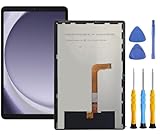
- This screen replacement For Samsung Galaxy Tab A9+ Plus SM-X210 SM-X215 SM-X216.please confirm the model before purchasing.
- This replacement screen has no frame. Equipped with a screen protector and a complete repair kit.
- Replacing old, cracks, dead spots, damage, touch not working properly or touch response problems on the screen.
- It’s highly recommended to install the screen with the guidance of the tutorial videos on YouTube. You can search " Tab A9+ Plus Screen Replacement" on YouTube for a tutorial videos of how to do the replacement.
- We provide the best service to our customers.please contact us immediately via Amazon message if you need any assistance.
Rank #4

- 【Compatibility】LCD Screen Replacement for Samsung Galaxy Tab A9+ A9 Plus X210 ,Brand New Item With High Quality ,It can replace your broken device well.
- Please order the right one you need. Please check the model Tab A9+ 11" Wi-Fi SM-X210 or Type or color category carefully when you choose the item.
- The real machine is tested three times to ensure that the galaxy tab A9+ screen has no dead pixels, no bright spots, and no dark spots.
- Instruction is NOT included.This is NOT an easy job for someone who has no technical skills with disassembling or assembling cellphones / mobile phones.
- Package Include: 1 xTab A9 Plus LCD Display Touch Screen Digitizer Replacement 1 x Tool Kit, (It's Only gift ,No returns or refunds are acceptable).
Rank #3

- Compatible Model : For Samsung Galaxy Tablet A11 Plus Screen Replacement. Please double identify and check your phone model matches before purchasing the screen replacement.
- High Quality : High resolution and high sensitive touch make your phone just like the good condition original one. our products are rigorously tested before leaving the factory to ensure that they are in good condition before leaving the factory.Many professional repair shops source their screens from us for replacing their customers' phone screen.
- Fix Problems : This Screen Replacement For Samsung Galaxy Tablet A11 Plus. Will fix all screen problems: cracks, damage, dead spots, blurry display, dust spots, wrong color issues, touch response problems and so on.
- Easy to Install : You just watch a YouTube video for Samsung Tablet A11 Plus Screen Replacement,according to the video operation,you can easily install a new screen.
- Service after sale : If broken,damaged or missing items upon receipt .please contact us immediately via Amazon.
Rank #2

- This screen replacement For Samsung Galaxy Tab A8 SM-X200 X205 X207.please confirm the model before purchasing.
- This replacement screen has no frame. Equipped with a screen protector and a complete repair kit.
- Replacing old, cracks, dead spots, damage, touch not working properly or touch response problems on the screen.
- It’s highly recommended to install the screen with the guidance of the tutorial videos on YouTube. You can search " Tab A8 Screen Replacement" on YouTube for a tutorial videos of how to do the replacement.
- We provide the best service to our customers.please contact us immediately via Amazon message if you need any assistance.
What to compare before approving a repair
- Whether your exact tablet model and location qualify for the service option.
- Whether the fault is covered by Samsung warranty or a separate retailer plan.
- The total estimate after diagnosis, including any applicable fees.
- Whether walk-in, mail-in, or a van appointment best suits your circumstances.
- The service timing stated for your particular request, rather than a general estimate.
Product prices and availability are accurate as of the date/time indicated and are subject to change. Any price and availability information displayed on Amazon at the time of purchase will apply.




