You can upscale low-resolution footage to a 4K output, but the larger frame does not recreate detail that was never captured. Treat the result as an enhanced, upscaled file—not a substitute for footage recorded natively in 4K. For 1080p clips, Topaz recommends starting with Artemis High Quality and trying Proteus Fine Tune if the preview falls short. For a short browser-based option, Adobe Firefly lists 4K output but limits uploads to MP4 clips under 200 MB and 5–20 seconds.
What 4K upscaling can—and cannot—do
Upscaling increases the output dimensions and uses image processing to make the enlarged video look clearer. It may improve perceived sharpness, but it cannot guarantee the original fine detail of native 4K footage. The vendor materials reviewed describe enhancement features; they do not establish, through independent testing, that upscaled footage matches footage captured at 4K.
As an Amazon Associate I earn from qualifying purchases.
Start by checking the source, not just its resolution. Blur, noise, compression artifacts, interlacing, and aspect-ratio issues can all affect the result. Enhancement may make some defects more visible or produce unnatural-looking detail, so judge the output against the original rather than assuming that a 4K label means a better image.
Quick wins for a faster PC:
Scan for outdated or missing drivers - takes under a minuteDriver Scan →Clear out junk files and repair common Windows errorsFree Scan →Choose a workflow that fits the clip
| Option | What the vendor documents | Questions to consider |
|---|---|---|
| Topaz Video desktop software | Topaz documents a 1080p-to-4K workflow, recommends Artemis High Quality for that case, and suggests Proteus Fine Tune if the result needs adjustment. Topaz’s upscaling guide | Does the preview improve this source? Does your computer meet the current requirements, and how long is the full render likely to take? |
| Topaz Video plugin for DaVinci Resolve Studio | The plugin requires Resolve Studio. Topaz warns that upscaling by 3–4x can reduce performance and interface responsiveness. Topaz’s plugin documentation | Is Resolve Studio already in your workflow? Check compatibility with your installed software version. |
| Adobe Firefly web upscaler | Adobe lists enhancement powered by Topaz Astra, output up to 4K, and MP4 uploads under 200 MB with a duration of 5–20 seconds. Adobe Firefly’s product page | Does the clip meet both limits, and is uploading it to a web service appropriate for your project? |
These are documented capabilities, not a comparative quality or speed ranking. Topaz describes its desktop software as an application and advises checking minimum system requirements before installation; consult the current Topaz quick-start guide for the applicable requirements. Current pricing and detailed system specifications are not established here.
#1 Best Overall

- 【SIMPLE, POWERFUL, COMPACT】- Easily play videos, photos, and music files from USB drives, hard drives, and SD cards. Simple and intuitive to use with no complicated settings. Takes up very little space - it’s smaller than a deck of playing cards!
- 【4K/UHD VIDEO PLAYBACK】- Stunning HDMI video quality up to 2160p/60Hz with support for the latest video formats such as H.265/HEVC. Feeds digital surround sound to home theater receivers for a cinema-like movie experience. Includes analog AV output for connecting to an older TV or for sending audio to a stereo system.
- 【READS USB DRIVES AND SD CARDS】- Reads USB flash drives and hard drives up to 8TB and SD cards up to 1TB. Supports FAT32, exFAT, and NTFS file systems. Automatic playback, continuous looping and repeat, and the ability to resume video playback from the last stop point.
- 【TRIGGER SENSOR INPUT】- Ability to loop one video continuously and play a different video when triggered by an optional push-button or motion sensor. Build an interactive digital signage display, art gallery or museum on-demand video player, or a Halloween special effect in just a few steps. Push-button and motion sensors sold separately.
- 【MEDIA FORMAT SUPPORT】 - Video: MP4, MKV, AVI, TS/TP, MOV, VOB, and M2TS files using H.265/HEVC, H.264/AVC, VC1, or MPEG2/4 codecs, up to 4096x2304p@30fps, 10-bit color, and 200mbps. Photos: JPG, JPEG, BMP, GIF (non-animated), PNG. Music: MP3, WMA, OGG, FLAC, APE, AAC
Upscale a clip and inspect the result
- Check the source. Note its resolution and aspect ratio, then inspect representative scenes for blur, noise, compression artifacts, and interlacing. A vendor tutorial illustrates a 322×240 source enlarged 2x to 644×480; that is an example, not a general quality guarantee. Topaz’s upscaling basics article
- Pick the processing route. Consider clip length and file size, whether you want desktop or browser processing, and whether your computer can handle the job. Check current system requirements and software compatibility before installing or relying on a particular setup.
- Set the output resolution. For 1920×1080 footage targeting 4K in Topaz Video, select 4K in the output menu. Topaz recommends Artemis High Quality for this 1080p case; if its result is unsatisfactory, try Proteus Fine Tune.
- Render a preview first. Check representative scenes closely for invented-looking texture, halos, flickering detail, faces that change unnaturally, or noise that has become more conspicuous. These are practical inspection checks, not reported test results.
- Compare at the viewing size that matters. Look at the preview beside the original and decide whether the apparent clarity is worth any artifacts and processing time. Do not commit to a full render based only on the output resolution.
- Render the full clip only if the preview works. For the Resolve plugin, account for Topaz’s warning that 3–4x upscaling can affect performance and interface responsiveness.
When the browser option is suitable
Adobe Firefly may suit a short clip that meets its listed upload restrictions: MP4, less than 200 MB, and 5–20 seconds. Adobe says the upscaler uses Topaz Astra and lists output up to 4K. These are vendor-stated features and limits; confirm them on the live product page before relying on them. The documented limits do not describe a general-purpose route for longer or larger footage.
Quick Recap
Best Value

- HD streaming made simple: With America’s number 1 TV streaming platform,* exploring popular apps—plus tons of free movies, shows, and live TV—is as easy as it is fun. *Based on hours streamed—Hypothesis Group
- Compact without compromises: The sleek design of Roku Streaming Stick won’t block neighboring HDMI ports, and it even powers from your TV alone, plugging into the back and staying out of sight. No wall outlet, no extra cords, no clutter.
- No more juggling remotes: Power up your TV, adjust the volume, and control your Roku device with one remote. Use your voice to quickly search, play entertainment, and more.
- Shows on the go: Take your TV to-go when traveling—without needing to log into someone else’s device.
- TV, simplified: With setup that only takes minutes, a simple-to-navigate Home Screen, and an uncluttered remote control that does all you need—Roku makes it easier to watch the TV you love.
Rank #4
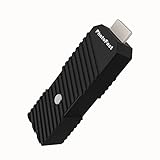
- 💬【Notes Before Purchase】4K Gamer Pro is only compatible with 1080p input and HDMI 2.0a or higher version cable (the original HDMI 1.4 cable that comes in the Nintendo Switch package doesn't work with 4KGP). **Please contact us if you see a black screen when turning the dongle on because it's an issue of preference or the HDMI cable.
- 🎮【Upscale Your Video Game From 1080p To 4K】 4K Gamer Pro photofast enhances the resolution while also making the image delicate, clear, and three-dimensional. It accomplishes this by using image processing technology for image sharpening, color processing, and depth of field without any lag or drop in FPS.
- 📺【3 Levels Of 4K Optimization】With 3 different levels of visual optimization, you can find the perfect quality to suit your TV, game, and needs. Find the right enhancement level so you can get the most comfortable visual experience for your favorite games.
- 👍【No Lag Or Drop In FPS】Enjoy high-resolution video quality without sacrificing FPS or suffering any lag.
- 🕹【Video Game Accessory】You can push your Nintendo Switch / Nintendo Switch OLED / Wii U / PS4 / PS3(1080p) / Xbox One / Xbox 360(1080p) / mClassic / RetroTink 5x for retro game console & more beyond 1080p and experience your favorite games in 4K
Rank #3

- Bring the theater home: Get the best seat in the house while enjoying movies and content from the comfort of your family room
- Playback of HD Blu-ray discs and DVDs
- Smart Functionality: With fast, stable built-in Wi-Fi, you can wirelessly access your favorite streaming apps and services including Netflix, YouTube, Amazon Prime Video & more
- Inputs/Outputs: 1 HDMI, 1 USB, 1 Coaxial, 1 Ethernet. Features built-in wifi
- 4K Upscaling: Get the most out of your 4K Ultra HD TV by upscaling the quality of your Blu-ray movies to near 4K quality. 4K Ultra HD discs are not supported
Rank #2

- [Unlock high-definition new experience, elevate game graphics to 4K 60 frame smooth picture quality] The 4K upscaler enhancer is equipped with professional 1080P to 4K up conversion technology, which can directly upgrade 1080P output devices to 4K with just one click 4K@60fps Ultra clear picture quality. Through precise image sharpening, delicate color tuning, and enhanced depth of field, the game graphics are clear, sharp, layered, and full of texture. The entire process of signal conversion has zero delay, no frame drops, and no screen lag, providing an immersive and smooth top-level gaming experience.
- [Super Compatibility] This 4K latency free converter has a wide range of compatibility, perfectly compatible with multiple mainstream game consoles such as Nintendo Switch, first generation Xbox, full range PlayStation, GameCube, PS2, Wii, DreamCast, PS3, Xbox 360, Wii U, etc. It also supports specialized adapter devices such as mClassic and RetroLink 5x, and is compatible with various 1080P output game devices. Easily upgrade the graphics of old consoles to meet the needs of different players, allowing experienced game enthusiasts to relive classic games and enjoy exciting gaming fun to the fullest.
- [Upgrade 1080P device screen to ultra clear 4K resolution]This 4K converter can easily upgrade 1080P device images to ultra clear 4K resolution, and can be easily adapted to various TV devices, catering to gaming scenarios and personal visual needs, creating just the right high-quality picture quality. After upgrading, enjoy pure 4K high-definition visual effects, with zero latency and no frame drops throughout the entire conversion process. While harvesting high-definition and delicate images, there is no need to sacrifice smooth frame rates. Immersive unlocking provides a comfortable and smooth ultimate gaming experience.
- [Usage] Connect the HDMI interface with UHD logo of the device to the Nintendo Switch base, and then connect the other end of the matching dedicated cable 4K@60Hz The monitor is ready to use.This upgrade only supports 1080p input and is compatible with HDMI 2.0a and above cables. It is not compatible with the original HDMI 1.4 cable. Please use the product's built-in HDMI extension cable; At the same time, the device is only compatible with 4K@60Hz Display device, not supported 4K@30fps 、 A 1440P monitor, when connected to such devices, may experience a black screen and fail to display properly.
- [Black screen troubleshooting] In case of abnormal situations such as black screen and stuttering, first confirm that the host can output 1080P image quality normally. This product is only compatible with 1080P input and HDMI 2.0a and above specification cables, and cannot be compatible with HDMI 1.4 version cables. If you have any questions about identification, please let us know 4K@60Hz For issues with the monitor and compliant high-definition cables, please feel free to contact customer service at any time. We will provide you with professional identification guidance and assist in quickly resolving usage issues.
Product prices and availability are accurate as of the date/time indicated and are subject to change. Any price and availability information displayed on Amazon at the time of purchase will apply.




