Free tools Windows power users keep installed
One-click scans. No signup required.
Some Lenovo Flex 5 models support pen pressure sensitivity, but not all of them, and the feature depends on pairing the exact laptop with a compatible active pen. For the IdeaPad Flex 5 14ABR8, Lenovo’s product specification lists Lenovo Digital Pen options with 4096 levels of pressure sensitivity. Other Flex 5 models use different pen protocols, and a pen is not always included in the box.
What the manufacturer specifications say, model by model
Lenovo publishes a PSREF (Product Specifications Reference) sheet for each model. The three Flex 5 variants covered by its published specifications differ in what they say about pen input, so it is best to read them one at a time.

As an Amazon Associate I earn from qualifying purchases.
| Model (as named in Lenovo’s PSREF) | Pen input listed | Pressure levels listed | Pen protocol stated | Pen included with the laptop? |
|---|---|---|---|---|
| IdeaPad Flex 5 14ABR8 | Lenovo Digital Pen options | 4096 | Not stated in the PSREF text | Not guaranteed. The spec lists a “No pen (purchase separately)” configuration alongside pen options. |
| Flex5 Chrome 14IAU | Lenovo USI Pen | 4096 | USI 1.0 only | Not stated in the PSREF text |
| IdeaPad Flex 5 14ITL05 | Lenovo Digital Pen options | 4096 | Not stated in the PSREF text | Not stated in the PSREF text |
IdeaPad Flex 5 14ABR8
This is the clearest case. Lenovo’s PSREF for the 14ABR8 lists Lenovo Digital Pen configurations with 4096 pressure levels. A separate Lenovo Digital Pen 2 product listing names the IdeaPad Flex 5 14ABR8 as a compatible system and advertises up to 4096 levels. Those two sources agree, which is the strongest support for pressure input on this model. You can read the specification at Lenovo’s PSREF for the IdeaPad Flex 5 14ABR8.
What’s actually slowing this PC down?
Pick the symptom - the matching free tool is one click away.
Flex5 Chrome 14IAU
This model uses a different pen standard. Lenovo’s PSREF lists a Lenovo USI Pen with 4096 pressure levels and states that the Flex5 Chrome 14IAU is compatible only with USI 1.0 stylus pens. A pen labeled for another protocol, including the Lenovo Digital Pen, should not be assumed to work here. The specification is at Lenovo’s PSREF for the Flex5 Chrome 14IAU.
#1 Best Overall
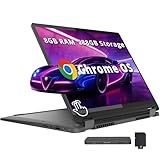
- 【Upgraded】Seal is opened for upgrade only, 1-Year warranty on Upgraded RAM/SSD from SnowBell, and original 1-Year Manufacture warranty on remaining components. 【14" WUXGA 2-in-1 Touchscreen Display】Navigate, create, and write naturally with utmost precision on this responsive touchscreen. Convert to a tablet with the flip of a screen around a 360° hinge.
- 【Intel Core i5-1334U Processor】Achieve the perfect combination of speed and efficiency with a powerful processor that ensures smooth multitasking, consistent performance, and reduced power consumption, an ideal companion for your daily digital tasks.
- 【8GB LPDDR4X RAM】Get powerful, high-bandwidth efficiency for intensive workloads; run several programs simultaneously while staying quick and responsive.【288GB Storage】128GB SSD+160GB Docking. Experience rapid, high-capacity storage designed to hold your massive assortment of documents, software, and entertainment files.
- 【Intel Iris Xe Graphics】Experience impressive integrated graphics performance, providing clear visuals and efficient handling of everyday tasks, multimedia, and light gaming.【Backlit Keyboard】Enjoy comfortable and accurate typing, even in dim light.【1080p Webcam】Provides high quality video calls, virtual meetings and online interactions.
- 【Chrome OS】12.42 x 9.02 x 0.78 inches, 3.48 lbs. 【Ports】1x USB-A, 2x USB-C, 1x Headphone/Microphone Combo, 1x MicroSD Card Reader; Wi-Fi 6E, Bluetooth 5.3. 【Bonus Docking Station Set】1x 7-in-1 Docking Station w/ 128GB Storage, 1x 32GB MicroSD Card w/ Adapter, 1x Type-C Data Cable, 1x 3-in-1 Charging Cable, 1x Suede Cleaning Cloth.
IdeaPad Flex 5 14ITL05
Lenovo’s PSREF for this model also lists Lenovo Digital Pen options with 4096 pressure levels. The matching number does not prove that pens are interchangeable across models. Confirm the pen against this exact model before buying. The specification is at Lenovo’s PSREF for the IdeaPad Flex 5 14ITL05.
Touch is not the same as pressure
Every model above has a touchscreen, and the 14ABR8 specification describes it as capacitive multi-touch supporting 10 simultaneous touch points. That is finger input. It tells you nothing about whether the screen responds to pen pressure. Pressure sensitivity is a feature of the pen-and-digitizer pairing: the pen reports how hard it is pressed, and the software can translate that into line weight, opacity, or brush size. A Flex 5 can be a capable touch laptop and still have no pressure input at all.
Rank #2

- BUILT FOR EVERYDAY USE — The IdeaPad Flex 5i Chromebook Plus features a x360 degree hinge, allows Flex 'Laptop' mode for everyday computing, 'Yoga' mode for sharing things, 'Flip' convertible mode for binge-watching, or 'Tablet' mode Spin for more intuitive interaction. With up to 10-hr battery life, it will last full-day use.
- GOOGLE AI BUILT IN, WITH GEMINI — Supercharge your daily tasks with Gemini. Brainstorm fresh ideas, quickly understand any content, and insert AI-generated content into any field, wherever your cursor takes you. With the Google One AI Premium Plan, you get Gemini Advanced, 2TB of cloud storage, and Gemini in Gmail, Docs, and more.
- THOUGHTFUL DESIGN — Equipped with Intel Core i3-1315U (6 cores, 8 threads, up to 4.5GHz) and Intel UHD Graphics; paired with 8GB DDR4 memory and 256GB Storage ( 128GB eMMC + 128GB SD Card) — perfect for large or growing collections of videos, music and school documents.
- EXCELLENT VISUA — Features a 14" WUXGA (1920x1200) IPS glossy panel with 300 nits brightness and touch capability, providing vibrant and responsive visuals for work and creativity. Plus, you can expand your workspace by connecting to 2 external monitors via USB-C Ports. Maximum supported resolution of 4k (3840x2160) @60Hz
- CONNECTIVITY FOR PRODUCTIVITY — The Flex5i Chromebook plus has 2 USB 3.2 Gen 2 Type-C ports, one full-function and one with charging and fast data transfer support, along with USB 3.2 Gen 1 Type-A and microSD card reader. Full connectivity allows you to get things done more efficiently. Enjoy blazing-fast wireless speeds with Intel Wi-Fi 6E and seamless device pairing via Bluetooth 5.3. And Backlit keyboard for easy typing in dim or dark locations.
How to confirm a pen will work with your laptop
- Find the exact model name and machine type. Check the label on the underside of the chassis, or the purchase receipt. “Flex 5” alone covers several different models, so a family name is not enough.
- Open the PSREF page for that exact model number from Lenovo’s site. Look for the pen section and note the stated pen type, such as Lenovo Digital Pen or Lenovo USI Pen, along with the pressure level.
- Match the pen protocol. If the PSREF names USI 1.0 (as it does for the Flex5 Chrome 14IAU), a pen built to another standard is not a safe substitute.
- Check whether the pen is included. Read the seller’s list of included accessories, because some configurations ship without a pen.
- Confirm the pen listing names your model. Lenovo’s Digital Pen 2 listing names the IdeaPad Flex 5 14ABR8 as compatible, so that is a good example of the match you should look for.
Whether the laptop comes with a pen
Not necessarily. The 14ABR8 specification includes a “No pen (purchase separately)” configuration next to its pen options, which means the pen is an optional accessory on at least some builds. If pressure input is the reason you are buying, check the included-accessory list on the specific listing before you order, rather than assuming the pen comes with the laptop.
Recommended Free Tools
What this evidence does and does not establish
- The 4096-level figure is the manufacturer’s specification for the named models. It is not an independent measurement of drawing quality.
- Lenovo’s PSREF pages are undated, and we accessed them in 2026. Configurations, regional stock, and pen bundles change, so verify the current listing for your region.
- The specifications do not establish how a pen performs in individual applications, nor do they address palm rejection, latency, or tilt support. Check those points in the specific software you plan to use.
- Pen compatibility for models not listed in these three specifications is not covered here.
For a Flex 5 that is not one of these models, look up its own PSREF page first. If the page does not list a pen, the laptop should be treated as touch-only for this purpose.
Quick Recap
Rank #4
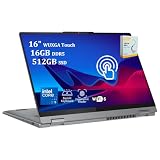
- 【Powerful Storage】: 16GB DDR5 SDRAM Memory, 512GB Solid State Drive
- 【Powerful Intel Core Performance】: Intel Core 5 120U Processor (10 Cores, Max Turbo Frequency Up to 5.0GHz, 12 MB Intel Smart Cache, 12 Threads)
- 【Strong Graphics and Display】: 16" WUXGA (1920x1200) IPS Touchscreen, Integrated Intel Graphics
- 【External Ports and Slots】: 2x USB-C (USB 10Gbps), with USB PD 3.1 and DisplayPort 1.4, 2x USB-A (USB 5Gbps), 1x HDMI 1.4b, 1x 3.5mm Combo Audio Jack, 1x MicroSD Card Reader
- 【Operating System】: Windows 11 Home, Backlit Keyboard, Fingerprint Reader, Wi-Fi 6 and Bluetooth 5.2, FHD 1080p Camera with Privacy Shutter, Dolby Audio, Authorized DLCA Accessory
Rank #3

- 【Upgraded】Seal is opened for upgrade only, 1-Year warranty on Upgraded RAM/SSD from SnowBell, and original 1-Year Manufacture warranty on remaining components. 【x360 16" 2.5K IPS 400nits Touch Display】Utilizing its 360° hinge, easily switch between laptop, tent, stand, and tablet modes for different activities like work, entertainment, presentations, and reading. A 2.5K(2560x1600) 400-nit display offers crystal-clear color and ultra-sharp visuals.
- 【Intel Core i7-1255U Processor】The 10-core Intel Core i7-1255U processor fuels seamless streaming, content creation, and entertainment. Get your things done fast with high performance, instant responsiveness and best-in-class connectivity.
- 【16GB DDR4 RAM】With a generous 16GB of RAM, you can seamlessly switch between tasks without experiencing any lag or delays.【1TB PCIe SSD】This whopping storage ensures that you can store all your important data without having to worry about running out of space anytime soon.
- 【Backlight Keyboard】Comfortable and accurate typing is a sure thing. 【Touch Style Fingerprint Reader】 Known for its high accuracy, speed, and reliability, it presents a convenient, secure, and reliable way to authenticate user identity. 【Integrated Intel Iris Xe Graphics】It delivers transformational GPU and integrated graphics to support fluid designing for creators and rich gaming experiences.
- 【Windows 11 Pro Included】Pro refers to the professional edition. Pro adds management devices and applications to the Home version, and supports remote and mobile working. 14.09 x 9.99 x 0.74", 4.63 lbs. Ports: 2x USB 3.2 Gen 1 (One Always On), 1x Thunderbolt 4 / USB4 40Gbps, 1x HDMI 1.4b, 1x Card reader, 1x Headphone/microphone combo jack (3.5mm), 1x Power connector; Wi-Fi 6, 11ax 2x2 + Bluetooth 5.1; Storm Grey. Bonus 32GB SnowBell USB Card.
Product prices and availability are accurate as of the date/time indicated and are subject to change. Any price and availability information displayed on Amazon at the time of purchase will apply.




