Developer time tracking works best when it is easy to start, straightforward to correct, and connected to the work it is meant to describe. Choose a workflow around your goal—personal time awareness, client billing, estimating projects, or planning team workload—then verify that the tracker captures and reports the details you actually need.
What developer time tracking can—and cannot—tell you
Time tracking records work against a task, project, client, or issue. Those records can help reconstruct where effort went, support invoices, and compare estimated time with recorded time. They describe logged hours; they do not, by themselves, measure code quality, productivity, or an individual developer’s value.
As an Amazon Associate I earn from qualifying purchases.
That distinction matters especially for team reporting. Treat hours as one input for planning and client conversations, not as a stand-alone score of performance.
Recommended Free Tools
Choose a workflow based on the job
Personal time awareness
If you want a clearer picture of how time is divided, prioritize fast capture and easy corrections. Toggl Track documents manual, one-click, Pomodoro, web, and mobile tracking options for software teams. Its developer-focused page also describes billable reporting and estimates-versus-actuals: Toggl Track for software teams.
#1 Best Overall

- 🌳【Exclusive Wood Grain Design 】Our exclusive wood grain design adds a natural and stylish touch to your workspace. As a limited edition timer, it not only looks elegant but also stands out as a unique option. It’s a great way to enhance your office, study, or living area with a touch of nature's elegance, all while boosting your productivity.
- 🔊【3 Volume Levels】Mute/Vibration/Alarm. In vibration mode, the vibration is noticeable on your desk without disturbing others nearby. Alarm volume: 70-80dB. In mute mode, the screen will flash to remind you, making it suitable for use in the library.
- ⏲️【Rotating timer with gravity sensor】Preset with 1,5,10,30, and 60 minutes. Simply flip to the desired number to start the countdown automatically. Flip the screen face up to pause, or face down to reset and turn off the screen.
- 💡🔋 【Portable & Convenient with Bright Display】 This compact and rechargeable timer features a light-up screen for excellent visibility in any lighting, whether in a classroom, kitchen, or bedroom. Its lightweight design makes it easy to carry in your bag or backpack, while the built-in rechargeable battery with USB-C charging offers a sustainable, eco-friendly alternative to disposable batteries.
- 🎁【Application Scenario】Perfect for work, school, office, and kitchen use, this cube timer features a stylish and modern design. It makes an excellent gift for students, friends, colleagues, families, or individuals with ADHD. Ideal for various scenarios such as work/office, back-to-school, college/classes/study, workouts, and kitchen tasks.
Client billing
For invoicing, check whether you can assign rates, separate billable from non-billable time, and produce reports or exports that fit your billing process. Clockify describes billable rates, labor rates, project estimates, reports, and exports on its software development time-tracking page. Toggl describes billable hours and costs in its software-team features. Confirm current plan limits and whether the resulting report works for your invoices.
Project estimation and team planning
For planning, record time against a consistent set of projects and tasks, then compare estimates with actuals across several projects. Clockify and Toggl both describe estimates-versus-actuals reporting. Use the comparison to inform future estimates, while accounting for changing scope and incomplete records.
Rank #2

- TIME MANAGEMENT — The 60-minute learning clock assists with organization and concentration among tasks. The desk timer is ideal for kids and adults to improve time management and productivity while completing activities
- SPECIAL NEEDS — The countdown analog timer can be understood intuitively by all ages and abilities, incluiding those with autism, ADHD or other learning disabilities. The visual timer provides a calm transition for every activity and ease workload during stressful situations
- EASY TO USE — The homework timer features 4 different removable silicone covers (not included) that encourage a creative and energetic environment for all ages and abilities. Each available color can be assigned to a different learning timer for a designated activity, such as gym timer, homework timer, kitchen timer, study timer or work timer
- OPTIONAL AUDIBLE ALERT — The timer for kids provides an optional alert feature for sound-sensitive environments to avoid distractions and interrumptions while doing your activity. This option is ideal for activities such as doing projects, reading, studying or taking tests
- PRODUCT DETAILS — The school desk timer requires 1 AA battery (not included). You can choose from more available colors — cotton ball white, lake day blue, dreamsicle orange, pale shale, Fern Green, and Peony Pink (not included)
Compare trackers on the details that affect daily use
| What to check | Why it matters |
|---|---|
| Capture and correction | Can you start a timer in the browser, issue tracker, or other tool where work happens? Can you add or correct time manually? |
| Integration mapping and sync | Check which issue fields, projects, tasks, tags, and links are carried into a time entry, and whether updates sync in one or both directions. |
| Reports and exports | Confirm that reports group time in the way you need for personal review, invoices, estimates, or team planning. |
| Access and administration | Find out whether setup requires a browser extension, workspace permission, project access, or administrator approval. |
| Privacy and visibility | Understand what the tracker collects, who can view entries, how the data will be used, and how corrections are handled. |
| Individual or team use | A freelancer may need client-ready records; a team may also need shared project views, approvals, or workload information. |
What the documented integrations do
Toggl Track with GitHub or Jira
Toggl’s GitHub guide describes installing a browser extension, enabling the integration, starting a timer from GitHub, and adding a description, project, or tags. Entries can then be reviewed or exported in the web app. Its Jira page describes Jira Sync, which updates Toggl from Jira, as well as starting timers from Jira through the browser extension. See the vendor’s GitHub integration guide and Jira integration guide. Availability and plan requirements can change, so check the current product terms before choosing.
Clockify with Jira
Clockify documents a Jira app that can create a time entry from an issue and synchronize work-log changes. The integration can map issue keys and titles, projects, tasks, and default tags or labels; its help page says custom fields are not mapped. Jira administrators manage installation, and users need access to the corresponding projects and tasks. Review the current Clockify Jira integration instructions against your setup before relying on it.
Rank #3
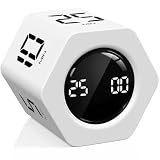
- A Real 5/25 Task Timer. The 5/25 working or studying technique is a time management method based on 25-minute stretches of focused work broken by 5 -minute breaks. We have preset 5, 25 minutes for you, you don’t have to set it every time by yourself. Other similar cube timers in the market are not real 5/25 timers as they don’t have preset 5, 25 minutes.
- Rotating Productivity Timer Flip Timer. We have preset 5, 25, 10, 30,60 minutes for gra vity sensing mode. You only need to flip the timer to the preset number with facing upwards, and then it will automatically start to countdown. Flip the timer screen facing upwards to stop the timing; Flip the timer screen facing downwards to reset it to zero.
- Stopwatch Timer Mode. Simply flip the timer to the side with stopwatch icon facing upwards, it will start to count up. Stopwatch timing range: 00-99 minutes and 59 seconds.
- 3 Volume Levels: Mute/Vibration/Alarm. In vibration mode, the vibration is noticeable at your desk without disturbing others nearby. Alarm volume: 70-80dB. In mute mode, the screen will flash to remind you which is suitable for using in the library.
- Great for Work, School, Office, Kitchen. This cube timer with stylish and aesthetic design is a great gift for students, friends, or coworkers, and families, people with ADHD, using it for work/ office, back to school & off to college/ classroom/study, workout, kitchen, etc.
Harvest with GitHub
Harvest’s member integration guide describes a Chrome extension for tracking time against Harvest projects and tasks inside GitHub. The time entry notes can include a link to the relevant issue or pull request, which can be useful for client-facing records. Details are in Harvest’s integrations guide.
Clockify across development tools
Clockify’s software-development page lists integrations for Jira, Azure DevOps, GitHub, GitLab, and YouTrack, alongside timer and manual entry, billable and labor rates, reports, and estimate comparisons. An integration’s presence does not guarantee that it transfers every field your process needs; inspect the specific tool’s mapping and access requirements.
Rank #4

- TIME MANAGEMENT — The 60-minute learning clock helps to stay on task, and assist with organization and concentration during study time. The dry-erase activity card helps to keep track of a task list and daily reminders
- SPECIAL NEEDS — The visual design of the desk timer helps to ease transitions between activities and encourages independence and productivity for all abilities, including those with autism, ADHD, or other special needs
- EASY TO USE — The timer for kids provides no loud ticking for concentration and a dry-erase activity card to write down tasks and placed on top of the slot as a reminder
- OPTIONAL AUDIBLE ALERT — The homework timer provides an optional alarm feature for sound-sensitive environments; ideal for activities such as doing homework, reading, studying, cooking and working out
- PRODUCT DETAILS — The 12. inches x 1.65 inches x 12 inches visual timer requires 2 AA batteries (not included). The size of the countdown timer is ideal for medium and large groups. The magnetic clock timer can be used as a wall mount or stand with foldable feet on a kids' desk
Set up a tracking routine that stays manageable
- Choose the purpose. Decide whether you need personal time awareness, client billing, estimates, or team workload planning. Avoid collecting detail that will not inform a decision or report.
- Create a small task structure. Set up projects and tasks that match actual reporting needs. Keep the taxonomy simple enough that starting or classifying an entry does not become a task of its own.
- Capture time where work happens. Use an integration from GitHub or Jira when it suits your workflow. Otherwise, use a simple manual-entry routine at natural breaks. Clockify documents both timer and manual entry; Toggl lists manual and multiple timer options.
- Review entries regularly. Check for missed, idle, or misclassified time daily or weekly, while the context is still fresh. Correcting entries is part of a reliable workflow, not evidence that every timer ran perfectly.
- Use accumulated records carefully. Compare estimates with actual logged time across several projects before revising future estimates. Account for uncertainty and scope changes rather than treating one project’s hours as a universal benchmark.
- Set expectations with a team. Explain what is collected, who can see it, how it will be used, and how people can correct entries.
Verify current plans and integration limits
Product features, integration availability, plan limits, and prices can change. Clockify’s software-development page displayed a free tier for five total users and an unlimited-user price of $3.99 per user when the page was accessed on October 7, 2026; these are time-sensitive vendor-displayed figures, not a guarantee of current pricing. Check the vendor’s current plan page before making a decision. The cited product pages do not establish a current Harvest price or partner terms.
The Tool Desk
Outbyte Driver Updater FREEScan for outdated or missing drivers - takes under a minuteDriver Scan →Outbyte PC Repair FREEClear out junk files and repair common Windows errorsFree Scan →Quick Recap
Best Value

- TIME MANAGEMENT — The 60-minute learning clock assists with organization and concentration among tasks. The desk timer is ideal for kids and adults to improve time management and productivity while completing activities
- SPECIAL NEEDS — The countdown analog timer can be understood intuitively by all ages and abilities, including those with autism, ADHD or other learning disabilities. The visual timer provides a calm transition for every activity and ease workload during stressful situations
- EASY TO USE — The homework timer features 4 different removable silicone covers (not included) that encourage a creative and energetic environment for all ages and abilities. Each available color can be assigned to a different learning timer for a designated activity, such as gym timer, homework timer, kitchen timer, study timer or work timer
- OPTIONAL AUDIBLE ALERT — The timer for kids provides an optional alert feature for sound-sensitive environments to avoid distractions and interrumptions while doing your activity. This option is ideal for activities such as doing projects, reading, studying or taking tests
- PRODUCT DETAILS — The school desk timer requires 1 AA battery (not included). You can choose from more available colors — cotton ball white, lake day blue, dreamsicle orange and pale shale (not included)
Product prices and availability are accurate as of the date/time indicated and are subject to change. Any price and availability information displayed on Amazon at the time of purchase will apply.




