Free tools Windows power users keep installed
One-click scans. No signup required.
A standard time clock tracks employee work time for payroll. It does not, by itself, satisfy the U.S. Federal Motor Carrier Safety Administration (FMCSA) requirement to record drivers’ hours of service. For most motor carriers and drivers covered by the rules, the record that counts for hours of service is an electronic logging device (ELD). Transportation companies usually need both, and each has to be set up for its own purpose.
Two records, two purposes
Payroll timekeeping answers one question: how many hours should this employee be paid for? A time clock or timekeeping app captures clock-in and clock-out events, breaks, and corrections, then exports hours to payroll.
As an Amazon Associate I earn from qualifying purchases.
An ELD answers a different question: how much driving and on-duty time has this driver logged under federal hours-of-service (HOS) rules, and when did the driver take rest? The FMCSA describes the device this way: “An ELD synchronizes with a vehicle engine to automatically record driving time, for easier, more accurate hours of service (HOS) recording.” (FMCSA, Electronic Logging Devices, updated October 2, 2023.)
| Feature | Payroll time clock or timekeeping software | ELD under FMCSA rules |
|---|---|---|
| Main purpose | Calculating paid hours | Recording driving time, on-duty time, and rest for HOS compliance |
| Data source | Employee punches or entries | Synchronization with the vehicle engine, plus driver input |
| Governing rule | Your company’s pay policies and payroll process | FMCSA ELD rule, where it applies |
| Vehicle synchronization | Not part of the FMCSA requirement | Required |
| Registration with FMCSA | Not required under the ELD rule | The device must appear on FMCSA’s registered-device list |
Do not treat a generic punch clock as an ELD. A device that does not synchronize with the vehicle engine and meet FMCSA performance and registration requirements cannot be used as the ELD for an operation the rule covers. The FMCSA sources reviewed do not say that every payroll time clock must meet ELD requirements, so a clock that only handles payroll is not automatically non-compliant. It is simply not the HOS record.
#1 Best Overall
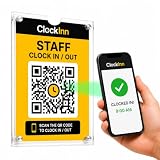
- NO TIME-CLOCK MACHINE REQUIRED — Replace bulky punch clocks, fingerprint readers and card systems with a professionally displayed QR sign. Nothing to wire in, no power, no batteries, no ink ribbons, no cards or fobs to replace when staff lose them.
- SCAN. ENTER PIN. CLOCK IN. — Staff scan the QR code at your workplace, enter their own 4-digit PIN and they're clocked in. No employee app to download, no accounts for them to set up, no training. Clock out and breaks work exactly the same way.
- RUN IT FROM YOUR PHONE OR LAPTOP — See who's on shift right now, review timesheets and attendance history, track breaks, build rotas and pull reports from anywhere — instead of walking over to a machine to check a printout.
- OPTIONAL GPS & SELFIE CONTROLS — Set a location and permitted radius so clock-ins can be required on site, and optionally ask for a selfie at clock-in. Turn either on or off per location, whenever you want.
- IN THE BOX + SOFTWARE INCLUDED — 2 x A5 clear acrylic wall holders, 4 adhesive mounting strips, ClockInn QR signage, quick-start guide and your activation code — plus 6 months of ClockInn Starter included. Continue on subscription, or stay free for up to 3 staff.
Who must use an ELD
The ELD rule applies to most motor carriers and drivers who are already required to keep records of duty status (RODS) under Part 395 of FMCSA’s regulations. FMCSA explicitly includes commercial buses within the rule’s scope (FMCSA, General Information about the ELD Rule; FMCSA, ELD FAQ3, issued March 15, 2017).
The rule has limited exceptions. Check each one against the current regulation before relying on it, because the examples below are not blanket exemptions.
Rank #2

- Advanced Time Tracking: The uAttend JR2000 makes employee time tracking effortless and accurate, powered by a cloud-based system designed for business efficiency.
- Complete Payroll Tasks with Ease: With uAttend, we automate payroll with time and attendance data, handle tax filings, and make switching easy.
- Real-Time Data Access: View, track, and manage employee attendance in real-time from any device, providing flexibility and control no matter where you are.
- Easy Setup & User-Friendly Interface: Enjoy an intuitive interface and straightforward setup process, making it accessible for any team, from first-time users to tech-savvy managers.
- In-Depth Reporting Capabilities: Gain valuable insights into attendance trends, productivity, and labor costs with our comprehensive reporting tools.
Short-haul drivers
Drivers who qualify for the applicable short-haul exception may continue to use time cards instead of an ELD. Eligibility depends on the exception’s conditions, not on the fact that the driver operates locally.
Do these 3 things before closing this tab:
1Scan for outdated or missing drivers - takes under a minute2Clear out junk files and repair common Windows errors3Fix the driver behind crashes, sound loss and screen glitchesLimited paper RODS use
FMCSA lists a paper-RODS option for limited use, described in its guidance as not more than 8 days in every 30-day period (FMCSA, ELD FAQ3, issued March 15, 2017). This is a cap on how often paper logs can be used, so a carrier that relies on paper for more days than that falls outside the exception.
Rank #3

- Streamlined Scheduling & Auto Time Tracking: Effortlessly manage shifts (including overnight schedules) with auto-calculated work hours. Real-time punch detection ensures accurate attendance records, simplifying admin tasks without complex setup.
- Fast & Reliable Fingerprint Recognition: Advanced sensor authenticates wet/dry fingerprints in 0.5 seconds, delivering quick, secure clock-ins 24/7. Consistent performance reduces wait times for all shifts.
- Flexible Payroll Sync: Align tracked hours with any payroll cycle (monthly/bi-weekly/weekly). Export timesheets via email or USB for error-free, fast payroll processing.
- Easy Attendance Editing & Real-Time Sync: Edit punches in seconds via the mobile app, with instant sync across the system (requires the same local network). Ensures accurate hours and simplifies payroll adjustments.
- Built-In Data Protection: Integrated backup safeguards attendance records during power outages, keeping data secure and recoverable to minimize disruptions.
Drive-away and tow-away operations
Drive-away and tow-away operations are listed as an exception. Confirm whether a specific movement fits the definition before assuming it is exempt.
Vehicles manufactured before 2000
Vehicles manufactured before 2000 are listed as an exception. Check the model year on the vehicle, not only the age of the fleet.
Rank #4

- 4-in-1 Time Clock: Features four verification modes—facial recognition, fingerprint, RFID card and PIN—to effectively prevent buddy punching and attendance disputes. This smart attendance clock auto-calculates work hours accurately, reduces manual errors, ensures fair payroll, and lowers daily admin costs.
- Remote Control & Auto Reports: Manage the time clock via the free NGTeco App for iOS and Android (same local network required). Easily check real-time attendance, adjust shifts, and export detailed attendance records with one click.
- Flexible Shift Management: Supports flexible scheduling and night shift settings. Easily adjust shift rules to simplify HR scheduling and boost overall work efficiency.
- Plug & Play: Simple setup requires no technical knowledge or IT support and is ready to use in minutes. The built-in offline recording feature keeps capturing clock-in data even with weak or intermittent network connections. All saved data syncs automatically once the internet is restored, ensuring zero data loss at all times.
- Paperless Time Clock: No more paper time cards, ink, or regular replacement supplies required. All attendance records are securely stored digitally in the system, making payroll processing faster and simpler for your team. It creates a cleaner, greener workplace for your business.
What an ELD does not change
An ELD records compliance; it does not set the rules. The HOS limits on driving time and on-duty time, and the required rest periods, stay the same whether the record is kept on a device, on paper, or in a payroll system. FMCSA’s Motor Carrier Safety Planner: Hours of Service covers those limits. The U.S. DOT’s 2025 Hours of Service of Drivers Regulations notice is also a useful reference for current HOS policy.
Windows Errors? Fix Them Before They Spread
Repair common Windows errors and clear accumulated junk for a smoother, more stable PC - no reinstall needed.Free scan · no reinstallOutdated Drivers Are Slowing You Down
One free scan finds every outdated or missing driver and matches the right update for your exact hardware.Free scan · exact hardware matchWhat must be in the onboard packet
For an ELD user, FMCSA requires the onboard packet to include:
Best Value

- Precision Time Tracking & Custom Rules: Eliminate inaccurate work hours with smart clock-in/out windows. Flexibly configure breaks, meal periods, and overtime rules—perfectly tailored for regular/weekend shifts and night schedules. Ensure payroll accuracy while adapting to your unique business needs.
- Cloud-Based Access & Real-Time Sync: Access your attendance dashboard anytime, anywhere via mobile or web. Enjoy seamless synchronization of attendance data across all devices with reliable 2.4G connectivity. Perfect for small and medium businesses needing instant employee tracking and always-current data.
- Department-Specific Management: Create custom attendance rules for different teams and manage cross-department schedules effortlessly. Monitor employee transfers with one-click simplicity and enable smooth data transition—providing clear insights for smarter management decisions.
- Enterprise Security with AWS Protection: Your attendance data receives enterprise-level protection through AWS U.S. servers with end-to-end encryption. Experience the assurance of effective protection against attendance data loss, leaks, and automatic backup—even during unexpected outages. Business continuity meets military-grade security.
- Free Management, Unlock More, Easier Attendance: Effortlessly manage basic team affairs with the free management app. Gain full access to all employee app features via a separate TimeEntrix subscription, covering GPS check-ins, real-time attendance reports, intelligent reminders and more to simplify your entire team’s attendance management.
- A user manual for the ELD
- Data-transfer instructions
- Malfunction instructions
- Blank RODS graph-grids, in a quantity sufficient for at least eight days
The eight-day figure is a minimum blank-grid supply stated in FMCSA’s ELD FAQ4, issued March 15, 2017. The graph-grids are backup supplies for an ELD operation. They do not replace a required ELD.
Independent reader supportYour contribution helps us test, update, and keep practical guides available for everyone.Check registration before you buy or rely on a device
ELD registration status changes. FMCSA’s ELD portal reported that five devices were removed from the registered list on August 6, 2026, and that affected carriers had to replace them before October 6, 2026. That replacement deadline has now passed, so a carrier still using a removed device should confirm its status immediately.
- Open FMCSA’s ELD portal, titled ELD – Electronic Logging Devices.
- Go to the registered-device list and search by the exact manufacturer and model name.
- Confirm the device appears on the current list. Do not rely on a vendor’s marketing claim or an older screenshot.
- Record the date you checked, and check again before renewing any contract or buying more units.
What to compare when choosing timekeeping software
Use these questions to separate payroll timekeeping from HOS compliance. They are practical comparison points based on the operational difference between the two records. This article does not evaluate named vendors or their integrations.
- Employee clock-in and clock-out flow: Can workers punch in on a terminal, on a phone, or at a yard kiosk?
- Driver access from the field or terminal: Can drivers record time away from the office without a shared device?
- Connectivity and offline handling: What happens to punches when the network drops, and does the system sync them later without losing entries?
- Payroll export or integration: Which payroll formats are supported, and is the export checked before it reaches payroll?
- Supervisor correction approvals: Can a manager change a time entry, and does the change require approval?
- Audit history: Does the system keep the original entry, the edited value, the editor, and the timestamp?
- Separation of records: Does the tool keep payroll hours apart from any HOS or RODS record, or does it blend them?
Scope of this guidance
The rules described here are U.S. federal requirements from FMCSA and the U.S. DOT. Other countries and Canadian provinces have their own rules. FMCSA’s general ELD overview states that it is not a substitute for the specific requirements in the rule. Read the regulation itself and the current FMCSA guidance before making compliance decisions.
Official references used here: FMCSA, Electronic Logging Devices (updated October 2, 2023); FMCSA, ELD FAQ3 (issued March 15, 2017); FMCSA, ELD FAQ4 (issued March 15, 2017); FMCSA, Motor Carrier Safety Planner: Hours of Service; U.S. DOT, Hours of Service of Drivers Regulations notice (2025); and FMCSA’s ELD – Electronic Logging Devices portal, which carries the 2026 registration notice.
Quick Recap
The Bottom Line
“”
Product prices and availability are accurate as of the date/time indicated and are subject to change. Any price and availability information displayed on Amazon at the time of purchase will apply.




