A time clock for mechanics can mean two different things: recording when employees are at work for payroll, or recording how long technicians spend on individual repair orders. Choose based on which record your shop needs. Before comparing products, check whether they capture attendance, repair-order labor, or both—and whether they calculate flagged hours or flat-rate pay rather than simply elapsed time.
What does a mechanic time clock need to track?
Start with the question you need the records to answer. Attendance data shows when an employee clocked in and out, and may categorize hours by job or department. Repair-order labor data associates a technician’s work time with a specific work order. Those records serve different purposes and are not automatically interchangeable.
As an Amazon Associate I earn from qualifying purchases.
- Payroll attendance: Employee start and stop times, often with job categories, corrections, and manager review.
- Repair-order labor: Time associated with a particular repair order or work order, potentially reported by mechanic, job, or billed labor.
- Flagged or flat-rate calculations: A separate calculation that may compare labor-guide or credited hours with time worked, or inform compensation. Do not assume a time clock provides it.
For example, Clockspot describes employee clock-ins, job or department labels, corrections, and manager approval before payroll. It also says its time clock does not calculate flagged hours, flat-rate pay, labor-guide time, technician efficiency, or repair-order profitability. Clockspot’s auto-repair time-clock page explains the distinction in the vendor’s own terms.
How to choose a system for your shop
- Define the record. Decide whether you need payroll attendance, elapsed time per repair order, or both. Write down the reports your payroll and service teams must be able to produce.
- Check how time is linked to work. Confirm whether technicians select a job or repair order when they start, whether the link is automatic, and how the system handles work that spans more than one job.
- Verify the calculations. Ask whether the product stores elapsed time only or also calculates billed labor, labor-guide time, flagged hours, efficiency, or flat-rate pay. Get the exact definitions and examples for the measures you intend to use.
- Review correction and approval controls. Find out who can edit a punch or labor entry, whether changes are recorded, and who approves time before it is used for payroll or reporting.
- Match access to the shop floor. Determine whether employees will use a shared kiosk, a browser on their own device, or a technician app. Test the actual workflow where work is performed.
- Confirm reporting and handoffs. Check reports by employee, job, repair order, mechanic, or billed labor as applicable. Verify payroll export, integrations, and supported regions directly with the vendor; the product descriptions below do not establish them.
Examples of mechanic and technician time-tracking tools
These examples describe capabilities vendors publish, not results from independent product testing. Features may change, so confirm current behavior and fit with the vendor before choosing.
#1 Best Overall

- DOUBLE POLE, SINGLE THROW (DPST) – Built for heavy-duty use, this time switch controls both lines of a 120V circuit with support for 40A resistive, inductive, and motor loads—ideal for pumps, HVAC units, and more.
| Product | Described workflow | What to verify |
|---|---|---|
| Clockspot | Browser-based employee time entry from a shared shop computer or kiosk, or employees’ own phones, tablets, or computers; job categories, correction requests, and manager approval are described. | It is an attendance time clock, not a repair-order system. The vendor explicitly says it does not calculate flagged hours, flat-rate pay, labor-guide time, technician efficiency, or repair-order profitability. Product details. |
| Way Repair Tech | The technician app describes digital repair orders, repair documentation, MOTOR repair guides, and automatic labor-time capture as a technician moves through jobs, with an edit option. | Ask how captured labor is associated with repair orders and whether its outputs match your payroll and reporting needs. Technician app details. |
| Windward Software | A support article describes starting and stopping a clock for mechanic or technician labor on a work order, plus mechanic and billed-labor reports. | The article was modified September 5, 2022; confirm current product behavior with the vendor. Support article. |
| Procede Software | The dealership time-clock page describes real-time tracking, repair-order search, role controls, job summaries, time-entry reports, and unit history. | Check whether the dealership workflow and available reports match your operation. Time-clock details. |
| RoadBays | The product page describes mobile technician punches directly into specific work orders, with time tied to the job and described as ready for payroll. | Confirm how the work-order time is reviewed and transferred into your own payroll process. Product details. |
Does a shop need a dedicated time-clock kiosk?
No. A shared tablet can act as a fixed kiosk for a browser-based time clock, but it is not inherently required. Clockspot describes use from a shared tablet or computer as well as employees’ own phones, tablets, or computers through a browser. Way Repair Tech describes a technician app. Choose the access method that technicians can use consistently without slowing down job entry.
Independent reader supportYour contribution helps us test, update, and keep practical guides available for everyone.Questions to ask before adopting one
- Can a technician clock into a specific repair order, or only into a shift, job category, or department?
- Can the system distinguish elapsed time from billed labor, flagged hours, and labor-guide time?
- What happens when a technician forgets to clock in, switches jobs, or needs an entry corrected?
- Can managers review changes and approve attendance before payroll?
- Which reports are available by employee, job, work order, mechanic, or unit?
- Does the vendor support the payroll handoff and integrations your shop relies on?
Get demonstrations using a realistic shop scenario: clock in, move between two repair orders, correct a missed punch, and review the resulting payroll and labor reports. That exercise reveals whether the system records the information your team needs without treating attendance time and repair labor as the same measure.
Quick Recap
Best Value

- PROVEN DURABILITY - The Intermatic T100 Series Mechanical Time Switch has a proven track record of durability, standing the test of time in industrial, commercial, and residential applications.
- HIGH LOAD CAPACITY - With the highest HP ratings in the industry, this time switch can handle electrical loads up to 40 A per pole, providing robust and reliable control for a wide range of applications.
- VERSATILE SCHEDULING - Enjoy direct 24-hour control with the flexibility of up to 12 ON/OFF operations per day. Set minimum ON/OFF times of one hour for precise and customizable scheduling
- CONVENIENT MANUAL OVERRIDE - The built-in manual override switch adds convenience, allowing you to take immediate control when needed, providing flexibility in managing your electrical loads
- TRIPPER INCLUDED - Each time switch comes equipped with one ON and one OFF tripper, offering a complete solution for 1 to 12 "On/Off" operations each day. Easy to set up and ready for reliable time-based control
Rank #4

- Unique Design: Classic design with three hands but with one different- Its hours are marked by various unique patterns to tell the time.
- High Quality Material: Made of acrylic material with colorful printed.
- Big Size: The face is printed on a 2mm thick acrylic, and the clock is about 12inch in diameter. Large size, it is easy to read from distance.
- Battery Operated Silent Mechanism: Powered by 1*AA battery (not include), with quiet & non-ticking sweep movement, provide a good sleep and work environment.
- Modern Design: The perfect decoration for living room, bedroom, classroom, office and studio. A great gift for your family, friends.
Rank #3
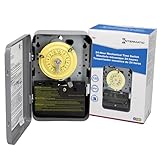
- 24-HOUR MECHANICAL CONTROL - The Intermatic T101 offers direct 24-hour control for a wide range of loads, providing reliability and precision in your daily operations.
- FLEXIBLE ON/OFF OPERATIONS - With the capability of up to 12 ON/OFF operations each day, and a minimum time interval of one hour, this mechanical time switch offers versatility to meet your specific scheduling needs.
- CONVENIENT MANUAL OVERRIDE - The T101 features a manual override switch, adding convenience and flexibility to your control options when needed.
- INCLUDED TRIPPERS - Each unit comes equipped with one ON tripper and one OFF tripper, ensuring a complete and ready-to-use package for your electrical control requirements.
- ROBUST AND TIME-TESTED DESIGN - Built for industrial, commercial, and residential applications, the T100 Series Mechanical Time Switch boasts the highest HP ratings in the industry, providing enduring performance and control for loads up to 40 amps.
Rank #2

- Highest motor load ratings in the industry
- 12 ON/OFF operations per day
- One ON and one OFF tripper included
- Can be installed in most Intermatic enclosures
- Available with pool heater protection
Product prices and availability are accurate as of the date/time indicated and are subject to change. Any price and availability information displayed on Amazon at the time of purchase will apply.




