Free tools Windows power users keep installed
One-click scans. No signup required.
There isn’t one set of three BIOS switches that every PC should enable. For most Windows 11 users, the useful checks are Secure Boot and TPM 2.0 readiness, memory integrity in Windows, and CPU virtualization if you run virtual machines. Gamers may instead want to check XMP or EXPO and Resizable BAR, provided their hardware supports them. These settings serve different purposes, and a BIOS option that helps one system can create boot, compatibility, or stability problems on another.
Start with the settings that match your goal
| Setting | What it is for | Who should check it | Main caveat |
|---|---|---|---|
| Secure Boot and TPM 2.0 readiness | Windows 11 requirements and trusted startup | People using Windows 11 or checking eligibility | Firmware labels and boot configuration vary by PC |
| Memory integrity | Windows protection for kernel-mode code integrity | Windows users who can confirm driver and app compatibility | Some drivers or apps may malfunction; rarely, incompatibility can prevent booting |
| CPU virtualization | Enables virtualization features used by VM software | People running Hyper-V or other virtualization workloads | It is workload-specific, not a universal performance setting |
| XMP or EXPO | Loads a supported memory profile | Desktop users whose memory, CPU, and motherboard support the offered profile | Stability and availability depend on the exact platform |
| Resizable BAR | Allows compatible PCIe hardware to negotiate a larger Base Address Register | Users with supported graphics hardware and motherboard firmware | May require UEFI boot and changing CSM/legacy settings |
For Windows security, treat Secure Boot and TPM as firmware readiness checks, while memory integrity is a separate Windows feature. For gaming, investigate XMP or EXPO and Resizable BAR. The title’s “three” is best read as three checks for a particular goal—not a universal trio of BIOS toggles.
As an Amazon Associate I earn from qualifying purchases.
Check Secure Boot and TPM before changing boot settings
Microsoft lists UEFI firmware capable of Secure Boot and TPM version 2.0 among the Windows 11 requirements. That does not mean every computer needs the same toggle changed: a firmware TPM may appear under a vendor-specific name, and a system may already be configured correctly. Confirm your PC model’s instructions and Windows 11 eligibility before changing firmware settings. See Microsoft’s Windows 11 requirements.
Do these 3 things before closing this tab:
1Clear out junk files and repair common Windows errors2Fix the driver behind crashes, sound loss and screen glitches3Repair Windows errors before they cause bigger problemsSecure Boot is part of the trusted startup path. Avoid switching between UEFI and legacy boot modes or changing Secure Boot keys based on a generic guide: firmware changes can stop a PC from starting correctly. Microsoft’s Secure Boot guidance explains that firmware configuration is device-dependent.
#1 Best Overall

- [Quick PC Diagnostic Tool] Is your new PC build showing a black screen? This motherboard speaker translates silent hardware failures into clear BIOS beep codes. Instantly identify if your RAM, CPU, or GPU is causing the boot failure without guessing.
- [Essential for DIY PC Builders] Modern motherboards often lack built-in audio alerts. Plugging in this mini piezo buzzer before your first boot ensures you hear the satisfying “single beep” of a successful POST, giving builders immediate peace of mind.
- [Universal 4-Pin Header Compatibility] Wondering if it fits your board? It features a standard 4-pin female connector (with 2 active wires) that perfectly matches the “SPEAKER” or “SPK” front panel header on almost all ATX, Micro-ATX, and Mini-ITX motherboards.
- [Clean Wiring & Loud Alarm] Designed with an approx. 3-inch cable, it is long enough to easily plug into the motherboard but short enough to reduce PC case wiring clutter. The premium piezo element delivers a loud, crisp beep that is impossible to miss.
- [Valuable 3-Pack for IT Repair] Includes 3 internal BIOS buzzers in one pack. Perfect for IT technicians keeping spare diagnostic tools in their repair kits, or PC enthusiasts testing multiple rigs. A cost-effective solution to save hours of troubleshooting.
Enable memory integrity only after checking compatibility
Memory integrity, also called hypervisor-protected code integrity (HVCI), is a Windows Virtualization-based Security feature that helps protect kernel-mode code integrity. It is not simply a BIOS switch; the underlying hardware and virtualization support must be available, and Windows manages the feature.
In Windows, open Windows Security → Device security → Core isolation details and review the Memory integrity status and any incompatible-driver notice. Microsoft warns that some drivers and apps can malfunction with the feature, and in rare cases an incompatibility can cause boot failure. If Windows identifies an incompatible driver, look for an updated version from the device or PC maker before enabling the setting. Microsoft’s memory integrity instructions cover checking and enabling it.
Rank #2

- Used to obtain beep codes from motherboards,alarm systems and other electronics. Keep your computer case internal cable tidy.
- Plugs right into your motherboard where the speaker hooks up. Red Line: connected to the positive(
- After the computer is turned on, we will hear the familiar sound of
- These internal speaker will emit a series of beep codes both long and short and also steady and intermittent to indicate to the troubleshooter what the source of the error is.
- Material: Metals and plastics.Package Includes: 3 PCS.
If enabling it causes a problem, return to the same Windows Security page and turn Memory integrity off if Windows still starts. For a system that will not boot, use Windows recovery options or the PC maker’s recovery instructions; do not randomly change Secure Boot or boot mode as a workaround.
Quick wins for a faster PC:
Repair Windows errors before they cause bigger problemsFix Now →Scan for outdated or missing drivers - takes under a minuteDriver Scan →Turn on CPU virtualization for virtual machines
CPU virtualization is useful when software such as Hyper-V needs hardware virtualization support. Microsoft notes that a Hyper-V host may require virtualization to be enabled in BIOS or UEFI. Some firmware separates CPU virtualization from I/O virtualization (often labeled VT-d or an equivalent); ASRock’s B760 BIOS guide describes VT-d as supporting VM-monitor compatibility and related capabilities. Look up the exact option in your motherboard or PC manual rather than assuming one label applies to every vendor.
Rank #3
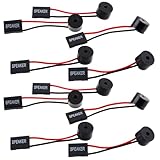
- Essential Tool: This PC motherboard internal speaker is a crucial diagnostic component for any computer build or repair. When you start your computer, the familiar boot 'beep' sound indicates normal system operation. More importantly, specific beep code patterns emitted by this BIOS alarm buzzer help diagnose hardware issues like memory errors, graphics card failures, or power supply problems
- Simple Plug and Play Installation: Installing this computer case speaker is straightforward and requires no technical expertise. It comes equipped with a standard 4-pin female connector designed to match the speaker header pins on the front panel of virtually any motherboard. The wiring is clearly indicated with red for positive and black for negative, though polarity is often interchangeable
- Durable and Reliable Construction: Built for long-term reliability, this motherboard speaker is constructed from sturdy metal and plastic materials. The robust build ensures it won't break easily during installation or from regular system vibrations. Its reliable performance means it will serve you consistently over the long term, providing clear, audible beep codes whenever you power on your PC
- Clear POST Code Audibility: In environments where external multimedia speakers are unnecessary, such as office servers, test benches, or minimalist setups, this internal PC speaker is indispensable. It allows you to hear the essential BIOS beep codes that confirm a successful boot or signal hardware faults
- Versatile Multi-Pack Value: This package includes 10 pieces of motherboard speaker offering exceptional value for frequent builders, repair shops, or IT departments. Each unit features an approximately 3-inch cable to minimize wiring clutter inside the computer case
If you do not run virtual machines or another feature that requires it, virtualization is not a must-enable performance tweak. Confirm the workload’s requirement first, then verify the setting in the relevant operating system or software. The ASRock Intel B760 BIOS setup guide is an example of model-specific documentation, not a universal menu map.
Use XMP or EXPO only when the platform supports the profile
XMP and EXPO are memory-profile options that can apply settings supported by a particular RAM kit and platform. Motherboards may use different labels: MSI documents A-XMP and EXPO for different platforms and memory types in its Click BIOS overview.
Rank #4

- Type: 5PCS PC computer motherboard alarm buzzer, length 2.3 inches
- Uses: The sound made by the buzzer is used to determine the working status of the motherboard.Easy to install, 4-pin female connector, plug and play, easy to plug into the speaker connector on the front panel of the motherboard
- Wiring: red positive pole, black negative pole (in fact, as long as the interface is connected to the speaker, both positive and negative poles can be used)
- How To Use: After turning on the computer, we will hear the familiar "beep" sound, usually indicating that the computer is working properly, the sound comes from this buzzer. If it is not normal, you can judge the fault by its sound
- 100% brand new and high quality
Before selecting a profile, check that the installed memory, CPU, and motherboard support it. A profile is not guaranteed to be available or stable on every system, so save changes only if the offered setting matches your hardware and the PC remains stable afterward. The cited vendor documentation does not establish a universal speed increase, and enabling a profile alone is not a reason to buy new RAM.
Enable Resizable BAR only on a compatible system
Resizable BAR is a PCIe capability that lets compatible hardware negotiate the BAR size. Intel says enabling it can improve performance in some cases, but the official guidance does not establish one guaranteed frame-rate gain for all games and systems. The feature may appear under another name, such as Smart Access Memory or Clever Access Memory.
Best Value

- AM4 socket: Ready for AMD Ryzen 3000 and 5000 series, plus 5000 and 4000 G-series desktop processors.Bluetooth v5.2
- Best gaming connectivity: PCIe 4.0-ready, dual M.2 slots, USB 3.2 Gen 2 Type-C, plus HDMI 2.1 and DisplayPort 1.2 output
- Smooth networking: On-board WiFi 6E (802.11ax) and Intel 2.5 Gb Ethernet with ASUS LANGuard
- Robust power solution: 12+2 teamed power stages with ProCool power connector, high-quality alloy chokes and durable capacitors
- Renowned software: Bundled 60 days AIDA64 Extreme subscription and intuitive UEFI BIOS dashboard
Intel’s setup guidance requires supported hardware and current motherboard firmware. Its documented checklist includes UEFI boot, disabling CSM or Legacy Mode, enabling Above 4G Decoding, and enabling Re-Size BAR Support (or Auto where appropriate). Those boot-mode changes can affect how an existing operating system starts, so do not follow the sequence blindly on a system configured for legacy boot. Check the PC or motherboard instructions and the graphics hardware maker’s compatibility guidance first. See Intel’s Resizable BAR overview and Intel Arc desktop quick-start guide.
Make one change at a time, then verify it
- Identify the exact system. Find the PC or motherboard model and consult its support page or manual. BIOS menu names and available features vary by model.
- Record the current configuration. Note the setting you intend to change and how to restore it. Avoid changing boot mode, Secure Boot keys, or several unrelated settings at once.
- Change only a supported setting. Use the manufacturer’s instructions for your model. If a memory profile causes instability or a boot-mode change prevents startup, restore the prior configuration using the maker’s documented recovery method.
- Verify in the right place. Check Windows Security for memory integrity, Windows 11 requirements and system information for security readiness, or the relevant vendor utility for graphics features. Do not assume a firmware option took effect just because it was selected.
- Check normal operation. Confirm Windows starts and the intended workload works before making another change.
Microsoft’s Windows 11 requirements, its memory integrity guidance, and the manufacturer documentation for the exact PC are better references than a generic BIOS walkthrough.
Quick Recap
Product prices and availability are accurate as of the date/time indicated and are subject to change. Any price and availability information displayed on Amazon at the time of purchase will apply.
Recommended Free Tools




