To convert an everyday temperature, enter a number, choose its starting scale, and select the scale you want. A useful converter should support Fahrenheit (°F), Celsius (°C), and kelvin (K), show units beside both the input and result, and apply the offset as well as the scale factor where needed.
What an everyday temperature converter should do
Keep the main interface focused on the three scales most useful for ordinary weather, cooking, and general reference: Fahrenheit, Celsius, and kelvin. The National Weather Service’s converter uses a direct prompt—“Enter a temperature that you would like:” —and labels its temperature scales separately, a clear pattern for identifying both the entered value and the output. National Weather Service temperature converter
As an Amazon Associate I earn from qualifying purchases.
Show the source scale next to the value being entered and the destination scale next to the result. Use °C and °F with the degree sign; write kelvin as K, without a degree sign. In running text, put a space between the number and its unit, such as 30.2 °C. NIST guidance on temperature units
Use the correct formula for each conversion
For absolute temperature readings, apply the appropriate formula below. Celsius and Fahrenheit conversions require both a scale factor and an offset; simply multiplying or dividing will not produce the right reading.
#1 Best Overall
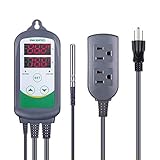
- Simple to use: plug it in, set the temp ranges, place the probe, plug in the heater/cooler into the marked outlet
- Be able to connect with refrigeration and heating equipment at the same time
- Easily calibrated
- Can display in Centigrade or Fahrenheit
- Whether you need temperature control for fermentation, greenhouse, kombucha control or to set up your temperature project system, the ITC-308 temperature controller is a great choice
| Convert | Formula |
|---|---|
| Celsius to Fahrenheit | °F = (°C × 1.8) + 32 |
| Fahrenheit to Celsius | °C = (°F − 32) ÷ 1.8 |
| Celsius to kelvin | K = °C + 273.15 |
| Kelvin to Celsius | °C = K − 273.15 |
| Fahrenheit to kelvin | K = (°F − 32) ÷ 1.8 + 273.15 |
| Kelvin to Fahrenheit | °F = (K − 273.15) × 1.8 + 32 |
These equations are from NIST’s temperature conversion table. NIST temperature conversion table
Distinguish a temperature reading from a temperature change
The formulas above convert absolute readings: temperatures measured from a scale’s zero point. A temperature interval—the amount of change between two readings—works differently. A change of 1 °C equals a change of 1 K and corresponds to a change of 1.8 °F. Celsius and kelvin readings, by contrast, differ by 273.15. Do not add or subtract 273.15 when converting a change in temperature. NIST temperature guidance NIST conversion factors
Rank #2

- Just Plug In & Set Your Temperature - Works in 30 Seconds No complicated wiring or electrician needed. Simply plug your heater or cooler into our controller, set your desired temperature on the bright LED screen, and you’re done. Perfect for anyone, regardless of technical experience.
- Keeps Your Space at the Perfect Temperature Automatically Set it once and forget it. Maintains your exact temperature (±1°F precision) whether it’s your RV bedroom, reptile’s habitat, or greenhouse plants. Works 24/7 so you can sleep peacefully knowing everything stays comfortable.
- Built for Real-World Use - Handles Your Powerful Equipment Safely Powers heaters, air conditioners, fans up to 1800W without breaking a sweat. The 6-foot sensor cord reaches anywhere you need it, and built-in safety protection prevents damage to your valuable equipment.
- Smart Features That Make Your Life Easier Remembers your settings during power outages, glows clearly in dark spaces, and offers 5 different control modes including timers. Set heating schedules, cooling cycles, or simple on/off automation (up to 99 hours).
- Trusted by Thousands - Works Where You Need It Most Perfect for RV climate control, reptile terrariums, greenhouse automation, workshop heating, pool equipment, incubators, and more. Reliable performance in temperatures from -40°F to 248°F.
Check results against familiar reference temperatures
NIST’s touchstone values are approximate. They are useful for spotting a likely formula or input error, not for checking precision to the last decimal place. NIST temperature reference values
Do these 3 things before closing this tab:
1Clear out junk files and repair common Windows errors2Scan for outdated or missing drivers - takes under a minute3Repair Windows errors before they cause bigger problems| Reference | Celsius | Kelvin | Fahrenheit |
|---|---|---|---|
| Freezing point of water | 0 °C | 273 K | 32 °F |
| Room temperature | 20 °C | 293 K | 68 °F |
| Body temperature | 37 °C | 310 K | 99 °F |
For a cooking-oriented check, NIST lists “Moderate” oven settings as approximately 350–375 °F, corresponding to approximately 180–190 °C. These are approximate culinary equivalents, not an exact conversion for a specific oven. NIST temperature reference values
Rank #3

- 【-9.9°F to 99.9°F Temperature Measurement Range】The K-type thermocouple thermometer measures temperatures from -76°F to 999°F. Within the range of -9.9°F to 99.9°F, the minimum measurement increment is 0.1°F; for other temperature ranges, the increment is 1°F. The thermometer requires a DC 4V–28V power supply.
- 【Bright LED Digital Display】Equipped with a bright red LED digital display featuring large, clear digits for easy temperature reading. The display is visible in both dimly lit and bright environments, allowing you to check the temperature status at a glance.
- 【Industrial Grade K-Type Thermocouple M6 Probe】The thermometer uses a K-type thermocouple sensor with an M6 probe and 0.5m cable. Its cold junction compensation function helps minimize the influence of ambient temperature on the sensor for accurate temperature measurement.
- 【Wide Range of Applications】This thermometer can be used for industrial temperature measurement, including measuring the temperature of boilers, air, liquids and various other mediums. Its wide measurement range makes it suitable for industrial and personal use.
- 【Measurement Notes】Due to the wide temperature measurement range, some measurement errors may occur. A measurement error within ±10°F/1% is considered normal. To help prevent static interference, we highly recommend wrapping the probe with insulating tape. If possible, using an insulated probe can help ensure accurate temperature readings.
When to add Rankine
Rankine is an optional extension for a general-purpose or scientific converter, rather than a requirement for an everyday tool. The National Weather Service converter includes it alongside Fahrenheit, Celsius, and kelvin; that establishes it as an available scale, not as a measure of demand for it in an everyday interface. Add it when the intended audience needs it, and keep the main choices easy to scan. National Weather Service temperature converter
Independent reader supportYour contribution helps us test, update, and keep practical guides available for everyone.Choose practical display behavior
The reference sources establish the equations and unit notation, but do not prescribe how many decimal places a converter should show, how it should round, or how it should validate entries. Choose those behaviors deliberately for the tool’s intended use. Whatever display policy you adopt, retain explicit unit labels so readers can tell what was entered and what the result represents.
Quick Recap
Best Value

- This -30-800 degree Centigrade Digital Temperature Meter is easy to setup and read, maximum humidity: 90% -100% (use in the no condensation environment)
- It is design with reverse polarity protection, positive and negative reversed will not burn, but the screen display nothing
- Temperature measuring range: -30-800 degree centigrade. If the temperature is within 100 degree, the display format is with 1 decimal. If the temperature is over 100 degree, the display format is with integer
- Wiring is simple, then the red is for positive, and black for negative
- Include K-type temperature probe
Rank #4

- 【Wide temperature range.】The range for KT8230 is -22~572℉/-30~300℃,This is a relay temperature controller, There is no voltage output directly, you need to connect additional power supply for the load, then it can be set by differential (1~80℃/1~120℉) to turn on/off the load, it is like a switch.
- 【Output is 30A relay, more accurate.】The temperature controller 120V can be used for big power equipment, like incubator, brooder, refrigerator,Fermenter,Greenhouse,etc. 1°F accuracy to keep the temperature in desired range.
- 【Support delay start function and temperature correction.】The cooler and heater will delay to work if you set the delay time(PL: 0~7min) not 0, You can set depend on what you need. -30.0°F~30.0°F/ -7℃~7℃ calibrate the temperature when there is error.
- 【Safe protection.】Temperature Regulator will alarm when it exceed temperature limit or sensor error, alert you when something wrong happened. You can also set the low(LS) and high temperature limit(HS) to change the temperature range, LS < Setting Temperature < HS.
- 【Simple operation.】 All parameters setting can be saved after restart, you don’t need to set the thermostat regulator when power off, or restart it from vacation. 2m NTC sensor allows more possibility for home
Product prices and availability are accurate as of the date/time indicated and are subject to change. Any price and availability information displayed on Amazon at the time of purchase will apply.




