PC Slower Than It Used to Be?
A free scan shows the junk files, broken settings and background clutter dragging Windows down - then fixes them in one click.Free scan · Windows 10 & 11Crashes, No Sound, or Screen Glitches?
Random freezes, missing sound and display glitches usually trace back to one bad driver. Find and replace yours safely.Free scan · under a minuteA Telephony Server NLM was a NetWare server component that connected computer-telephony applications with a PBX or business communications system. NLM stands for NetWare Loadable Module: software that provided a service on a NetWare server.
What “Telephony Server NLM” means
In this historical context, the phrase refers to the server-side part of a computer-telephony integration (CTI) system built for Novell NetWare. The module linked the telephone switching system to the NetWare environment, where client applications could use telephony interfaces such as TSAPI.
As an Amazon Associate I earn from qualifying purchases.
Novell described NetWare Telephony Services as a platform for call control and routing, coordinating calls with related information, and providing call monitoring and reporting. Those are platform functions; the available historical descriptions do not establish that every deployment exposed every function.
How it fit into a CTI system
- NetWare server: Hosted the NLM. Novell described NLMs as service components that could be loaded or unloaded without shutting down the server. Novell’s corporate overview
- PBX or business communications system: Supplied the telephone switching side. A 1993 report described the Telephony Server NLM as linking that system to a NetWare server. South China Morning Post, 1993
- Drivers and CTI link: The server relied on a configured connection to the switching system. Novell support material refers to Tserver drivers and CTI links, though it is troubleshooting material rather than a complete installation specification. Novell support troubleshooting document
- Client applications and APIs: Applications communicated with the telephony server through client-server application programming interfaces, including TSAPI in historical descriptions. Technical glossary entry, 1996
What it did—and what it did not mean
The NLM was not the PBX itself, nor was it simply a telephone client application. It was the NetWare-hosted service between the switching equipment and software using telephony APIs. That arrangement let applications work with call information and control functions through the server rather than connecting directly to the telephone switch.
#1 Best Overall

- Supports up to 3000 users and up to 450 concurrent calls
- Zero configuration provisioning of Grandstream SIP endpoints
- Built-in conferencing & meetings platform; supports desktop, Wave app, and SIP endpoints
- Wave for Android, iOS, Chrome and Firefox browsers allows communication with all UCM6300 users & solutions
- API available for third-party integrations, including CRM and PMS platforms
The acronym here specifically means NetWare Loadable Module. The definition applies to the legacy NetWare telephony architecture described in sources from the 1990s; it does not establish present-day product availability, support, security status, or compatibility with modern systems.
Quick Recap
Best Value

- Grandstream 2 FXO, 2 FXS, 500 Users *No Video Conferencing* UCM6302A
- NO MONTHLY PER-SEAT FEES. This is an all-inclusive telephone system
- Supports up to 1500 users and up to 200 concurrent calls
- Zero configuration provisioning of Grandstream SIP endpoints
- Built-in Instant Messaging (IM), Audio Conferencing & Web Meetings platform that supports access from computers, mobile devices, and SIP endpoints
Rank #4

- Supports up to 3000 users and up to 450 concurrent calls
- Zero configuration provisioning of Grandstream SIP endpoints
- Built-in conferencing & meetings platform; supports desktop, Wave app, and SIP endpoints
- Wave for Android, iOS, Chrome and Firefox browsers allows communication with all UCM6300 users & solutions
- API available for third-party integrations, including CRM and PMS platforms
Rank #3
- Audio Only
- 1000 Users, 4 FXO, 4 FXS Based on Asterisk* version 16 open-source telephony operating system
- Zero configuration provisioning of Grandstream SIP endpoints
- Built-in Instant Messaging (IM), Audio Conferencing & Web Meetings platform that supports access from computers, mobile devices, and SIP endpoints
- Free Wave App allows easy voice & Instant Messaging (IM) communications using desktops, Web, and Android/ iOS devices
Rank #2
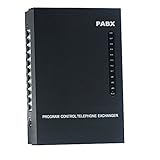
- 2 CO Lines x 8 Extensions,Automated Telephone System.
- This SOHO-PBX SP-208 system is an ideal telephone system for small offices and home offices. It is very easy to install and use.
- It has all the standard features comparable to those expensive PBX systems in the market. It works with your current analog phones and you do not need to spend extra money to buy proprietary telephones to work with the PBX.
- The SP-208 is your ideal small or home office receptionist. It is features packed and comes with an easy to follow instruction booklet.
- With the design and production according to G.712 and G.732 protocol of CCITT, this system integrates virtues of various practical function of PABX, and it has unique advantage in innovation.
Product prices and availability are accurate as of the date/time indicated and are subject to change. Any price and availability information displayed on Amazon at the time of purchase will apply.
Independent reader supportYour contribution helps us test, update, and keep practical guides available for everyone.



