To put subtitles on a TCL TV, use the TV’s accessibility captions setting if it runs Google TV, or turn subtitles on from the video app’s playback controls. App controls are often needed because the TV-wide setting may not apply to every streaming service.
Turn on captions in TCL Google TV settings
On a TCL TV running Google TV, the accessibility captions path is Settings > Accessibility > Captions. From the Google TV home screen:
As an Amazon Associate I earn from qualifying purchases.
- Open Settings.
- Choose Accessibility > Captions.
- Turn on Display, then choose any available caption preferences.
TCL notes that these preferences may not affect some streaming apps. If captions still do not appear, use the app’s playback controls instead. TCL’s Google TV caption instructions cover this setting.
Recommended Free Tools
Enable subtitles while watching a streaming app
Many services expose subtitle choices only after a video starts. The exact remote button and menu wording depend on the app and device; look for Subtitles, Closed Captions, CC, Audio & Subtitles, or a speech-bubble/dialog icon.
#1 Best Overall
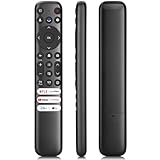
- 【Support TV Models】RC813 remote Only for TCL Google Smart TV 65QM850G 75QM850G 85QM850G 98QM850G 98QM851G 85QM851G 75QM851G 65QM851G 115QM891G 98QM751G 85QM751G 75QM751G 65QM751G 55QM751G 98S550G 43S551G 50S551G 55S551G 65S551G 75S551G 85S551G 75S571G 65S571G 55S571G 43S571G 55S470G 43S470G 50S470G 58S470G 65S470G 70S470G 75S470G 85S470G 43S450G 50S450G 55S450G 58S450G 65S450G 75S450G 85S450G 50S45G 32S370G 40S370G 43S370G 32S250G 55Q750G, 65Q750G 75Q750G 85Q750G 55Q670G 65Q670G 75Q670G 85Q670G 85Q650G 75Q650G 65Q650G 55Q650G 43Q651G 50Q651G 55Q651G 65Q651G 75Q651G 85Q651G 98Q651G 85Q681G 75Q681G 65Q681G 55Q681G 55Q550G 50Q550G 65Q550G 50Q570G 55Q570G 65Q570G 75Q570G etc.
- 【No Pairing Required】Replacement remote control compatible with TCL RC813 remote, no programming and no pairing needed, just put 2*AAA batteries in and it will work immediately. (Note: Batteries and manual are not included) (Not for TCL Roku TVs) (Not for TCL Fire TVs)
- 【Stable & High-Quality】 Strongest signal by Infrared technology further transmission for multi-angle induction. Precisely control far from 12 meters/40 feet.Fastest response not over 0.2 second to your TV, It supports over 120,000 clicks approved test
- 【6 Popular Shortcut Keys】One key quickly access to popular streaming channels --- NFLX, p-video, YouTube, Channel, Dis and Apple TV. Save you searching time and enjoy a good leisure time faster
- We test it before delivery to make sure it's working. If you are caught in some problems when using our products, welcome to contact us at any time. We are committed to providing you with a satisfactory solution promptly.
- Open the streaming app and start the movie or episode.
- Use the remote to show playback options. Depending on the app, press OK/Enter, Up, or Down.
- Choose the subtitle or caption control.
- Select an available language or caption track, then resume playback.
TCL describes app-specific controls for services including Netflix, Disney+, Hulu, Prime Video, Max, and Apple TV+. See TCL’s guide to caption controls in streaming apps; follow the on-screen labels for your app, as its controls may differ.
For a Google TV rental or purchase
For a movie or show rented or purchased through Google, start playback, press Down on the remote, and choose Closed captions and audio. Tracks depend on the title. For a video watched through a paid subscription, Google advises contacting that streaming service about its subtitle and language options. Google TV’s language and caption guidance explains the distinction.
Rank #2

- PACKAGE INCLUDED: Pack of 2 remote. Two-pack remote control can solve your home backup remote control needs. Infrared remote no pairing or programming needed. Just Insert 2 Pcs*AAA batteries to get it work (Batteries and manual are not included)
- EXACT COMPATIBILITY: Acoyer universal remote control only for Roku Series TVs, Compatible with TCL Roku TVs, Hisense Roku TVs, Onn Roku TVs, Sharp Roku TVs, Element Roku TVs, Westinghouse Roku TVs, Philips Roku TVs, Insignia Roku TVs, JVC Roku TVs, RCA Roku TVs, Hitachi Roku TVs and Sanyo Roku TVs Series.
- NOT APPLICABLE: TV Remote is NOT Compatible with Roku Stick/Streaming Stick/ Box(1/2/3/4(HD/LT/XS/XD))/ Ultra/ Express/ Premiere/ Player. NOT Compatible with TCL TV, Hisense TV, Onn TV, Sharp TV, Element TV, Westinghouse TV, Philips TV, Insignia TV, JVC TV, RCA TV, Hitachi TV and Sanyo TVs.
- SHORTCUT BUTTONS: Get to favorite apps quickly with shortcut buttons and it have 4 shortcuts buttons. Precisely control far from 10 meters/30 feet and it supports over total 160,000 clicks for all buttons via approved tests.
- AFTER SALE SERVICE: Acoyer remote controls with an unlimited return and refund service in 1-year warranty. If you have any questions or concerns regarding your order, please feel to reach out to us.
If your TCL TV is Roku or another platform
The Settings path above is specifically for Google TV, not every TCL Smart TV. Menu names and available controls vary by model, region, input, account status, and software version. For TCL Roku TVs, use the app’s playback controls for subtitles; the official guidance cited here does not establish one universal system-wide caption path for every model. Check your TV’s manual for its platform-specific controls. TCL says some TVs include a built-in manual, and model-specific downloads may be available through its support site. TCL’s Google TV settings overview also notes that settings vary by model and software.
Why subtitles may not appear
Caption availability can differ between titles, even within the same app. A missing language option may mean the video does not offer that track; some videos also have permanent subtitles that cannot be switched off. Google explains that choices depend on the video in its language and caption guidance.
Quick Recap
Rank #4
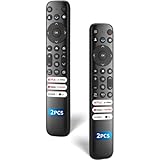
- 【Packing List】There are two remote controls in the package, so you don't have to worry about not being able to use your TV because of a lost or damaged remote.
- 【Compatibility】Replacement remote control for TCL Google TV, compatible for TCL UHD HDR LED QD Mini LED QLED 4K Google TVs, for TCL QM8, QM7, S5, S4, S3, Q7, Q6, Q5 series tvs. Compatible for 65QM850G, 75QM850G, 85QM850G, 98QM751G, 85QM751G, 98S550G, 43S551G, 55S470G, 43S470G, 55Q670G, 65Q670G etc...(Not for Fire or Roku TVs)
- 【Quick-Access Shortcut Keys】This remote control is equipped with 6 dedicated buttons for popular streaming media channels. With just one press, you can instantly access your favorite streaming channels. No pairing or programming required! Simply insert 2 AAA batteries (Not included) to start using immediately.
- 【Enhanced Durability Range】Designed for longevity by over 160,000+ click-tested buttons and an extended (30ft/10m) operating range. Ergonomic design ensures comfortable use from any corner of your home theater.
- 【Full function replacement】Note: No voice control or included batteries/manual, Popular shortcut keys are only compatible with TCL Google TV itself comes with shortcut programs or popular shortcut keys. For old TVs, you cannot use shortcut programs without shortcut programs.
Rank #3

- 【Compatible with All TCL TVs】Remote Control Compatible with All TCL Android Smart 4K UHD TVs,However, If the buyer is a TV from another brand, including TCL ROKU, the remote control cannot be used directly. - No Voice Search Function
- 【EASY TO USE】Using our remote couldn't be easier since no programming or setup is required. Just insert 2pcs*AAA batteries, and it is ready to go! (⚠ batteries are not included)
- 【2 Hotkeys】Equipped with 2 shortcut keys, NETFLIX/YouTube providing quick viewing experience
- 【HIGH QUALITY】Our remote has been upgraded to give you a greater transmitting distance (over 35 ft) and has a quick response time,The remote control shell is made of ABS material, which is resistant to falling and has no peculiar smell.
- 【AFTER-SALE SERVICE】Our Remote comes with an unlimited return and refund service in 7 days. We maintain a high standard of excellence and strive a 100% satisfaction to customer .
- Try another episode or title in the same app to see whether the issue is limited to that video.
- Stop and restart playback, or close and reopen the app.
- Restart the TV or streaming device. TCL’s app guidance suggests unplugging it for 30 seconds, then reconnecting power. See TCL’s app and caption troubleshooting guidance.
- Check whether the title offers captions in the language you selected.
- If the track is unavailable, contact the streaming service. If captions should be available but still fail, contact TCL support and provide the TV platform, app, title, season and episode if relevant, and what happens when captions are enabled.
Product prices and availability are accurate as of the date/time indicated and are subject to change. Any price and availability information displayed on Amazon at the time of purchase will apply.




