What’s actually slowing this PC down?
Pick the symptom - the matching free tool is one click away.
If you want to make your first game in GDevelop, start a small project now and use tutorials to solve the next problem you encounter. You do not have to finish a course—or understand every editor feature—before you build. GDevelop’s official getting-started guide lets you customize a template or start from scratch, preview your game, and choose among in-app tutorials, documentation with an example, or videos that lead into building an example game.
Start with a game small enough to finish
Choose one simple idea: a character moves across a screen and reaches a goal. Treat that as a practical first-project suggestion, not a GDevelop requirement. The point is to make a complete playable loop before adding story, multiple levels, inventory, or multiplayer.
GDevelop’s product overview describes a no-code event system and ready-made behaviors. Those tools can help you get a basic mechanic working without first learning every feature or writing code. You can also extend projects with JavaScript, but that is not a prerequisite for beginning with events.
Choose a template or start from scratch
GDevelop’s Getting Started guide supports both routes. A template gives you something to modify quickly; a blank project gives you practice selecting and connecting the pieces yourself. Neither is the universally correct choice: use a template if you want to reach a playable result sooner, or start blank if learning how the project is assembled is part of your goal.
#1 Best Overall
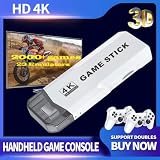
- Retro Game Console Stick 20,000+ Preloaded Games & 23 Emulators: retro gaming console with an massive collection of 20,000+ classic titles across 23 built-in emulator console – no downloads, no internet, no accounts needed. Game stick pro everything comes ready to play on a generous 64GB TF card, packed with arcade hits, platformers, shooters, and co-op favorites. Video games console just plug in and dive straight into your childhood favorites! (Press the SELECT and START buttons at the same time to return to the main menu.)
- 4K Upscaling & Crystal-Clear 1080P Output: Experience retro game consoles with projector like never before with stunning 4K upscaling and smooth 1080P HD output. Consola de videojuegos includes an extended HDMI cable for easy connection to modern TVs, monitors, or projectors. Relive the magic with sharper visuals and vibrant colors – all while keeping that authentic retro feel
- Dual 2.4G Wireless Controllers – Zero Lag, 40ft Range: Video game console team up or battle friends with two upgraded 2.4GHz wireless controllers featuring near-zero latency and a strong 40-foot range. Perfect for 2-player matchups in fighting games, sports titles, and co-op adventures – with no tangled cords getting in the way!
- True Plug and Play Video Games for Tv– Ready in Seconds: No setup, no hassle. Just connect the stick to your TV’s HDMI port, plug into power, and you’re gaming in under 30 seconds! Save your progress anytime and pick up right where you left off. Perfect for gamers of all ages – especially those who prefer simplicity over complicated setups.(Note: 2 wireless controllers require 4 AA batteries, which are not included.)
- The Ultimate Gift for Gamers & Families: Playstation portal A cross-generational crowd-pleaser! Whether it's for birthdays, holidays, or family game nights – this console brings everyone together. Travel-friendly and backed by 24/7 support, it’s the go-to gift that delivers joy, nostalgia, and endless fun
Once your project opens, make the smallest scene that can demonstrate your idea. Add only the objects needed for the first loop, such as a player and a goal. Where a ready-made behavior fits, try it rather than trying to master every setting before seeing the game run.
Learn the two editor areas by using them
Scene editor: make the level
The Scene editor is where you arrange the objects that make up a level or menu. Place the player and goal, then create only enough space for the player to move between them. GDevelop’s interface documentation describes the Scene editor as the place to design scenes with objects.
Rank #2

- 🎮【Compatibility and Connectivity】 RG P01 game controller is fully compatible with PC, Switch, Android (version 11.0 and above), and iOS devices. It offers versatile connection options, including wireless pairing via Bluetooth and a 2.4G receiver for PC. Simply press specified buttons to switch between different modes and connect to your device seamlessly
Events Editor: define what happens
The Events Editor is where you define game logic with conditions and actions. For an illustrative first mechanic, you might make the game show a win state when the player overlaps the goal. This is an example of the kind of interaction to build, not a verified sequence of exact editor clicks.
Build one mechanic, then check whether it behaves as intended. You do not need to know every event type before creating your first one; look up the specific condition or action that your project needs.
The Tool Desk
Outbyte PC Repair FREERepair Windows errors before they cause bigger problemsFix Now →Outbyte Driver Updater FREEFix the driver behind crashes, sound loss and screen glitchesFind Drivers →Rank #3

- Precision Control:Hall Effect Joysticks with 0.5ms response eliminate stick drift, ideal for fighting games & sports sims. 1000Hz polling rate ensures lag-free inputs.
- ☑Specially Designed for Retro Games:The wireless nes controller Perfectly adapt to all retro games.Using this wireless mini controller to play a classic game with your friends or family who also love retro games will surely activate your pleasant memories together.
- ☑Easy& Efficient:Wireless connection is more convenient.No need for excessive operation,connect to the receiver and play immediately.only one interface is needed,and dual devices can be used directly. The Wireless Controller is ergonomically designed and has a good hold。The Joystick buttons operate like PC computer keyboard.Setting are not lost:One setting is never lost,and the two handles will not be confused.
- ☑High Compatibility:Fully compatible with mainstream operating systems,for driver free plug and play.This wireless gamepad is seamlessly compatible with Windows,IOS,DOS,MAC OS,linux and more!Type-C adapter suits for new laptops such as Mac M3,Mac M2,Mac M1.
- ☑Wonderful Gift:BFTDjanus Wireless Controller's Package Includes 2 Wireless Controller; 1 USB Wireless Receiver.This is a great gift for hobbyist retro gaming enthusiasts, and of course your kid,father, husband, or boyfriend will be ecstatic to receive it on birthdays, anniversaries,Father's Day, Children's Day, Christmas, and all sorts of other holidays. If you have any questions that need to be resolved after purchase, just contact us via email, we will reply within 24 hours.
Preview early, then look up the problem you actually have
Use GDevelop’s Preview button to try the game while you build. The getting-started guide notes that the button is available in the toolbar. A preview turns a vague question—“How do collisions work?”—into a concrete one: “Why does my player pass through this goal?”
When something does not work, reproduce it in the preview and seek help for that obstacle. Check whether the object, behavior, condition, or action you used matches what you intended. Then consult a tutorial or documentation page focused on that issue and return to the project to apply what you learned.
Rank #4

- Long battery life and comfortable design: RG P01 Wireless Gaming Controller is built-in 600mAh large-capacity battery, support up to 9 hours of gaming time, fully charged 2.5 hours. The PC controllers gamepad can be charged via a Type-C cable and can be played while charging. Back with 2 MACRO programming keys, 1 continuous transmission setting key, software ABXY layout exchange, support wired upgrade.
- Immersive gaming experience: The RG P01 pc gaming controller is built-in RGB stick light effect, with Hall trigger and Hall stick. Give you a good visual experience, and wireless game controllers is built-in six-axis gyroscope, with double asymmetric pendulum motor, vibration intensity adjustment, you can feel the real experience of the game collision, vibration, shooting and other scenes. Give you a good game experience from all senses.
- Support a variety of platforms and a variety of connection methods: RG P01 wireless gampad controller supports Switch, PC, Steam, Android and IOS, and the portable PC controller supports 2.4G wireless transmission technology, Bluetooth, wired three connection methods, with signal stability, strong anti-interference, long connection distance, eliminate delay and other characteristics.
- Plug and play convenience: The RG P01 Wireless Gaming Controller is easy to set up and play in real time without additional drivers. Multiple connection options are supported. Simply press the specified button to switch between different modes and seamlessly connect to your gaming controller. You are free to enjoy games with your friends and family anywhere at any time, at home, traveling, and family gatherings, and are perfect for gifts to friends, children, and husbands.
- Quality After-sales Service: We are committed to providing customers with satisfactory products and services.If you have any questions, please contact us, we are 24 hours online will certainly provide you with satisfactory solutions. 【Notice】Not Compatible with Xbox,PS5 NOW
Pick the learning aid that fits your next question
| Resource or route | Useful when |
|---|---|
| In-app tutorial | You want editor orientation without leaving GDevelop. The official getting-started guide lists in-app tutorials. |
| Documentation and example | You want to look up concepts and inspect a working project. GDevelop recommends its Basic Game Making Concepts documentation followed by the Asteroids example. |
| Video followed by replication | A visual walkthrough helps you understand the interface. GDevelop recommends its Intro Tutorial Video Series followed by the Asteroids example; build along, then change something so the result becomes yours. |
| Template | You want a ready-made starting point to customize. |
| Blank project | You want to practice creating and connecting the project’s parts yourself. |
These approaches work at different stages rather than competing for a single winner. A short tutorial can be exactly what you need when you are stuck; it becomes less useful when you keep watching without applying anything to a project.
Independent reader supportYour contribution helps us test, update, and keep practical guides available for everyone.Expand only after the first loop works
Once the player can move and reach the goal, add one more mechanic if it serves the game: a collectible, a hazard, or a timer. Preview again and fix what breaks before adding another feature. That sequence keeps each new problem small enough to investigate.
Do these 3 things before closing this tab:
1Fix the driver behind crashes, sound loss and screen glitches2Clear out junk files and repair common Windows errors3Scan for outdated or missing drivers - takes under a minuteBest Value

- KEY FEATURES – Encourage role-play with On the Go Game Controller! Babies and toddlers can now join in the gaming fun with the On the Go Game Controller. Put big fun in your little one’s hands with a game controller that looks like the ones bigger kids use! This controller has multiple buttons, roller balls, and more that play sounds and music and introduce numbers, colors, shapes, and more! Plays delightful melodies, includes a light-up LED, sensory activities, automatic shut-off function, and is battery operated. Requires two “AA” batteries (included). Ages 3+ months.
- EDUCATIONAL BENEFITS – Promotes listening, visual skills, thinking and learning
- SUPPORTS DEVELOPMENTAL SKILLS – Stimulates TACTILE/MOTOR SKILLS. Develops ACTION/REACTION SKILLS. Provides hours of interactive learning fun.
- SAFETY - All Learning Journey products are regularly safety tested and in compliance with all domestic and international toy safety regulations.
- AWARD WINNING PRODUCTS – Fun fact: The Learning Journey has an extensive line of award winning educational toys that have been tested by the most important panel of judges kids!
When you are ready for a more structured route, the GDevelop Academy organizes learning from platform basics through mechanics, polishing, and publishing. It lists free learning resources as well as paid courses, including an Essentials course. Use it if a guided curriculum suits you; it is not a prerequisite for making a first game.
What you need before you begin
The cited starting materials are digital: GDevelop, documentation, examples, tutorials, and digital assets. You do not need to buy a physical guide or equipment specifically to follow this workflow. GDevelop also points to free and premium assets; check free resources first, and consider a paid asset only if a particular project needs it.
Quick Recap
Product prices and availability are accurate as of the date/time indicated and are subject to change. Any price and availability information displayed on Amazon at the time of purchase will apply.




