Routing an Ethernet cable sharply around a corner, pulling it taut, or letting it hang from the plug can strain the cable and connection. Those mistakes do not make a connector fail every time, but they can deform or damage a cable and may impair transmission. A smoother route with support near the device reduces avoidable stress.
Why cable routing can put a connector at risk
The connector is only one part of the path: tension, twisting, sharp bends, crushing, or a cable’s unsupported weight can stress the cable and the connection. Siemens installation guidance recommends strain relief when cables are subject to tensile force, while ODVA’s EtherNet/IP installation manual advises planning routes to protect connectors. Neither establishes a failure rate or says a routing mistake inevitably breaks a connector.
As an Amazon Associate I earn from qualifying purchases.
Cable damage and connector damage are different possibilities. A kink or crushed jacket can damage the cable without visibly breaking the plug; a plug may also be loose or damaged independently of the cable route.
Do these 3 things before closing this tab:
1Scan for outdated or missing drivers - takes under a minute2Repair Windows errors before they cause bigger problems3Fix the driver behind crashes, sound loss and screen glitchesRouting habits to avoid
- Sharp corners and tight loops: Guide the cable in a gradual curve instead of forcing it around an edge or folding it back on itself.
- Pulling the cable taut: Leave enough slack for a smooth turn and ordinary movement. Do not use the plug as the point that bears the cable’s tension.
- Twisting while laying the run: Avoid twisting the cable as you route it; untangle it rather than pulling a twist tight.
- Tight ties or pinch points: Do not cinch ties or press the cable into a clip so tightly that its sheath changes shape. Keep it clear of sharp edges and places where furniture, doors, or equipment can crush it.
- Unsupported weight at the device: Secure the run so its weight and movement do not pull down on the connector or lever it sideways.
For a long run, Ethernet cable clips or a cable-routing raceway can guide and support the cable. Choose a route and supports that fit the cable without pinching it or forcing a tight bend; these aids cannot guarantee that a connector will never fail.
#1 Best Overall

- Improve organization and protect your networking cables with the Ethernet strain relief boos; Durable strain relief boot supports RJ45 cables, including Cat6 Ethernet cable
- Strain relief boots provide additional support for thicker Category 6 Ethernet cable; Strain relief boot reduces strain on the cable connector and the Ethernet port for improved durability
- RJ45 boots support Cat6 cables with an outer diameter of up to 6.5mm; Provide durability to custom-made Cat6 Ethernet cables with durable Cat6 strain relief boots
- Cost-effective 100-pack of Ethernet cable ends provides plenty of boots for creating a large number of custom-length cables; Improve the durability of custom-made cables with strain relief boots
How to route a cable near a device
- Plan the path. Keep it away from sharp edges, pinch points, and places where people or equipment are likely to tug it.
- Make turns gradual. Leave room near the device for a smooth curve and for the plug to be handled without bending it sideways.
- Support the run. Use suitable clips or a raceway where needed so the cable is not hanging from the connector. Do not tighten a support enough to deform the sheath.
- Check the cable’s instructions. Follow the manufacturer’s bend-radius and pulling-tension limits for the exact cable and installation condition.
- Seat the plug without force. Insert it normally and avoid using the connector to pull, reposition, or support the cable.
Use the bend-radius limit for the right cable
Bend radius is the radius of the curve a cable makes; a smaller radius means a sharper bend. The limit depends on cable construction and whether it is being pulled into place or is already installed. Siemens installation guidance distinguishes between these conditions, so a figure for one should not automatically be applied to the other.
A legacy TIA/EIA-568-B.1 text hosted by the University of Crete specifies, in the no-load condition, a minimum bend radius of four times the cable diameter for four-pair UTP horizontal cable and eight times the diameter for four-pair screened twisted-pair cable. That text says the minimum bend radius for four-pair UTP patch cable was still under study in that edition. These are not universal limits for Ethernet patch cords: use the cable maker’s instructions for the cable in hand. The hosted standard is a legacy edition, not a substitute for checking which current standard applies to a particular installation.
Rank #2
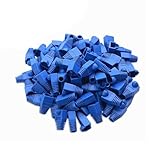
- Durable RJ45 Strain Relief Boots Design : RJ45 connectors from dust, , and bending stress while extending patch cable life. Soft PVC material offers flexible fit for Cat5/5e/6 cables with outer diameters up to 6.5mm, keeping connections tidy and reliable rj45 strain relief boots
- Color-Coded Organization for Easy Maintenance :Multiple color options help you quickly identify cables in server rooms or home offices, reducing mix-ups during routine maintenance. Color variety supports consistent labeling and efficient troubleshooting blue rj45 boots
- Easy Fit, Wide Compatibility :Plug covers compatible with Cat5, Cat5e, Cat6, and Cat6a pass-through connectors, providing protective coverage for crimped RJ45 ends without hindering plug insertion or removal cat6 pass through connectors
- Value-Pack Convenience for Large Setups :Bulk packs deliver ample boots for constructing numerous custom-length cables, enabling tidy cable management across multiple workstations and network racks without frequent reorders cat6 ethernet cable
- Secure Fit and Reliable Shielding Support :Rugged boot construction adds reinforcement at the connector interface, reducing strain on the RJ45 plug and improving durability in daily network operations across various environments cat6 shielded rj45 connectors
What to check if a connection becomes unreliable
Routing is one possible source of physical stress, not proof that it caused an intermittent network problem. Inspect the cable for a visible kink or jacket damage, and check whether the plug remains seated. If the cable is visibly damaged, or its connector no longer seats reliably, replacing that cable is a reasonable next step. If there is no visible damage, do not assume the route alone explains the problem.
What’s actually slowing this PC down?
Pick the symptom - the matching free tool is one click away.
Quick Recap
Best Value

- Durable RJ45 Strain Relief Boots Design : RJ45 connectors from dust, , and bending stress while extending patch cable life. Soft PVC material offers flexible fit for Cat5/5e/6 cables with outer diameters up to 6.5mm, keeping connections tidy and reliable rj45 strain relief boots
- Color-Coded Organization for Easy Maintenance :Multiple color options help you quickly identify cables in server rooms or home offices, reducing mix-ups during routine maintenance. Color variety supports consistent labeling and efficient troubleshooting blue rj45 boots
- Easy Fit, Wide Compatibility :Plug covers compatible with Cat5, Cat5e, Cat6, and Cat6a pass-through connectors, providing protective coverage for crimped RJ45 ends without hindering plug insertion or removal cat6 pass through connectors
- Value-Pack Convenience for Large Setups :Bulk packs deliver ample boots for constructing numerous custom-length cables, enabling tidy cable management across multiple workstations and network racks without frequent reorders cat6 ethernet cable
- Secure Fit and Reliable Shielding Support :Rugged boot construction adds reinforcement at the connector interface, reducing strain on the RJ45 plug and improving durability in daily network operations across various environments cat6 shielded rj45 connectors
Rank #4
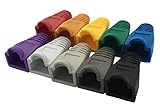
- The RJ45 boots cover protects RJ45 connectors from dust and Oxidation, moisture, prevents network cable rubber from being exposed, and prolongs the RJ plug’s life time.
- Material: PVC Soft Plastic. Network cable diameter within 5.5-6.5mm is applicable.
- Multiple color for your options,so that you can well classify the network cable, which is conducive to daily maintenance. 10 colors: white, gray, red, black, purple, blue, green, yellow, orange and dark gray.
- Compatible connectors: CAT5 CAT5E CAT6 CAT6E RJ45 Cable Cap Connector Boots Plug Cover Strain Relief Boots.
- Package-Pack of 100pcs RJ45 Boots.10PCS for each color.If you have any questions during use, please feel free to contact us. We can replace it for you or refund it to you within 30 days.
Rank #3

- Improve organization and protect your networking cables with the Ethernet strain relief boos; Durable strain relief boot supports RJ45 cables, including Cat6 Ethernet cable
- Strain relief boots provide additional support for thicker Category 6 Ethernet cable; Strain relief boot reduces strain on the cable connector and the Ethernet port for improved durability
- RJ45 boots support Cat6 cables with an outer diameter of up to 6.5mm; Provide durability to custom-made Cat6 Ethernet cables with durable Cat6 strain relief boots
- Color-coded Category 6 boots come in eight colors; Package of Cat 6 strain relief boots includes 25 boots in each color: blue, white, purple, yellow, gray, green, red, and black; Color-code networking cables for easy identification in the server room or a home office
- Cost-effective 200-pack of Ethernet cable ends provides plenty of boots for creating a large number of custom-length cables; Improve the durability of custom-made cables with strain relief boots
Sources and scope
- TIA/EIA-568-B.1 text, a legacy edition hosted by the University of Crete; its patch-cord bend-radius guidance was not settled in the cited passage.
- Siemens, SIMATIC NET Twisted-Pair and Fiber-Optic Networks: Guidelines for Installing Networked Automation Systems in Buildings; publication date/version was not established, and its guidance is for networked automation installations.
- ODVA, EtherNet/IP Media Planning and Installation Manual; the cited manual is dated 2006.
Product prices and availability are accurate as of the date/time indicated and are subject to change. Any price and availability information displayed on Amazon at the time of purchase will apply.




