Quick wins for a faster PC:
Scan for outdated or missing drivers - takes under a minuteDriver Scan →Repair Windows errors before they cause bigger problemsFix Now →To run a Socrative Space Race, open Launch, choose Space Race, select a quiz with correct answers configured, set teams and any optional time limit, then start the activity. Students join with the displayed QR code or the room name; you can track team progress in Results and finish the race to gather reports.
Before you launch: check the quiz and room
Choose or create the Socrative quiz you want to use and make sure its questions have correct answers selected. Without a correct answer specified, the rockets will not move, according to Socrative’s Space Race guide.
As an Amazon Associate I earn from qualifying purchases.
Also check the room type so students know how to sign in. In a public room, they enter the room name and their own name. In a rostered room, they enter the room name and a student ID supplied by the teacher. Socrative’s room overview describes the rostered room as private. The basic room workflow described in Socrative’s quick-start guide lets students join by QR code or room name without setting up a student account.
Outdated Drivers Are Slowing You Down
One free scan finds every outdated or missing driver and matches the right update for your exact hardware.Free scan · exact hardware matchPC Slower Than It Used to Be?
A free scan shows the junk files, broken settings and background clutter dragging Windows down - then fixes them in one click.Free scan · Windows 10 & 11How to set up and start a Space Race
- Open the activity: In the teacher interface, select Launch, then choose Space Race.
- Select your quiz: Choose the quiz with correct answers configured.
- Set teams and participation: Choose the number of teams. Students can play individually on their own computer or mobile device, work together using one shared device, or join the same team on separate devices. You can let students choose their teams or have Socrative auto-assign them. Auto-assignment attempts to split students evenly when there are more students than teams; it does not guarantee exactly equal team sizes.
- Choose race options: Select a race icon and, if useful, set a time limit. Socrative’s guide, written by Kenny Dickie and dated May 5, 2026, states that the limit can be up to 45 minutes.
- Start and invite students: Launch the race, then use Invite Students to display its QR code. Students can scan it, or open the Student app and enter the room name. Give rostered-room students their student IDs as well.
Choose team and timing settings for your class
| Choice | Available approach | Practical consideration |
|---|---|---|
| Participation | Individual play, shared-device collaboration, or students on the same team using separate devices | Choose whether each student answers independently or works with teammates. |
| Team assignment | Students choose teams or Socrative auto-assigns them | Auto-assignment attempts an even split when the class is larger than the number of teams; exact equality is not promised. |
| Timing | No time limit or an optional limit of up to 45 minutes, according to Socrative’s May 5, 2026 guide | Use a limit when you want the race to end on a schedule; otherwise, leave it untimed. |
Socrative documents these as configuration choices, not as approaches with proven universal learning benefits. There is no single best setting for every class.
#1 Best Overall

- All New Game: It's the 2nd edition of the quick question “what am I?” Game. Includes 6 new bands- dino, narwhal, robot, flower, butterfly, & brain
- Simple To Play: Pick a headband, place a card in it and play to figure out what's shown on your card. Using yes/no questions, be the first to guess 3 cards correctly and you win
- Family Game Night: Hedbanz is a must-have in your collection of family games for kids and adults. It is for everyone ages 6 and up. For 2-6 players, bring along when you are in need of fun board games for family night
- Funny Random Stuff For Family Game Night: Throw the best party, birthday, game night & Friendsgiving with new party games, family board games & card games for teens & adults
- Spin Master Toys & Games: Looking for kids games, yard games & card games for grown ups, kids or teens? Shop everything from family game night, travel games, puzzles for adults & family games
Monitor progress and finish the race
During the activity, open the Results tab to see team progress. You can project that screen so students can follow the race; a projector is optional, since an existing classroom display or screen sharing can serve the same purpose.
Click Finish to gather reports, or return to Launch. If you set a time limit, Socrative’s guide says the race ends when time expires or when the teacher removes the limit. Socrative’s product overview also states that the platform supports up to twenty simultaneous quizzes, polls, exit tickets, or Space Races. That is a platform-wide simultaneous-activity figure, not a stated team limit for one race.
Quick Recap
Best Value

- Add a blue disc to block opponents and lift discs higher
- Features blue Blocker Disc: This game includes blue Blocker Disc that open doors to new strategies
- Features blue Blocker Dics: this game includes blue Blocker Dics that open doors to new strategies
Rank #4

- FUNNY FAMILY GAMES-In fact, happiness is so simple.through Nicecho shut the box,makes you addicted and gives your brain a good tease, leaving you hooked for hours, and offering you a perfect way to beat boredom. simple rules of the game, enjoy the thrilling moments of the game.
- PREMIUM QUALITY DESIGN-Shut the box made of solid pinewood. The design of felt surface reduces noise when the board game is going on. Durable, scratch-resistant and environmentally friendly.Four different colors of acrylic silk-screen technology dice to ensure long-term use.
- LEARNING AND SOCIAL TOOLS-It is not only a math game, to promote children's learning ability of math addition, subtraction, multiplication and division,but aslo a kind of social entertainment, which can develop a sense of rules and exercise their thinking ability, logic ability and reaction ability in an interesting way.
- PORTABLE AND PRACTICAL-The size of shut the box is 8.74*8.74*1.1inch. Because of its light weight, it can be easily carried into any outdoor activity. Perfect for home, classroom, parties, picnics, birthday, and bars. Make your own rules and enjoy the game whenever and wherever you are.
- INTIMATE SERVICE-Shut The Box is a great game for families and friends of all ages. If for any reason you're not 100% SATISFIED, please let us know and our customer service team will help you RETURN OR REFUND.
Rank #3

- FUN FAMILY GAME FOR KIDS: Remember playing the original Trouble board game as a kid? Introduce a new generation to classic Trouble gameplay with this Trouble game for kids
- EASY TO LEARN AND SET UP: The Trouble game is easy to play and quick set up. The object of the game is simple: the first player to get all of their game pieces around the board wins
- POWER UP SPACES: The game instructions include options for classic Trouble gameplay or a version with Power Up Spaces for a more challenging game
- POP-O-MATIC BUBBLE: In this beloved children's board game, players press and pop the plastic bubble to roll the die. The iconic Pop-o-Matic die roller is fun to press, and it keeps the die from getting lost
- BOARD GAMES FOR FAMILY: Adults and kids can play this family board game together. It's a fun indoor game for playdates and a great choice for Family Game Night
Rank #2
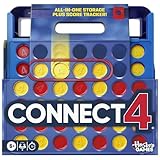
- CONNECT 4 GAME WITH EXCITING UPDATES: This Connect 4 board game features the classic gameplay fans love, plus all-in-1 storage, score trackers, and a modern design
- ALL-IN-1 CARRYING CASE WITH STORAGE: When done playing, release the discs from the grid and they neatly drop into a storage tray. The grid and tray fold into an all-in-1 portable case with a handle
- EFFORTLESS, 1-MOTION SET-UP: No parent’s help needed! Simply fold up the grid to play, and it’s time 4 edge-of-your-seat action
- ADDICTIVE STRATEGY GAME FOR KIDS & ADULTS: The drama builds as the discs drop! Players try to get 4 in a row of their color discs to win this popular game for teens, adults, and kids ages 6+
- BUILT-IN SCORE TRACKERS FOR EPIC COMPETITIONS: Sliding score trackers let players easily track who wins each round. Win 4 rounds to be champ
Product prices and availability are accurate as of the date/time indicated and are subject to change. Any price and availability information displayed on Amazon at the time of purchase will apply.




