Outdated Drivers Are Slowing You Down
One free scan finds every outdated or missing driver and matches the right update for your exact hardware.Free scan · exact hardware matchPC Slower Than It Used to Be?
A free scan shows the junk files, broken settings and background clutter dragging Windows down - then fixes them in one click.Free scan · Windows 10 & 11First check where the number comes from. The FDA says it has not authorized, cleared, or approved any smartwatch or smart ring intended to measure or estimate blood glucose on its own. A watch can instead display readings from a separate continuous glucose monitor (CGM) worn on the body. In that case, the CGM—not the watch—is measuring glucose, and troubleshooting should focus on the sensor, its instructions, and the connection to the watch or phone. Do not use a watch-only glucose estimate to make diabetes treatment decisions.
Identify what is producing the reading
Open the app or device details and establish whether the watch is claiming to estimate glucose by itself or relaying data from a separate CGM with a sensor under the skin. The FDA warns consumers not to buy or use smartwatches or smart rings that claim to measure blood glucose levels on their own. A watch face showing CGM data does not turn the watch into a glucose sensor.
As an Amazon Associate I earn from qualifying purchases.
If the display is a standalone watch estimate, do not rely on it as a glucose measurement. If it is connected to a CGM, use the CGM’s own instructions and status messages to assess the reading.
Quick wins for a faster PC:
Scan for outdated or missing drivers - takes under a minuteDriver Scan →Clear out junk files and repair common Windows errorsFree Scan →Why a CGM reading can differ from a fingerstick
A CGM measures glucose in interstitial fluid, the fluid around cells, while a fingerstick meter measures glucose in blood. Because these are different measurements, they may not match exactly. A difference can be more noticeable when glucose is changing quickly—for example, after eating, taking insulin, or exercising—because the interstitial reading can lag behind blood glucose by several minutes.
#1 Best Overall

- Advanced Blood Glucose Meter Kit: The Metene TD-4116 diabetes testing kit utilizes advanced technology to provide more accurate and reliable test results, helping you better control your blood sugar levels. After opening the test strip, it is valid for 6 months. Please refer to the test strip storage instructions in the user manual.
- Easy to Use: The blood glucose monitor is with code-free design, ready for testing once insert the strip correctly; the quick guide inside the package lists the steps to do a test clearly, easy to follow; any problem about operation, we are here ready to answer and provide glucose monitoring system instructional videos
- 7 Seconds And 0.7µl Blood: This blood glucose meter kit just needs 0.7 microliter blood sample and 7 seconds to get you blood glucose value; Fast, minimizes wound and less painful
- More Clearly Glucose Trend: 4 modes to record your glucose value according to different time, shows your glucose trend more clearly; 450 blood sugar values storage, continuous 14/21/28/60/90 day average, which brings more convenient Diabetes management for you and your health provider
- User-friendly for The Aged: 4 reminder alarms could be set everyday to remind the aged to do a test in time, considerate; the display is larger than most glucose monitors, showing the results more clearly, easier to read for the aged
Some CGM documentation also describes differences during a sensor’s first day and when pressure is put on the sensor. These are possibilities, not a universal explanation or a guarantee that a particular reading is wrong. Device behavior and instructions vary by model; calibration guidance for one CGM should not be applied to another.
What to check, in order
- Check symptoms and trends. Do not dismiss symptoms because a watch or CGM value looks reassuring. If the reading does not fit how you feel, confirm it with a blood glucose meter as directed by the device instructions and care plan.
- Use the meter correctly. Wash and dry your hands before testing. Check the meter and strip instructions, expiry dates, and storage conditions; improperly stored meters or strips can produce less accurate results. Alternative-site testing may be less accurate when glucose is changing quickly.
- Consider whether glucose is changing rapidly. A recent meal, insulin dose, or exercise can make CGM and fingerstick results harder to compare because the CGM measures interstitial fluid rather than blood.
- Review the CGM sensor status. Check for a new sensor, pressure from lying on or bumping it, warm-up or sensor-error messages, or missing data. Follow the instructions for that exact model and use a meter when its guidance tells you to.
- Check the display and connection path. If the CGM reading is being relayed through a phone or watch, review the app connection and alert settings. A phone or alert-delivery problem can prevent data or warnings from appearing, but it does not by itself prove that the sensor’s glucose measurement is inaccurate.
- Look for a notice that applies to your exact product. FDA notices can concern particular CGM models or lots. Check the product and lot against current notices; a problem affecting one sensor should not be generalized to every CGM.
When to confirm a reading or get help
If symptoms conflict with a CGM reading, or a reading seems suspect, use a blood glucose meter according to the device instructions and your care plan. If the mismatch keeps happening, follow that plan and contact the device maker or your clinician. For severe or urgent symptoms, use the care plan’s urgent instructions rather than waiting for a watch or app reading to settle the question.
Rank #2

- HSA/FSA eligible. No prescription needed.
- 24/7 GLUCOSE TRACKING. See your glucose response to food, exercise, sleep, and other lifestyle factors via the Lingo app.
- OPTIMIZE YOUR NUTRITION. Discover which foods work for you and those that don't. The Lingo app shows you how specific meals and other factors impact your glucose, so you can learn from your insights and build healthier habits.
- NAVIGATE PREDIABETES WITH A NEW VIEW OF YOU. More time in healthy glucose range is linked to lower diabetes risk. Three out of four users with prediabetes say Lingo was effective in helping to achieve their health goals¹.
- HEALTHY GLUCOSE SUPPORTS HEART HEALTH. What you eat matters to your glucose and your heart. Keeping your glucose in a healthy range (70–140 mg/dL) more often can help protect your heart from heart disease²⁻⁴.
Sources and scope
- FDA safety communication on smartwatches and smart rings that claim to measure blood glucose
- FDA guidance on continuous glucose monitoring
- FDA information on blood glucose monitoring devices
- FDA safety information on blood glucose meters and supplies
- FDA recall notice for specified FreeStyle Libre 3 and Libre 3 Plus sensors
These sources establish the FDA’s safety boundary for watch-only glucose claims and provide device-specific guidance and notices. They do not establish a universal CGM accuracy tolerance, calibration procedure, or ranking of the causes of every mismatch.
The Tool Desk
Outbyte Driver Updater FREEFix the driver behind crashes, sound loss and screen glitchesFind Drivers →Outbyte PC Repair FREERepair Windows errors before they cause bigger problemsFix Now →Quick Recap
Best Value

- HSA/FSA eligible. No prescription needed.
- 24/7 GLUCOSE TRACKING. See your glucose response to food, exercise, sleep, and other lifestyle factors via the Lingo app.
- OPTIMIZE YOUR NUTRITION. Discover which foods work for you and those that don't. The Lingo app shows you how specific meals and other factors impact your glucose, so you can learn from your insights and build healthier habits
- NAVIGATE PREDIABETES WITH A NEW VIEW OF YOU. More time in healthy glucose range is linked to lower diabetes risk. Three out of four users with prediabetes say Lingo was effective in helping to achieve their health goals¹.
- HEALTHY GLUCOSE SUPPORTS HEART HEALTH. What you eat matters to your glucose and your heart. Keeping your glucose in a healthy range (70–140 mg/dL) more often can help protect your heart from heart disease²⁻⁴.
Rank #4
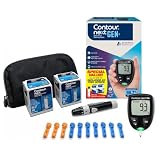
- CLINICALLY PROVEN ACCURACY: Track and manage your diabetes confidently with our reliable blood glucose monitoring system. Readings that are personalized, HI/LO target ranges, and easy-to-understand summaries of your blood sugar test results (1)
- BLUETOOTH CONNECTIVITY: Sync your glucose monitor kit and get readings automatically to a free app via Bluetooth for seamless tracking and data sharing with our blood sugar testing kit
- EASY TO USE: SmartLIGHT target range indicator (2) instantly shows if blood sugar levels are above, below, or within target range for quick, clear feedback
- SECOND-CHANCE SAMPLING (3): Apply additional blood to the same test strip within 60 seconds to help reduce strip waste, avoid unnecessary retesting, and save money over time with our blood sugar testing kit
- NO CODING REQUIRED: Get fast, accurate results without the hassle of manual coding, reducing the risk of user error and making testing simpler, quicker, and more reliable
Rank #3

- 【Stable & Accurate for Testing】: The Microtech Blood Glucose Meter (BGM) has undergone rigorous clinical and laboratory tests based on strict standards to ensure it meets the highest accuracy criteria. The test strip interface with a double layer 9 electrode and the test strips using a new type of glucose dehydrogenase ensure better stability and anti-interference capabilities. It has obtained certifications such as FDA, CE, GMP, and ISO 15197:2015. It is a reliable and precise choice in blood sugar monitoring.
- 【Get a quick and gentle test in 5 seconds】: The Microtech blood sugar test kit is designed for comfort. The high precision blood sugar detection system only requires a tiny 0.5µl blood sample and can give accurate results in 5 seconds. The adjustable depth lancet device offers a nearly painless testing experience, minimizing pain and providing fast and reliable results every time.
- 【Wider Use for Your Family's Health】: Personalized Alerts + Broader Applicable Population. The Microtech blood sugar test kit has improved accuracy with the HCT range expanded to 10% - 70%. This means it is suitable for a wider range of people, including infants, pregnant women, frail people, and obese people. By setting personalized warning values, the blood sugar concentration limit can be set according to the doctor's advice. Therefore, it is the best choice for your whole family for daily health check-ups and blood sugar control.
- 【Easy to Track】: Our blood glucose test kit can store up to 500 test results, providing 7/14/30/60/90 average blood glucose test values, easily tracking daily blood sugar levels, and better managing your diabetes treatment.
- 【ALL IN ONE】: 1 x Gocheck2 Blood Glucose Monitor, 100 x Blood Test Strips, 100 x 30 gauge Lancets, 1 x control solution, 1 x Lancing device, 1 x Meter User Guide, 1 x Test Strip User Guide, Our Exclusive Lifetime Warranty and Technical Support. Tips: This product doesn't need to use or purchase a control solution for calibration.
Product prices and availability are accurate as of the date/time indicated and are subject to change. Any price and availability information displayed on Amazon at the time of purchase will apply.




